manuals.online logo
Brands
  1. Home
  2. •
  3. Brands
  4. •
  5. BT
  6. •
  7. Radio
  8. •
  9. BT FREEWAY PRO TWIN User manual

BT FREEWAY PRO TWIN User manual

Other manuals for FREEWAY PRO TWIN

1

Other BT Radio manuals

BT AVIATOR 10M User manual

BT

BT AVIATOR 10M User manual

BT FREEWAY PRO TWIN User manual

BT

BT FREEWAY PRO TWIN User manual

BT AVIATOR 10M User manual

BT

BT AVIATOR 10M User manual

BT FREEWAY User manual

BT

BT FREEWAY User manual

BT FREEWAY FM User manual

BT

BT FREEWAY FM User manual

BT FREEWAY FM User manual

BT

BT FREEWAY FM User manual

BT FREEWAY MINI User manual

BT

BT FREEWAY MINI User manual

Popular Radio manuals by other brands

Grundig G6 AVIATOR owner's manual

Grundig

Grundig G6 AVIATOR owner's manual

Makita DMR114 instruction manual

Makita

Makita DMR114 instruction manual

PURE Move R3 manual

PURE

PURE Move R3 manual

Motorola CP040 Detailed service manual

Motorola

Motorola CP040 Detailed service manual

Bosch GPB18V-5C Operating/safety instructions

Bosch

Bosch GPB18V-5C Operating/safety instructions

Ocean Digital WR-230 user manual

Ocean Digital

Ocean Digital WR-230 user manual

Realistic TRC-457 owner's manual

Realistic

Realistic TRC-457 owner's manual

Uniden AX 144 owner's manual

Uniden

Uniden AX 144 owner's manual

SIGNIFY EA2173 instruction manual

SIGNIFY

SIGNIFY EA2173 instruction manual

auna multimedia 10026443 user manual

auna multimedia

auna multimedia 10026443 user manual

GME TX680 instruction manual

GME

GME TX680 instruction manual

Motorola MTM5 00 Series Basic service manual

Motorola

Motorola MTM5 00 Series Basic service manual

Tivoli Audio ONE+ owner's manual

Tivoli Audio

Tivoli Audio ONE+ owner's manual

Sirius Satellite Radio SDVK1 installation guide

Sirius Satellite Radio

Sirius Satellite Radio SDVK1 installation guide

Sirius XM RAdio EDGE user guide

Sirius XM RAdio

Sirius XM RAdio EDGE user guide

Trevi XF 100 user guide

Trevi

Trevi XF 100 user guide

EisSound KBSound iSelect user manual

EisSound

EisSound KBSound iSelect user manual

Kirisun DM588-02 user manual

Kirisun

Kirisun DM588-02 user manual

manuals.online logo
manuals.online logoBrands
  • About & Mission
  • Contact us
  • Privacy Policy
  • Terms and Conditions

Copyright 2025 Manuals.Online. All Rights Reserved.

BT Freeway Pro Twin – Issue 02 – Edition 02 – 04.06.04 – 6196
User Guide
BT FREEW Y PRO TWIN
6196 BT Fway Pro Tw UG [2] 4/6/04 10:17 am Page 1
Section
BT Freeway Pro Twin – Issue 02 – Edition 02 – 04.06.04 – 6196
8 Channels
38 Sub-channels (CTCSS)
10 Call alert tones
Key lock
Scan function
Volume control
Backlit display
Roger beep tone
VOX (when using either handset or headset)
Belt clips
Welcome…
to your BT Freeway Pro Twin
Personal Mobile Radios
6196 BT Fway Pro Tw UG [2] 4/6/04 10:17 am Page 2
Section
BT Freeway Pro Twin – Issue 02 – Edition 02 – 04.06.04 – 6196
This User Guide provides you with all
the information you need to get the
most from your mobile radios.
Before you use your mobile radios for
the first time you will need to follow
the simple instructions in ‘Getting
Started’, on the next few pages.
Need help?
If you have any problems setting up or using your
BT Freeway Pro Twin you may find the answer in ‘Help’
at the back of this guide.
Got everything?
2 BT Freeway Pro
mobile radios
2 belt clips (attached
to back of radio)
2 x NiMH rechargeable
battery packs
1 Dual charging unit
1 Power supply for the
dual charging unit
2 headsets
6196 BT Fway Pro Tw UG [2] 4/6/04 10:17 am Page 3
Getting started
Install the batteries . . . . . . . . . . . . . .5
Charge the batteries . . . . . . . . . . . . .6
ttaching the belt clip (optional) . . . .7
Removing the belt clip . . . . . . . . . . . .7
Headset use . . . . . . . . . . . . . . . . . . .7
Getting to know your radio
Radio controls . . . . . . . . . . . . . . . . . .8
Display . . . . . . . . . . . . . . . . . . . . . . .9
Using your mobile radios
Switching the radio power ON . . . . . .10
Switching the radio power OFF . . . . . .10
djusting the volume . . . . . . . . . . . .10
Selecting a channel . . . . . . . . . . . . . .10
Selecting a sub-channel (CTCSS) . . . .11
Key lock . . . . . . . . . . . . . . . . . . . . . .11
Switching channel monitor on or off . .12
Talking to another radio . . . . . . . . . . .12
Listening to another radio . . . . . . . . .13
Sending a call tone . . . . . . . . . . . . . .13
Channel scan . . . . . . . . . . . . . . . . . .14
Delete channels from the scan list . . .15
Roger tone . . . . . . . . . . . . . . . . . . . .16
VOX (using the handset) . . . . . . . . . . .17
VOX sensitivity level
(using the handset) . . . . . . . . . . . . . . .17
Using a Freeway headset . . . . . . . . . .18
Sensitivity level
(using your Freeway headset) . . . . . . .19
Help . . . . . . . . . . . . . . . . . . . . . . . . .21
General information
Safety and general . . . . . . . . . . . . . .23
Environmental . . . . . . . . . . . . . . . . . .24
Cleaning . . . . . . . . . . . . . . . . . . . . . .24
Mobile radio channel
frequency chart . . . . . . . . . . . . . . . . .25
Guarantee . . . . . . . . . . . . . . . . . . . . .26
BT ccessories and replacement items .27
R&TTE . . . . . . . . . . . . . . . . . . . . . . .27
Declaration of Conformity . . . . . . . . . .28
4In this guide
BT Freeway Pro Twin – Issue 02 – Edition 02 – 04.06.04 – 6196

6196 BT Fway Pro Tw UG [2] 4/6/04 10:17 am Page 4
Install the batteries
Your BT Freeway Pro mobile radios are each supplied
with a rechargeable NiMH battery pack.
However, each mobile radio will operate with 3 x
alkaline batteries (not supplied) if required.
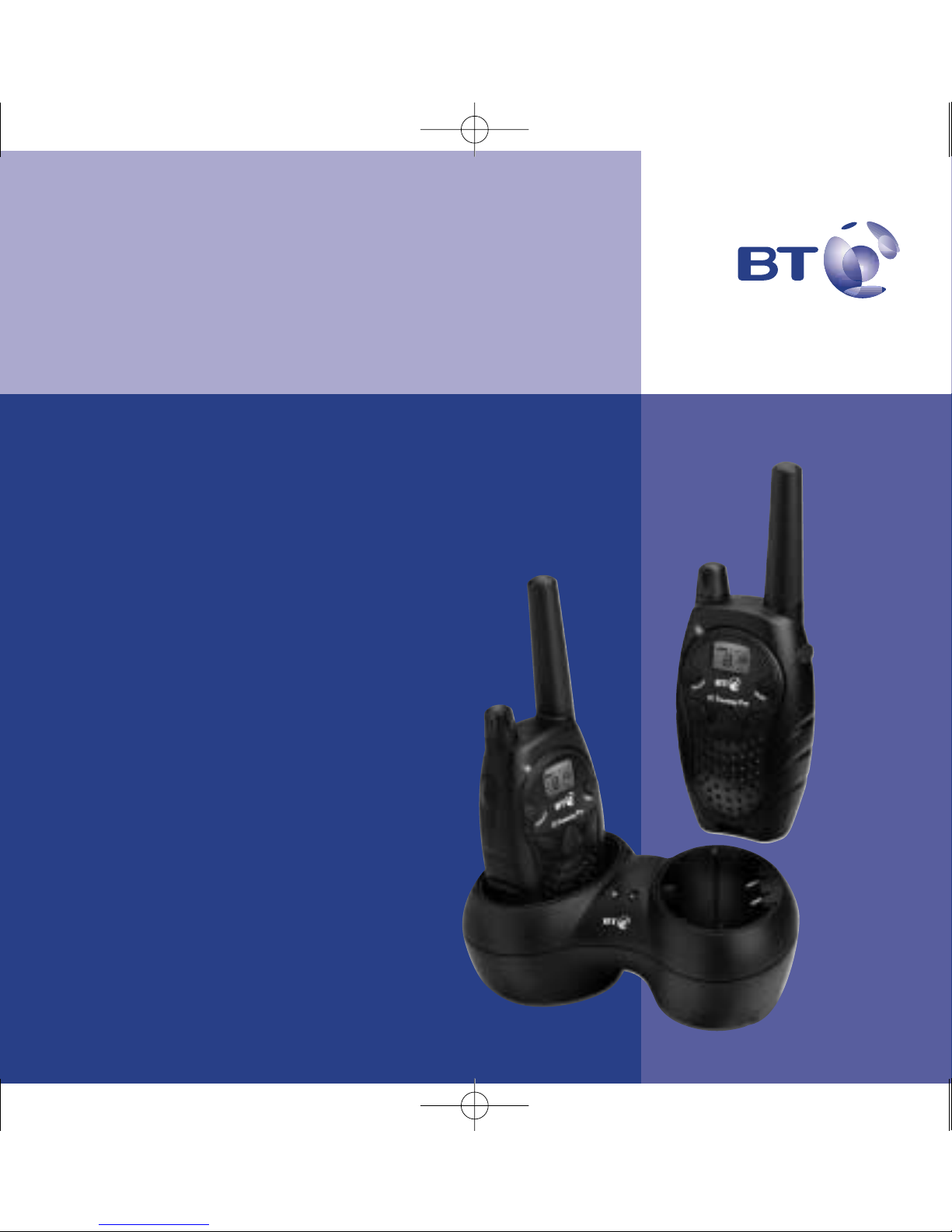
1. With the back of the radio facing you, lift the battery
cover latch up to release and remove the battery cover.
2. Insert the battery pack ensuring that the metal contacts
are facing out as shown.
Or
Insert 3 x alkaline batteries, ensuring that the + and –
marked on the batteries match up with those marked
inside the battery compartment, as shown.
Or
3. Reposition the battery cover and press down until it clicks
into place.
5
BT Freeway Pro Twin – Issue 02 – Edition 02 – 04.06.04 – 6196
Getting started
Please note
If the belt clip is attached you will
need to remove it first. See
“Attaching the belt clip” on page 7.
Metal
charging
pads
6196 BT Fway Pro Tw UG [2] 4/6/04 10:17 am Page 5
Charge the batteries
Locate the dual charging unit on a flat surface, within
reach of a mains power socket:
1. Plug the dual charger lead into the back of the charging
unit and the plug into the mains power socket and
switch on.
2. Slide each radio into one of the charging pockets, facing
forward, to begin charging.
To fully charge the batteries from a fully discharged state
takes around 14 to 16 hours.
Your BT Freeway Pro Twin radios are ready for use.
6 Getting started
BT Freeway Pro Twin – Issue 02 – Edition 02 – 04.06.04 – 6196
䊳
䊳
䊴
OX
BT Freeway Pro
M
o
d
e
M
o
n
i
t
o
r
䊳
䊳
䊴
M
o
n
i
t
o
r
WARN NG – f using alkaline
batteries
lkaline batteries need replacing
and C NNOT be charged using the
charging unit.
Charging
Your BT Freeway Pro radios can be
charged when they are switched on
or off. However, it is recommended
that you switch your radios off
whilst charging as the charging
time will be quicker.
The lights on the charging unit will
stay lit even when the battery pack
is fully charged.
Battery low indicator
When the battery power becomes
low the icon will be displayed
to indicate that the battery needs
recharging (or the 3 alkaline
batteries need replacing). When
you press you will also hear the
battery low alert tone.
The operation of your radio will
become unreliable when the
batteries are low.
If the charge level becomes too
low, your radio will automatically
switch off to avoid damage to the
rechargeable battery pack.
For optimal battery life either
remove the handsets from the
charger once they are charged or
switch off the charger.
PTT
6196 BT Fway Pro Tw UG [2] 4/6/04 10:17 am Page 6
Attaching the belt clip (optional)
lign the belt clip post with the hole in the back of the
radio, then gently push the clip until it clicks into place.
Removing the belt clip
Push down on the release tab on the top of the belt clip
to release the catch and pull the belt clip away from the
back of the radio.
Headset use
If you wish to use a headset with your radio, see page 18.
7Getting started
BT Freeway Pro Twin – Issue 02 – Edition 02 – 04.06.04 – 6196
Replacing rechargeable batteries
The charge capacity of
rechargeable batteries will reduce
with time and the battery pack will
eventually require replacing.
Rechargeable battery packs are
available from:
www.withandwithoutwires.com or
from 0870 240 5522.
If using alkaline batteries, you
should replace LL the batteries,
do not mix new and old batteries
and ensure that you use the same
type of battery.
For long-term storage of the
radios, it is recommended that you
remove the batteries.
6196 BT Fway Pro Tw UG [2] 4/6/04 10:17 am Page 7
BT Freeway Pro Twin – Issue 02 – Edition 02 – 04.06.04 – 6196

Getting to know your radio
Switch radio on/off, page 10
Rotate to adjust radio volume,
page 10
LED indicator light
Three slow flashes then break – Idle
Quick flash – Receiving
Solid – Transmitting
PTT (Press To Talk)
Press to talk to another radio,
page 13
Press to save a menu setting
Monitor
Use to scan for active channels,
page 14
lso monitor current channel
activity, page 12
–
Use to scroll through the menu
settings
Speaker
Display
Headset socket
Page 18
Mode
Press to access the menu options.
Use to exit the menu.
Use to lock/unlock the keypad,
page 11
+
Use to scroll through the menu
settings
Microphone
Call
Press to transmit a call tone to
alert another user you want to talk
to them, page 14
Radio controls
8
6196 BT Fway Pro Tw UG [2] 4/6/04 10:17 am Page 8
䊳
䊳
䊴
OX
9
BT Freeway Pro Twin – Issue 02 – Edition 02 – 04.06.04 – 6196
Getting to know your phone
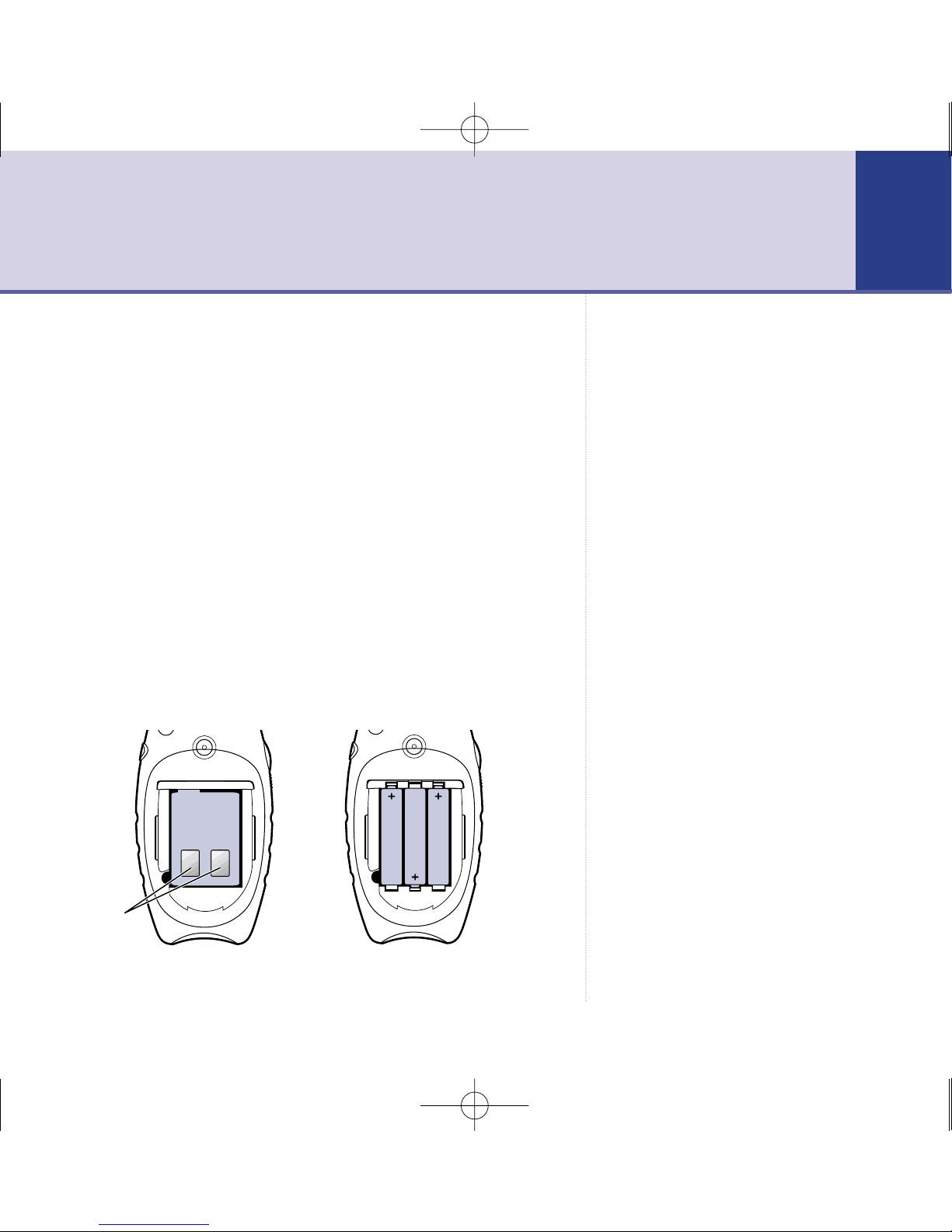
Display
Channel number
Roger tone
ctive
Subchannel
(CTCSS) number
VOX
ctive
Keypad locked Channel scan
ctive
Battery level indicator
Indicates the charge status
of the battery
6196 BT Fway Pro Tw UG [2] 4/6/04 10:17 am Page 9
BT Freeway Pro Twin – Issue 02 – Edition 02 – 04.06.04 – 6196
Using your mobile radios
Switching the radio power ON
1. Turn clockwise to switch the radio on. You will hear
an ‘on’ tone and all the display icons will appear briefly.
The display will then return to the standby display.
Switching the radio power OFF
1. Turn anti-clockwise to switch the radio off.
Adjusting the volume
1. Rotate clockwise to increase the volume, or
anti-clockwise to decrease the volume level.
Talking and listening
To communicate, all radios in your group must be set to
the same channel and sub-channel (CTCSS), you should
set these before you use your radio.
Selecting a channel
Your BT Freeway Pro has 8 channels you can select from.
With the radio switched on:
1. Press . The current channel flashes.
10
Remember!
To communicate with others, all
mobile radios in your group must
be set to the same channel and
sub-channel.
6196 BT Fway Pro Tw UG [2] 4/6/04 10:17 am Page 10