manuals.online logo
Brands
  1. Home
  2. •
  3. Brands
  4. •
  5. Bush Classic
  6. •
  7. Turntable
  8. •
  9. Bush Classic KTS-601 User manual

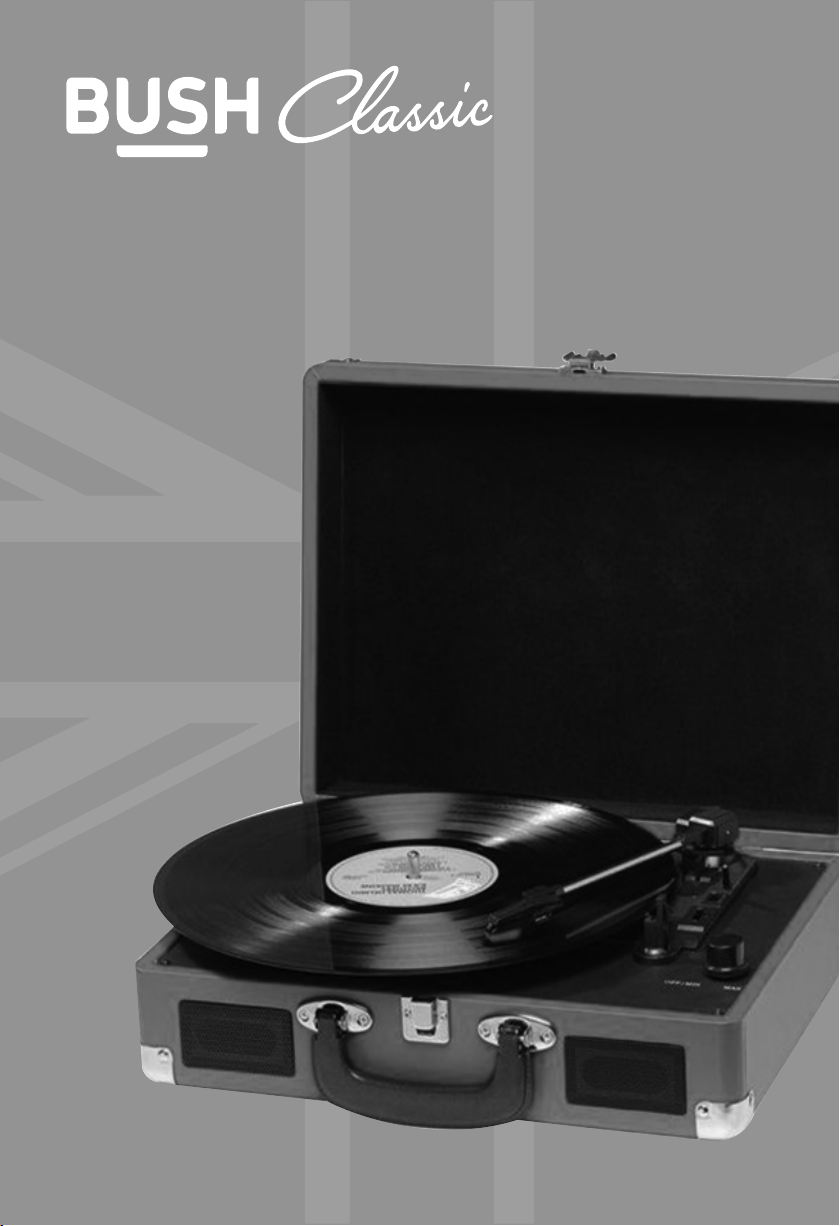
Bush Classic KTS-601 User manual

This manual suits for next models

1

Other Bush Classic Turntable manuals

Bush Classic KTS-607 User manual

Bush Classic

Bush Classic KTS-607 User manual

Bush Classic TT-1861 User manual

Bush Classic

Bush Classic TT-1861 User manual

Popular Turntable manuals by other brands

Technics SP-10 MKIIP Service manual

Technics

Technics SP-10 MKIIP Service manual

Trevi Mpv 1745 SD instructions

Trevi

Trevi Mpv 1745 SD instructions

Noblex NXC1039BT Service manual

Noblex

Noblex NXC1039BT Service manual

I.A.V. Piccolo owner's manual

I.A.V.

I.A.V. Piccolo owner's manual

JVC QL-Y5F Instruction book

JVC

JVC QL-Y5F Instruction book

Gemini CDT-05 MKII product manual

Gemini

Gemini CDT-05 MKII product manual

Rotel RP-820 owner's manual

Rotel

Rotel RP-820 owner's manual

Shuman MC-250BT user manual

Shuman

Shuman MC-250BT user manual

Stanton STR8-150 owner's manual

Stanton

Stanton STR8-150 owner's manual

Audio Technica AT-LPW40WN user manual

Audio Technica

Audio Technica AT-LPW40WN user manual

Crosley McQueen CR7011-GY instruction manual

Crosley

Crosley McQueen CR7011-GY instruction manual

auna TT-Classic Plus instruction manual

auna

auna TT-Classic Plus instruction manual

COMO AUDIO Turntable Analog user manual

COMO AUDIO

COMO AUDIO Turntable Analog user manual

Dual 1009 F owner's manual

Dual

Dual 1009 F owner's manual

AXIOMTEK OPS883-H Series Quick installation guide

AXIOMTEK

AXIOMTEK OPS883-H Series Quick installation guide

Pioneer PL-71 operating instructions

Pioneer

Pioneer PL-71 operating instructions

Vestax PDX-a1 owner's manual

Vestax

Vestax PDX-a1 owner's manual

Denon DP-400 owner's manual

Denon

Denon DP-400 owner's manual

manuals.online logo
manuals.online logoBrands
  • About & Mission
  • Contact us
  • Privacy Policy
  • Terms and Conditions

Copyright 2025 Manuals.Online. All Rights Reserved.

Instruction Manual
KTS-601
SKU: 135950804
It all begins here, with your instructions. Don’t worry, there’s
nothing too technical coming up. Just simple, step-by-step
guidance to get you up and running quickly. Sound good? Then
let’s get started.
Help and Guidance
We’re here to help you get the most from your Turntable. Should you require
any guidance, a simple solution can often be found online at:
www.bush-support.com
If you still require further assistance, call one of our experts on 0345 604 0105
Classic Portable Turntable | Instruction Manual 2
You’ll soon be enjoying your new Turntable.
1
Safety information
Important - Please read these instructions fully before
installing or operating
Power source
4
Classic Portable Turntable | Instruction Manual
CAUTION: TO REDUCE THE RISK OF ELECTRIC SHOCK, DO NOT REMOVE ANY COVER. NO USER-SERVICEABLE.
PARTS INSIDE, REFER ANY SERVICING TO QUALIFIED SERVICE PERSONNEL .
·Please read this owner’s guide
·Please take the time to follow the instructions in
this owner’s guide carefully It will help you set up.
and operate your system properly and enjoy all of its
advanced features .
·Please save this owner’s guide for future reference .
·The product label is located on the back of the
product.
·Heed all warnings - on the product and in the owner’s
guide.
·Do not use this apparatus near water or moisture .
·Do not use this product near a bathtub, washbowl,
kitchen sink, and laundry tub, in a wetbasement,
near a swimming pool,or anywhere else that water or
moisture is present .
·Only use attachments/accessories specified by the
manufacturer .
·Unplug this apparatus during lightning storms or
when unused for long periods of time - to prevent
damage to this product .
·Refer all servicing to qualified service personnel
·Servicing is required when the apparatus has
been damaged in any way:such as liquid has been
spilled or objects have fallen into the apparatus;the
apparatus has been exposed to rain or moisture,does
not operate normally, orhasbeen dropped -
·Do not attempt to service this product yourself.
·Opening or removing covers may expose you to
dangerous voltages or other hazards .
·To prevent risk of fire or electric shock, avoid
overloading wall outlets,extension cords, or integral
convenience receptacles .
·Use suitable power sources - Plug the product into a
suitable power source, as describedin the operating
instructions or as marked on the product .
The mains plug is used as the disconnect device, the
disconnect device shall remain readily accessible.
CAUTION
RISK OF ELECTRIC SHOCK!
DO NOT OPEN!
This symbol means that this unit is double
insulated . An earth connection is not required.
This product complies with European low
voltage (2006/95/EC) and electromagnetic
compatibility (2004/108/EC) directives .
Disposal information
WEEE marking “Information for the consumer”
Disposal of your old product Your product is
designed and manufactured with high quality
materials and components, which can be
recycled and reused . When this crossed out wheeled bin
symbol is attached to a product it means theproduct is
covered by theEuropean Directive 2002/96/EC.
Please make yourself aware of the local collection
system for electrical and electronic products. Please act
according to your local rules and do not dispose of your
old products with your normal household waste. The
correct disposal of your old product will help prevent
potential negative consequences for the environment
and human health.
Safety information

Contents
Page Contents
Warnings ...........................................................................................................................................................................................5
Box contents and features
Set up and operating the turntable
Replacing the stylus ..................................................................................................................................................................... 9
Precautions .................................................................................................................................................................................... 9
Specifications .................................................................................................................................................................................10
Guarantee ........................................................................................................................................................................................11~14
Warnings
Warning
1. No naked flame sources, such as lighted candles, should be placed on or near this equipment.
2. Do not place the product in enclosed bookcases or racks without proper ventilation.
3. The mains adaptor is used as the disconnect device and must be easily reached to unplug.
4. Always use the power adaptor supplied if it needs to be replaced make sure the replacement has the
same rating.
5. The ventilation should not be impeded by covering the ventilation openings with items, such as
newspapers, table-cloths, curtains, etc.
6. Do not expose to dripping or splashed fluids. Objects filled with liquids, such as vases, must not be
placed on or near this equipment.
8. The unit should not be exposed to direct sunlight, very high or low temperature, moisture, vibrations or
placed in dusty environment.
9. Do not use abrasives, benzene, thinner or other solvents to clean the surface of the unit. To clean, wipe
with clean soft cloth it and a mild detergent solution.
10.Never attempt to insert wires, pins or other such objects into the vents or opening of the unit.
11. Do not disassemble or modify the turntable - apart from the stylus which can be replaced, there are no
other user serviceable parts.
12. If the turntable is damaged in anyway or malfunctions do not use. Consult a qualified service engineer.
13. Switch o the mains socket the power adaptor is connected to when the turntable is not in use.
14.Do not dispose of this product with household waste at the end of its life cycle; hand it over to a
collection centre for the recycling of electrical and electronic appliances. By recycling, some of
the materials can be reused. You are making an important contribution to protect our environment.
Please check with your Local Authority or recycling advice.
Disposal of your old appliance:
1. When this crossed-out wheeled bin symbol is attached to a product, it means the
product is covered by the European Directive.
2. All electrical and electronic products should be disposed of
separately from household waste at an appropriate recycling point/centre.
3. The correct disposal of your old appliance will help prevent potential negative
consequences for the environment and human health.
4. For more detailed information about disposal of your old appliance, please
contact your local authority or the shop where you purchased the product.
Classic Portable Turntable | Instruction Manual 5
6
7~8
Box Contents
1 x Turntable with attache case housing
1 x Power adaptor
1 x 2 Phono to 3.5mm jack AUX IN lead
1 x User guide
Box contents and features
Classic Portable Turntable | Instruction Manual
1 x Spare stylus
6
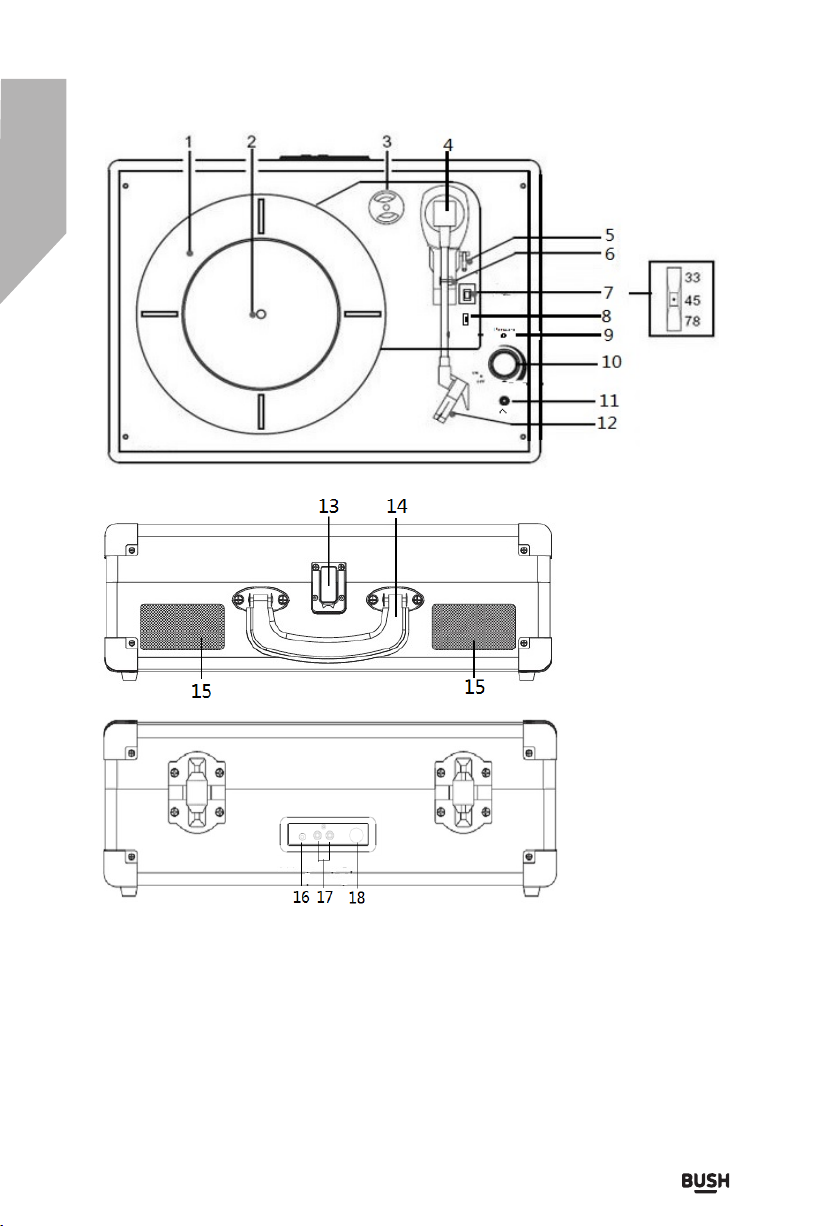
10. Power switch / Volume control
11. Headphone jack
12. Stylus
13. Lock catch
14. Carrying handle
15. Speaker
16. Aux in jack
17. Line out channel R/L
18. DC in jack
1.Turntable deck
2.Turntable shaft
3.Centre hole adaptor
4.Tone arm
5.Cuing lever
6.Tone arm clip
7.Turntable speed selector
8.Auto stop control switch
9.LED power indicator
Using the turntable
1. Place the tunable case on a flat level surface.
2. Insert the adaptor cord into the DC jack at the rear of the
case and plug the adaptor into the mains supply socket
3. On first use, ensure that the cable tie is removed from the
player arm
4. Remove the stylus cover (fig. 1) and keep in a safe place
for future use
5 . Move the speed selector to the speed (33, 45 or 78rpm)
corresponding to the record to be played
6 .Tum the VOLUME knob to turn the turntable on and the
mode indicator will illuminate red
7 .Place a record onto the turntable spindle and unclip the
tone arm(fig. 2)
8. Use the cuing lever to lift the tone arm (fig3) and move the
arm (fig 4)so that the stylus is positioned just inside the
edge of the record or aligned with the start of the track to
be played.
9. Slowly lower the arm and after a short interval the record
will start to play
10. Adiust the volume to the desired level by rotating the
volume control knob
11. When the end of the record has been reached thez
turntable will stop
12. Use the lever again to lift the tone arm (the deck will start
to rotate again), move it back to the clip and lower into the
cradle. The deck will stop
13. Secure the tone arm using the clip and refit the stylus
cover after use and ALWAYS before moving the turntable
14. To tum off the turntable at any time, lift the tone arm on the
record and turn the VOLUME knob fully anticlockwise. A
Note
Some records have larger centre hole and it may be
necessary to fit the centre hole adaptor to the turntable
shaft before placing the record on the turntable
Always refit the stylus cover and secure the turntable arm
using the clip before moving the turntable
Fig 1
Fig 2
Fig 3
Fig 4
Classic Portable Turntable | Instruction Manual
7
Using With Auxiliary Device
Auxiliary analogue audio equipment can be connected and amplified via the
turntable
2. Connect the auxiliary equipment using a 3.5mm jack cable (cable not
Included) into the LINE IN jack next to the mode knob
3. Press the PLAY button on the auxiliary equipment and use the track controls
as usual on the auxiliary device
4 .The volume can be adjusted using the volume knob on the turntable or the
controls on the connected auxiliary device.
5. To tum off the unit at any time, tum the volume knob fully anticlockwise
Using Headphones (not included)
A stereo headphone jack has been provided so that the turntable can be
used without disturbing others. Plug in the headphones at the point
marked" HEADPHONE near the volume knob and adjust the listening
volume to your chosen level. Excessive sound pressure from earphones
and headphones can cause hearing loss. The turntable speakers will not
operate when earphones are fitted
Connecting the Turntable to External Speaker
If connecting the turntable to external speakers (via a suitable amplifier)
use a twin phono to twin phono lead (not included) to connect the RCA
output jacks to the AUDIO IN of the amplifier (see Fig. 5).Ensure red
plugs are inserted into the red sockets and white into white.
Fig 5
Classic Portable Turntable | Instruction Manual
8
Care and Maintenance
Changing the stylus
1. Ensure the tone arm is secured by the clip
2. Insert a tip of a small screwdriver as shown and gently push in a downward
direction
3. Remove the old stylus (fig.7)
4. Hold the tip of the new stylus, align the guide pins as shown and clip into
position (fig 8)
Caring for the turntable
Wipe external surfaces with a soft cloth. If the case is very dirty, unplug
from the mains supply and use a damp cloth soaked in a weak solution of
washing up liquid and water. Allow to dry thoroughly before reusing
Caring for records
Hold records by the label or edges (fig 9). Oils from clean hands can leave
a residue on the record surface that will gradually deteriorate the quality of
your record
Keep in a cool, dry place and store records in their sleeves and jackets
when not in use
Store records upright (on their edges). Records stored horizontally will
eventually bend and warp
Do not expose records to direct sunlight, high humidity and high
temperatures. Long exposure to high temperatures will warp the record
Should the record become dirty, gently wipe the surface in a circular motion
using a soft anti-static cloth(fig. 10) suitable for this application
Fig 6 Fig 7 Fig 8
Classic Portable Turntable | Instruction Manual
9
Trouble Shooting Guide
Observation Potential cause / solution
The turntable
does not work
Has the adaptor lead been correctly plugged into the mains and the
DC input jack at the rear of the case? Does
the socket that is being used have power?
Has the volume knob been turned in a clockwise direction to switch
the unit on?
No sound
Is the volume control set at minimum on the turntable or any
auxiliary that has been connected?
Noisy sound Has the turntable been placed close to a TV set or similar?
Record does not play
Has the stylus cover been removed?
Is the stylus in contact with the record surface? Check the Aux in
cable was removed?
Record sound skips
Is the stylus damaged?
Does the surface of the record need cleaning? Is the
record scratched or warped?
Auxiliary equipment
does not play Is the auxiliary equipment correctly connected to the unit?
RECYCLING ELECTRICAL PRODUCTS
You should now recycle your waste electrical goods and in doing so help the
environment.
This symbol means an electrical product should not be disposed of with normal
household waste. Please ensure it is taken to a suitable facility for disposal when
finished with.
Visit www.recycle-more.co.uk, click on “bank locator” and enter your
postcode to find your nearest recycling site.
Classic Portable Turntable | Instruction Manual
10
In the unlikely event of diffculties with your appliance please follow the trouble shooting guide below
If the problem persists, visit the technical support website: www.bush-support.com