UWP30RSEXXX
Instruction Manual
MANUAL UWP30RSEXXX code 8021820 / 110518 http://www.carlogavazzi.com/ CARLO GAVAZZI
ENGLISH
Read carefully the instruction manual. If the
instrument is used in a manner not specified by the
producer, the protection provided by the instrument
may be impaired. Maintenance: make sure that
the connections are correctly carried out in order
to avoid any malfunctioning or damage to the instrument.
PRODUCT DESCRIPTION
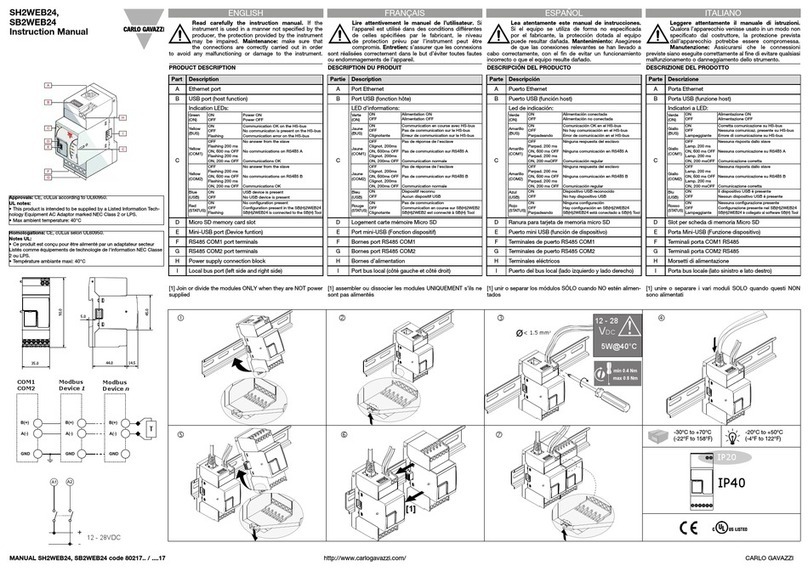
[1] Join or divide the modules ONLY when they are NOT power
supplied
Part Description
A Ethernet port
B USB port (host function)
C
Indication LEDs:
Green
(ON)
ON
OFF
Power ON
Power OFF
Yellow
(BUS)
ON
OFF
Flashing
Communication OK on the HS-bus
No communicaton is present on the HS-bus
Communication error on the HS-bus
Yellow
(Port1)
OFF
Flashing 200 ms
ON, 600 ms OFF
Flashing 200 ms
ON, 200 ms OFF
No answer from the slave
No communications on RS485 COM1
Communications OK
Yellow
(Port2)
OFF
Flashing 200 ms
ON, 600 ms OFF
Flashing 200 ms
ON, 200 ms OFF
No answer from the slave
No communications on RS485 COM2
Communications OK
Blue
(USB)
ON
OFF
USB device is present
No USB device is present
Red
(Prg)
ON
OFF
Flashing
No configuration is present
Configuration present in the UWP
UWP is connected to the UWP 3.0 Tool
D Micro SD memory card slot
E Mini-USB port (Device function)
F RS485 COM1 port terminals
G RS485 COM2 port terminals
H Power supply connection block
I Local bus port (left side and right side)
FRANÇAIS
Lire attentivement le manuel de l’utilisateur. Si
l’appareil est utilisé dans des conditions différentes
de celles spécifiées par le fabricant, le niveau
de protection prévu par l’instrument peut être
compromis. Entretien: s’assurer que les connexions
sont réalisées correctement dans le but d’éviter toutes fautes
ou endommagements de l’appareil.
DESCRIPTION DU PRODUIT
[1] assembler ou dissocier les modules UNIQUEMENT s’ils ne
sont pas alimentés
ESPAÑOL
Lea atentamente este manual de instrucciones.
Si el equipo se utiliza de forma no especificada
por el fabricante, la protección dotada al equipo
puede resultar dañada. Mantenimiento: Asegúrese
de que las conexiones relevantes se han llevado a
cabo correctamente, con el fin de evitar un funcionamiento
incorrecto o que el equipo resulte dañado.
DESCRIPCIÓN DEL PRODUCTO
[1] unir o separar los módulos SÓLO cuando NO están alimen-
tados
ITALIANO
Leggere attentamente il manuale di istruzioni.
Qualora l’apparecchio venisse usato in un modo non
specificato dal costruttore, la protezione prevista
dall’apparecchio potrebbe essere compromessa.
Manutenzione: Assicurarsi che le connessioni
previste siano eseguite correttamente al fine di evitare qualsiasi
malfunzionamento o danneggiamento dello strumento.
DESCRIZIONE DEL PRODOTTO
[1] unire o separare i vari moduli SOLO quando questi NON
sono alimentati
90.0
44.0 14.5
45.0
5.0
35.0
12 - 28
VDC
5W@40°C
< 1.5 mm2
[1]
IP20
IP40
-20°C to +50°C
(-4°F to 122°F)
-30°C to +70°C
(-22°F to 158°F)
Approvals: CE, cULus according to UL60950.
UL notes:
• This product is intended to be supplied by a Listed Information Tech-
nology Equipment AC Adaptor marked NEC Class 2 or LPS.
• Max ambient temperature: 40°C
Homologations: CE, cULus selon UL60950.
Notes UL:
• Ce produit est conçu pour être alimenté par un adaptateur secteur
Listés comme équipements de technologie de l'information NEC Classe
2 ou LPS.
• Température ambiante maxi: 40°C
Device 1
Device n
COM2
T
Partie Description
A Port Ethernet
B Port USB (fonction hôte)
C
LED d’informations:
Verte
(ON)
ON
OFF
Alimentation ON
Alimentation OFF
Jaune
(BUS)
ON
OFF
Clignotante
Communication en course avec HS-bus
Pas de communication sur le HS-bus
Erreur de communication sur le HS-bus
Jaune
(Port1)
OFF
Clignot. 200ms
ON, 600ms OFF
Clignot. 200ms
ON, 200ms OFF
Pas de réponse de l'esclave
Pas de communication sur RS485 COM1
Communication normale
Jaune
(Port2)
OFF
Clignot. 200ms
ON, 600ms OFF
Clignot. 200ms
ON, 200ms OFF
Pas de réponse de l'esclave
Pas de communication sur RS485 COM2
Communication normale
Bleu
(USB)
ON
OFF
Dispositif reconnu
Aucun dispositif USB
Rouge
(Prg)
ON
OFF
Clignotante
Pas de communication
Communication en course sur UWP
UWP est connecté à UWP 3.0 Tool
D Logement carte mémoire Micro SD
E Port mini-USB (Fonction dispositif)
F Bornes port RS485 COM1
G Bornes port RS485 COM2
H Bornes d’alimentation
I Port bus local (côté gauche et côté droit)
Parte Descripción
A Puerto USB
B Puerto USB (función host)
C
LED de indicación:
Verde
(ON)
ON
OFF
Alimentación conectada
Alimentación no conectada
Amarillo
(BUS)
ON
OFF
Parpadeando
Comunicación OK en el HS-bus
No hay comunicación en el HS-bus
Error de comunicación en el HS-bus
Amarillo
(Port1)
OFF
Parpad. 200 ms
ON, 600 ms OFF
Parpad. 200 ms
ON, 200 msOFF
Sin respuesta del esclavo
Sin comunicación en RS485 COM1
Comunicación regular
Amarillo
(Port2)
OFF
Parpad. 200 ms
ON, 600 ms OFF
Parpad. 200 ms
ON, 200 ms OFF
Sin respuesta del esclavo
Sin comunicación en RS485 COM2
Comunicación regular
Azul
(USB)
ON
OFF
Dispositivo USB reconocido
No hay dispositivo USB
Rojo
(Prg)
ON
OFF
Parpadeando
Sin configuración
Hay configuración en UWP
UWP está conectado a UWP 3.0 Tool
D Ranura para tarjeta de memoria micro SD
E Puerto mini USB (función de dispositivo)
F Terminales de puerto RS485 COM1
G Terminales de puerto RS485 COM2
H Bloque de conexión de la alimentación
I Puerto del bus local (lado izquierdo y lado derecho)
Parte Descrizione
A Porta Ethernet
B Porta USB (funzione host)
C
Indicatori a LED:
Verde
(ON)
ON
OFF
Alimentazione ON
Alimentazione OFF
Giallo
(BUS)
ON
OFF
Lampeggiante
Corretta comunicazione su HS-bus
Nessuna comunicaz. presente su HS-bus
Errore di comunicazione su HS-bus
Giallo
(Port1)
OFF
Lamp. 200 ms
ON, 600 ms OFF
Lamp.
200 ms
ON, 200 msOFF
Nessuna risposta dallo slave
Nessuna comunicazione su RS485 COM1
Comunicazione corretta
Giallo
(Port2)
OFF
Lamp. 200 ms
ON, 600 ms OFF
Lamp.
200 ms
ON, 200 msOFF
Nessuna risposta dallo slave
Nessuna comunicazione su RS485 COM2
Comunicazione corretta
Blu
(USB)
ON
OFF
Il dispositivo USB è presente
Nessun dispositivo USB è presente
Rosso
(Prg)
ON
OFF
Lampeggiante
Nessuna configurazione presente
Configurazione presente nel UWP
UWP è collegato al software UWP 3.0 Tool
D Slot per scheda di memoria Micro SD
E Porta Mini-USB (Funzione dispositivo)
F Terminali porta COM1 RS485
G Terminali porta COM2 RS485
H Morsetti di alimentazione
I Porta bus locale (lato sinistro e lato destro)