Cassida Quattro
4-way Automatic Counterfeit Detector
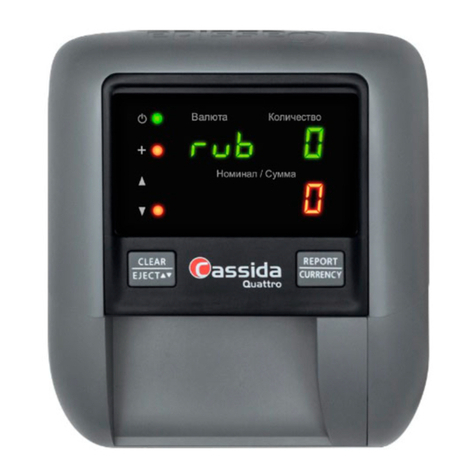
1.4 Controls and Indicators
9
CLEAR/EJECT Button
•Press once to clear information from the
last bill taken and clear all counts.
•Press and hold to change the ejection
direction for authenticated bills through
either the front or rear slot.
NOTE: Rejected bills will always reject to the
front of the unit. You’ll hear an audible tone
and the direction arrow will change when the
ejection direction has changed.
REPORT/CURRENCY Button
•Press once to get a detailed report showing
number of authenticated bills taken and the
value of the bills taken.
•Press again to scroll through each
denomination in descending order — $100,
$50, $20, $10, $5, $2, $1. Each screen will
show the denomination and the number of
bills taken for that denomination.
•Press and hold 5 seconds to change to a
different currency, if your unit is so equipped.