4
Helyezzük az edényt a kívánt főzési zónára. Amennyiben az
edény nem a megfelelő helyen van, a rendszer nem kapcsolja
be az adott főzési zónát, valamint az alábbi jelzés lesz látható.
This appliance is not intended to be used via
an external timer or a remote control system.
The manufacturers decline any responsibility
in the event of non-compliance with what is
described above and the accident prevention
norms not being respected and followed.
The producer is not responsible for any failure
to observe the instructions given in this manual
and current safety regulations for the correct
use of the equipment.
Reserves the right to make any modifications
to the equipment or this manual without prior
notice.
Contact our official distributor should you re-
quire technical assistance or additional infor-
mation on our products.
To avoid all risk, if the power cable
becomes damaged, it must only be
replaced by the manufacturer, by
an authorised service centre, or by
a qualied electrician.
OPERATING PRINCIPLE (Fig. 11)
It exploits the electromagnetic properties of most cooking vessels.
The coil (inductor) which produces the electromagnetic field is
operated and controlled by the electronic circuit.
The heat is transmitted to food by the cooking vessel itself.
The cooking process takes place as described below.
- loss of heat is minimum (high efficiency)
- the system stops automatically when the vessel is removed or
even just lifted from the hob
- the electronic circuit guarantees maximum flexibility and fine
adjustments.
1 Vessel
2 Induced current
3 Magnetic field
4 Inductor
5 Electronic circuit
6 Power supply
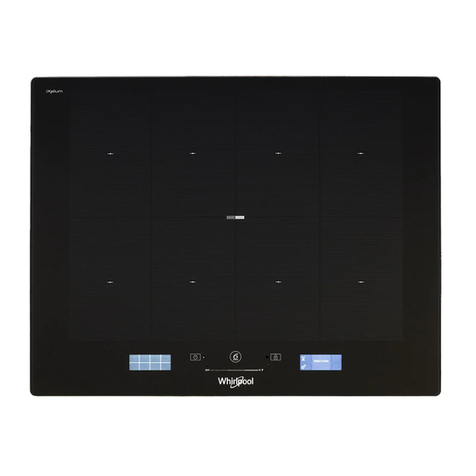
User’s Instructions (Fig. 2)
1 ON/OFF
2 Minus –
3 Plus +
4 Cooking zone
5 Setting level display
6 Zone selection lights
Touch panel (Fig. 12)
10.
Filter clean warning display/button. Warning of the need to
replace the filter – press to deactivate once the filter has been cleaned or
replaced.
8. Decrease extractor fan speed.
11. Enable and disable extractor fan timer.
Timer: the extractor fan works for 5 min. at the current speed and another
5 min. at each of the lower speeds until it stops.
12. Extractor fan speed display panel.
7.Extractor fan on and off.
9.Increase extractor fan speed.
It is advisable to let the appliance work for 15 minutes after the
cooking of the food in order to remove completely the fumes.
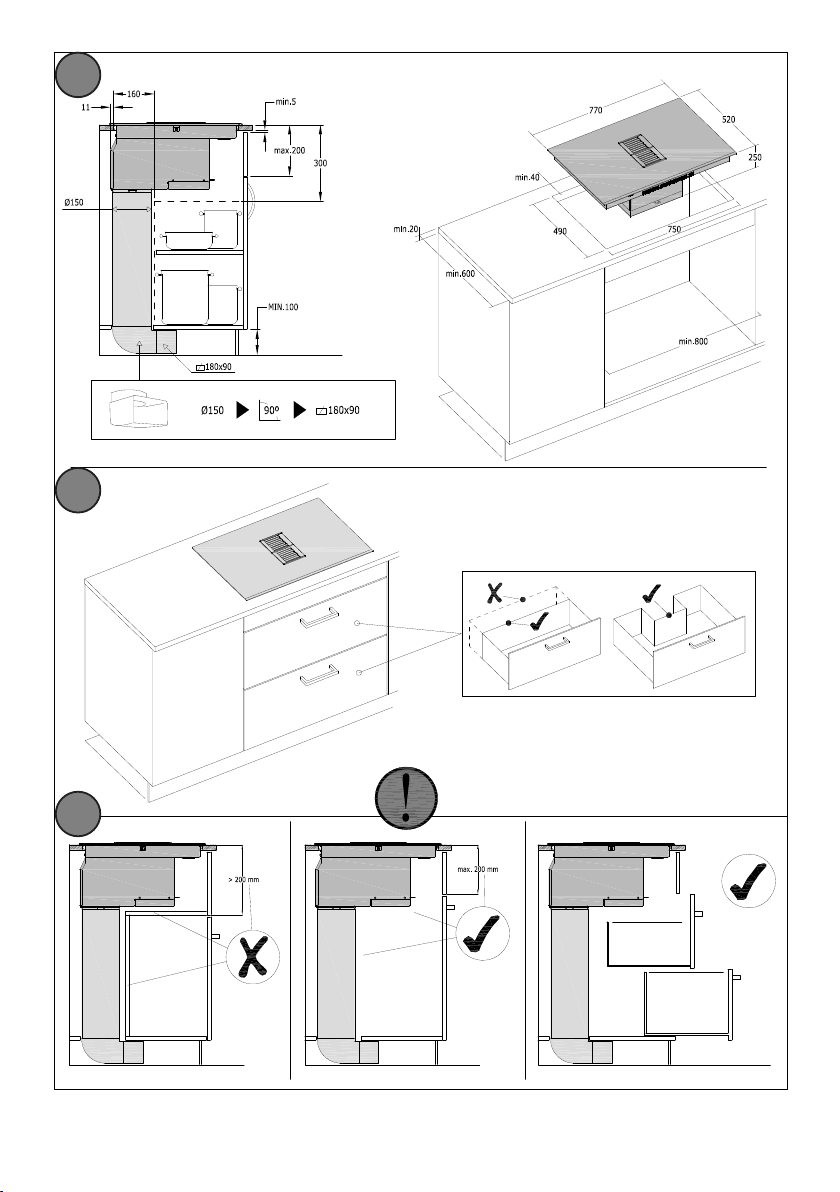
Installation
All operations relative to installation (electric connection) should be
carried out by skilled personnel in conformity with the rules in force.
As for the specific instructions see part pertaining to installer.
Switching the Touch Control ON/OFF
After mains voltage is applied the control initializes for approx.
1 second before it is ready for operation.
After a reset all displays and LEDs glow for approx. 1 second. When
this time is over all displays and LEDs extinguish and the control is
in the stand-by mode.
Press the ON/OFF (1) button to switch the touch control on.
The cooking zone displays show a static “0“.
If a cooking zone is in the “hot“ status, the display shows a static
“H“ instead of “0“. The bottom right dot is blinking in 1 second
intervals on all cooking zone displays to indicate that no cooking
zone is selected at the moment.
After switching-ON the electronic control remains activated for 20
seconds. If no cooking zone or timer selection follows within this
period of time, the electronic control automatically switches back
into the stand-by-mode. The control can only be switched-ON if it
identifies the ON/OFF key alone being operated. Should it recognize
key activation other than that, the control remains in the standby-
mode.
If the child safety feature is active when switching on, all cooking
zones show “L“,(LOCKED). If the cooking zones are in a“hot“ status,
the display shows “L“ and“H“ in alternation.When theTouch Control
is ON it can be switched- OFF at any time by operating the ON/OFF
key. This is also valid if the control has been locked (activated child
safety feature).
The ON/OFF key has always priority in the switch-OFF function.
Automatic switch-OFF
When the control is ON it automatically switches-OFF after
20 seconds if no cooking zone or select key has been operated
within this period of time. If case of a cooking zone selection, the
automatic switch-OFF time is composed of 10 seconds deselection
time for a cooking zone at setting“0“ and 10 seconds switch-OFF
time.
Switching a cooking zone ON and OFF
First place the pan in the chosen cooking zone. If the pan is not
present the system cannot be switched on the correspondent zone.
If the touch control is switched on, the cooking zone can be selected
by pressing the button (4) of the corresponding zone.
The display (5) of the zone selected lights up, while the remaining
displays are dimmed. if the cooking zone is “hot”, “H” and “0” are
alternately displayed.
Press the PLUS (3) or MINUS (2) button to select a setting and the
zone will begin to heat up.
Once the cooking zone has been selected, the setting can be
Amennyiben az érintővezérlő egység aktív, a zónának megfele-
lő gombbal (4) bekapcsolhatjuk azt. A működő főzőzóna kijelző-
je bekapcsol (5), a többi kijelző sötét marad. Amennyiben a főző-
zóna forró, ennek kijelzőjén a „H” és a „0” jelzés felváltva jelenik
meg. A PLUSZ (3) vagy MÍNUSZ (2) gombokkal állítsuk be a tel-
jesítményfokozatot: ekkor a zóna felmelegszik. A főzőzóna kivá-
lasztását követően a kívánt fokozat a PLUSZ (3) gomb folytonos
nyomva tartásával is kiválasztható. A beállítás az 1-es fokozattal
kezdődik, és 0,4 másodpercenként 1 fokozattal nő. A 9-es foko-
zatot elérve az érték nem nő tovább (végső fokozat).
Amennyiben a fokozatot a MÍNUSZ (2) gombbal kezdtük el beállí-
tani, az indulási fokozat a 9-es (a legnagyobb fokozat). A gombot
nyomva tartva 0,4 másodpercenként 1 fokozattal csökken a be-
állított fokozat egészen a 0-ig, amikor nem módosul tovább. Ez-
után a beállítás csak a PLUSZ (3) vagy MÍNUSZ (2) gombok új-
bóli megnyomásával módosul.
Egy adott főzőzóna kikapcsolása
A kikapcsoláshoz a főzőzónához tartozó kiválasztó gombbal (4)
válasszuk ki a kikapcsolni kívánt zónát. A a zóna kijelzője (5) be-
kapcsol, a többi zóna kijelző sötét marad. A főzőzóna (4) és MÍ-
NUSZ (2) gombokat együttesen lenyomva az adott zóna fokoza-
tát „0”-ra állítjuk. Vagy ehelyett a MÍNUSZ (2) gombbal a fokoza-
tot lecsökkenthetjük egészen „0”-ig. Amennyiben a főzőzóna for-
ró, a „H” és „0” jelzések felváltva jelennek meg.
Az összes főzőzóna kikapcsolása
A BE/KI gombot (1) bármikor lenyomva azonnal kikapcsoljuk az
összes főzőzónát. Készenléti módban az esetleges forró főzőzó-
nákat jelző „H” jelzések maradnak láthatók. Az összes többi zóna
kijelző sötét marad.
A főzőzónák teljesítménye kilenc fokozatban állítható: a kiválasz-
tott fokozat hét szegmenses LED-kijelzőn látható 1-9-es számok
formájában (3).
A bal első főzőzóna esetében a 9-es fokozatot kiválasztva a zóna
30 percen át működik ezen a fokozaton, majd biztonsági okok-
ból a teljesítmény némileg csökken. Amennyiben nagyobb telje-
sítményre van szükség, válasszuk az extra teljesítmény (turbó)
fokozatot („P”).
Számos főzőzóna kombináció áll rendelkezésre:
Önálló zónák (7-a. ábra)
Modelltől függően három vagy négy darab különálló zóna (A, B,
C, D, E) áll rendelkezésre, melyek egymástól függetlenül mű-
ködtethetők.
A megfelelő észleléshez szükséges minimáls edény alj átmérők:
A, B, C, D zónák esetén: 12 cm; E zóna esetén: 14,5 cm.
Dupla zóna (7-b. ábra)
Két különálló zónát együttesen is működtethetünk (mintha
egyetlen zóna volna a kettő). A lehetséges zóna kombinációk:
A+B vagy C+D. A zónák együttes működtetéséhez az adott kom-
binációt alkotó zónákon egyidejűleg nyomjuk meg a kiválasztó
gombokat („8”). Ekkor a hátsó felület kijelzőján („8”) a követke-
ző jel látható:
selected by keeping the PLUS (3) button pressed down. The setting
begins at level 1 and increases by 1 level every 0.4 seconds. When
setting “9” is reached, the setting will not be changed further.
If the setting level has been selected using the MINUS (2) button, the
start level is “9“ (maximum level). Keep the button pressed down to
lower the active level by 1 every 0.4 seconds. When setting “0” is
reached, there will be no further setting changed. The setting can
only be changed by pressing the MINUS (2) or PLUS (3) button again.
Switching a cooking zone o
Select the zone to be switched off using the corresponding button
(4).The display (5) of the zone selected lights up, while the remaining
displays are dimmed. Press the Cooking zone (4) and MINUS (2)
buttons at the same time and the setting level of the zone is changed
to 0. Alternatively, the MINUS button (2) can be used to reduce the
setting level to 0.
If a cooking zone is “hot”,“H” and “0” will be alternately displayed.
Switching-OFF all cooking zones
Immediate switching-OFF of all cooking zones can be achieved
anytime by means of the ON/OFF key. In the standby-mode an “H“
appears on all cooking zones which are “hot“.All other cooking zone
displays are not illuminated.
Wattage settings
The output of the cooking zones can be set in 9 steps which are
indicated by the figures “1“ thru“9“ by means of LED sevensegment-
displays.
In the cooking zone located on the front left, when selecting
the power level 9 and after 30 minutes operating, the power will
decrease slightly for safety reasons. In case more power is required,
select the boost level (“P”)
Cooking Zones
There are several possible cooking zone combinations:
Single Cooking Zone (Fig. 7-a)
Depending on the model, there are 3 or 4 single cooking zones (A, B, C, D,
E) which can function independently.
Minimum diameter of the pan base to ensure optimal detection:
Zones A, B, C, D: 12 cm / Zone E: 14.5 cm
Dual Cooking Zone (Fig. 7-b)
There is a further option of two single cooking zones operating together
as if they were a single zone. The possible cooking zone combinations
are A+B or C+D. This function is enabled by simultaneously pressing the
selection keys “8” on both the zones to be combined. The following symbol
will then be shown on display “8” of the rear area:
Display “8” located on the front area will indicate the power level selected
for the combined zone.
This function makes it possible to obtain a rectangular cooking zone,
particularly suited to rectangular or oval-shaped pans.
If you are using a round pan, the minimum diameter of the base should be
20 cm in order to ensure optimal detection.
Boost function
After selection of a respective cooking zone, the boost function can
be activated by selecting the power level 9 and then pressing PLUS
(3) button . By means of this function certain cooking zones are
enabled to receive power over the nominal (the number of boostable
cooking zone depends on the power available on a partial modules
which is to be lees than total hob power ). If the desired cooking zone
has the capacity to activate the booster, the display shows a “P“
symbol. In case the available power is not enough the cooking stage
display flashes for 3 seconds on the cooking zone which needs to be
reduced and which requires automatic adjustment.
The boosting time is limited to 5 min to protect cooking utensils.After
the booster is switched off automatically, the cooking zone continues
operation on power level “9”. The booster can be reactivated after
some minutes.
In case that the pan is removed from the cooking zone during
boosting, the boosting function remains active and boosting time
continues.
The power management is based on on the principle that the last
entry is requested by the induction as top priority. That means that
previous actions and settings also made for the other cooking zones
are reversed automatically, if necessary.
-
If induction identifies the necessity of reducing power at a cooking
zone, the selected cooking stage flashes on that cooking zone
providing a correction period of 3 sec before the power is reduced
automatically to a minimum cooking stage.
-
If the setting is adjusted within the correction period, the power
management checks the settings again. Should a new setting lead to
further power reduction, the correction period starts again.
- If no automatic correction needs being made to the cooking zone
setting, the flashing stops immediately and the original value
remains as a steady display indication. Should the situation change
again on the power reduced cooking zone, no automatic power
increase is effected.
NOTE:
When selecting the Booster function on any of the rear areas (left
or right), the front area located on the same side will automatically
switch o (if it was already switched on) in order to focus all the
power on the rear area. This allows you to benefit from an extra
powerful Booster.
However, when selecting the Booster function on any of the front
areas (left or right), the rear area located on the same side may be
operated up to power level 8, as it will not require as much energy
input.
Residual heat indicator
It is meant to indicate to the user that the glass ceramic has a
dangerous touch temperature in the circumference of a cooking
zone. The temperature will be determined following a mathematical
model and the remaining residual heat will be indicated by means of
“H” on the corresponding 7-segment display.
Heating-up and cooling down will be calculated dependent on:
·the selected setting („0“ to „9“)
·the ON/OFF time.
After switching-OFF the cooking zone the respective display shows
“H” until the assigned cooking zone temperature is mathematically
in a uncritical level. (≤60°C).
Automatic Switch-o (Operating Time Limitation)
For each activated cooking zone a max. operating time is defined. The
max. operating time is depending on the selected cooking stage. After the
expiration of the max. operating time the cooking zone is automatically
switched o.
Each actuation of the cooking zone status (changing the cooking level
etc.) resets the count-down timer to the initial starting value.
Timer settings takes priority vs. operating time limitations for high cooking
stage setting.
Protection against unintended switching-ON
·If the electronic control realizes a continuous operation of keys
for approx. 10 seconds, it switches OFF automatically. The control
sends out an audible failure signal for 10 seconds, so that the user
can remove the object which has been mistakenly placed onto the
operation surface. The displays show the failure code “ E R 0 3 “ .
If the failure carries on for more than 10 seconds, only the code “E
R 0 3 “ will be displayed as long as the failure will be recognized
by the electronic control. If the cooking zone is in the “hot” status,
“H“ will appear on the display in alteration with the failure notice.
·If no cooking zone will be activated within 20 seconds after
switching-ON by means of the Power-key, the control switches
Az elülső felület kijelzője („8”) a kombinált zóna teljesítményfo-
kozatát fogja mutatni,
A funkció révén egy téglalap alakú zóna jön létre, amely alkal-
mas téglalap vagy ovális alakú edényekkel történő főzéshez.
Amennyiben kerek aljú edényt használunk, a megfelelő észle-
lés érdekében az edény alja legalább 20 cm átmérőjű legyen.
A kívánt főzőzóna kiválasztását követően az extra teljesít-
mény funkció a 9-es teljesítményfokozat kiválasztásával, majd
a PLUSZ (3) gomb megnyomásával aktiválható. A funkció révén
egyes főzési zónák a névlegesnél nagyobb teljesítmény elérésé-
re válnak képessé (hogy egyidejűleg hány zóna működhet ext-
ra teljesítmény módban, az függ az egyes zónákra eső teljesít-
ménytől, amely nem haladhatja meg a főzőlap maximális telje-
sítményét). Amennyiben a teljesítmény korlátok mellett az adott
főzőzónán még elérhető az extra teljesítmény funkció, a kijelzőn
a „P” jelzés jelenik meg. Amennyiben a teljesítmény korlátozás
nem engedi meg az adott zónán az extra teljesítmény funkció
használatát, azon zóna kijelzője, melynek teljesítményét csök-
kenteni kellene, három másodpercen keresztül villogó jelzést ad.
A főzőedények védelme érdekében az extra teljesítményű foko-
zat működése öt (5) perc időtartama van korlátozva. Az extra tel-
jesítmény funkció automatikus lekapcsolását követően a zóna
„9”-es főzési teljesítményfokozatban működik tovább. Pár perc
elteltével az extra teljesítmény funkció újra aktiválható.
Amennyiben extra teljesítmény módban történő működés köz-
ben levesszük az edényt az adott főzési zónáról, a mód ettől füg-
getlenül működésben marad egészen az öt perces időtartam le-
jártáig.
A teljesítmény-vezérlés azon az elven alapul, hogy az egyes fő-
zési zónáknál az utoljára végrehajtott teljesítményfokozat állítás
élvez elsőbbséget. Ez azt jelenti, hogy azon zónáknál kerül el-
sődleges csökkentésre a teljesítményfokozat, ahol azt a legko-
rábban állítottuk.
- Amennyiben az indukció azt érzékeli, hogy valamely főzési zó-
nánál a teljesítményfokozat csökkentése szükséges, a módo-
sítást megelőzően az állításra javasolt zóna kijelzője 3 másod-
perc hosszan villogni kezd, majd három másodperc után az adott
zóna teljesítménye automatikusan módosításra kerül.
- Amennyiben ezen időtartamon belül a felhasználó maga mó-
dosítja az adott zóna teljesítmény, a rendszer újra ellenőrzi a
teljesítmény korlátoknak való megfelelést. Amennyiben további
teljesítmény korrekció szükséges, a 3 másodperces várakozá-
si idő újra indul.
- Amennyiben további módosításra nincs szükség, a villogás
azonnal megszűnik, és az eredeti érték marad folyamatos kijel-
zés mellett. Ahol a teljesítményfokozat csökkentésre került, a tel-
jesítményfokozat semmilyen körülmények között sem fog auto-
matikusan növekedni, még akkor sem, ha a zónák aktuális telje-
sítményfokozatai ezt lehetővé is tennék.
-
-
-
-
-
-