manuals.online logo
Brands
  1. Home
  2. •
  3. Brands
  4. •
  5. Corsran Technology
  6. •
  7. Headphones
  8. •
  9. Corsran Technology B20 User manual

Corsran Technology B20 User manual

Popular Headphones manuals by other brands

Bose SoundSport owner's guide

Bose

Bose SoundSport owner's guide

Renkforce RF-WH-150 operating instructions

Renkforce

Renkforce RF-WH-150 operating instructions

Blu ARIA POD+ quick guide

Blu

Blu ARIA POD+ quick guide

Jabra Elite Active 45e Get started

Jabra

Jabra Elite Active 45e Get started

Denver TWE-36MK2 user manual

Denver

Denver TWE-36MK2 user manual

Grandstream Networks GUV3060 quick start guide

Grandstream Networks

Grandstream Networks GUV3060 quick start guide

iMoshion TWS In-Ear Headset user manual

iMoshion

iMoshion TWS In-Ear Headset user manual

Sven AP-B250MV user manual

Sven

Sven AP-B250MV user manual

BUXTON BTW 3800 user manual

BUXTON

BUXTON BTW 3800 user manual

HiFuture Voyager user manual

HiFuture

HiFuture Voyager user manual

Philips UpBeat SHB2505 user manual

Philips

Philips UpBeat SHB2505 user manual

Denon AH-C260 owner's manual

Denon

Denon AH-C260 owner's manual

WATSON KH2130B instruction manual

WATSON

WATSON KH2130B instruction manual

Pure Acoustics Golf TWS20 user manual

Pure Acoustics

Pure Acoustics Golf TWS20 user manual

Srhythm Soulmate Series user manual

Srhythm

Srhythm Soulmate Series user manual

Motorola Talkabout MHP71 user manual

Motorola

Motorola Talkabout MHP71 user manual

Sony MDR-NC8 Specifications

Sony

Sony MDR-NC8 Specifications

AUSounds AU-Stream quick start guide

AUSounds

AUSounds AU-Stream quick start guide

manuals.online logo
manuals.online logoBrands
  • About & Mission
  • Contact us
  • Privacy Policy
  • Terms and Conditions

Copyright 2025 Manuals.Online. All Rights Reserved.

USER MANUAL
1. Understand the
headphone
2. How to wear
3. Charging and transmit music files
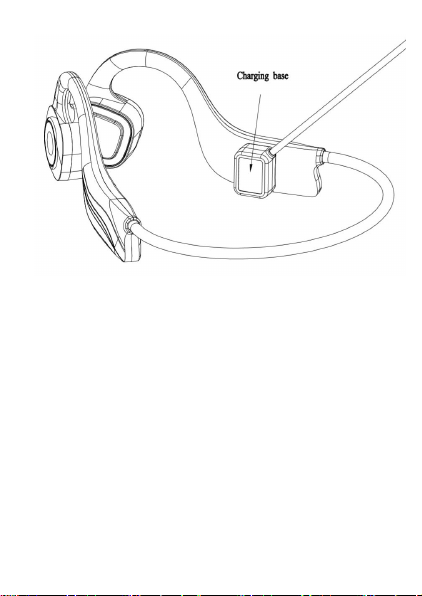
1) Headphones comes with unique
charging base
2) Bring the charging base and charging
contacts together as follows to charge or
transmit files
3) Always ensure the charging contacts
and the charging base are clean to avoid
bad contact
4. Wireless Headset controls
1) On/Off: Press the “MFB” for about 3
seconds
2) Pairing:
(1) While the device is turned off, press
and hold the Power Button for 3
seconds, at which point the Led
Indicator will begin flashing in
alternating red/blue and voice
promotion “waiting for connection”
(2) On the electronic device that
you’re pairing your headphones with,
locate the Bluetooth menu and select
the headphones
(3) Headphones will be connected
within seconds and voice will prompt
with the word “Device connected”.
3) Mode switching between Wireless
Mode/MP3 Mode:
Press the “+” and “-”at the same time.
4) Adjust volume:Click Volume“+”/
Volume “-”
5) Move back to previous song: Press
and hold “-”
Skip to next song: Press and hold “+”
6) Pause/play music:
Click the “MFB” once. The head-
phones will beep, and your music will
pause/play
7) Answer a call: Click the MFB once
8) Reject a call: Press and hold the MFB
9) How to control MP3 play: Click the
“-” to the single track, single play or Loop
Playback
5. Specifications:
Wireless version: Wireless 4.2
Support profile: A2DP v1.3,AVRCP
v1.5,HFP v1.6,HSP v1.2
Working frequency: 20HZ –20KHZ
Speaker Diameter: 16 mm
Speaker Impedance: 8 ohm
Speaker Power: 7mW
Battery: Polymer lithium battery,
200mAH
Music playback time: 4-5 hours
Talk time: 4-5 hours
Standby time: 120 hours
Charging time: 1.5 hours
Charging port: Charging contacts &
charging base
Wireless transmission distance: 33 feet
(free space)
Microphone: Built-in microphone
Microphone sensitivity: -38 dB
Headphone type:Bone conduction
Power display: IOS device
Main material: PC/ABS
Weight: 1.6 OZ
Dimensions: 4.48*3.24*1.41 inch
Built-in Memory: 8GB
Waterproof rating: IPX8
6.Tips for using this headphones for
swimming
1) Wear the headphones at the right
position before you wear your swimming
cap, so that the swimming cap will help
to position the headphones
2) Turn your headphone to MP3 mode
for better music experience when
swimming
7.Cautions
1) Liquid except water, sweat, such as
salty water may lead to damage of the
headphone. Please avoid using this
headphones when swimming in the river
or in a sea
2) When swimming, this headphones
could not connect to your smart phone,
please turn it to MP3 mode.
3)Please mind the volume, do not turn it
too loud in case it would hurt your
hearing ability.
8. Package list
Bone conduction headphones*1
Charging Dock*1 User Manual*1
This device complies with Part 15 of
the FCC Rules. Operation is subject
to the following two conditions:
This device may not cause harmful
interference, and
This device must accept any
interference received, including
interference that may cause
undesired operation.
Warning: Changes or modifications
not expressly approved by the party
responsible for compliance could
void the user's authority to operate
the equipment.
NOTE: This equipment has been
tested and found to comply with the
limits for a Class B digital device,
pursuant to Part 15 of the FCC
Rules. These limits are designed to
provide reasonable protection
against harmful interference in a
residential installation. This
equipment generates uses and can
radiate radio frequency energy and,
if not installed and used in
accordance with the instructions,
may cause harmful interference to
radio communications. However,
there is no guarantee that
interference will not occur in a
particular installation. If this

equipment does cause harmful
interference to radio or television
reception, which can be determined
by turning the equipment off and on,
the user is encouraged to try to
correct the interference by one or
more of the following measures:
Reorient or relocate the receiving
antenna.
Increase the separation between the
equipment and receiver.
Connect the equipment into an outlet
on a circuit different from that to
which the receiver is connected.
Consult the dealer or an
experienced radio/TV technician for