
D-Link DS-605 - VPN Client - PC User manual

D-Link NetDefend VPN Client (DS-601/605)
A quick installation guide to setting up the D-Link NetDefend VPN Client in a VPNC scenario
These scenarios ere developed by the VPN Consortium
Scenario 1. Client-to-Gateway using pre-shared secrets
Typical client-to-gateway VPN using a preshared secret for authentication.
Description how to configure the NCP Secure Entry Client for Windows.
Docu ent version 1.00
Using D-Link NetDefend Client v1.0
Prepared by:
NCP ngineering GmbH
Do buehler Strasse 2,
90449 Nürnberg, Ger any
Phone: +49-911-99.68.0
Fax: +49
-
911
-
99.68.299

Version 0.90 Page
2
of 15 06.Sep.04
Disclaimer
Considerable care has been taken in the preparation of this quick guide, errors in content, typographical
or otherwise ay occur. If you have any co ents or reco endations concerning the accuracy, then
please contact NCP as desired.
NCP akes no representations or warranties with respect to the contents or use of this quick guide, and
explicitly disclai s all expressed or i plied warranties of erchantability or use for any particular
purpose. Further ore, NCP reserves the right to revise this publication and to ake a end ents to the
content, at any ti e, without obligation to notify any person or entity of such revisions and changes.
Copyright
This quick guide is the sole property of NCP and ay not be copied for resale, co ercial distribution or
translated to another language without the express written per ission of NCP engineering G bH,
Do bühler Str.2, D-90449 Nürnberg, Ger any.
Trademarks
All trade arks or registered trade arks appearing in this anual belong to their respective owners.
© 2004 NCP Engineering G bH. All rights reserved.
Version 0.90 Page
3
of 15 06.Sep.04
1. Scenario 1: Client-to-gateway with pre-shared secrets
1.1 Scenario Setup
The following is a typical client-to-gateway VPN that uses a preshared secret for authentication.
172.23.9.0/24
|
|--
+-----------+ /-^-^-^-^--\ +-----------+ |
| Client A |=====| Internet |=====| Gateway B |-----|
+-----------+AW \--v-v-v-v-/ BW+-----------+BL |
Dynamically assigned 22.23.24.25 172.23.9.1 |--
|
Figure 1.1.1: cenario
Client A's WAN interface (AW) has the address dyna ically assigned to it by the ISP. Client A will access
Gateway B's internal LAN, by eans of a secure tunnel.
Gateway B connects the internal LAN 172.23.9.0/24 to the Internet. Gateway B's WAN (Internet)
interface has the address 22.23.24.25. Gateway B's LAN interface address, 172.23.9.1, can be used for
testing IPsec but is not needed for configuring Client A.
The IK Phase 1 parameters used in Scenario 1 are:
Main ode
TripleDES
SHA-1
MODP group 2 (1024 bits)
pre-shared secret of "hr5xb84l6aa9r6"
SA lifeti e of 28800 seconds (eight hours) with no kbytes rekeying
The IK Phase 2 parameters used in Scenario 1 are:
TripleDES
SHA-1
ESP tunnel ode
MODP group 2 (1024 bits)
Perfect forward secrecy for rekeying
SA lifeti e of 3600 seconds (one hour) with no kbytes rekeying
Selectors for all IP protocols, all ports, between the client and 172.23.9.0/24, using IPv4 subnets
1.2 Using the Configuration Assistant
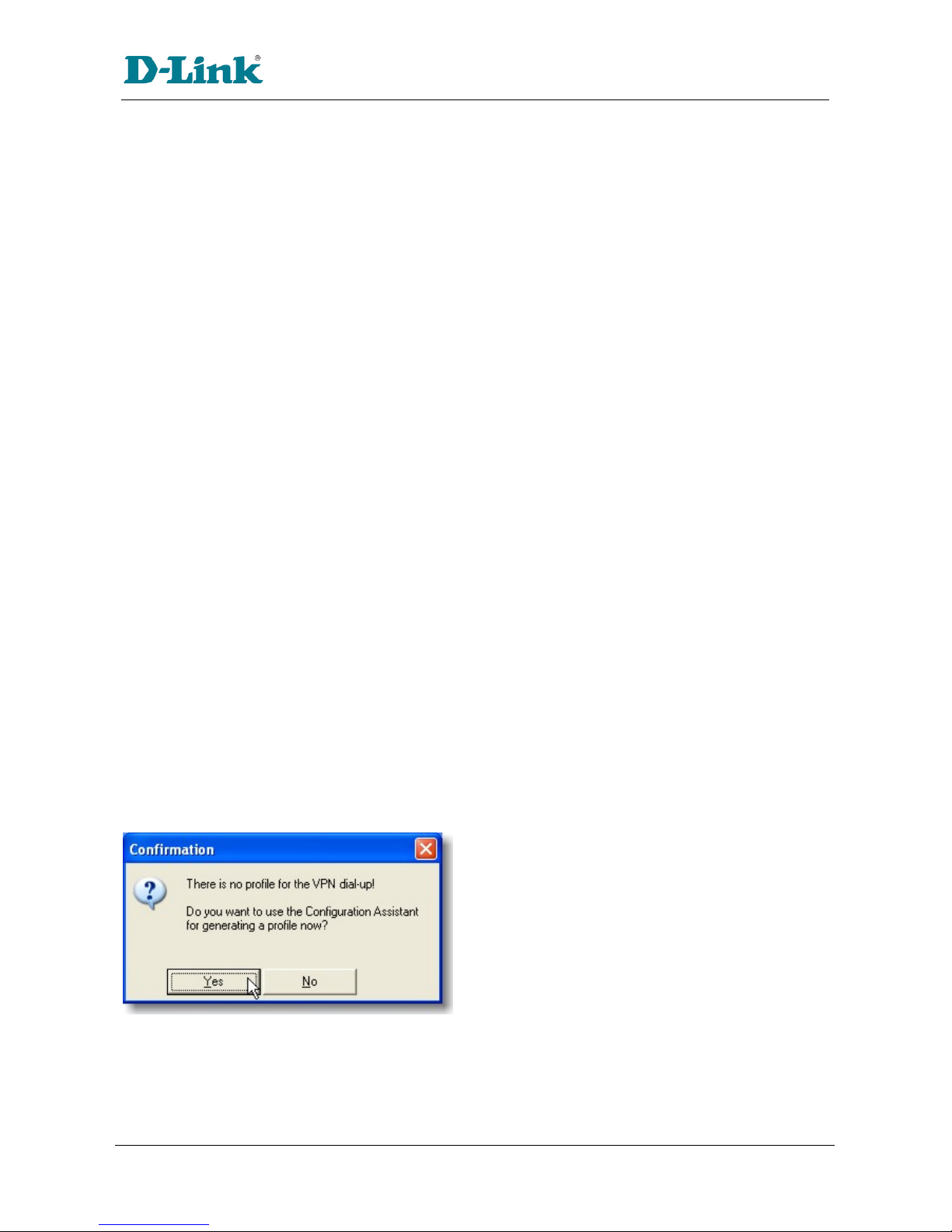
Figure 1.2.1: Configuration Assistant
The first ti e you start up the D-Link VPN Client you ay be pro pted to create a profile if one doesn't
already exist. You can either use the assistant as outlined in section 1.2, or odify an existing profile as
in section 1.3.
Version 0.90 Page
4
of 15 06.Sep.04
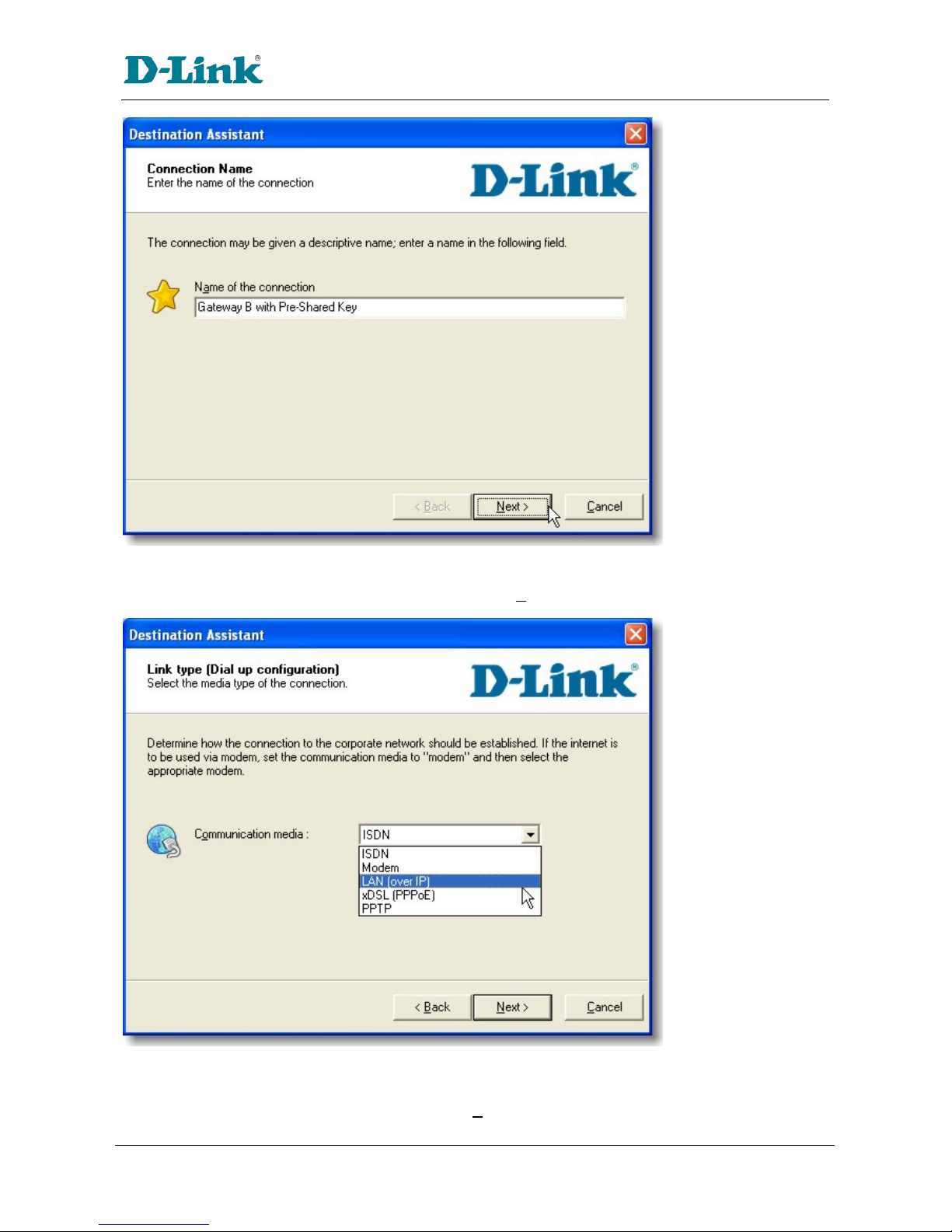
Figure 1.2.2: Configuration Assistant: Connection Name
Several profiles can be created and each given different na e. In this exa ple, this profile is created
and given the na e Gateway B with Pre-Shared Key. Click Next >.
figure 1.2.3: Configuration Assistant: Link type (Dial up configuration)
The VPN Client supports different edia types; the integrated dialer for exa ple, can be used to
establish a connection to the ISP with a ode (if available to the syste ) prior to building the VPN
Tunnel. In this exa ple, select LAN (over IP). Click Next >.
Version 0.90 Page
5
of 15 06.Sep.04
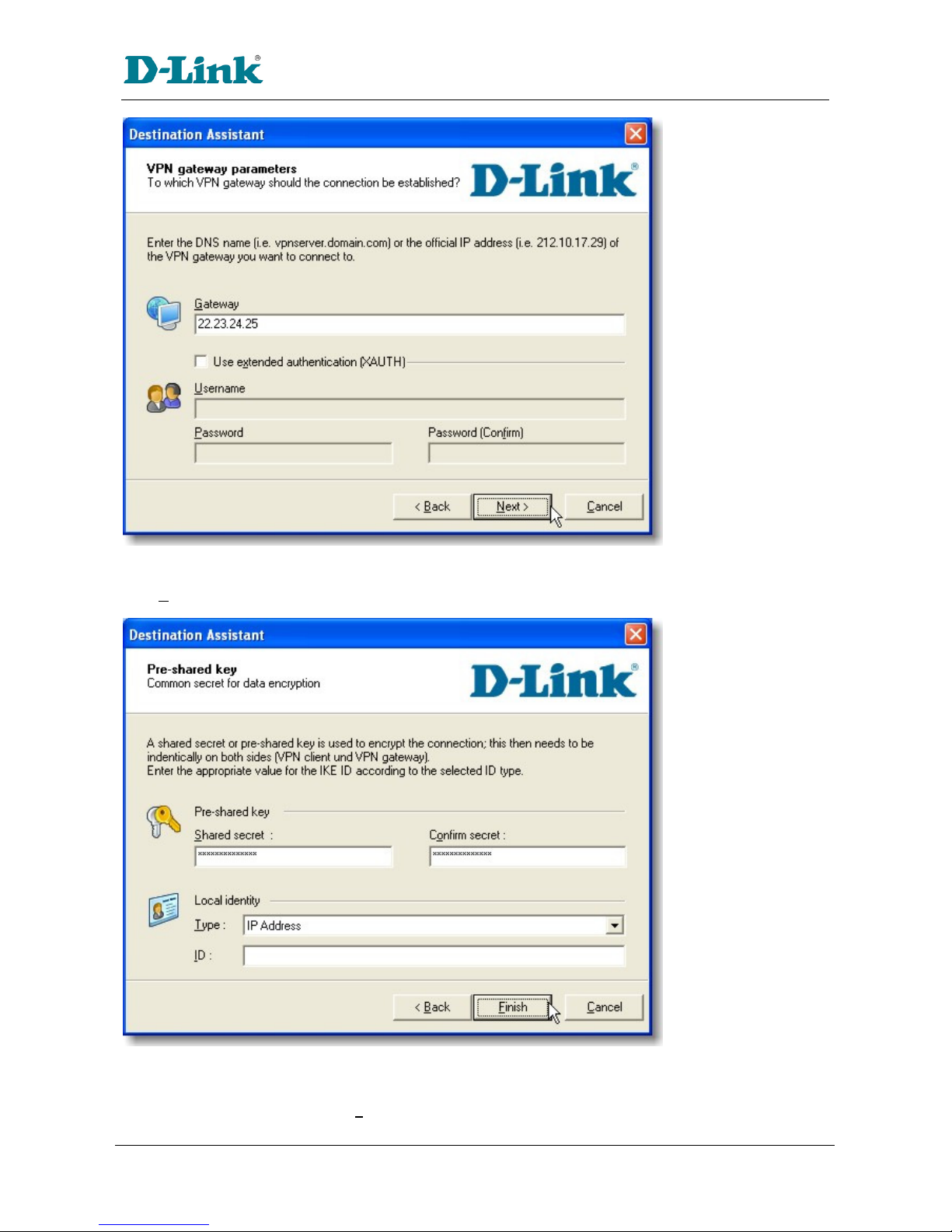
figure 1.2.4: Configuration Assistant: VPN gateway parameters
Enter in the gateway's IP address or DNS na e.
Click Next >.
figure 1.2.5: Configuration Assistant: Pre-shared keys
In this exa ple, a pre-shared key or shared secret is used, identical passwords on the IPSec
co unicating peers. Enter in the given hr5xb84l aa9r (see section 1.1) and confir this to ensure
that it is correctly entered in. The Finish button will not be available until the values have been correctly
entered in and atch.
Version 0.90 Page
6
of 15 06.Sep.04
1.3 Checking/Modifying the Configuration
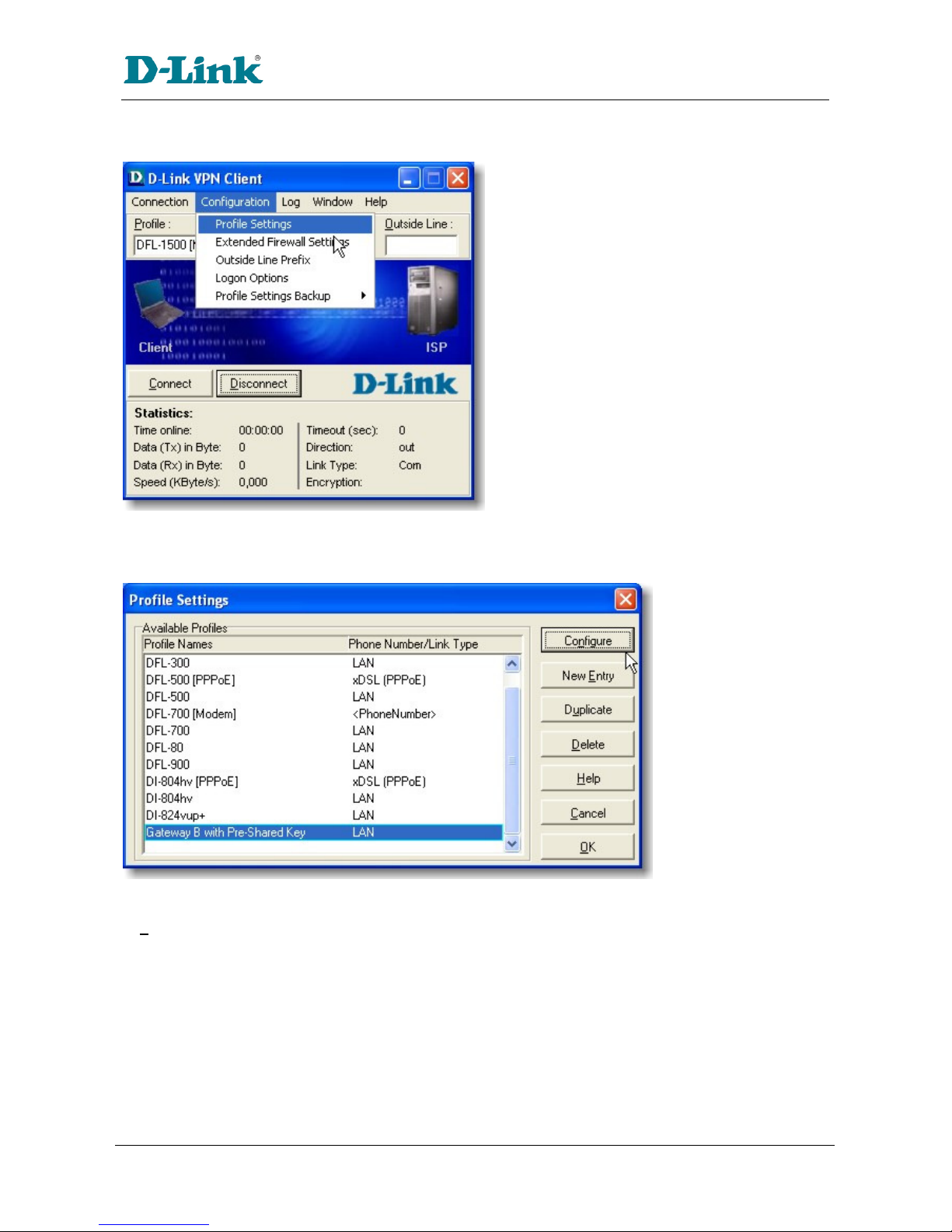
figure 1.3.1: Configuration -> Profile ettings
Open the Profile Settings to odify the para eters to define the specific IKE and IPSec proposals as
specified in section 1.1.
figure 1.3.2: Profile ettings
Either double click on the profile that is going to be odified, or select the profile and then click on
Configure.
Version 0.90 Page
7
of 15 06.Sep.04
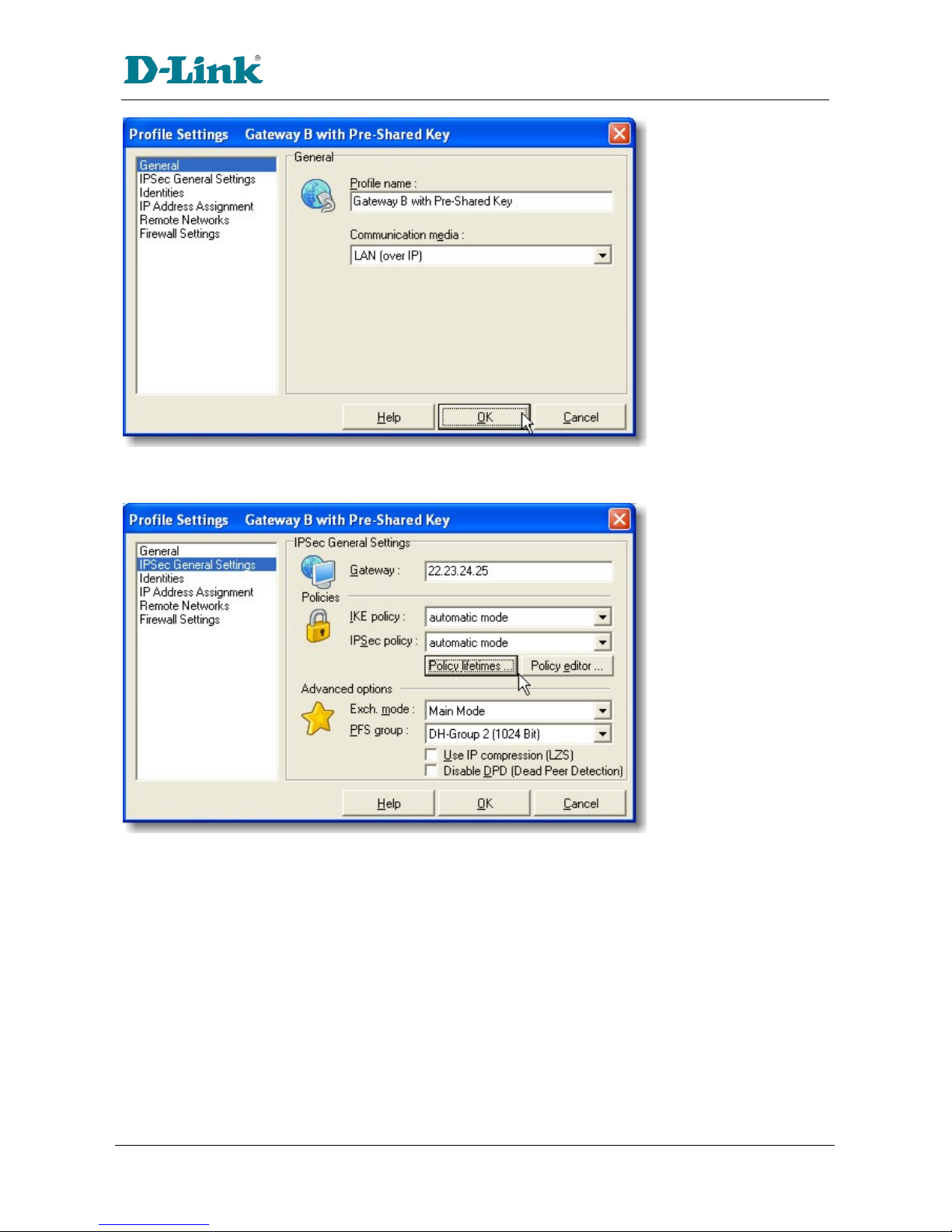
figure 1.3.3: Profile ettings: General
Review the para eters and ensure they are correct. Select IPSec General Settings to continue…
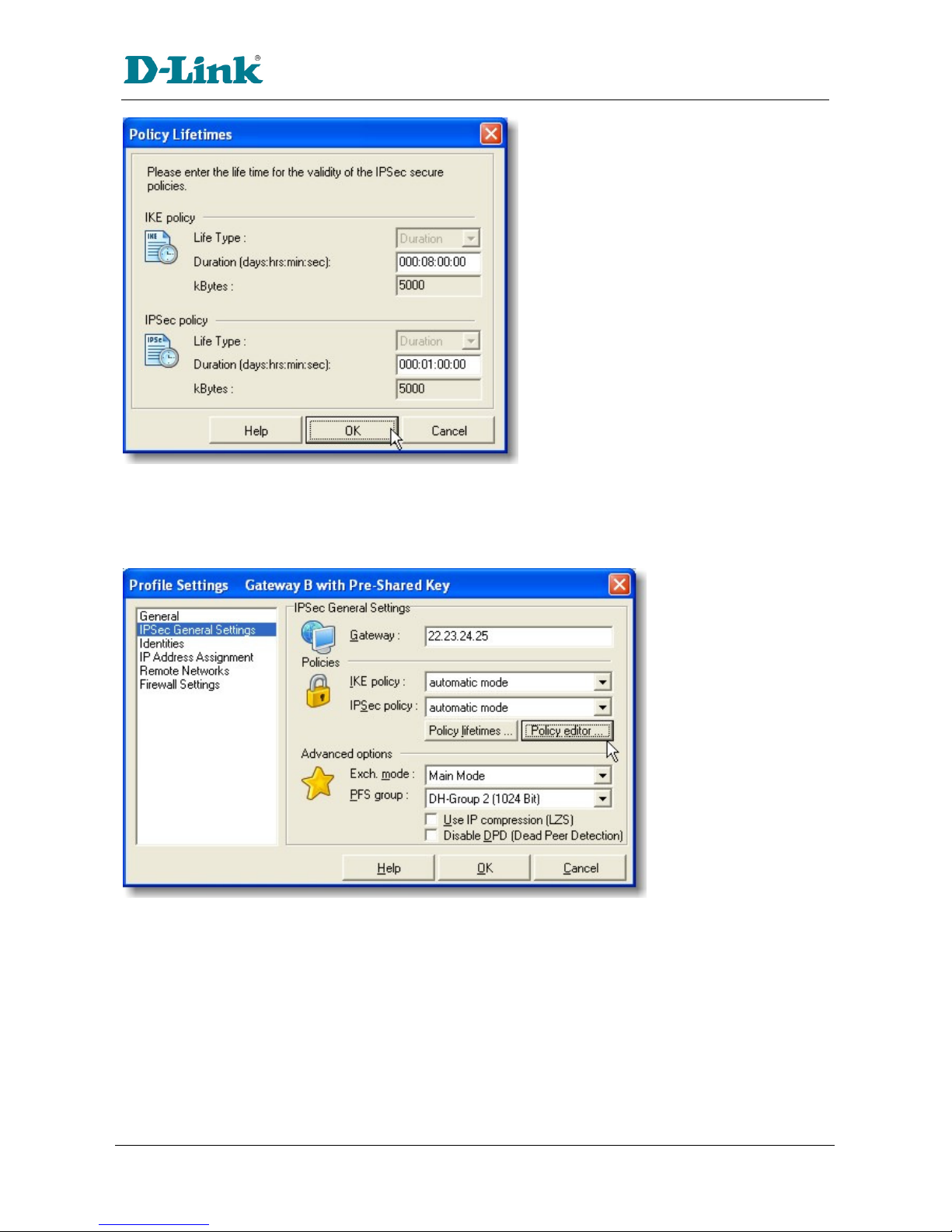
figure 1.3.4: Profile ettings: IP ec General ettings: Policy Lifetimes
When automatic mode is selected for both the IKE (Phase 1) and IPSec (Phase 2) Policies, the client will
trans it a range of different co only used proposals and the VPN Gateway can then select one to use
for the connection. However, in this exa ple, (although auto atic ode works) both the IKE and IPSec
policies will be anually defined in accordance to section 1.1; so select Policy lifetimes…
Version 0.90 Page
8
of 15 06.Sep.04
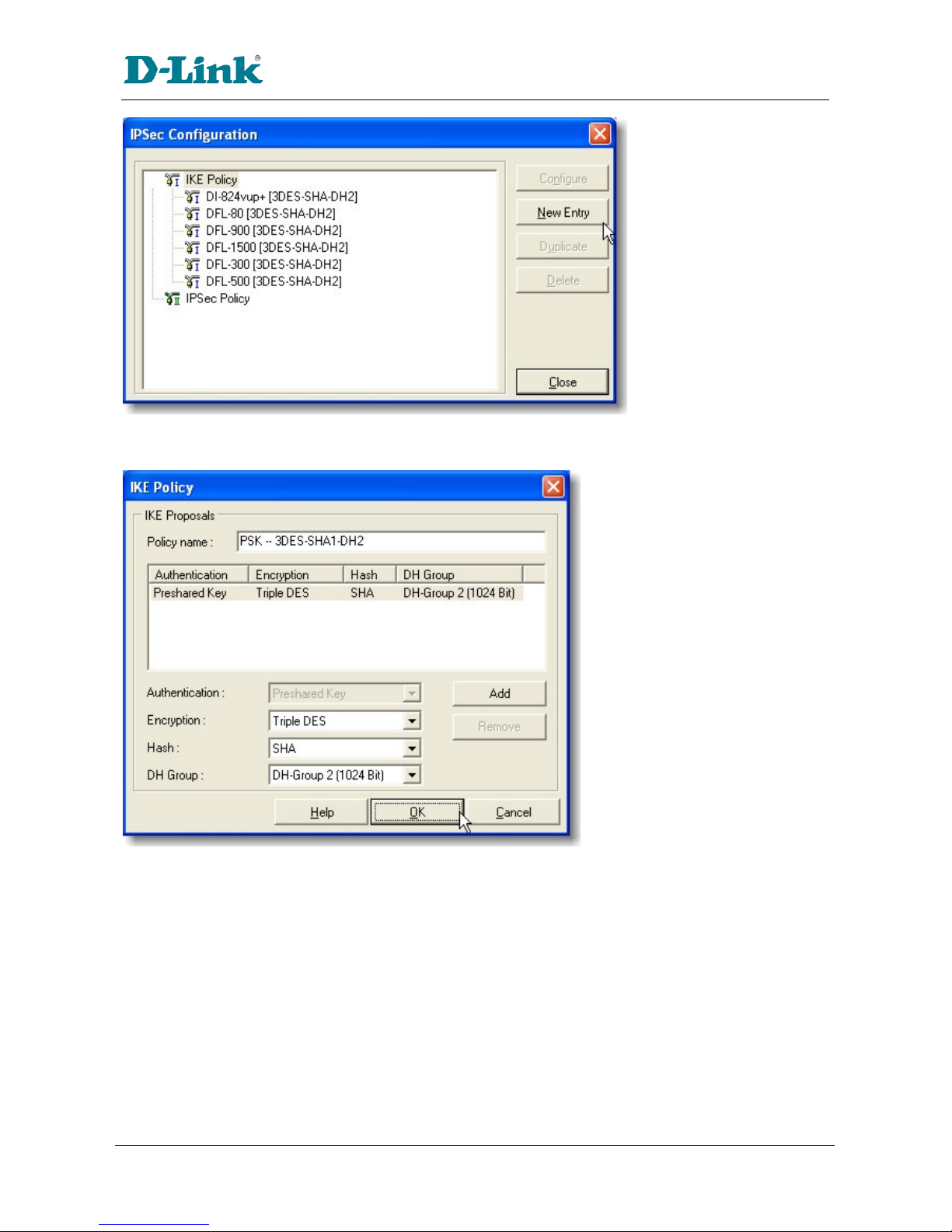
figure 1.3.5: Policy Lifetimes
The duration for the IKE Policy (SA lifeti e) has been set to 8 hours (28800 seconds), and the IPSec
Policy (SA) lifeti e is li ited to 1 hour (3600 seconds).
Click OK to return to define the Proposals…
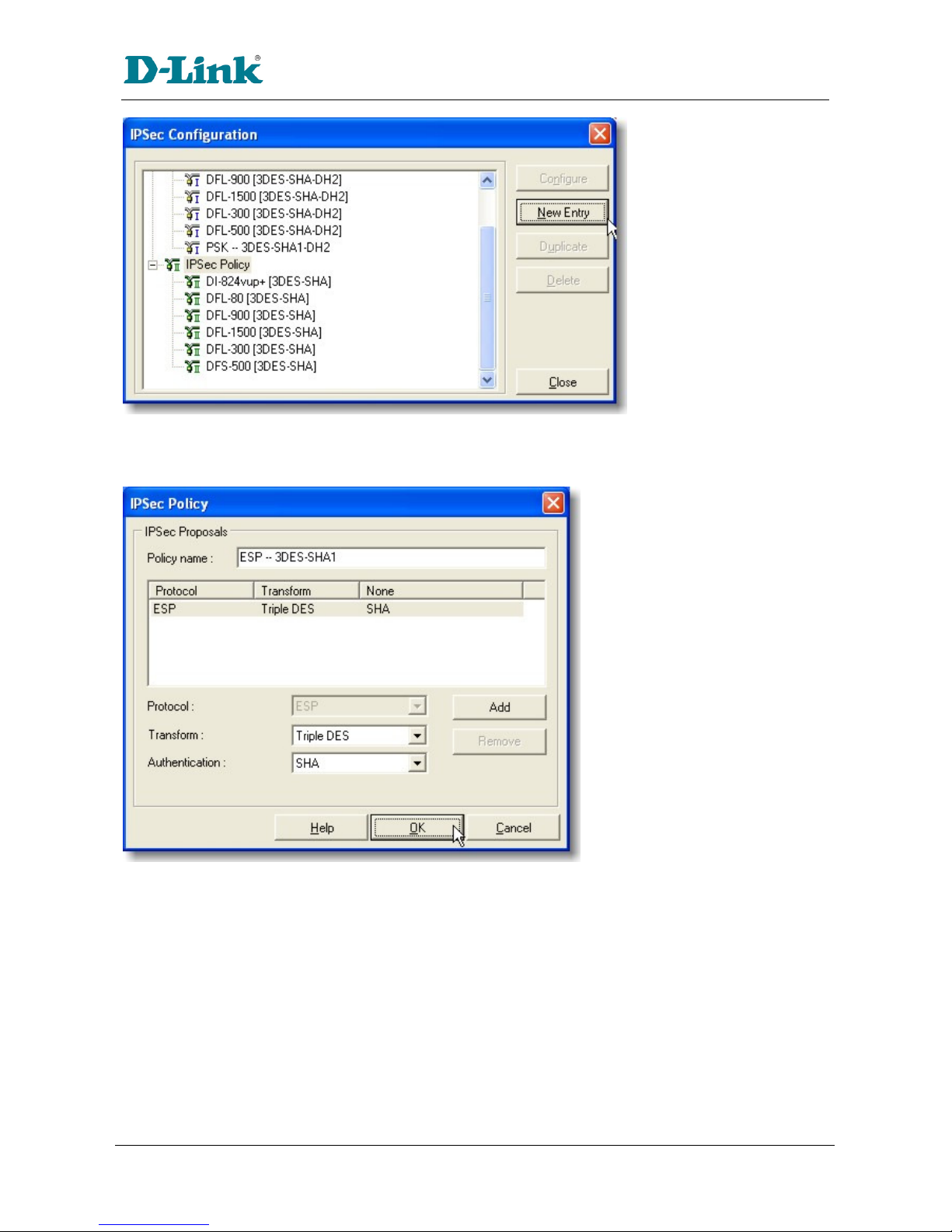
figure 1.3.6: Profile ettings: IP ec General ettings: Policy Editor
Select the Policy Editor… to define specific proposals to be used in this connection as lined out in section
1.1.
Version 0.90 Page
9
of 15 06.Sep.04
figure 1.3.7: Proposal Definitions: IKE Policy
First select IKE Policy and click on New Entry to define a new IKE Policy (Phase 1 para eters) to be used.
figure 1.3.8: Defining an IKE Policy
Si ply select the para eters for this proposal. Several proposals ay be grouped together under the
na e, but for the purpose of this exa ple, only one proposal is defined. Select Preshared Key for the
IKE ode, Triple DES (168bit 3DES) for the encryption algorith to be used, SHA (160bit SHA-1) for the
authentication algorith , and finally DH-Group 2 (1024 Bit) for the key exchange protocol. Click OK to
return to the previous dialog box.
Version 0.90 Page
10
of 15 06.Sep.04
figure 1.3.9: Proposal Definitions: IP ec Policy
In the sa e way, select IPSec Policy and click on New Entry to define the IPSec proposal (Phase 2
para eters).
figure 1.3.10: Defining an IP ec Policy
Si ply select the para eters for this policy: ESP tunnel ode, Triple DES (168bit 3DES-CBC) for
encryption algorith and SHA (SHA-1 160 Bit) for the authentication code/hash algorith . Click OK to
continue…
This manual suits for next models
2
Table of contents
Other D-Link Software manuals
D-Link
D-Link D-View 5.1 User manual
D-Link
D-Link DPH-128MS - VoiceCenter VoIP Phone User manual

D-Link
D-Link DCS-100 User manual
D-Link
D-Link AirPlus DP-G310 User manual
D-Link
D-Link PS Admin User manual
D-Link
D-Link DS-601 - VPN Client - PC Operational manual
D-Link
D-Link D-View 5.1 User manual
D-Link
D-Link DSN-210-SW - SureSync Continuous Data... User manual
D-Link
D-Link DV-600P - D-View Professional Edition User manual

















