Data Video ITC-100 KF1000 User manual

ITC-100 KF1000
8 Channel Intercom / Talkback
System for SE-1000
Instruction Manual
http:// www.datavideo-tek.com
Rev: 280807

1
Warnings and Precautions
1. Read all of these warnings and save them for later reference.
2. Follow all warnings and instructions marked on this unit.
3. Unplug this unit from the wall outlet before cleaning. Do not use liquid or aerosol cleaners. Use a
damp cloth for cleaning.
4. Do not use this unit in or near water.
5. Do not place this unit on an unstable cart, stand, or table. The unit may fall, causing serious
damage.
6. Slots and openings on the cabinet top, back, and bottom are provided for ventilation. To ensure
safe and reliable operation of this unit, and to protect it from overheating, do not block or cover
these openings. Do not place this unit on a bed, sofa, rug, or similar surface, as the ventilation
openings on the bottom of the cabinet will be blocked. This unit should never be placed near or
over a heat register or radiator. This unit should not be placed in a built-in installation unless
proper ventilation is provided.
7. This product should only be operated from the type of power source indicated on the marking label
of the AC adapter. If you are not sure ofthetype of power available, consult your Datavideo dealer
or your local power company.
8. Do not allow anything to rest on the power cord. Do not locate this unit where the power cord will
be walked on, rolled over, or otherwise stressed.
9. If an extension cord must be used with this unit, make sure that the total of the ampere ratings on
the products plugged into the extension cord do not exceed the extension cord’s rating.
10. Make sure that the total amperes of all the units that are plugged into a single wall outlet do not
exceed 15 amperes.
11. Never push objects of any kind into this unit through the cabinet ventilation slots, as they may
touch dangerous voltage points or short out parts that could result in risk of fire or electric shock.
Never spill liquid of any kind onto or into this unit.
12. Except as specifically explained elsewhere in this manual, do not attempt to service this product
yourself. Opening or removing covers that are marked “Do Not Remove” may expose you to
dangerous voltage points or other risks, and will void your warranty. Refer all service issues to
qualified service personnel.
13. Unplug this product from the wall outlet and refer to qualified service personnel under the following
conditions:
a. When the power cord is damaged or frayed;
b. When liquid has spilled into the unit;
c. When the product has been exposed to rain or water;
d. When the product does not operate normally under normal operating conditions. Adjust
only those controls that are covered by the operating instructions in this manual; improper
adjustment of other controls may result in damage to the unit and may often require
extensive work by a qualified technician to restore the unit to normal operation;
e. When the product has been dropped or the cabinet has been damaged;
f. When the product exhibits a distinct change in performance, indicating a need for service.
Warranty


2
Datavideo warrants that the equipment it manufactures shall be free from defects in material and
workmanship for a period of 12 months from the date of product purchased. If equipment fails due to
such defects, Datavideo will, at its option, repair or provide a replacement for the defective part or
product.
Equipment that fails after the warranty period, has been operated or installed in a manner other than
that specified by Datavideo, or has been subjected to abuse or modification, will be repaired for time
and material charges at the Buyer’s expense. This warranty does not affect your statutory rights
within the Country of purchase.
For EU Customers only - WEEE Marking.
This symbol on the product indicates that it will not be treated as household waste. It must be handed
over to the applicable take-back scheme for the recycling of electrical and electronic equipment. For
more detailed information about the recycling of this product, please contact your local Datavideo
office.
Introduction
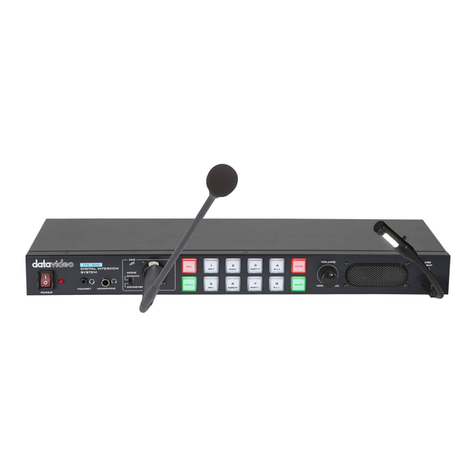
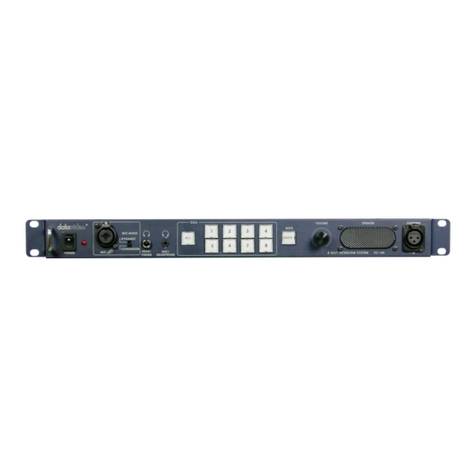
The ITC-100 is a 19” Rack Mount 8 Way Intercom / Talkback System. It incorporates
tally indicators for each channel and individual channel call buttons as well as a call
all channels button.
It is ideal in a live environment and enables easy bi-directional communication
between all members of the crew. It is a perfect accessory for the Datavideo
SE-1000 vision mixers.

3
Contents
WARNINGS AND PRECAUTIONS 1
WARRANTY 2
INTRODUCTION 2
PACKING LIST 3
FRONT PANEL CONNECTIONS 4
REAR PANEL CONNECTIONS 6
ITC-100SL SLAVE UNIT 7
USING THE ITC-100 WITH THE SE-1000 / TB-10 9
ITC-100 TALLY INPUT PIN CROSS REFERENCE 10
SPECIFICATIONS 11
SERVICE AND SUPPORT 13
Packing List
1. ITC-100 KF 1000 Main Unit x 1
2. ITC-100SL Slave Unit x 6
3. ITC-100SL Carrying Case x 6
4. 20m XLR to XLR Intercom Cable x 6
5. MC-1 Headset / Microphone x 6
6. MC-2 XLR Gooseneck Mic x 1
7. LP-1 XLR Gooseneck Light x 1
8. 12V 3.0A Power Supply Unit x 1
9. AC Power cord. x 1
10.Instruction Manual x 1

4
Front Panel:
On / Off Switch
Powers the ITC-100 On/ Off. RedLED indicates that unit is switched on.
XLR Microphone Socket
Combined XLR / ¼” (6.3mm) Jack Microphone Input for either a
Condenser or Dynamic Gooseneck Microphone. XLR supports
Condenser Microphones ¼” (6.3mm) Jack supports Dynamic.
Headphone Socket
¼ “ / 6.3mm Stereo Headphone Socket for conventional headphones.
Plugging in headphones will disable the built-in speaker
Microphone / Headset Socket
3.5mm Stereo Socket for combined Microphone Headset.
Plugging in a Microphone / Headset will disable the built-in speaker and
the XLR Microphone Input.
ALL Button
Opens communication with all channels. All channels will hear
communication from the operator, or from any other channel using the
TALK button.

5
Channel Buttons 1~6 + AUX 1 / 2
Opens communication with individual channels. More than 1 channel
can be active at any given time, active channels are illuminated red.
All active channels will hear any communication from the operator or
from any other active channel.
The buttons will also indicate if any channel is paging, the paging
channel will flash in orange until the page is answered.
MUTE Button
Mutes all communication from the base station or any channel.
N.B. If any channel uses the CALL button the paging tone will still
sound even when the MUTE button is active.
Volume Control
Controls the Volume of the built-in speaker or outputs to the
headphones or mic/headset according to what is connected
Built-In Speaker
Sounds audible alert when a channel is paging and provides audio
during talkback conversations. Speaker is mute when headphones or
mic / headset are connected to the ITC-100
12V Light Socket
12V Powered light socket for gooseneck light (supplied).

6
Rear Panel:
Channel Input / Output XLR Sockets
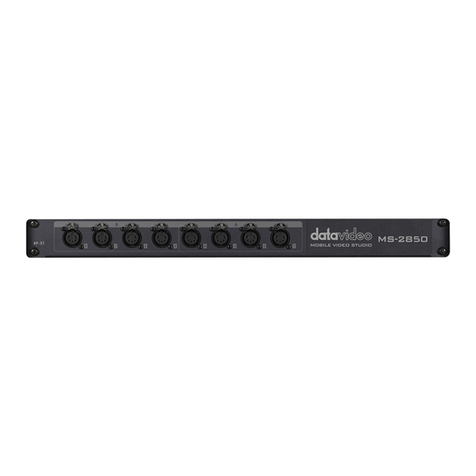
Each of the 8 channels has an XLR connector that carries
bi-directional signals between the ITC-100 and ITC-100SL. All
connections are contained within the one cable. Channels 1 ~ 3
are supplied tally light information from tally A; channels 4 ~ 6
are supplied tally light information from tally B.
Tally Inputs A & B
Tally Inputs A & B are configured for direct connection to the
Datavideo SE-1000 via the TB-10. They supply tally information
to the ITC-100SL; RED indicates Live. Tally A will feed
information to channels 1 ~ 3 and Tally B will feed information to
channels 4 ~ 6
DC In 12V 2.5A
Connect the 12V 3.0A power supply. The power supply plug
has a screw in locking collar to secure the connection.
Ground Terminal
When connecting this unit to any other component, make sure
that it is properly grounded by connecting this terminal to an
appropriate point.When connecting, use the socket and be sure
to use wire with a cross-sectional area of at least 1.0 mm2.

7
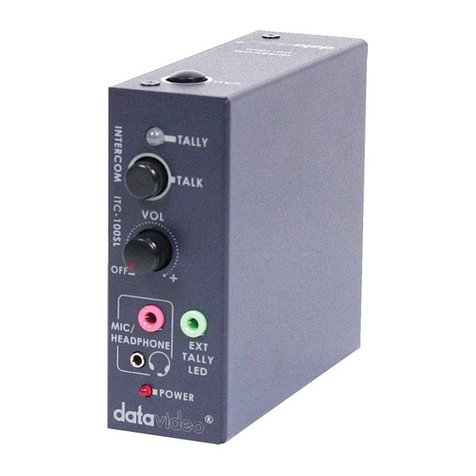
ITC-100SL Slave Unit :
XLR Connection
Connects the ITC-100SL to the ITC-100 Base Station. Power, tally and
bi-directional audio are all carried through the same cable.
Call Button
Sends a paging message to the ITC-100 Base Station. The channel button
will flash orange and there will be an audible tone, each time the button is
pressed.
Tally LED
Will illuminate RED when the channel is LIVE
Talk Button
Opens up talk back communication with the ITC-100 base station, and any
other active channels. Press the button to activate, press a second time to
de-activate. PLEASE NOTE: It is important to press the button to
deactivate the talk channel as soon as you have finished talking,
otherwise it will remain an open channel and become distracting and
confusing for other members of the crew.
Volume Control
Adjusts the volume of the headphones.

8
Mic / Headphone Socket
The ITC-100SL has both a 3.5mm and 2.5mm Mic / Headset socket. A
standard 3.5mm Mic / Headset can be used, or a Motorola type 2.5mm Mic /
headset could be used if preferred.
External Tally LED Socket
An external tally display (TD-1) can be connected to the ITC-100SL. This
enables the tally light to be positioned in a more convenient place, such as on
top of the camera. When the channel is LIVE the LED will be RED, and when
the channel is CUED the LED will be AMBER.
N.B. The Tally LED on the ITC-100SL will continue to operate as normal
when a TD-1 has been added.
Power LED
The Power LED indicates when the channel is active. If the operator has
opened the channel by pressing the channel button 1 ~ 8, or by pressing ALL
then the LED will light up.
N.B. The tally indicator lights will continue to work even when the
Power LED is not on, and the channel is not active.

9
Using the ITC-100 KF1000 with the SE-1000 / TB10:
The ITC-100 KF1000 is an ideal accessory for the Datavideo SE-1000 Vision Mixer.
The SE-1000 has five HD / SDI channels, so in the diagram below we have five
camera crew, each with an ITC-100SL. The sixth ITC-100SL could be for
communicating with the graphics operator or other members of the crew.
The Tally output from the SE-1000 connects to the TB-10; this provides the status
of the SE-1000. The TB-10 Tally Out connects to the ITC-100 Tally Inputs A and B.
Tally Input A provides tally information to channels 1 ~ 3, Tally Input B provides tally
information to channels 4 ~6 , when the camera is live the cameraman will see a
red light.
Other manuals for ITC-100 KF1000
3
This manual suits for next models
1
Table of contents
Other Data Video Intercom System manuals

Data Video
Data Video ITC-100SL User manual

Data Video
Data Video ITC300HP2K User manual

Data Video
Data Video ITC-200E User manual

Data Video
Data Video ITC-100SL User manual

Data Video
Data Video ITC-200E User manual

Data Video
Data Video RP-31 User manual

Data Video
Data Video ITC-100 KF1000 User manual

Data Video
Data Video ITC-100 User manual

Data Video
Data Video ITC-300 User manual

Data Video
Data Video ITC-100 KF1000 User manual