manuals.online logo
Brands
  1. Home
  2. •
  3. Brands
  4. •
  5. Datalogic
  6. •
  7. Cables And Connectors
  8. •
  9. Datalogic QL300 User manual

Datalogic QL300 User manual

This manual suits for next models

1

Other Datalogic Cables And Connectors manuals

Datalogic 94ACC0160 User manual

Datalogic

Datalogic 94ACC0160 User manual

Datalogic Win-Net Vehicle PWR Cab HRS 3500-16P-CV User manual

Datalogic

Datalogic Win-Net Vehicle PWR Cab HRS 3500-16P-CV User manual

Datalogic ID-NET QL Series User manual

Datalogic

Datalogic ID-NET QL Series User manual

Datalogic QL300 User manual

Datalogic

Datalogic QL300 User manual

Datalogic 94ACC0174 User manual

Datalogic

Datalogic 94ACC0174 User manual

Popular Cables And Connectors manuals by other brands

Philips SWA6310 Specifications

Philips

Philips SWA6310 Specifications

StarTech.com CRJ4550PK quick start guide

StarTech.com

StarTech.com CRJ4550PK quick start guide

Nohau EMUL-IP2K-PC user guide

Nohau

Nohau EMUL-IP2K-PC user guide

Foxun SX-SP144E-HD4K2K operating instructions

Foxun

Foxun SX-SP144E-HD4K2K operating instructions

Philips SWA3305W Specifications

Philips

Philips SWA3305W Specifications

opticis Stretch DVIM1-1P0x user manual

opticis

opticis Stretch DVIM1-1P0x user manual

Volkswagen VAS 6558A operating manual

Volkswagen

Volkswagen VAS 6558A operating manual

NEXIBO N-13 user manual

NEXIBO

NEXIBO N-13 user manual

CYP PU-1H3HBTL Operation manual

CYP

CYP PU-1H3HBTL Operation manual

Allen-Bradley 1784-u2dhp installation instructions

Allen-Bradley

Allen-Bradley 1784-u2dhp installation instructions

Global Caché Flex Link Blaster quick start

Global Caché

Global Caché Flex Link Blaster quick start

Hauppauge USB-Live2 Quick installation guide

Hauppauge

Hauppauge USB-Live2 Quick installation guide

Fenix MPSV 15 installation manual

Fenix

Fenix MPSV 15 installation manual

BEGA 71 085 manual

BEGA

BEGA 71 085 manual

Tesla HPWC installation manual

Tesla

Tesla HPWC installation manual

GAMERON LUXURY TV CABLE instruction manual

GAMERON

GAMERON LUXURY TV CABLE instruction manual

molex Milli-Grid Dual row 87568 Series operating instructions

molex

molex Milli-Grid Dual row 87568 Series operating instructions

Burndy Continental Industries thermOweld CRE-7 instructions

Burndy

Burndy Continental Industries thermOweld CRE-7 instructions

manuals.online logo
manuals.online logoBrands
  • About & Mission
  • Contact us
  • Privacy Policy
  • Terms and Conditions

Copyright 2025 Manuals.Online. All Rights Reserved.

QL300 / QL500
Quick Link ID-NET™Connectors
DESCRIPTION
The QL series ID-NET™ connectors provide a fast and efficient way to
cable an ID-NET™ network using standard cables. The QL300/500s are
typically Master ID-NET™ connectors designed to be used with the
QL100/150/200s ID-NET™ Slave connectors.
The QL300 is a passive connection module which can be used in
Standalone or ID-NET™ Master Multidata, Slave Multidata or Master
Synchronized layouts. It provides separate ports for Power Supply,
External Trigger, Digital I/O and Communication. Host communication is
provided through connectivity to the reader Main serial interface
(RS232/485) or Aux RS232 serial interface.
ID-NET™ network and power supply signals are sent out to the next
connected device by means of a dedicated port, however input power is
not received from the network. Therefore each QL300 must be powered
separately.
The QL500 is an active connection module which can be used in
Standalone or ID-NET™ Master Multidata, or Master Synchronized
layouts. It provides separate ports for Power Supply, External Trigger,
Digital I/O and Communication. Host communication is provided through
the integrated Ethernet module which connects internally to the reader's
Main serial interface. Reader Aux RS232 serial interface is also provided.
ID-NET™ network and power supply signals are sent out to the next
connected device by means of a dedicated port, however there is no
network input connector and therefore it cannot be used as an ID-NET™
Slave.
Starting from software release 2.02.01 the QL500 also supports complete
Backup & Restore functionality (Configuration and Environmental
parameter storage) for network, Master and up to 9 Slave devices. See
the QL500 software release verification note on the opposite page.
The QL series are compatible with the following readers:
DS2100N
Matrix 210™
Matrix 450™
DS2400N
Matrix 300™
DS4800
Matrix 410™
QL300
QL500
821001645 (Rev. E)
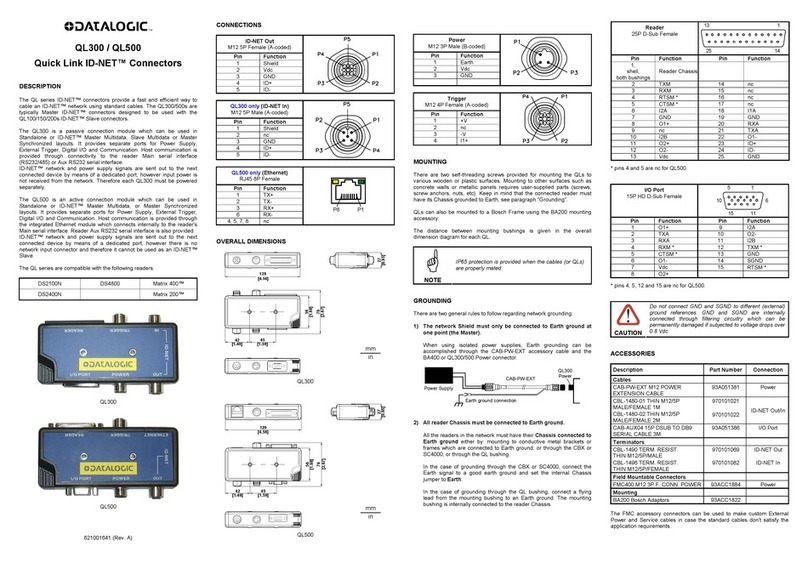
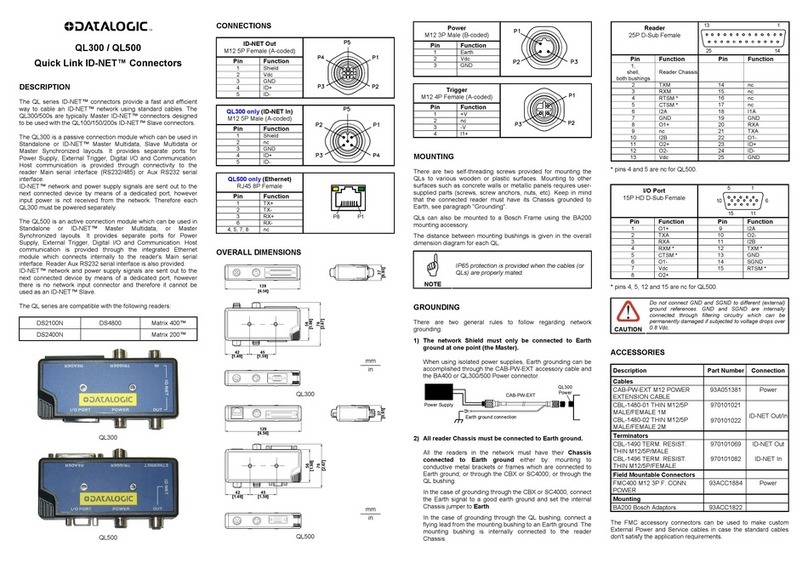
CONNECTIONS
ID-NET Out
M12 5P Female (A-coded)
Pin
Function
1
Shield
2
Vdc
3
GND
4
ID+
5
ID-
QL300 only (ID-NET In)
M12 5P Male (A-coded)
Pin
Function
1
Shield
2
nc
3
GND
4
ID+
5
ID-
QL500 only (Ethernet)
RJ45 8P Female
P8 P1
Pin
Function
1
TX+
2
TX-
3
RX+
6
RX-
4, 5, 7, 8
nc
OVERALL DIMENSIONS
129
[4.56]
42
[1.49] 45
[1.59]
56
[1.98]
76
[2.67]
27
[0.95]
QL300
129
[4.56]
56
[1.98]
42
[1.49] 45
[1.59]
27
[0.95]
76
[2.67]
QL500
CAUTION
Connect Input Power only to the 3-pin Power
connector. Attempts to power the device from any other
connector can result in damage to the connected
devices.
Power
M12 3P Male (B-coded)
Pin
Function
1
Earth
2
Vdc
3
GND
Trigger
M12 4P Female (A-coded)
Pin
Function
1
+V
2
nc
3
-V
4
I1+
*pins 4 and 5 are nc for QL500.
*pins 4, 5, 12 and 15 are nc for QL500.
CAUTION
Do not connect GND and SGND to different (external)
ground references. GND and SGND are internally
connected through filtering circuitry which can be
permanently damaged if subjected to voltage drops over
0.8 Vdc.
MOUNTING
There are two self-threading screws provided for mounting the QLs to
various wooden or plastic surfaces. Mounting to other surfaces such as
concrete walls or metallic panels requires user-supplied parts (screws,
screw anchors, nuts, etc). Keep in mind that the connected reader must
have its Chassis grounded to Earth, see paragraph "Grounding".
QLs can also be mounted to a Bosch Frame using the BA200 mounting
accessory.
The distance between mounting bushings is given in the overall
dimension diagram for each QL.
NOTE
IP65 protection is provided when the cables (or QLs)
are properly mated.
GROUNDING
All the readers in the network must have their Chassis and ID-NET™
shield connected to Earth ground.
For readers in the network connected through a CBX or SC4000, connect
the Earth signal to a good earth ground and set the internal Chassis and ID-
NET™ shield jumpers to Earth.
When using isolated power supplies, Earth grounding can be
accomplished through the CAB-PW-EXT accessory cable and the BA400
or QL200/300/500 Power connector.
Power Supply
Earth ground connection
BA400 or QL
Power connector
CAB-PW-EXT
For readers in the network connected through QLs, there are two general
cases regarding network grounding:
1. Grounding through conductive metal brackets or frames.
When the QL connectors are mounted to conductive metal brackets
and/or frames it is sufficient to provide a good Earth ground to the
metal frame. In this case all readers have their Chassis as well as
their ID-NET™ shield connected to Earth ground through the QL
mounting bushings.
2. Grounding to isolated (non-metallic) brackets or surfaces (i.e.
plastic, wood, concrete).
Connect a flying lead from the QL mounting bushing to an Earth
ground. The mounting bushings are internally connected to the reader
Chassis and to the ID-NET™ shield.
ACCESSORIES
Description
Part Number
Connection
Cables
CAB-PW-EXT M12 POWER
EXTENSION CABLE
93A051381
Power
CBL-1480-01 M12/5P
MALE/FEMALE 1M IDNET
CBL-1480-02 M12/5P
MALE/FEMALE 2M IDNET
93A050049
93A050050
ID-NET Out/In
CAB-AUX04 15P DSUB TO DB9
SERIAL CABLE 3M
93A051386
I/O Port
Terminators
CBL-1490 TERM. RESIST.
M12/5P/MALE IDNET
93A050046
ID-NET Out
CBL-1496 TERM. RESIST.
M12/5P/FEMALE IDNET
93A050047
ID-NET In
Field Mountable Connectors
FMC400 M12 3P F. CONN. POWER
93ACC1884
Power
Mounting
BA200 Bosch Adaptors
93ACC1822
The FMC accessory connectors can be used to make custom External
Power and Service cables in case the standard cables don't satisfy the
application requirements.
Reader
25P D-Sub Female
1
14
25
13
Pin
Function
Pin
Function
1,
shell,
both bushings
ID-NET™ shield
Reader Chassis
2
TXM
14
nc
3
RXM
15
nc
4
RTSM *
16
nc
5
CTSM *
17
nc
6
I2A
18
I1A
7
GND
19
GND
8
O1+
20
RXA
9
nc
21
TXA
10
I2B
22
O1-
11
O2+
23
ID+
12
O2-
24
ID-
13
Vdc
25
GND
I/O Port
15P HD D-Sub Female
1
6
15
5
11
10
Pin
Function
Pin
Function
1
O1+
9
I2A
2
TXA
10
O2-
3
RXA
11
I2B
4
RXM *
12
TXM *
5
CTSM *
13
GND
6
O1-
14
SGND
7
Vdc
15
RTSM *
8
O2+
mm
in
mm
in
TECHNICAL SPECIFICATIONS
ELECTRICAL FEATURES
QL300
QL500
Supply Voltage
10 to 30 Vdc
(see Voltage Drop below)
Consumption
-
210 mA - 70 mA
Maximum Distributed Current
Allowed
see related reading device manual
for consumption
4 A
Inputs
see relative reader Reference Manual
Outputs
see relative reader Reference Manual
PHYSICAL FEATURES
Mechanical Dimensions
129 x 76 x 27 mm
(5.1 x 3 x 1.1 in.)
Weight
312 g.
(11 oz.)
309
(10.9 oz.)
ENVIRONMENTAL FEATURES
Operating Temperature
0° to 50 C (+32° to 122 °F)
Storage Temperature
-20° to 70 C (-4° to 158 °F)
Humidity max.
90% non condensing
Vibration Resistance
14 mm @ 2 to 10 Hz
EN 60068-2-6
2 hours on each axis
1.5 mm @ 13 to 55 Hz
2 g @ 70 to 200 Hz
Shock Resistance
30 g; 11 ms;
EN 60068-2-27
3 shocks on each axis
Protection Class
EN 60529
IP65
(when IP protection caps or
IP cables and reading
device are correctly
connected)
IP40
The features given are typical at a 25 C ambient temperature (if not otherwise
indicated).
VOLTAGE DROP AND MAX DISTRIBUTED CURRENT CALCULATIONS
For correct network management, the maximum number of readers which can
propagate power through the QLs must be calculated so that max distributed current is
not exceeded and so voltage drop doesn't affect reader functioning. This is done
according to the following formula:
Voltage Drop = (Max Reader Current x Number of readers) x
(Resistance per Meter per wire* x Cable length in Meters)
* the resistance calculation must include both wires (Vdc and GND).
Example:
An ID-NET™ network is composed of 4 DS2100N readers. Three 2-meter ID-NET™
cables are used to connect the readers, which have Cable Resistance = 0.058 Ohms
per meter per wire. The network power is 24 Vdc.
(0.2083 A x 4 readers) x [(0.058 x 2) x 6 meters] = 0.58 Vdc voltage drop
24 Vdc - 0.58 = 23.42 Vdc at reader number 4 (worst case)
Integrate a sufficient number of QL200s to resupply network power.
SOFTWARE RELEASE VERIFICATION NOTE
Starting from software release 2.02.01 the QL500 also supports:
•Ethernet IP (explicit messaging)
•Modbus TCP
•Backup & Restore
When Ethernet TCP/IP is enabled, the QL500 software release is shown in the read-
only parameter in Genius™ Data Communication Settings> CBX Gateway>Line
Parameters> PrgName. The Scanner Family must have software package 006 or later.
When Ethernet TCP/IP is enabled, the QL500 software release is shown in the VisSet™
Welcome menu. The Matrix Family reader must have software release 6.10 or later.
For more information on these features see the reader's Help On Line.
TYPICAL LAYOUTS
Point to Point - Matrix 210™ with QL500 (Ethernet to Host)
1The reader connected to the QL500 must be configured for Ethernet communication. See the
QL500/BM2x0 Ethernet Configuration sheet provided with this device or the Setup Procedure Using
Programming Barcodes available on the CD-ROM.
ID-NET™ Synchronized Network - Matrix 410™ Master with QL300
+ Matrix 410™ Slaves with QL150
TRIGGER
In order to allow direct trigger cabling between the photocell and the QL300/500 using standard M12 A-
coded one-to-one cables, the trigger signal has been internally wired to manage PNP type photocells. The
external trigger therefore must be connected as shown in the diagram below.
EXTERNAL TRIGGER
Ground
V
Signal
VCC
~
~
+
-
READER
19
13
Vdc
I1B
QL300/500
2
1
+V
nc
19
13
Trigger
18
I1A
4
I1+
18
7
GND
3
-V
7
Power
1
Vdc
2
3
GND
Reader
I/O PORT
ID-NET™ Synchronized Network - DS4800 Master with QL500
+ DS4800 Slaves with QL200 and QL100
1The reader connected to the QL500 must be configured for Ethernet communication. See the
QL500/BM2x0 Ethernet Configuration sheet provided with this device or the Setup Procedure Using
Programming Barcodes available on the CD-ROM.
2The above diagram is an example showing layout connections and is not intended to represent power
limits, which instead, depend on each specific application. See "Voltage Drop and Max Distributed
Current Calculations".
ID-NET™ Multidata Network - DS4800 Master with QL300
+DS2100N Scanner Slaves with QL300s
COMPLIANCE
FCC Compliance
Modifications or changes to this equipment without the expressed written approval of Datalogic could void the authority to
use the equipment.
This device complies with PART 15 of the FCC Rules. Operation is subject to the following two conditions: (1) This device
may not cause harmful interference, and (2) this device must accept any interference received, including interference which
may cause undesired operation.
This equipment has been tested and found to comply with the limits for a Class A digital device, pursuant to part 15 of the
FCC Rules. These limits are designed to provide reasonable protection against harmful interference when the equipment is
operated in a commercial environment. This equipment generates, uses, and can radiate radio frequency energy and, if not
installed and used in accordance with the instruction manual, may cause harmful interference to radio communications.
Operation of this equipment in a residential area is likely to cause harmful interference in which case the user will be
required to correct the interference at his own expense.
CE Compliance
Warning:
This is a Class A product. In a domestic environment this product may cause radio interference in which case the user may
be required to take adequate measures.
Power Supply
This product is intended to be installed by Qualified Personnel only.
This accessory device is intended to be supplied by a UL Listed or CSA Certified Power Unit with «Class 2» or LPS power
source.
Host
QL500 1
PS
Power
I/O
CAB-PW-EXT
Matrix 210™
Ethernet
Host
QL150
PS
Power
Main Interface
CBL-1490
ID-NET
Terminator
The ID-NET network must be terminated inserting an
ID-NET terminator into the QL300 (Master) and into the
last QL in the network.
Slave Nodes
CBL-1480-xx
CAB-PW-EXT
CBL-1480-xx
CAB-AUX03
CAB-AUX03
QL300
CBL-1496
ID-NET
Terminator
Master
QL150
ID-NET™
Host
QL200 2
PS
Power
Ethernet Interface
CBL-1490
ID-NET
Terminator
The ID-NET network must be terminated
inserting an ID-NET terminator into the last
QL in the network.
ID-NET on the QL500 is internally
terminated.
Slave Nodes
CBL-1480-xx
CAB-PW-EXT
CBL-1480-xx
Power
QL500 1
Master
QL100
ID-NET™
Host
QL300
PS
CBL-1490
ID-NET
Terminator
The ID-NET network must be terminated inserting an
ID-NET terminator into the QL300 (Master) and into the
last QL300 in the network.
Slave
CBL-1480-xx
AUX Port
CBL-1480-xx
Power
QL300
Master
QL300
Power
Power
Slave
PS
PS
CBL-1496
ID-NET
Terminator
ID-NET™