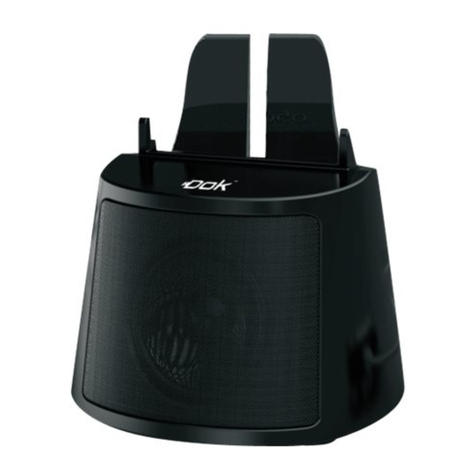
Dok CR13 User manual

DUAL CHARGER
WIRELESS SPEAKER SYSTEM WITH
RECHARGEABLE "Li-Ion" BATTERY
CR13
User’s Guide
Smart Device
not included.
Wireless Speaker System with Bluetooth Technology for
"Hands Free" Answering
Dual Charger Smart Device Cradle Holder
Includes 2 USB Charging Cables
Rechargeable Battery for Speaker System

Features
01
Contents
Thank you for purchasing our product. For operation and security, read
this manual carefully and keep it handy for future reference.
Wireless Speaker System with Bluetooth Technology for "Hands
Free" Answering.
2 USB Charging Ports for Charging and Viewing
Simultaneously.
Smart Device Cradle Holder with Insert to "Cradle" Any and All
Types of Smart Devices.
View Smart Devices Vertically or Horizontally.
Rechargeable "Li-Ion" Battery for Speaker System.
Includes 2 USB Charging Cables.
Contents...............................................................................................01
Features...............................................................................................01
Warnings and Precautions.................................................................02
Important Safety Instructions............................................................03
What’s in the Gift Box.........................................................................04
........................................................................05
Operation........................................................................................06-12
Troubleshooting..................................................................................13
Location of Functions

02
Warnings and Precautions
CAUTION
MOISTURE AND CONDENSATION
For units with an insertable AC Power Adapter cordset:
• The power adapter should remain operable for its
intended use. Disconnect the AC Power Adapter if
you are not intending to use the unit for a long
period of time.
• When connecting or disconnecting the AC Power
Adapter Cord, grip the plug and not the cord itself.
Pulling the cord may cause damage and create a
hazard.
SAFETY
WHEN IN USE
FCC INFORMATION
WARNING:
CAUTION:
To reduce the risk of fire or electric
shock, do not expose this unit to rain or moisture.
Use of controls or adjustments or
performance of procedures other than those
specified may result in hazardous radiation
exposure.
“Caution Marking and Rating Label” is affixed
under the lid or on the bottom of the unit with a
mass not exceeding 7kg.
RISK OF ELECTRIC SHOCK,
DO NOT OPEN.
CAUTION: TO PREVENT THE RISK OF
ELECTRIC SHOCK – DO NOT REMOVE COVER
OR BACK. NO USER-SERVICEABLE PARTS
INSIDE. REFER SERVICING TO QUALIFIED
PERSONNEL.
This symbol is intended to alert you to the
presence of uninsulated, dangerous
voltage within the unit's enclosure that
might be of a sufficient magnitude to
constitute a risk of electric shock. DO NOT
OPEN THE UNITS CASE.
This symbol is intended to inform you that
important operating and maintenance
instructions are included in the literature
accompanying this product.
If the unit is exposed to moisture and extreme cold
temperatures and moved to a warm environment,
condensation may form on the units internal
components. Under these circumstances, turning
the power “ON” may cause damage to the unit or
cause harm to the user. Allow the unit to stand in a
warm environment for 1 to 3 hours and allow the unit
to air dry safely.
• Do not use this unit in conditions that are extreme
– hot, cold, dusty or humid.
• Do not restrict the air flow of the unit by placing it
on a soft surface like a bed, carpet or covering.
This unit complies with part 15 of the “FCC Rules.”
Operation is subject to the following conditions:
1. This unit may not cause harmful interference.
2. This unit must accept any interference received,
including interference that may cause
undesirable operation.
For units with a Rechargeable Battery:
• Do not expose batteries to excessive
conditions – extreme cold, heat, sun or fire.

03
Important Safety Instructions
1. Read These Instructions: All safety
and operations manual should be read
before the product is operated.
2. Keep These Instructions: The safety
and operations manual should be retained
for future reference.
3. Heed All Warnings: All warnings
applicable to the unit and in the operations
manual should be adhered to.
4. Follow All Instructions: All operations
manual should be followed.
5. Water and Moisture: Do not use this
unit near water. For example, do not use
near a bath tub, wash bowl, kitchen sink,
or laundry tub. Do not use this unit in a
wet basement or near a swimming pool or
similar location. The unit shall not be
exposed to dripping or splashing and no
objects filled with liquids (ex: vases), shall
be placed on or near this unit.
6. Cleaning: Clean the unit only with a
dry cloth. Unit must be unplugged from
the wall outlet before cleaning. Do not
use liquid cleaners or aerosol cleaners on
the unit.
7. Ventilation: Slots and openings in the
cabinet of the unit are provided to ensure
reliable operation and ventilation and to
protect the unit from overheating. The
openings must not be covered and should
never be blocked by placing the product
on a soft surface like a bed, sofa, or rug.
This unit should not be placed in a built-in
installation like a bookcase or rack, unless
proper ventilation is provided.
8. Heat: Do not install the unit near any
heat source like a radiator, heat register,
stove or other device that produces heat,
including amplifiers.
9. Grounding or Polarization: If
applicable, do not disable or circumvent
the polarized or grounding-type plug. A
polarized plug has 2 blades with 1 wider
than the other. A grounding-type plug has
rd
2 blades and a 3 grounding plug. The
rd
wide blade, or the 3 prong, is provided for
your safety. If the provided plug does not
fit into an outlet, consult a qualified
electrician for replacement of this outlet.
10. Power Cord Protection: Protect the
power cord from being walked on, pinched
or cut or damaged in any way. If any
damage occurs, consult with a trained
technician for repair.
11. Accessories: Only use accessories
specified and approved by the
manufacturer. Do not place this unit on an
unstable cart, stand, tripod, bracket or table
that has not been previously approved by
the manufacturer. This unit may fall,
causing serious injury to a child, adult or to
the unit itself. Any mounting of the unit
should be done within the manufacturer's
guidelines.
12. Transporting: If a pre-approved
device is used to transport this unit, caution
and care must be observed and practiced
to avoid damages. Make sure the device
and unit together are stable before moving.
13. Lightning: Unplug this unit and
disconnect the antenna or cable system
during lightning storms or when unused for
long periods of time. This will help prevent
damage to the unit due to lightning and
power line surges.
14. Servicing: Do not attempt to service
this unit yourself. Opening or removing
covers may expose you to dangerous
voltage or other hazards. Refer all
servicing to a qualified service technician.
15. Power Sources: Only connect to the
type of household power supply as
indicated in the operations manual and
“Caution Marking and Rating Label.” If you
are not sure of the type of power supplied
to your home (or location of the outlet the
unit is being plugged into), consult with the
local power company. For units intended to
operate from battery power, or other
sources, refer to the manufacturer's
operations manual.
16. Overloading: Do not overload wall
outlets or extension cords. This can result
in a risk of fire or electric shock and may be
hazardous.
17. Foreign Material: Protect this unit
from intrusion of any foreign substances
like dirt, water, moisture and insects. Do
not force any foreign materials or chemicals
into this unit. This could result in a risk of
fire or electric shock and may be
hazardous.
18. Replacement Parts and Safety
Check: When replacement parts are
required, be sure the service technician
has used replacement parts specified and
approved by the manufacturer. Ask the
service technician to perform safety
checks to ensure the proper operation to
avoid possible fire, electric shock or other
hazards.
19. Outdoor Antenna Grounding: If an
outside antenna or cable system is
connected to the unit, be sure the antenna
or cable system is grounded to provide
some protection against voltage surges
and built-up static charges. If there is any
doubt to the proper grounding of these
systems, contact a qualified electrician to
inspect your location.
20. Wall or Ceiling Mounted: The unit
should be mounted to a wall or a ceiling
only as recommended by the
manufacturer.
21. Disconnect Device: Make sure all
disconnect devices are in proper working
condition and readily available in the event
of an emergency or if power “off ” is
needed quickly.
22. Protective Attachment Plug: If
applicable, this unit may be equipped with
an attachment plug having overload
protection. This is a safety feature. See
the operations manual for replacement or
resetting of this protective device. If
replacement of the plug is required, be
sure the qualified service technician has
used a replacement plug specified by the
manufacturer that has the same overload
protection as the original plug.
23. Power Lines: An outside antenna
system should not be located in the
vicinity of overhead power lines or other
electric light or power circuits, or where it
can fall into such power lines or circuits.
When installing an outside antenna
system, extreme care should be taken to
keep from touching such power lines or
circuits, as contact with them may be fatal.
Always consult with your local power
company before installing an outside
antenna.

What’s in the Gift Box
04
Cradle Holder Insert AC Power Adapter
CR13-Base Unit
USB Phone
Charging Cables
AUX IN Cable User’s Manual

Location of Functions
05
1. Speaker
2. Cradle Holder Insert (For
Flat-Bottom Phones Only)
3. Smart Device Holder
4. Bluetooth Button and Icons
5. Power Switch
6. LED Indicator
7. Charging Cord Gap
8. Red USB Socket 5V 2.1A
9. AUX IN Jack
10. DC Jack
11. USB Socket 5V 1A
1
7
3
4 6
2
5
8 9 10 11
(For Flat-Bottom
Phones Only)

Plug the small end of included AC power adapter into the DC POWER INPUT on
the rear of unit and connect power adapter to an AC power outlet to power the
unit. Turn the button to power ON/OFF.
The built-in Rechargeable "Li-Ion" Battery will charge when the AC power adapter
is connected to an AC power outlet. In different circumstances, indicator shows
different color light:
A. Turn the unit "On" with the button in the "ON" position. The power
indicator will flash blue.
B. Turn the unit "Off " with the button in the "OFF" position. The power
indicator will not light up.
06
Operation
2. Connect the Unit to Power Outlet
1. Turning the unit ON and OFF
POWER
OFF ON
POWER
OFF ON
POWER
OFF ON
INDICATOR COLOR in different circumstances
ON mode
(when NOT charged)
ON mode
(when charged)
ON mode
(when FULLY charged)
Flashing blue
RED & Flashing Blue
Flashing Blue
OFF mode
(when NOT charged)
OFF mode
(when charged)
OFF mode
(when FULLY charged)
OFF
RED
OFF
AC power adapter

STEP 1. Connect the charging cable to your device:
Phones
Tablets & MIDs
Other Devices
If necessary, disconnect your USB cable from your existing smart phone
power adaptor, then use the charging cable that comes with your phone.
NOTE: Older model phones may not come with a USB charging cable. Contact
your phone's service provider or review the cables available in this catalog.
Remove USB cable
from 120V adaptor
Operation (continued)
3. Cradle and Charge Your Smart Device
• A convenient stand to charge, cradle and hold your Smart Device on your desk,
counter or table while connected to an AC power outlet.
• Setup for Smart Devices: The shape of the smart device will determine if an
Insert is needed. Use the included insert for flat-bottom phones (a) only. Round-
bottom phones (b) do not require the insert.
a
For FLAT-bottom phones
b
For ROUND-bottom phones
Optional Insert
07

STEP 2. Connect your device to 1 of the 2 USB Charging Ports, as per below:
Operation (continued)
08
For smart phones and
small devices, all 2 USB Charging Ports may be used.
Please use the RED USB Charging Port for
use with Tablets and/or smart devices requiring DC 5V/2.1A.
PLEASE NOTE:
A. The RED USB Charging Port provides a maximum of 2.1A charging current
designated to charge most 5V smart devices. It could take longer to fully charge
smart devices that exceed 2.1A.
B. Even in the OFF mode, as long as an active power is connected to the unit, your
smart device can be charged still.

STEP 3. Setup your Smart Devices:
Operation (continued)
09
Plug the other end of the
Charging Cable into a USB
charging port on the rear of the
Unit. See “STEP 2” on page 8.
Plug one end of the
Charging Cable into
the charging port of the
smart device. See “
STEP 1” on page 7.
Place your smart device
into the Cradle of the unit.
See “Setup for Smart
Devices” on page 7.
A. Setup for Smart Phones:
See Page 6 “Connect
the Unit to Power
Outlet”
or
B. Setup for Tablets and MIDs:
Rest your Smart Device - Vertically or
Horizontally.
Other manuals for CR13
1
Table of contents
Other Dok Speakers System manuals