Dometic GROUP WAECO PerfectView Accessory User manual

PerfectView Accessory
Right RCA DIN R L B
(CA3) (Monitor) (Mirror S/W)
Model No. RV-SWITCH-SV
Left
(CA2)
Back
(CA1)
PerfectView Accessory
Left View S/W
Right Blink
Monitor
Trigger Left Blink
11-32 V
GND
Right View S/W
B+
Back Gear
Back View S/W
E4 10R-02 0530
DE 7 Schaltbox
Bedienungsanleitung
EN 15 Control Box
Instruction Manual
FR 23 Boîte de commande
Notice d’utilisation
ES 33 Caja de distribución
Instrucciones de uso
IT 42 Scatola di comando
Istruzioni per l’uso
NL 51 Schakelbox
Gebruiksaanwijzing
DA 59 Kontrolboks
Betjeningsvejledning
SV 67 Kopplingsbox
Bruksanvisning
NO 75 Koblingsboks
Bruksanvisning
FI 83 Kytkinrasia
Käyttöohje
_RV-SWITCH-SV.book Seite 1 Montag, 24. Oktober 2011 8:34 20

D
Fordern Sie weitere Informationen zur umfangreichen Produktpalette aus dem
Hause Dometic WAECO an. Bestellen Sie einfach unsere Kataloge kostenlos und
unverbindlich unter der Internetadresse: www.dometic-waeco.de
GB
We will be happy to provide you with further information about Dometic WAECO
products. Please order our free catalogue with no obligation to buy on our homepage:
www.dometic-waeco.com
F
Demandez d’autres informations relatives à la large gamme de produits de la maison
Dometic WAECO. Commandez tout simplement notre catalogue gratuitement et
sans engagement à l’adresse internet suivante : www.dometic-waeco.com
E
Solicite más información sobre la amplia gama de productos de la empresa
Dometic WAECO. Solicite simplemente nuestros catálogos de forma gratuita y
sin compromiso en la dirección de Internet: www.dometic-waeco.com
I
Per ottenere maggiori informazioni sull’ampia gamma di prodotti Dometic WAECO è
possibile ordinare una copia gratuita e non vincolante del nostro Catalogo all’indiriz-
zo Internet: www.dometic-waeco.com
NL
Maak kennis met het omvangrijke productscala van de firma Dometic WAECO.
Bestel onze catalogus gratis en vrijblijvend onder het internetadres:
www.dometic-waeco.com
DK
Bestil yderligere information om det omfattende produktudvalg fra Dometic WAECO.
Bestil vores katalog gratis og uforpligtende på internetadressen:
www.dometic-waeco.com
S
Inhämta mer information om den omfattande produktpaletten från Dometic WAECO:
Beställ våra kataloger gratis och utan förpliktelser under vår Internetadress:
www.dometic-waeco.com
N
Be om mer informasjon om det rikholdige produktutvalget fra Dometic WAECO.
Bestill vår katalog gratis uforbindtlig på Internettadressen: www.dometic-waeco.com
FIN
Pyytäkää lisää tietoja Dometic WAECOn kattavista tuotevalikoimista. Tilatkaa
tuotekuvastomme maksutta ja sitoumuksetta internet-osoitteesta:
www.dometic-waeco.com
_RV-SWITCH-SV.book Seite 2 Montag, 24. Oktober 2011 8:34 20

PerfectView
3
1
45 6
23
1
2
_RV-SWITCH-SV.book Seite 3 Montag, 24. Oktober 2011 8:34 20

PerfectView
4
Right RCA DIN R L B
(CA3) (Monitor) (Mirror S/W)
Model No. RV-SWITCH-SV
Left
(CA2)
Back
(CA1)
PerfectView Accessory
Left View S/W
Right Blink
Monitor
Trigger Left Blink
11-32 V
GND
Right View S/W
B+
Back Gear
Back View S/W
E
4 10R-02 0530
1
2
4
3
5
3
_RV-SWITCH-SV.book Seite 4 Montag, 24. Oktober 2011 8:34 20

PerfectView
5
Right RCA DIN R L B
(CA3) (Monitor) (Mirror S/W)
Model No. RV-SWITCH-SV
Left
(CA2)
Back
(CA1)
PerfectView Accessory
Left View S/W
Right Blink
Monitor
Trigger Left Blink
11-32 V
GND
Right View S/W
B+
Back Gear
Back View S/W
E
4 10R-02 0530
1
2
4
123
Right RCA DIN R L B
(CA3) (Monitor) (Mirror S/W)
Model No. RV-SWITCH-SV
Left
(CA2)
Back
(CA1)
PerfectView Accessory
Left View S/W
Right Blink
Monitor
Trigger Left Blink
11-32 V
GND
Right View S/W
B+
Back Gear
Back View S/W
E
4 10R-02 0530
3
4
5
6
5
_RV-SWITCH-SV.book Seite 5 Montag, 24. Oktober 2011 8:34 20

PerfectView
6
bl br ge gn gr or rt sw ws
DE Blau Braun Gelb Grün Grau Orange Rot Schwarz Weiss
EN Blue Brown Yellow Green Grey Orange Red Black White
FR Bleu Marron Jaune Vert Gris Orange Rouge Noir Blanc
ES Azul Marrón Amarillo Verde Gris Naranja Rojo Negro Blanco
IT Blu Marrone Giallo Verde Grigio Aranci-
one
Rosso Nero Bianco
NL Blauw Bruin Geel Groen Grijs Oranje Rood Zwart Wit
DA Blå Brun Gul Grøn Grå Orange Rød Sort Hvid
SV Blå Brun Gul Grön Grå Orange Röd Svart Vit
NO Blå Brun Gul Grønn Grå Oransje Rød Svart Hvit
FI Sininen Ruskea Keltai-
nen
Vihreä Harmaa Oranssi Punai-
nen
Musta Valkoi-
nen
gr ws sw rt/sw
2
34a
1
Right RCA DIN R L B
(CA3) (Monitor) (Mirror S/W)
Model No. RV-SWITCH-SV
Left
(CA2)
Back
(CA1)
PerfectView Accessory
Left View S/W
Right Blink
Monitor
Trigger Left Blink
11-32 V
GND
Right View S/W
B+
Back Gear
Back View S/W
E
4 10R-02 0530
4b
rt
gn br ge or
bl
6
_RV-SWITCH-SV.book Seite 6 Montag, 24. Oktober 2011 8:34 20

PerfectView Hinweise zur Benutzung der Anleitung
DE 7
Bitte lesen Sie diese Anleitung vor Einbau und Inbetriebnahme sorgfältig durch
und bewahren Sie sie auf. Geben Sie sie im Falle einer Weitergabe des Geräts an
den Nutzer weiter.
Inhaltsverzeichnis
1 Hinweise zur Benutzung der Anleitung . . . . . . . . . . . . . . . . . . . . . . . . . . . . .7
2 Sicherheits- und Einbauhinweise . . . . . . . . . . . . . . . . . . . . . . . . . . . . . . . . .8
3 Lieferumfang . . . . . . . . . . . . . . . . . . . . . . . . . . . . . . . . . . . . . . . . . . . . . . . . .9
4 Bestimmungsgemäßer Gebrauch . . . . . . . . . . . . . . . . . . . . . . . . . . . . . . . .10
5 Technische Beschreibung. . . . . . . . . . . . . . . . . . . . . . . . . . . . . . . . . . . . . .10
6 Schaltbox anschließen . . . . . . . . . . . . . . . . . . . . . . . . . . . . . . . . . . . . . . . .11
7 Schaltbox benutzen. . . . . . . . . . . . . . . . . . . . . . . . . . . . . . . . . . . . . . . . . . .13
8 Gewährleistung . . . . . . . . . . . . . . . . . . . . . . . . . . . . . . . . . . . . . . . . . . . . . .14
9 Entsorgung . . . . . . . . . . . . . . . . . . . . . . . . . . . . . . . . . . . . . . . . . . . . . . . . .14
10 Technische Daten . . . . . . . . . . . . . . . . . . . . . . . . . . . . . . . . . . . . . . . . . . . .14
1 Hinweise zur Benutzung der Anleitung
AACHTUNG!
Nichtbeachtung kann zu Materialschäden führen und die Funktion des
Produktes beeinträchtigen.
IHINWEIS
Ergänzende Informationen zur Bedienung des Produktes.
➤Handlung: Dieses Symbol zeigt Ihnen, dass Sie etwas tun müssen. Die erforder-
lichen Handlungen werden Schritt für Schritt beschrieben.
✓Dieses Symbol beschreibt das Ergebnis einer Handlung.
Abb. 15, Seite 3: Diese Angabe weist Sie auf ein Element in einer Abbildung hin, in
diesem Beispiel auf „Position 5 in Abbildung 1 auf Seite 3“.
Beachten Sie bitte auch die nachfolgenden Sicherheitshinweise.
_RV-SWITCH-SV.book Seite 7 Montag, 24. Oktober 2011 8:34 20

Sicherheits- und Einbauhinweise PerfectView
DE
8
2 Sicherheits- und Einbauhinweise
Der Hersteller übernimmt keine Haftung für Schäden aufgrund folgender Punkte:
zBeschädigungen am Produkt durch mechanische Einflüsse und Überspannungen
zVeränderungen am Produkt ohne ausdrückliche Genehmigung vom Hersteller
zVerwendung für andere als die in der Anleitung beschriebenen Zwecke
AACHTUNG!
Klemmen Sie wegen der Kurzschlussgefahr vor Arbeiten an der Fahrzeug-
elektrik immer den Minuspol ab.
Bei Fahrzeugen mit Zusatzbatterie müssen Sie an dieser ebenfalls den Minus-
pol abklemmen.
AACHTUNG!
Unzureichende Leitungsverbindungen können zur Folge haben, dass durch
Kurzschluss
zKabelbrände entstehen,
zder Airbag ausgelöst wird,
zelektronische Steuerungseinrichtungen beschädigt werden,
zelektrische Funktionen ausfallen (Blinker, Bremslicht, Hupe, Zündung, Licht).
AACHTUNG!
Achten Sie auf einen korrekten Anschluss aller Leitungen. Es darf nie zu einer
Verbindung der Steuerleitung mit Masse kommen, da sonst ein Geräteschaden
eintreten kann. Isolieren Sie insbesondere das blanke Ende der Steuerleitung,
wenn sie nicht gebraucht und daher nicht angeschlossen wird!
Beachten Sie deshalb folgende Hinweise:
zVerwenden Sie bei Arbeiten an den folgenden Leitungen nur isolierte Kabelschuhe,
Stecker und Flachsteckhülsen.
– 30 (Eingang von Batterie Plus direkt),
– 15 (Geschaltetes Plus, hinter Batterie),
– 31 (Rückleitung ab Batterie, Masse),
– 58 (Rückfahrscheinwerfer).
Verwenden Sie keine Lüsterklemmen.
zVerwenden Sie eine Krimpzange zum Verbinden der Kabel.
Für Verbindungen, die nicht wieder gelöst werden sollen, können Sie die Kabel-
enden miteinander verlöten und anschließend isolieren.
zSchrauben Sie das Kabel bei Anschlüssen an Leitung 31 (Masse)
– mit Kabelschuh und Zahnscheibe an eine fahrzeugeigene Masseschraube oder
– mit Kabelschuh und Blechschraube an das Karosserieblech.
Achten Sie auf eine gute Masseübertragung!
_RV-SWITCH-SV.book Seite 8 Montag, 24. Oktober 2011 8:34 20

PerfectView Lieferumfang
DE 9
Beim Abklemmen des Minuspols der Batterie verlieren alle flüchtigen Speicher der
Komfortelektronik ihre gespeicherten Daten.
zFolgende Daten müssen Sie je nach Fahrzeugausstattung neu einstellen:
– Radiocode
– Fahrzeuguhr
– Zeitschaltuhr
– Bordcomputer
– Sitzposition
Hinweise zur Einstellung finden Sie in der jeweiligen Bedienungsanleitung.
Beachten Sie folgende Hinweise bei der Arbeit an elektrischen Teilen:
zBenutzen Sie zum Prüfen der Spannung in elektrischen Leitungen nur eine Dioden-
prüflampe (Abb. 11, Seite 3) oder ein Voltmeter (Abb. 12, Seite 3).
Prüflampen mit einem Leuchtkörper (Abb. 13, Seite 3) nehmen zu hohe Ströme
auf, wodurch die Fahrzeugelektronik beschädigt werden kann.
zBeachten Sie beim Verlegen der elektrischen Anschlüsse, dass diese
– nicht geknickt oder verdreht werden,
– nicht an Kanten scheuern,
– nicht ohne Schutz durch scharfkantige Durchführungen verlegt werden (Abb. 2,
Seite 3).
zIsolieren Sie alle Verbindungen und Anschlüsse.
zSichern Sie die Kabel gegen mechanische Beanspruchung durch Kabelbinder oder
Isolierband, z. B. an vorhandenen Leitungen.
3Lieferumfang
Nr. in
Abb. 3, Seite 4 Menge Bezeichnung Artikel-Nr.
1 1 Schaltbox RV-SWITCH-SV
2 1 Anschlusskabel Bordnetz
3 1 Dreistufiger Schalter zur manuellen
Aktivierung der Kameras
4 1 Zweistufiger Schalter zur Aktivierung
der manuellen Bedienung
5 1 Verbindungskabel Schaltbox –
Monitor
RV-502-M/M
– 1 Montagematerial
_RV-SWITCH-SV.book Seite 9 Montag, 24. Oktober 2011 8:34 20

Bestimmungsgemäßer Gebrauch PerfectView
DE
10
Anschlüsse und Bedienelemente
4 Bestimmungsgemäßer Gebrauch
RV-SWITCH-RV ist eine Schaltbox, die Komponenten aus verschiedenen WAECO
Rückfahrvideosystemen aneinander anpasst. Über RV-SWITCH-RV können bis zu drei
Kameras an einen Monitor angeschlossen werden.
5 Technische Beschreibung
Die Schaltbox RV-SWITCH-RV dient zur Erweiterung von vorhandenen Rückfahr-
videosystemen. Sie besitzt drei getrennt voneinander steuerbare Kamera-Eingänge, so
dass z. B. ein Betrieb mit einer Rückfahr- und zwei Seitenkameras oder mit drei getrennt
steuerbaren Kameras (für Gelenkbusse, Maschinenüberwachung usw.) möglich ist.
Außerdem können z. B. Kameras, die unterschiedliche Spannungen benötigen, mit-
einander verschaltet werden.
Am Monitor ist nur ein Kameraeingang notwendig. Der Monitor kann über den entspre-
chenden Steuerausgang automatisch aktiviert werden.
Alle Kameras sind manuell aktivierbar. Außerdem kann mit entsprechenden Kameras
eine Spiegelfunktion geschaltet werden, so dass das Monitorbild einem Blick in den Rück-
spiegel entspricht.
Über verschiedene Adapter (Zubehör) ist die Schaltbox mit fast allen WAECO Kameras
und Monitoren einsetzbar.
Die Schaltbox kann an 12 V bis 32 V Gleichspannung angeschlossen werden.
Nr. in Abb. 4,
Seite 5 Bezeichnung Bezeichnung
1 Left (CA2) 6-polige Mini-DIN-Buchse
Anschluss der linken Kamera
2Back (CA1) 6-polige Mini-DIN-Buchse
Anschluss der Rückfahrkamera
Nr. in Abb. 5,
Seite 5 Bezeichnung Bezeichnung
3 R L B (Mirror S/W) DIP-Schalter
Auswahl der Spiegelfunktion
4DIN (Monitor) Monitor-Ausgang
Anschluss eines Monitors
5 RCA (Monitor) Monitor-Ausgang
Anschluss eines Monitor mit A/V-Eingang
6Right (CA3) 6-polige Mini-DIN-Buchse
Anschluss der rechten Kamera
_RV-SWITCH-SV.book Seite 10 Montag, 24. Oktober 2011 8:34 20

PerfectView Schaltbox anschließen
DE 11
6 Schaltbox anschließen
6.1 Benötigtes Werkzeug
Für den elektrischen Anschluss und seine Überprüfung benötigen Sie folgende Hilfs-
mittel:
zIsolierband
zWärmeschrumpfschlauch
zDiodenprüflampe (Abb. 11, Seite 3) oder Voltmeter (Abb. 12, Seite 3)
zKrimpzange (Abb. 14, Seite 3)
zGgf. Lötkolben (Abb. 15, Seite 3)
zGgf. Lötzinn (Abb. 16, Seite 3)
zGgf. Kabeldurchführungstüllen
6.2 Schaltbox und Komponenten testen
Bevor Sie die Schaltbox und die gewünschten Komponenten fest montieren und ver-
drahten, sollten Sie das System testen. Dadurch können Sie feststellen, ob die
Komponenten zusammen so arbeiten, wie Sie es wünschen. Dadurch vermeiden Sie,
Komponenten wieder ausbauen zu müssen.
Gehen Sie zum Testen wie folgt vor:
➤Legen Sie die einzelnen Geräte aus.
➤Schließen Sie die Geräte an wie im folgenden Kapitel beschrieben, aber ohne die
Leitungen fest zu verlegen.
➤Schließen Sie ggf. die Steuerleitungen an.
➤Schalten Sie das System ein.
➤Testen Sie, ob die Komponenten wie zusammen gewünscht arbeiten.
✓Wenn das System zu Ihrer Zufriedenheit arbeitet, können Sie die Geräte und Leitun-
gen fest verlegen.
6.3 Schaltbox anschließen
AACHTUNG!
zAchten Sie auf einen korrekten Anschluss aller Leitungen. Es darf nie zu
einer Verbindung der Steuerleitung mit Masse kommen, da sonst ein Geräte-
schaden eintreten kann. Isolieren Sie insbesondere das blanke Ende der
Steuerleitung, wenn sie nicht gebraucht und daher nicht angeschlossen wird!
zWenn Sie einen Monitor besitzen, der nur für 12 V zugelassen ist, und ein
24-V-Bordnetz vorhanden ist, müssen Sie einen Spannungswandler installie-
ren.
_RV-SWITCH-SV.book Seite 11 Montag, 24. Oktober 2011 8:34 20

Schaltbox anschließen PerfectView
DE
12
Den Schaltplan für die Schaltbox finden Sie in Abb. 6, Seite 6:
IHINWEIS
RV-SWITCH-SV passt verschiedene Rückfahrvideo-Komponenten aneinander
an, aber keine Videostandards. Daher müssen Kamera und Monitor zueinander
passen (PAL mit PAL und NTSC mit NTSC).
Die meisten LCD-Monitore unterstützen beide Standards.
Pos. Bezeichnung des Anschlusses
rt/sw Rot/Schwarzes Kabel: Anschluss an den zweipoligen Schalter
sw Schwarzes Kabel: Anschluss an Masse (Klemme 31)
ws Weißes Kabel:
zAnschluss an die Steuerleitung des dreipoligen Schalters für die rechte
Kamera (Anschluss an Schalter-Stecker R)
zAnschluss an den zweipoligen Schalter
gr Graues Kabel: Anschluss an die Steuerleitung des dreipoligen Schalters
für die Rückfahrkamera (Anschluss an Schalter-Stecker L)
rt Rotes Kabel: Anschluss an +12 V bis +24 V (z. B. geschaltetes Plus,
Klemme 15)
bl Blaues Kabel: Anschluss an die Steuerleitung des Monitors
(Standby/Monitor an)
gn Grünes Kabel: Anschluss an den rechten Blinker
br Braunes Kabel: Anschluss an den linken Blinker
ge Gelbes Kabel: Anschluss an die Steuerleitung des dreipoligen Schalters
für die linke Kamera (Anschluss an Schalter-Stecker B)
or Orangefarbenes Kabel: Anschluss an die Rückfahrleuchte
1 Kamera-Anschluss 1
2Kamera-Anschluss 2
3 Kamera-Anschluss 3
4a Ausgang für Rückfahrmonitor (Cinch)
4b Ausgang für Rückfahrmonitor (DIN)
_RV-SWITCH-SV.book Seite 12 Montag, 24. Oktober 2011 8:34 20

PerfectView Schaltbox benutzen
DE 13
7 Schaltbox benutzen
7.1 Manuell betreiben
Sie können die Schaltbox manuell betreiben. Dazu montieren Sie den mitgelieferten
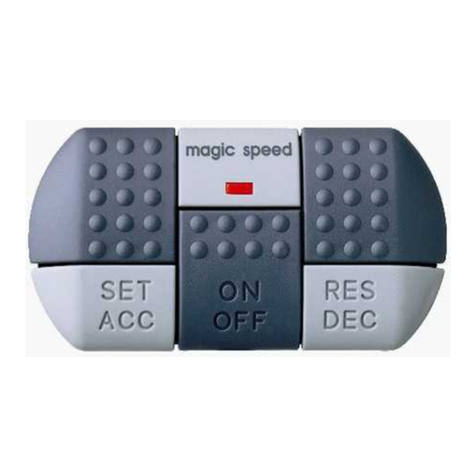
zweistufigen Schalter (Abb. 34, Seite 4) an geeigneter Stelle auf dem Armaturenbrett
und schließen ihn an der schwarz/roten und weißen Leitung an. Im manuellen Betrieb
aktivieren Sie eine bestimmte Kamera über den mitgelieferten dreistufigen Schalter
(Abb. 33, Seite 4) von Hand.
Im manuellen Betrieb wird über die blaue Leitung ein Schaltsignal geliefert, mit dem der
Monitor aktiviert werden kann.
➤Stellen Sie den zweistufigen Schalter in die gewünschte Stellung, um die zugehörige
Kamera einzuschalten:
– I: manuelle Bedienung eingeschaltet
– 0: manuelle Bedienung ausgeschaltet (der dreistufige Schalter ist ohne Funktion)
➤Schließen Sie die Leitungen des dreistufigen Schalters (Abb. 33, Seite 4) gemäß
der Zuordnung auf Seite 12 an.
➤Stellen Sie den dreistufigen Schalter in die gewünschte Stellung, um die zugehörige
Kamera einzuschalten:
– B: Rückfahrkamera (CA1) (Abb. 61, Seite 6)
– L: linke Kamera (CA2) (Abb. 62, Seite 6)
– R: rechte Kamera (CA3) (Abb. 63, Seite 6)
IHINWEIS
Wenn der Schalter angeschlossen ist, liegt an der Steuerleitung des Monitor im
manuellen Betrieb kein Signal an.
7.2 Automatisch betreiben
Sie können die Schaltbox im Automatikbetrieb betreiben. Im Automatikbetrieb schalten
sich die Kameras entsprechend der anliegenden Steuersignale automatisch ein oder aus.
Der Monitor wird durch die Schaltbox automatisch aktiviert.
IHINWEIS
Im automatischen Betrieb liegt an der Steuerleitung des Monitor ein Signal von
+12 V an, wenn einer der Blinker oder der Rückwärtsgang betätigt wird.
Im automatischen Betrieb wird in jedem Fall die Kamera (Priorität auf Rück-
wärtsgang) aktiviert, deren Steuerleitung aktiv ist. Eine ggf. davon abweichende
Schalterstellung wird ignoriert.
➤Schließen Sie die grüne Leitung des Bordnetz-Anschlusskabels an die rechte
Blinkerlampe an.
➤Schließen Sie die braune Leitung des Bordnetz-Anschlusskabels an die linke
Blinkerlampe an.
➤Schließen Sie die orangefarbene Leitung des Bordnetz-Anschlusskabels an den
Rückfahrscheinwerfer an.
_RV-SWITCH-SV.book Seite 13 Montag, 24. Oktober 2011 8:34 20

Gewährleistung PerfectView
DE
14
8 Gewährleistung
Es gilt die gesetzliche Gewährleistungsfrist. Sollte das Produkt defekt sein, wenden Sie
sich bitte an die Niederlassung des Herstellers in Ihrem Land (Adressen siehe Rückseite
der Anleitung) oder an Ihren Fachhändler.
Zur Reparatur- bzw. Gewährleistungsbearbeitung müssen Sie folgende Unterlagen mit-
schicken:
zeine Kopie der Rechnung mit Kaufdatum,
zeinen Reklamationsgrund oder eine Fehlerbeschreibung.
9 Entsorgung
➤Geben Sie das Verpackungsmaterial möglichst in den entsprechenden Recycling-
Müll.
MWenn Sie das Produkt endgültig außer Betrieb nehmen, informieren Sie sich
bitte beim nächsten Recyclingcenter oder bei Ihrem Fachhändler über die
zutreffenden Entsorgungsvorschriften.
10 Technische Daten
Ausführungen, dem technischen Fortschritt dienende Änderungen und Liefermöglich-
keiten vorbehalten.
PerfectView Accessory
Artikel-Nr.: RV-SWITCH-SV
Maße (BxHxT): 130 x 30 x 57 mm
Betriebsspannung: 12 V – 32 V DC
Leistungsaufnahme: max. 0,84 Watt (ohne Kameras)
Steuereingänge: positive Spannungssignale 12 V – 24 V
E4
10R-02 0530
_RV-SWITCH-SV.book Seite 14 Montag, 24. Oktober 2011 8:34 20

Schaltbox Notes on using the manual
EN 15
Please read this manual carefully before installing and starting up the device and
store it in a safe place. If the device is handed over to another person, this manual
is to be handed over along with it.
Contents
1 Notes on using the manual . . . . . . . . . . . . . . . . . . . . . . . . . . . . . . . . . . . . .15
2 Safety and installation instructions . . . . . . . . . . . . . . . . . . . . . . . . . . . . . . .16
3 Scope of delivery. . . . . . . . . . . . . . . . . . . . . . . . . . . . . . . . . . . . . . . . . . . . .17
4 Proper usage. . . . . . . . . . . . . . . . . . . . . . . . . . . . . . . . . . . . . . . . . . . . . . . .18
5 Technical description . . . . . . . . . . . . . . . . . . . . . . . . . . . . . . . . . . . . . . . . .18
6 Connecting the control box . . . . . . . . . . . . . . . . . . . . . . . . . . . . . . . . . . . . .19
7 Using the control box . . . . . . . . . . . . . . . . . . . . . . . . . . . . . . . . . . . . . . . . .21
8 Guarantee . . . . . . . . . . . . . . . . . . . . . . . . . . . . . . . . . . . . . . . . . . . . . . . . . .22
9 Disposal . . . . . . . . . . . . . . . . . . . . . . . . . . . . . . . . . . . . . . . . . . . . . . . . . . .22
10 Technical data. . . . . . . . . . . . . . . . . . . . . . . . . . . . . . . . . . . . . . . . . . . . . . .22
1 Notes on using the manual
ANOTICE!
Failure to observe this instruction can cause material damage and impair the
function of the product.
INOTE
Supplementary information for operating the product.
➤Action: This symbol indicates that action is required on your part. The required ac-
tion is described step-by-step.
✓This symbol describes the result of an action.
fig. 15, page 3: This refers to an element in an illustration. In this case, item 5 in
figure 1 on page 3.
Please observe the following safety instructions.
_RV-SWITCH-SV.book Seite 15 Montag, 24. Oktober 2011 8:34 20

Safety and installation instructions Schaltbox
EN
16
2 Safety and installation instructions
The manufacturer will not be held liable for claims for damage resulting from the following:
zDamage to the product resulting from mechanical influences and excess voltage
zAlterations to the product without express permission from the manufacturer
zUse for purposes other than those described in the operating manual
ANOTICE!
To prevent short circuits, always disconnect the negative terminal of the
electrical system before working on the vehicle.
If the vehicle has an additional battery, its negative terminal should also be dis-
connected.
ANOTICE!
Inadequate supply cable connections could result in short circuits with the
consequence that:
zcable fires occur
zthe airbag is triggered
zelectronic control devices are damaged
zelectric functions fail (indicators, brake light, horn, ignition, lights)
ANOTICE!
Ensure that all lines are connected correctly. The control line may never be con-
nected to earth; doing so can damage the device. Make especially sure to insu-
late the bare end of the control line when it is not in use and thus not connected.
Please observe the following instructions:
zWhen working on the following supply lines, only use insulated cable lugs, plugs and
tab sleeves.
– 30 (direct supply from positive battery terminal)
– 15 (connected positive terminal, behind the battery)
– 31 (return cable from the battery, earth)
– 58 (reversing light)
Do not use terminal strips.
zUse a crimping tool to connect the cables.
For permanent connections, you can solder the cable ends together and then insu-
late them.
zWhen connecting to supply cable 31 (earth), screw the cable
– to the vehicle's earth bolt with a cable lug and a gear disc or
– to the sheet-metal bodywork with a cable lug and a self-tapping screw.
Ensure that there is a good earth connection.
_RV-SWITCH-SV.book Seite 16 Montag, 24. Oktober 2011 8:34 20

Schaltbox Scope of delivery
EN 17
When the negative terminal of the battery is disconnected, all data stored in the volatile
memory will be lost.
zThe following data must be set again, depending on the vehicle equipment options:
– radio code
– vehicle clock
–timer
– on-board computer
– seat position
You can find instructions for making these settings in the appropriate operating
instructions.
Observe the following instructions when working with electrical parts:
zWhen testing the voltage in electrical cables, only use a diode test lamp (fig. 11,
page 3) or a voltmeter (fig. 12, page 3).
Test lamps with an illuminant (fig. 13, page 3) consume voltages which are too
high and can damage the vehicle's electronic system.
zWhen making electrical connections, ensure that
– they are not kinked or twisted
– they do not rub on edges
– they are not laid in sharp edged ducts without protection (fig. 2, page 3).
zInsulate all connections.
zSecure the cables against mechanical wear with cable binders or insulating tape,
for example to existing cables.
3 Scope of delivery
No. in
fig. 3, page 4 Quantity Description Item number
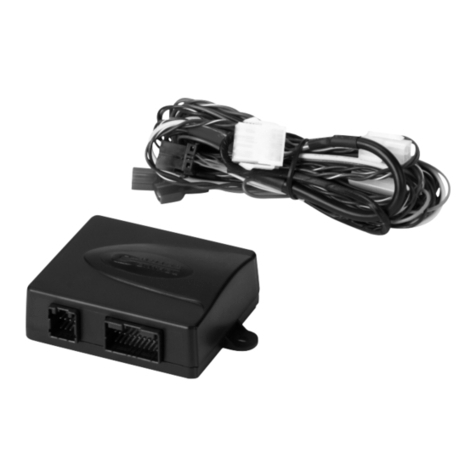
1 1 control box RV-SWITCH-SV
2 1 connection cable for vehicle electrics
3 1 Three-stage switch for activating the
camera manually
4 1 Two-stage switch for activating
manual operation
5 1 connecting cables for control box –
monitor
RV-502-M/M
– 1 installation material
_RV-SWITCH-SV.book Seite 17 Montag, 24. Oktober 2011 8:34 20

Proper usage Schaltbox
EN
18
Connections and controls
4 Proper usage
RV-SWITCH-RV is a control box that matches components from different WAECO
reversing video systems to each other. Up to three cameras can be connected to a
monitor via RV-SWITCH-RV.
5 Technical description
The control box RV-SWITCH-RV is used for the expansion of existing reversing video
systems. It possesses three separate controllable camera inputs, enabling e. g. operation
with a reversing and two side cameras or with three separate contollable cameras (for
articulated buses, machine monitoring etc.). In addition, for example, cameras that
require different voltage can be connected to each other.
Only one camera input is required on the monitor. The monitor can be automatically
activated via the corresponding control output.
All cameras can be activated manually. In addition, with corresponding cameras a mirror
function can be switched on so that the monitor picture corresponds to a view in the rear
mirror.
The control box can be used with almost all WAECO cameras and monitors via various
adapters (accessories).
The control box can be connected to 12-V to 32-V DC voltage.
No. in
fig. 4, page 5 Description Description
1 Left (CA2) 6-pin mini DIN socket
Connection for the left camera
2Back (CA1) 6-pin mini DIN socket
Connection for the reversing camera
No. in
fig. 5, page 5 Description Description
3 R L B (Mirror S/W) DIP switch
Select mirror function
4DIN (Monitor) Monitor output
Connection for a monitor
5 RCA (Monitor) Monitor output
Connection for a monitor with an A/V input
6Right (CA3) 6-pin mini DIN socket
Connection for the right camera
_RV-SWITCH-SV.book Seite 18 Montag, 24. Oktober 2011 8:34 20

Schaltbox Connecting the control box
EN 19
6 Connecting the control box
6.1 Tools required
To make and test the electrical connection, the following tools are required:
zinsulating tape
zheat shrinking sleeve
zdiode test lamp (fig. 11, page 3) or voltmeter (fig. 12, page 3)
zcrimping tool (fig. 14, page 3)
zsoldering iron (optional) (fig. 15, page 3)
zsolder (optional) (fig. 16, page 3)
zcable bushing sleeves (optional)
6.2 Testing the control box and components
Before you install and connect the desired components, you should test the system. In
this way you can determine whether the components work together in the way you want.
You thus avoid having to dismantle the components later.
To test the system, proceed as follows:
➤Lay out the individual devices.
➤Connect the devices as described in the following chapter, but without securing the
cables .
➤If necessary, connect the control cables.
➤Switch the system on.
➤Check to see whether the components are working together as desired.
✓If the system is working to your satisfaction, you can secure the devices and cables.
6.3 Connecting the control box
ANOTICE!
zEnsure that all lines are connected correctly. The control line may never be
connected to earth; doing so can damage the device. Make especially sure
to insulate the bare end of the control line when it is not in use and thus not
connected.
zIf you possess a monitor that may only be used for 12 V and 24-V electrics is
being used, a voltage converter must be installed.
_RV-SWITCH-SV.book Seite 19 Montag, 24. Oktober 2011 8:34 20

Connecting the control box Schaltbox
EN
20
The circuit diagram for the control box can be found in fig. 6, page 6:
INOTE
RV-SWITCH-SV matches different reversing video components to each other,
but no video standards. For this reason camera and monitor must match (PAL
with PAL and NTSC with NTSC).
Most LCD monitors support both standards.
Pos. Connection name
rt/sw Red/black cable: connection to the two-pin switch
sw Black cable: Connection to earth (terminal 31)
ws White cable:
zConnection to the control cable of the three-pin switch for the right-
hand camera (connection to R switch-plug)
zConnection to the two-pin switch
gr Grey cable: Connection to the control line of the three-pin switch for the
reverse camera (connection to switch plug L)
rt Red cable: Connection to +12 V to +24 V (e. g. switched positive,
terminal 15)
bl Blue cable: Connection to the monitor control line (standby/monitor on)
gn Green cable: Connection to the right indicator
br Brown cable: Connection to the left indicator light
ge Yellow cable: Connection to the control wire of the three-pin switch for the
left camera (connection to switch plug B)
or Orange cable: Connection to the reversing light
1 Camera connection 1
2Camera connection 2
3 Camera connection 3
4a Output for reversing monitor (RCA)
4b Output for reversing monitor (DIN)
_RV-SWITCH-SV.book Seite 20 Montag, 24. Oktober 2011 8:34 20
This manual suits for next models
1
Table of contents
Languages:
Other Dometic GROUP Control Unit manuals
Popular Control Unit manuals by other brands

Sera
Sera 620.D operating instructions

RTI
RTI RCM-4 Quick reference guide

Mitsubishi Electric
Mitsubishi Electric MELSEC iQ-R Series user manual

NI
NI 9265E Operating instructions and specifications

Interlogix
Interlogix DIGITAL INVERTER GENERATOR Installation sheet

Bürkert
Bürkert Type2012 operating instructions