PLAYING
TUNING SOUND
The Stylophone is tuned to
concert pitch before it leaves
the factory. You may wish to
accompany some other music
which is not in tune with it
and this is easy. Turn your
Stylophone on its side, with the
stylus held rmly on one of the
keys, turn the tuning control
in either direction until the
correct pitch is obtained.
There are 3 dierent Octaves
available on the Stylophone. Switch
1 is a lower octave great for bass
sounds, switch 2 in the middle is the
classic sound, and switch 3 to the
right is great for lead sounds.
VIBRATO
Switch on the vibrato to create an
oscillating feature of each note.
VOLUME
Controlled from the right hand side
of the Stylophone.
HEADPHONES/AUDIO OUT
Play the Stylophone through
headphones or a separate amplier
(not supplied) using a standard
3.5mm jack plug.
03
Keep the keyboard and stylus
clean with a soft cloth.
Should the Stylophone emit a
‘crackling’ noise when played,
clean the keyboard and stylus tip
with a light abrasive metal cleaner.
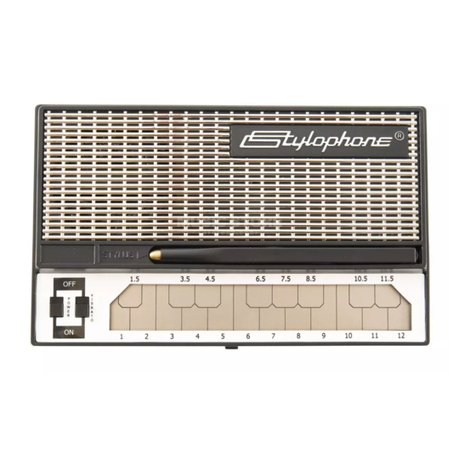
The keyboard is set out in the same
way as a piano keyboard.
The bottom row of notes represent
the white keys and the top row
the black. Switch your Stylophone
on. Remove the stylus from its
housing and touch the point onto
the keyboard. A smooth eect is
obtained by sliding the stylus or you
can pick out notes separately.