manuals.online logo
Brands
  1. Home
  2. •
  3. Brands
  4. •
  5. Eagle Eye Power Solutions
  6. •
  7. Cables And Connectors
  8. •
  9. Eagle Eye Power Solutions ELM Series User manual

Eagle Eye Power Solutions ELM Series User manual

Popular Cables And Connectors manuals by other brands

StarTech.com ST124HD20 quick start guide

StarTech.com

StarTech.com ST124HD20 quick start guide

Philips SWV4543S/10 Features

Philips

Philips SWV4543S/10 Features

Larson Electronics 10-50C instruction manual

Larson Electronics

Larson Electronics 10-50C instruction manual

Grip MEK-PM Assembly and operating manual

Grip

Grip MEK-PM Assembly and operating manual

Ultra Products Travel Pack #3 ULT31436 Specifications

Ultra Products

Ultra Products Travel Pack #3 ULT31436 Specifications

Surpass QCH-F Operation manual

Surpass

Surpass QCH-F Operation manual

Philips SWA6310 Specifications

Philips

Philips SWA6310 Specifications

StarTech.com CRJ4550PK quick start guide

StarTech.com

StarTech.com CRJ4550PK quick start guide

Nohau EMUL-IP2K-PC user guide

Nohau

Nohau EMUL-IP2K-PC user guide

Foxun SX-SP144E-HD4K2K operating instructions

Foxun

Foxun SX-SP144E-HD4K2K operating instructions

Philips SWA3305W Specifications

Philips

Philips SWA3305W Specifications

opticis Stretch DVIM1-1P0x user manual

opticis

opticis Stretch DVIM1-1P0x user manual

Volkswagen VAS 6558A operating manual

Volkswagen

Volkswagen VAS 6558A operating manual

NEXIBO N-13 user manual

NEXIBO

NEXIBO N-13 user manual

CYP PU-1H3HBTL Operation manual

CYP

CYP PU-1H3HBTL Operation manual

Allen-Bradley 1784-u2dhp installation instructions

Allen-Bradley

Allen-Bradley 1784-u2dhp installation instructions

Global Caché Flex Link Blaster quick start

Global Caché

Global Caché Flex Link Blaster quick start

Hauppauge USB-Live2 Quick installation guide

Hauppauge

Hauppauge USB-Live2 Quick installation guide

manuals.online logo
manuals.online logoBrands
  • About & Mission
  • Contact us
  • Privacy Policy
  • Terms and Conditions

Copyright 2025 Manuals.Online. All Rights Reserved.

V1.0
www.eepowersolutions.com | Tel: 1-877-805-3377 | Fax: 1-414-962-3660 | info@eepowersolutions.com
Eagle Eye How-to Guide:
Crimping Four Way TE Connector for the ELM-Series
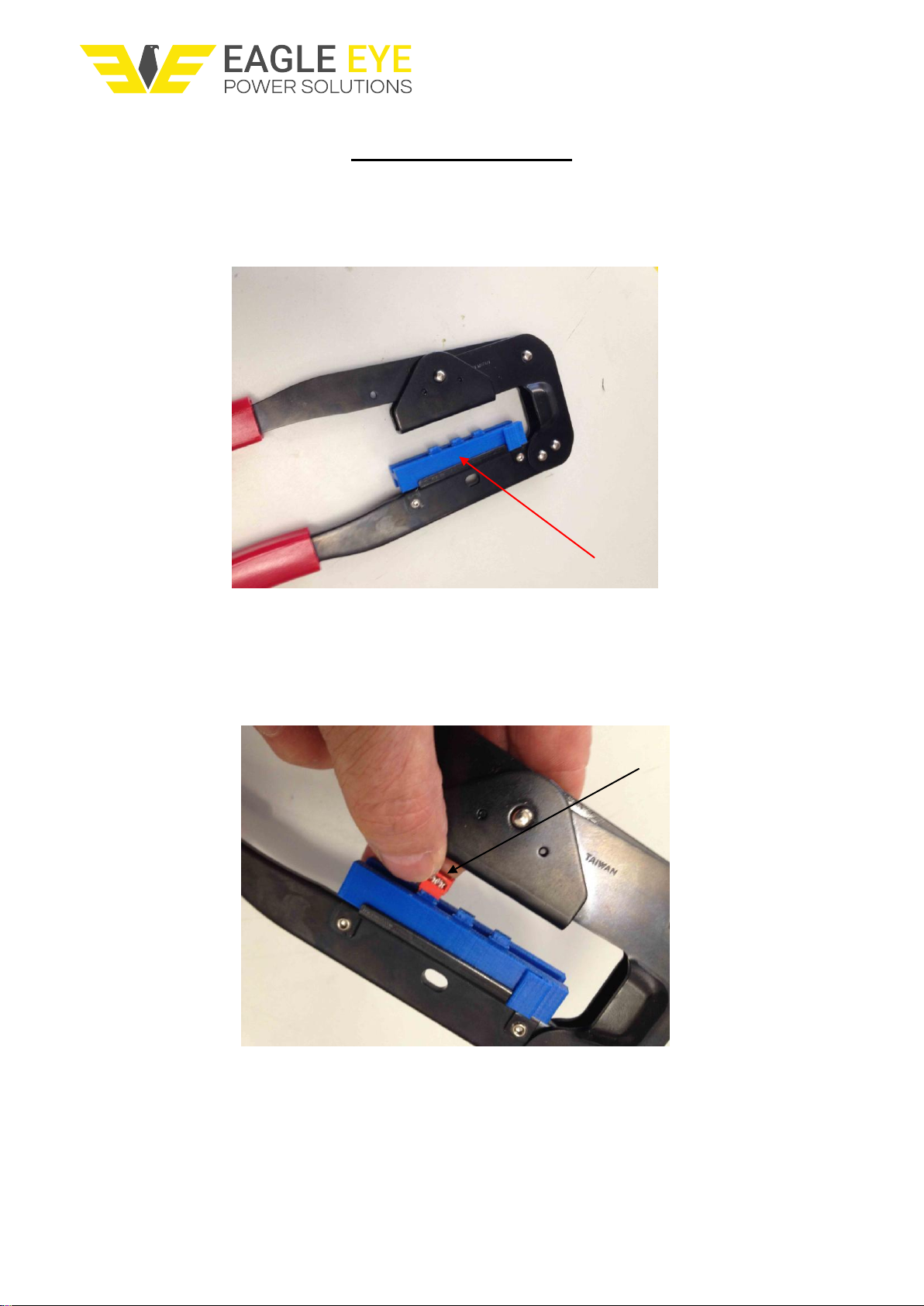
The crimping tool consists of parallel opening jaws and a replaceable connector insert (Fig 1).
Replaceable insert
Fig. 1
First, place the four way connector into one of the three locations on the insert. Care must
be taken not to press down the cable retaining bar on the back of the connector (Fig 2).
Cable retaining bar
Fig. 2

V1.0
www.eepowersolutions.com | Tel: 1-877-805-3377 | Fax: 1-414-962-3660 | info@eepowersolutions.com
Fig 3 shows the correct seating of the connector.
Fig. 3
The four way cable is now passed between the connector and cable retaining bar (Fig 4)
Fig. 4
V1.0
www.eepowersolutions.com | Tel: 1-877-805-3377 | Fax: 1-414-962-3660 | info@eepowersolutions.com
Squeeze the handle until the cable retaining clip engages with the “pips” on the body
of the connector (Fig 5).
Release the handle and now remove the connector and cable from the crimp tool.
V1.0
www.eepowersolutions.com | Tel: 1-877-805-3377 | Fax: 1-414-962-3660 | info@eepowersolutions.com
Remove excess cable with a sharp pair of side cutters
NOTE: Please refer to document below for correct polarity of cable assembly.
V1.0
www.eepowersolutions.com | Tel: 1-877-805-3377 | Fax: 1-414-962-3660 | info@eepowersolutions.com









