Installation
Features
• The SmartSite 4.3" color LCD mirror is
designed for vehicle rearview monitoring.
• Combines normal mirror image and reversing
rear camera image.
• Three screen set options: left, middle, or right
side of mirror monitor.
• SmartSite attaches in place of most originally
equipped factory rearview mirrors.
• Built-in interface function can support up to
two cameras.
• Automatically displays reverse camera view
when reverse gear is engaged.
• Reversing function camera always has highest
priority.
• Mirror can be installed in both 12 volt and 24
volt vehicles.
• Special anti-glare treatment.
• Includes high/low voltage and short circuit
protection.
Safety and Installation Guidelines
• Secure the monitor in such a way that it
cannot become loose under any circumstance
(sudden braking, accidents) and cause injury
to the occupants of the vehicle.
• Do not attach the mirror in the area that my be
used by an airbag, as this could cause injury if
the airbags are triggered.
• The picture quality can be impaired in the
vicinity of electromagnetic fields. For this
reason, do not mount the monitor near
loudspeakers.
• Do not drop, open, submerge or spill liquid on
the monitor.
• Do not operate the monitor if the housing has
been damaged.
• Do not press on the LCD display.
Controls and Operation
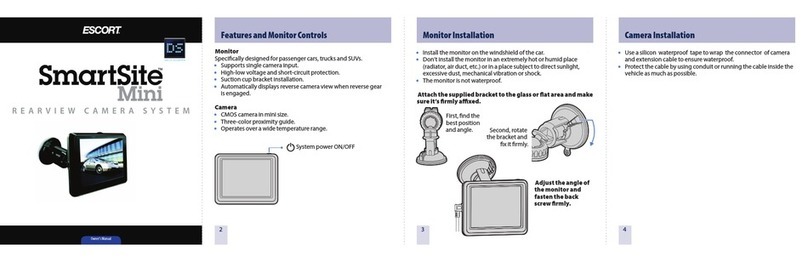
Mirror Monitor Installation
1 Remove the factory rearview mirror from the
vehicle.
2 Adjust the angle of the mirror monitor by
rotating the ball joint on the bracket to the best
position.
3 Unscrew the silver lug and slide the mirror
monitor onto the original metal lug on the
widescreen.
4 Fix the screw firmly.
NOTE: If our bracket is not compatible with the
vehicle’s original mirror, then you have to prepare
the glue to either attach the monitor on the
windshield or elsewhere. The mirror monitor
bracket is detachable.
Power Connection
CAUTION: Before making any connections,
disconnect the ground terminal of the vehicle
battery to avoid short circuits.
1 Connect the RED wire to a positive (12V or 24V)
power terminal, which is energized with the
ignition key in the accessory position.
2 Connect the BLACK wire to a suitable negative
connection point on the vehicle.
3 Connect the GREEN wire (CAM 1 trigger) to
the switched power output terminal of the “R”
(reverse) gear. The CAM 1 trigger is always in
priority.
NOTE: The plugs should be fully inserted into the
connectors or jacks. A loose connection may cause
malfunction of the unit.
Mirror Monitor Operation
When you turn the ignition to the accessory or
ON position, power is supplied and the front LED
light will turn red. No image will be displayed on
the monitor. You must press CAM SELECT/ or
engage reverse gear to activate the camera.
Mirror Monitor Controls
CAM SELECT/
Press button to select CAM 1 or CAM 2. Or, hold
for more than 2 seconds to power off the
monitor (standby). Press again to power on.
MENU
Contrast Control
To adjust the display contrast, press MENU,
choose CONTRAST on the screen display, and
press + or – to increase or decrease contrast.
Brightness Control
To adjust the display brightness, press MENU,
choose BRIGHTNESS on the screen display, and
press + or – to increase or decrease brightness.
Color Control
To adjust the display color, press MENU, choose
COLOR on the screen display, and press + or - to
increase or decrease color contrast.
Normal/Mirror Image Setting
If your camera and control box has a Normal/
Mirror function, you can change these settings
for CAM 1 and CAM 2 separately.
Press MENU, tap MIR1 OFF on the screen
display and press + or – to select mirror or
normal image for CAM 1. You can set the CAM 2
image in the same way.
Park (on)
To adjust the settings for the parking assist line
(which helps you judge distance while in
reverse), press MENU, tap Park (on) on the screen
display, and press + or – to activate it.
The parking assist line only appears when the
reverse gear is engaged. It can be adjusted
horizontally by pressing + or – to your preferred
height for the current parking conditions. The
setting is saved in memory.
Cleaning and Maintenance
• If your vehicle has been parked in direct
sunlight allow the monitor to cool off before
operating.
• Unplug or power off before cleaning. Clean
the monitor with a slightly damp soft cloth,
using only mild household detergent.
• Do not use liquid or aerosol cleaners, or strong
solvents to clean the monitor as they might
damage the finish.
• Do not block or cover the holes on the
monitor. Their function is for ventilation to
keep the unit from overheating.
• Do not push objects of any kind into the
monitor through the ventilation holes, as this
may result in fire or electric shock.
• Do not submerge the monitor or spill any kind
of liquid on it.
ESCORT RADAR DETECTORS RADAR DETECTORS