HSA and Cable Cubby Routing Template • Preparation
Preparation
1 2HSA and Cable Cubby Routing Template • Preparation
Preparing the Routing Template
The routing template is reusable. Do not discard this template
when installation is complete. Save it for installing future surface
access enclosures of the same size.
1. Cut two 1/2" x 4" (approximately 1.3 cm x 10.2 cm) strips of soft,
finished lumber at least long enough to span the distance between
the desired installation location on the mounting surface and the
edges of the mounting surface (figure 1).
These strips raise the routing template above the mounting surface
to provide room for the router’s collar, to protect the mounting
surface, and to extend the reach of the routing template so that it
can be clamped to the edge of the surface.
CAUTION
Do not allow the wood screws to protrude through the
bottom of the wooden strips. Protruding screws will mar the
table when the template is used.
Mounting
Surface
Edge
Mounting
Surface
Edge
Wood Thickness
0.5" / 1.3 cm
Width of Mounting Surface
Routing Template
Wood Strip
Height
4" / 10.2 cm
Minimum
4 Screws
Wood
Strips
Figure 1 — Prepared HSA 200/HSA 222/Cable Cubby 300
mounting template
2. Using four or more short wood screws, secure the mounting
template to the lumber strips.
Preparing the Table
The preferred and recommended method for preparing the table is to
use the appropriate Extron routing template and a router. Alternatively,
you can use a paper cut-out template and a sabre saw or keyhole saw,
but this method is not recommended. Prepare the table as follows:
CAUTION
The opening in the table should be cut only by licensed and
bonded craftspeople. Exercise care to prevent scarring or
damaging the furniture.
The routing templates for the various HSA models are not
interchangeable. If you use the wrong template, you will
cut an improperly-sized hole. If you use a larger template
than required, the cut will result in gaps in the table surface.
The surfaces of the enclosure have screws and other
protruding hardware that could damage fine furniture.
Do not rest the enclosure on unprotected furniture.
1. Locate the desired mounting location on the tabletop or other
installation surface. Mark the location.
CAUTION
Ensure that only the wooden strips contact the furniture.
Failure to do so can mar the furniture.
2. Place the mounting template assembly on the table, centered on
the mounting location. Position the template so that the HSA or
Cable Cubby opening is oriented properly. If necessary, use a
square to ensure that the template is properly positioned.
Extron is not responsible for improperly-positioned HSA or Cable
Cubby products.
3. Once the template assembly is positioned properly, secure the
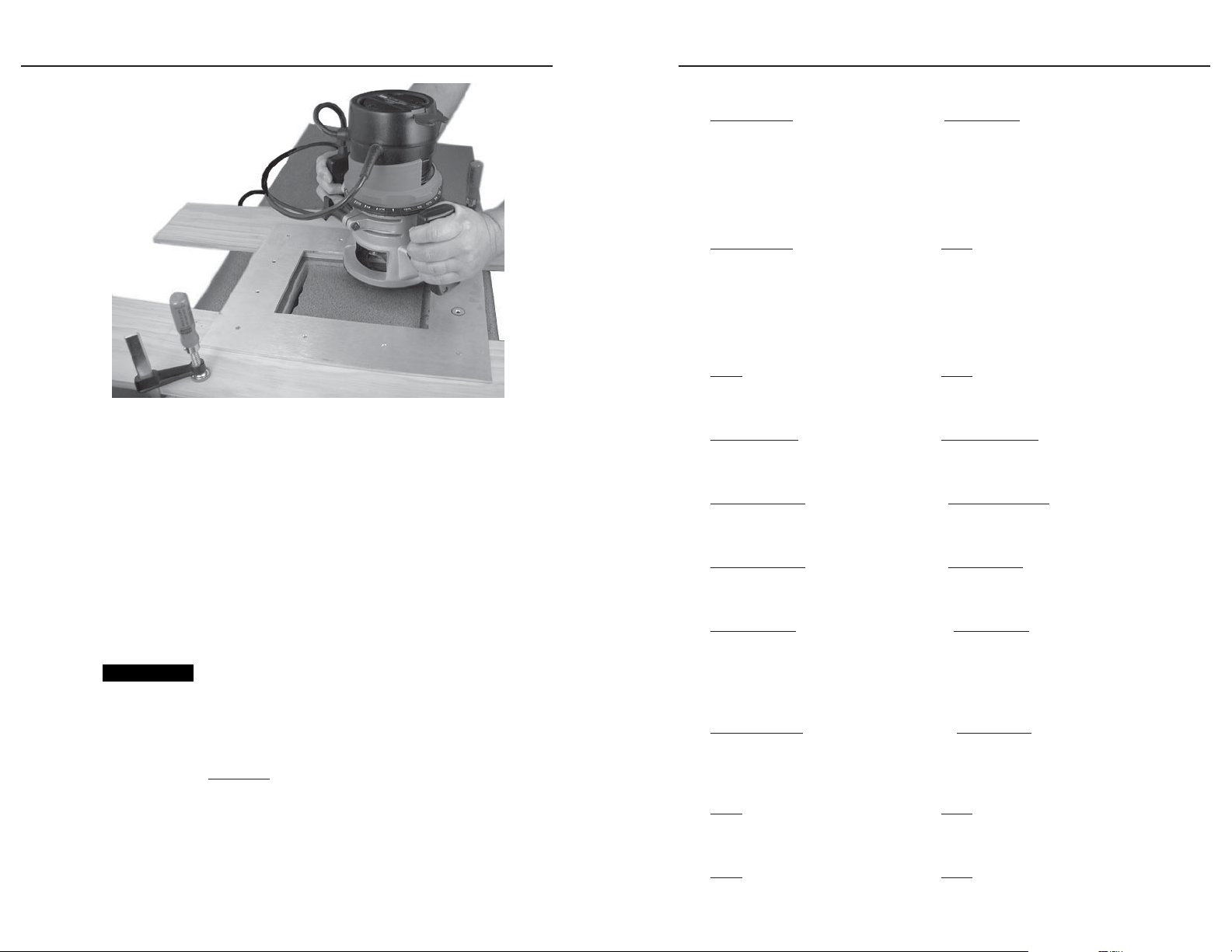
assembly to the table with C-clamps (figure 2).
Wear safety glasses when operating the router. Failure to
comply may result in eye injury.
4. Using a router with 5/8" (or 16 mm) outside diameter guide
bushings and a 1/2" (or either 12 mm or 12.7 mm) diameter
straight router bit, carefully cut the opening in the table surface
(figure 2).
5. Remove the C-clamps and the routing template.
CAUTION
The flanged edges of the top of the surface enclosure are
bevelled to an ultra-fine thickness of less than 0.04 (4/100)"
(approximately 1 mm). These edges are soft and can be easily
nicked or bent. Exercise caution when handling and
mounting the enclosure. Mishandling can damage the
appearance of the enclosure.
Tel. 07131 911201
Fax 07131 911203