FLIR LNB3373SB User manual

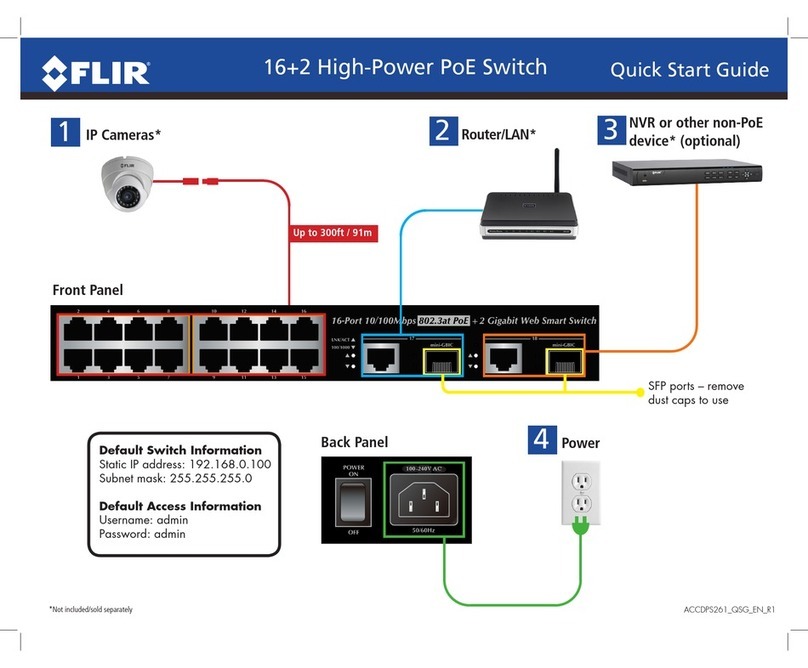
*Not included/sold separately
Router/LAN*
23
Power
NVR or other non-PoE
device* (optional)
4
Up to 300ft / 91m
1IP Cameras*
16+2 High-Power PoE Switch Quick Start Guide
Front Panel
Back Panel
100-240V AC
Default Switch Information
Static IP address: 192.168.0.100
Subnet mask: 255.255.255.0
Default Access Information
Username: admin
Password: admin
ACCDPS261B_QSG_EN_R1
SFP ports – remove
dust caps to use

LED Indicators
System
Name Color Meaning
PWR Green ON: The switch is receiving power.
OFF: The switch is not powered.
FCC Notice
This equipment has been tested and found to comply with the limits for a Class A digital device, pursuant to Part
15 of the FCC Rules. These limits are designed to provide reasonable protection against harmful interference when
the equipment is operated in a commercial environment. This equipment generates, uses, and can radiate radio
frequency energy and, if not installed and used in accordance with the Instruction manual, may cause harmful
interference to radio communications. Operation of this equipment in a residential area is likely to cause harmful
interference in which case the user will be required to correct the interference at his own expense.
Technical Specifications
Name Specification
Ports 16x 10/100Base-TX RJ-45 Auto-MDI/MDI-X ports
2x 10/100/1000Base-T RJ-45 Auto-MDI/MDI-X ports
2x 1000Base-X SFP interfaces, shared with ports 17 and 18
PoE Standard IEEE 802.3af / 802.3at PoE / PSE
PoE Power Output Per Port 52V DC, Max. 30.8 watts
Total Power Ouput 220 watts across ports 1~16
PoE Class Class 0/1/2/3/4
Standard Compliance IEEE 802.3 Ethernet
IEEE 802.3u Fast Ethernet
IEEE 802.3ab Gigabit Ethernet
IEEE 802.3z Gigabit Ethernet over Fiber-Optic
IEEE 802.3x Full-duplex flow control
IEEE 802.1Q VLAN
IEEE 802.1p QoS
IEEE 802.1D Spanning Tree Protocol
IEEE 802.1w Rapid Spanning Tree Protocol
IEEE 802.3af Power over Ethernet
IEEE 802.3at Power over Ethernet Plus
Operating Humidity 5 ~ 95% (non-condensing)
Operating
Temperature
32 ~ 122F / 0 ~ 50C
Power Input 100~240V AC, 50/60Hz, 4A
Dimensions
(W x D x H)
17.3” x 7.9” x 1.8”
440 x 200 x 44.5mm (W x D x H)
1U height
Weight 2.55kg / 5.62lbs.
Port 1 to Port 16
Name Color Meaning
LNK/ACT Green ON: Successfully established link at 10/100Mbps.
Flashing: Switch is sending/receiving data.
OFF: No connection.
POE Orange ON: Port is providing 52V DC in-line power.
OFF: Connected device is not a PoE Powered Device (PD).
Port 17 and Port 18 (RJ-45 or SFP)
Name Color Meaning
LNK/ACT Green Flashing: Switch is sending/receiving data.
OFF: No connection.
100/1000 Green ON: Port is established at 1000Mbps.
Slow Flashing: Port is established at 100Mbps.
OFF: Port is established at 10Mbps.
PoE Power Usage
Name Meaning
50W ON: PoE power consumption is 50W or greater across ports 1~16.
100W ON: PoE power consumption is 100W or greater across ports 1~16.
150W ON: PoE power consumption is 150W or greater across ports 1~16.
190W ON: PoE power consumption is 190W or greater across ports 1~16.
16+2 High-Power PoE Switch Quick Start Guide
ACCDPS261B_QSG_EN_R1
This manual suits for next models
1
Other FLIR Switch manuals