manuals.online logo
Brands
  1. Home
  2. •
  3. Brands
  4. •
  5. FUTABA
  6. •
  7. Media Converter
  8. •
  9. FUTABA SBD-3 User manual

FUTABA SBD-3 User manual

Other FUTABA Media Converter manuals

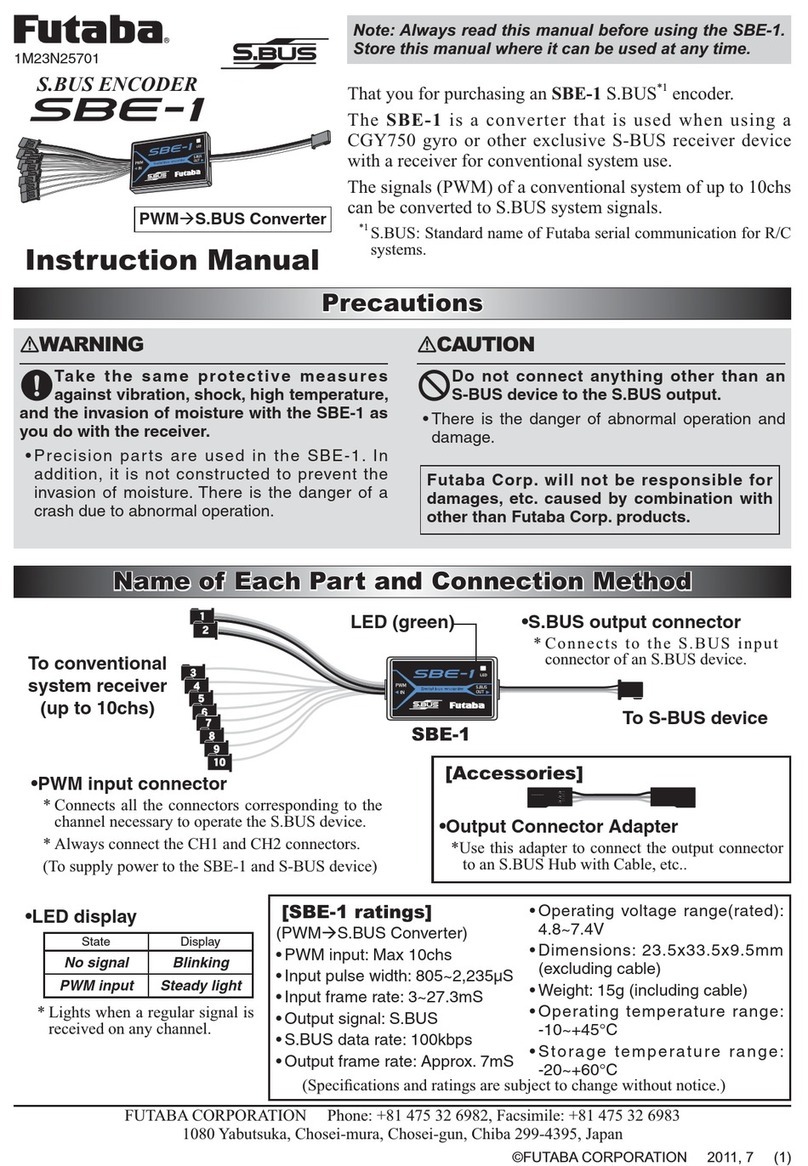
FUTABA SBE-1 User manual

FUTABA

FUTABA SBE-1 User manual

FUTABA T18SZ User manual

FUTABA

FUTABA T18SZ User manual

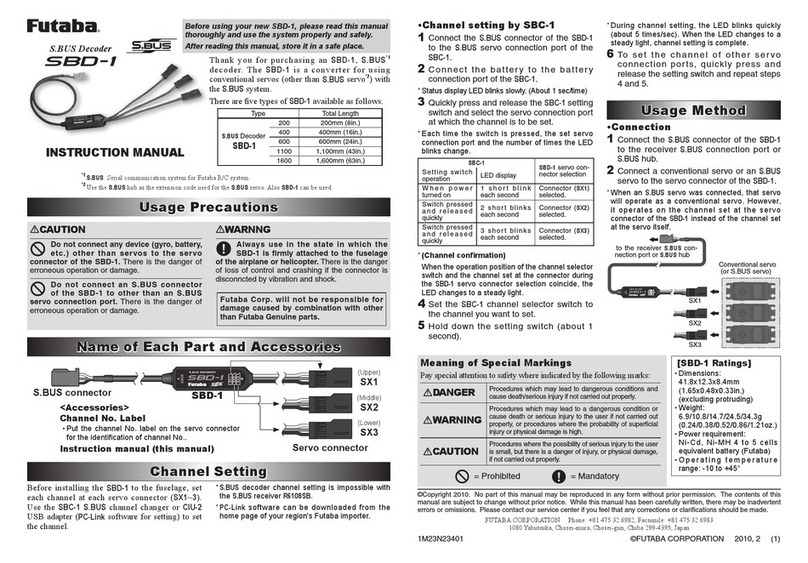
FUTABA SBD-1 User manual

FUTABA

FUTABA SBD-1 User manual

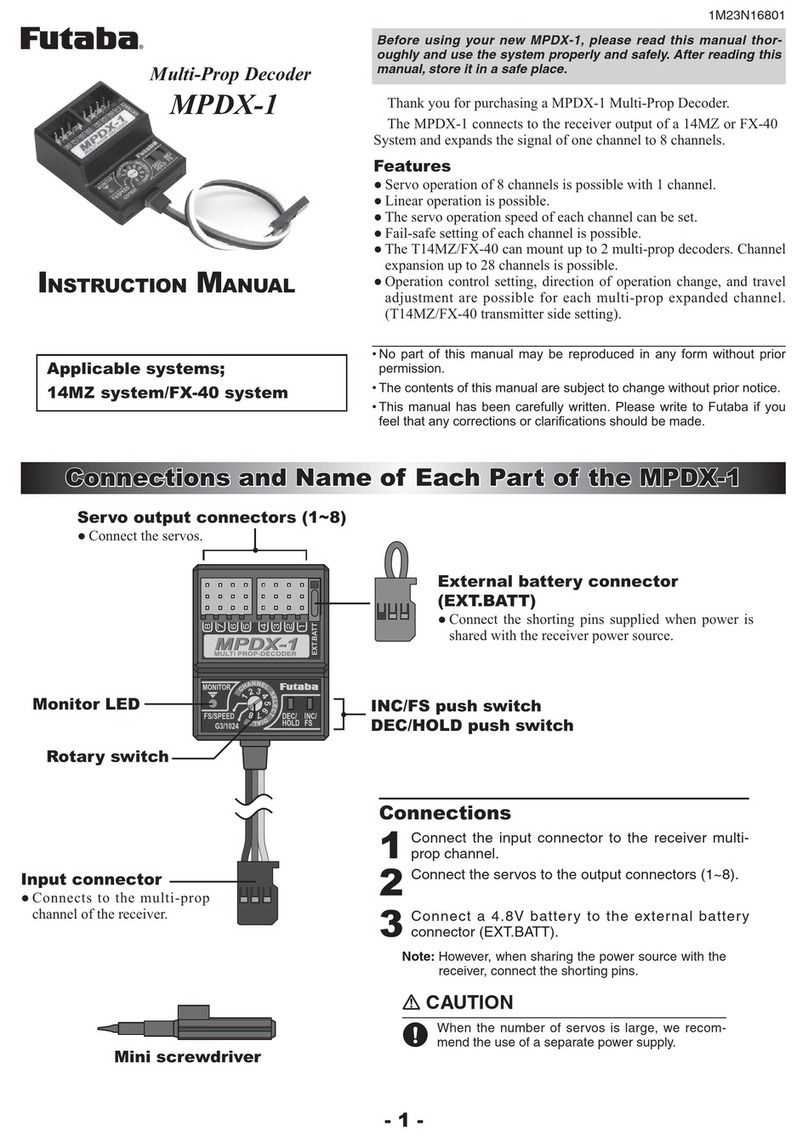
FUTABA MPDX-1 User manual

FUTABA

FUTABA MPDX-1 User manual

FUTABA SBD-3 User manual

FUTABA

FUTABA SBD-3 User manual

Popular Media Converter manuals by other brands

TR-Electronic CMS582M-4096/4096 IOL DMS 14H7 KRF Assembly instructions

TR-Electronic

TR-Electronic CMS582M-4096/4096 IOL DMS 14H7 KRF Assembly instructions

Korenix JetCon 2301S user manual

Korenix

Korenix JetCon 2301S user manual

StarTech.com ET91000LCOAM manual

StarTech.com

StarTech.com ET91000LCOAM manual

Alesis AI-3 Reference manual

Alesis

Alesis AI-3 Reference manual

Caton Vpro 5100 user guide

Caton

Caton Vpro 5100 user guide

Cypress CSC-5500 Operation manual

Cypress

Cypress CSC-5500 Operation manual

H&B TX-100 Installation and instruction manual

H&B

H&B TX-100 Installation and instruction manual

Bolin Technology D Series user manual

Bolin Technology

Bolin Technology D Series user manual

IFM Electronic Efector 400 RN30 Series Device manual

IFM Electronic

IFM Electronic Efector 400 RN30 Series Device manual

GRASS VALLEY KUDOSPRO ULC2000 user manual

GRASS VALLEY

GRASS VALLEY KUDOSPRO ULC2000 user manual

Linear Technology DC1523A Demo Manual

Linear Technology

Linear Technology DC1523A Demo Manual

Lika ROTAPULS I28 Series quick start guide

Lika

Lika ROTAPULS I28 Series quick start guide

Weidmuller IE-MC-VL Series Hardware installation guide

Weidmuller

Weidmuller IE-MC-VL Series Hardware installation guide

Optical Systems Design OSD2139 Series Operator's manual

Optical Systems Design

Optical Systems Design OSD2139 Series Operator's manual

Tema Telecomunicazioni AD615/S product manual

Tema Telecomunicazioni

Tema Telecomunicazioni AD615/S product manual

KTI Networks KGC-352 Series installation guide

KTI Networks

KTI Networks KGC-352 Series installation guide

Gira 0588 Series operating instructions

Gira

Gira 0588 Series operating instructions

Lika SFA-5000-FD user guide

Lika

Lika SFA-5000-FD user guide

manuals.online logo
manuals.online logoBrands
  • About & Mission
  • Contact us
  • Privacy Policy
  • Terms and Conditions

Copyright 2025 Manuals.Online. All Rights Reserved.

SBD-3
このたびはS.BUS デコー
ダー SBD-3 をお買い上げい
ただきありがとうございま
す。本説明書をよく読んで
正しい使い方により末永く
お楽しみください。
S.BUS デコーダー
チャンネル変更
チャンネル変更
注意事項
注意事項
ESC 接続例
ESC 接続例
サーボ接続例
サーボ接続例
取扱説明書
SBD-3 は3CH の動作を行います。もし
3CH 以外の動作をさせたい場合は下記の機
器を使用してチャンネルを変更する必要が
あります。
[ チャンネル変更できる機器 ]
● USB アダプター CIU-2/3(設定用ソフト
SBD-Link)
● T6K, T10J, T12K, T14SG ( V4 ~), FX-22
(V4 ~)
 このうちのいずれかを使用します。
※SBD-Link は弊社ホームページからダウンロー
ドします。(http://www.rc.futaba.co.jp)
変更方法はそれぞれの説明書をご参照くだ
さい。SBD-1 の変更と同じ手順で行います。
SBD-1 には 3つのコネクターがありそれぞ
れに CH を設定します。SBD-3 はこのうち
のSx1 の設定で CH を変更してください。
警告
コネクターの極性に注意する。
コネクターはしっかり差す。
■飛行、走行中にコネクターが抜けると、
大変危険です。
防振対策を施し、燃料や水分がか
からない位置に取り付ける。
■本製品には電子部品が使用されていま
す。振動、衝撃、高温等に対する保護対
策を施してください。
配線ケーブルは機体搭載時、引っ
張られた状態ではなく多少余裕が
あるようにする。
■ケーブルが引っ張られた状態だと、振動
により、配線切れやコネクター抜けによ
る、動作不良の恐れがあります。
Futaba S.BUS/S.BUS2 システムのセッ
トで使用する。
■Futaba S.BUS/S.BUS2 システム以外で
は使用できません。
組立後は必ず動作検査を行う。
■検査が終わるまでは飛行・走行させない
でください。
アナログサーボを使用する場合、受
信機は必ずノーマルモードに設定し
てください。
■FASSTest 12ch モード、ハイスピー
ド・モード時、S-FHSS レシーバーは
アナログサーボが使用できません。
ESC から受信機電源を供給してはい
けない。受信機電源供給タイプの
ESC を使用する場合は ESC からの 3ch
配線の赤(+)コードを抜いて ESC から
電源供給されないようにする。
■受信機 / サーボの電源は専用バッテリ
ーを使用してください。
SBD-3のサーボ接続口にサーボ /
ESC 以外の機器(ジャイロ、バッテ
リー等)を接続しない。
■異常動作や破損の恐れがあります。
ラジコン模型以外には、使用しない。
ESC から受信機電源を供給してはいけない。
受信機電源供給タイプの ESC を使用する場
合は ESC からの 3ch 配線の赤(+)コードを抜い
て ESC から電源供給されないようにする。
■受信機 / サーボの電源は専用バッテリーを使用
してください。
■双葉電子工業(株)ラジコンカスタマー
サービス
〒299-4395 千葉県長生郡長生村藪塚 1080
 
TEL.(0475)32-4395
修理・アフターサービス、プロポに関する
お問い合わせは弊社ラジコンカスタマー
サービスへどうぞ
1M23N37701
< SBD-3 仕様>
用途 : S.BUS/S.BUS2→PWM 変換器
全長:238 mm    
重量:4.7 g
定格電圧 : DC3.7 ~7.4 V
(使用可能電圧範囲 3.5 ~8.4 V)
SBD-3 は S.BUS/S.BUS2 か
ら従来システム(PWM)
3CH の ESC やサーボを使用
する変換器です。
対応機種
S.BUS/S.BUS2 受信機
S.BUS/S.BUS2
S.BUS/S.BUS2
3CH
3CH
※ S.BUSサーボを接続した場合、
そのサーボは従来システム用の
サーボとして動作します。ただ
し、サーボ自体に設定されてい
たチャンネルではなく、3CH で
動作します。
※ 接続できるサーボは1個です。
S.BUS/S.BUS2
3CH PWM
Sx2
Sx1
Sx1
Sx3
SBD-1 は3つの出力ポート
があります。
SBD-3(本製品)の出力ポートは
SBD-1 設定の Sx1 にあたります。
Sx1 のチャンネルを変更してください。
SBD-1
SBD-3
弊社製品以外との組み合わせにより発生
した損害等につきましては弊社では責任
を負いかねます。
双葉電子工業株式会社 ホビ-ラジコン事業センター・営業部
〒299-4395 千葉県長生郡長生村藪塚 1080 TEL:0475-32-6111 FAX:0475-32-2915
©FUTABA CORPORATION 2021 年4月 第 1版
SBD-3
SBD-3
SBD-3
S.BUS Decoder
Channel Setting
Channel Setting
ESC connection example
Servo connection example
Instruction Manual
If you want to change the output channel
from CH3. The equipment by which a
channel set is possible.
[Channel change device ]
●CIU-2/3 USB adapter (SBD-Link
software for setting)
●T6K, T10J, T12K, T14SG (V4.0-), FX-
22 (V4.0-)
*SBD-Link software can be downloaded
from the home page of your region's Futaba
importer.
Refer to each manual for how to change.
Follow the same procedure as for changing
SBD-1. The SBD-1 has three connectors,
each of which sets a CH. For SBD-3,
change the CH with the Sx1 setting.
1M23N37701
The SBD-3 is a converter
for using conventional
servo/ESC with the S.BUS
system.
S.BUS/S.BUS2
S.BUS/S.BUS2
3CH
3CH
When an S.BUS servo was
connected, that servo will
operate as a conventional
servo. However, it operates
on the channel set at the
servo connector of the SBD-3
instead of the channel set at
the servo itself.
Only one servo can be
connected.
S.BUS/S.BUS2
PWM CH3
Sx2
Sx1
Sx1
Sx3
The SBD-1 has three output
ports.
The output port of SBD-3 (this product)
corresponds to Sx1 in the SBD-1 setting.
Change the channel of Sx1.
SBD-1
SBD-3
FUTABA CORPORATION
Hobby Radio Control Business Center Sales & Marketing Department
1080 Yabutsuka, Chosei-mura, Chosei-gun, Chiba-ken, 299-4395, Japan
TEL: +81-475-32-6051, FAX: +81-475-32-2915
©FUTABA CORPORATION 2021, 4 (1)
Thank you for purchasing the
SBD-3. Before using your new
SBD-3, please read this manual
thoroughly and use the SBD-3
properly and safely. After read-
ing this manual, store it in a safe
place.
Appllcable systems
S.BUS/S.BUS2 receiver
Use : S.BUS / S.BUS2 to PWM
converter
Length : 238 mm (9.4 in)
Weight : 4.7 g (0.17 oz)
Operating voltage : DC3.7 V to 7.4 V
(Acceptable: DC3.5 V to 8.4 V)
Precautions
Precautions
WARNING
Failure to follow these safety precautions may
result in severe injury to yourself and others.
In order to prevent any short circuits,
please observe the polarity of all
connections.
Ensure that the unit is connected
properly to the receiver.
■If the connector is disconnected during
flight, it becomes inoperable.
Ensure that the unit is mounted in an
area that will eliminate exposure to
fuel, water and vibration.
■As with any electronic components, prop-
er precautions are urged to prolong the life
and increase the performance of the unit.
Allow a slight amount of slack in the
unit cables and fasten them at a
suitable location to prevent any damage
from vibration during ight.
Used in a set of Futaba S.BUS / S.BUS2
systems.
To ensure that the SBD-3 is
functioning as desired, please test
accordingly.
■Do not fly until inspection is complete.
When using analog servos, make
sure the receiver is in normal
mode.
■There is the danger of erroneous op-
eration or damage on the FASSTest 12ch
mode / High-speed mode / S-FHSS.
Do not supply receiver power
from the ESC. When using the
receiver power supply type ESC,
remove the red (+) cord of the 3ch
wiring from the ESC so that the power
is not supplied from the ESC.
■Use a dedicated battery to power the
receiver / servo.

Do not connect an S.BUS
connector of the SBD-3 to other
than an S.BUS connection port.
■There is the danger of erroneous op-
eration or damage.
Do not use the SBD-3 with
anything other than an R/C model.
Futaba Corp. will not be responsible
for damage caused by combination
with other than Futaba Genuine parts.
SBD-3
SBD-3
Do not supply
receiver power
from the ESC. When
using the receiver
power supply type
ESC, remove the red
(+) cord of the 3ch
wiring from the ESC
so that the power is not supplied from the
ESC.
■Use a dedicated battery to power the receiver
/ servo.