InstructionManual
If you want to change the output channel
from CH3. The equipment by which a
channel set is possible.
[Channelchangedevice]
● CIU-2/3 USB adapter (SBD-Link
software for setting)
● T6K,T10J,T12K,T14SG(V4.0-),FX-
22(V4.0-)
*SBD-Link software can be downloaded
from the home page of your region's Futaba
importer.
Refer to each manual for how to change.
Follow the same procedure as for changing
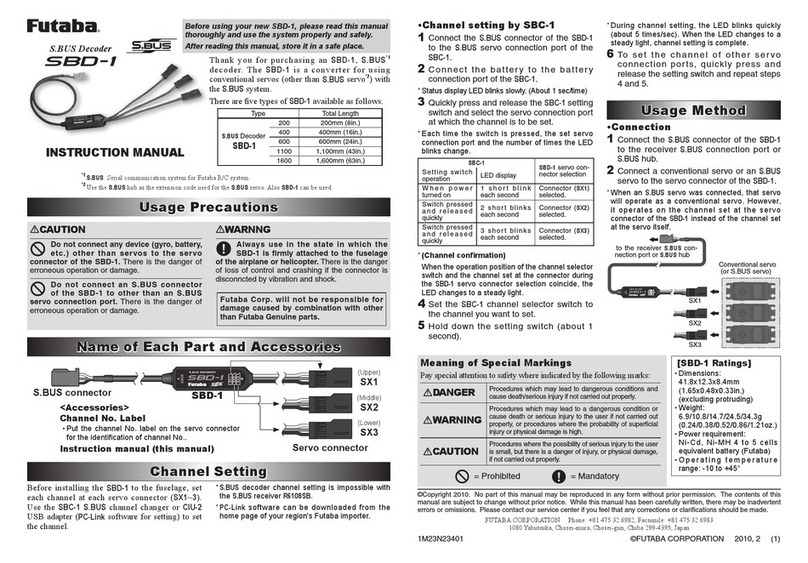
SBD-1. The SBD-1 has three connectors,
each of which sets a CH. For SBD-3,
change the CH with the Sx1 setting.
1M23N37701
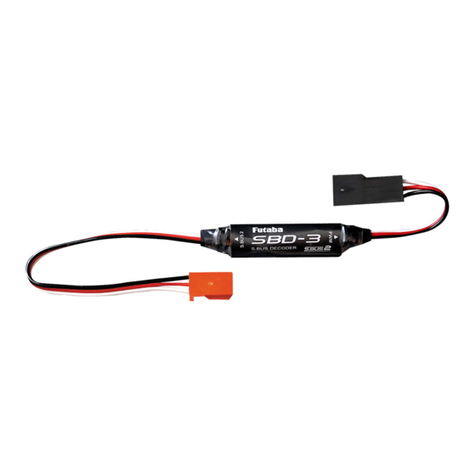
TheSBD-3isaconverter
forusingconventional
servo/ESCwiththeS.BUS
system.
S.BUS/S.BUS2
S.BUS/S.BUS2
3CH
3CH
When an S.BUS servo was
connected,thatservowill
operateasaconventional
servo.However,itoperates
on the channel set at the
servoconnectoroftheSBD-3
insteadofthechannelsetat
theservoitself.
Onlyoneservocanbe
connected.
S.BUS/S.BUS2
PWMCH3
Sx2
Sx1
Sx1
Sx3
TheSBD-1hasthreeoutput
ports.
TheoutputportofSBD-3(thisproduct)
correspondstoSx1intheSBD-1setting.
ChangethechannelofSx1.
SBD-1
SBD-3
FUTABA CORPORATION
Hobby Radio Control Business Center Sales & Marketing Department
1080 Yabutsuka, Chosei-mura, Chosei-gun, Chiba-ken, 299-4395, Japan
TEL: +81-475-32-6051, FAX: +81-475-32-2915
©FUTABA CORPORATION 2021, 4 (1)
Thank you for purchasing the
SBD-3. Before using your new
SBD-3, please read this manual
thoroughly and use the SBD-3
properly and safely. After read-
ing this manual, store it in a safe
place.
Appllcablesystems
S.BUS/S.BUS2receiver
Use:S.BUS/S.BUS2toPWM
converter
Length:238mm(9.4in)
Weight:4.7g(0.17oz)
Operatingvoltage:DC3.7Vto7.4V
(Acceptable:DC3.5Vto8.4V)
Precautions
WARNING
Failuretofollowthesesafetyprecautionsmay
resultinsevereinjurytoyourselfandothers.
Inordertopreventanyshortcircuits,
pleaseobservethepolarityofall
connections.
Ensurethattheunitisconnected
properlytothereceiver.
■If the connector is disconnected during
flight, it becomes inoperable.
Ensurethattheunitismountedinan
areathatwilleliminateexposureto
fuel,waterandvibration.
■As with any electronic components, prop-
er precautions are urged to prolong the life
and increase the performance of the unit.
Allowaslightamountofslackinthe
unitcablesandfastenthemata
suitablelocationtopreventanydamage
fromvibrationduringflight.
UsedinasetofFutabaS.BUS/S.BUS2
systems.
ToensurethattheSBD-3is
functioningasdesired,pleasetest
accordingly.
■Do not fly until inspection is complete.
Whenusinganalogservos,make
surethereceiverisinnormal
mode.
■There is the danger of erroneous op-
eration or damage on the FASSTest 12ch
mode / High-speed mode / S-FHSS.
Donotsupplyreceiverpower
fromtheESC.Whenusingthe
receiverpowersupplytypeESC,
remove the red (+) cord of the 3ch
wiringfromtheESCsothatthepower
isnotsuppliedfromtheESC.
■Use a dedicated battery to power the
receiver / servo.
DonotconnectanS.BUS
connectoroftheSBD-3toother
thananS.BUSconnectionport.
■There is the danger of erroneous op-
eration or damage.
DonotusetheSBD-3with
anythingotherthananR/Cmodel.
FutabaCorp.willnotberesponsible
fordamagecausedbycombination
withotherthanFutabaGenuineparts.
SBD-3
SBD-3
Donotsupply
receiverpower
fromtheESC.When
usingthereceiver
powersupplytype
ESC,removethered
(+)cordofthe3ch
wiringfromtheESC
sothatthepowerisnotsuppliedfromthe
ESC.
■Use a dedicated battery to power the receiver
/ servo.