alarm signal:
Use the + slider to set your desired
alarm signal. This setting will also be indicated in
the display:
: at the set alarm time, only the acoustic
alarm signal will sound for up to 30 seconds
: at the set alarm time, only the pill box will
start vibrating for up to 30 seconds
+ : at the set alarm time, the alarm will sound
alternating with the vibration of the pill box
for up to 30 seconds
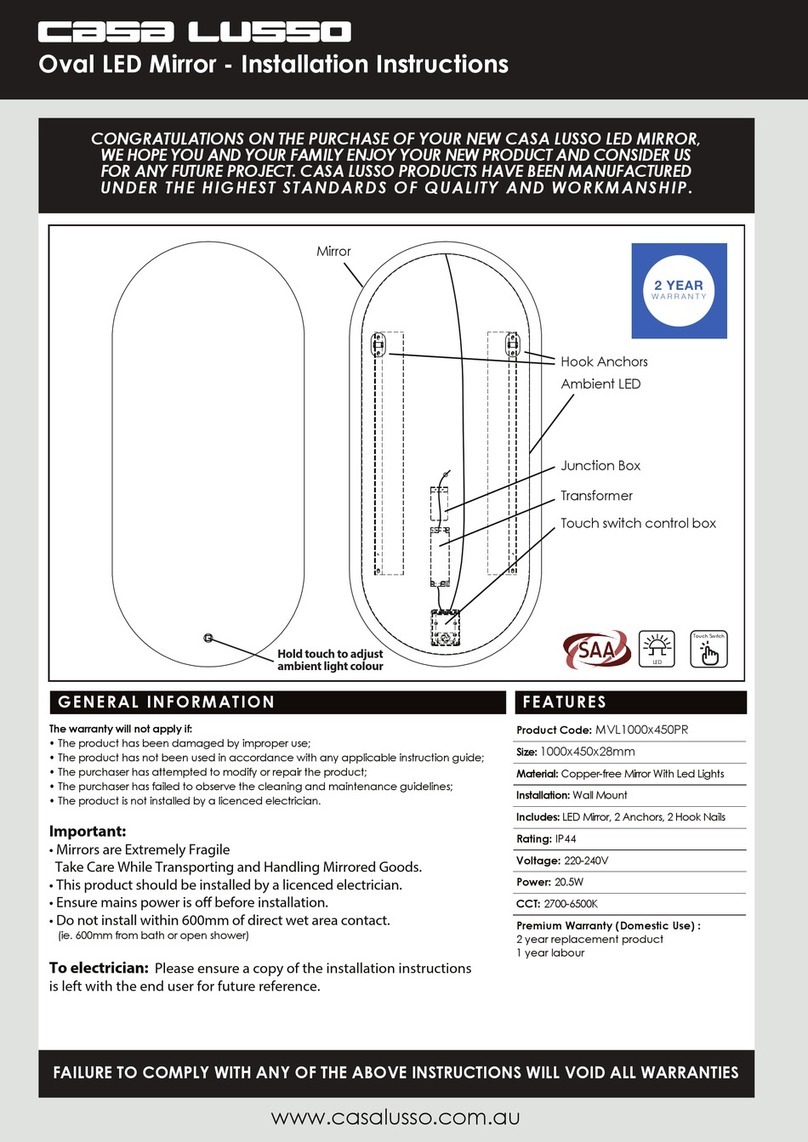
Storing medicine in the pill box:
1. carefully rotate the transparent pill cover until
compartment 1 opens
2. ll this compartment with the medicine you
should take rst, in accordance with the alarm
time you’ve set at 1
3. rotate the pill cover until compartment 2 opens
and ll it with the medicine you should take at
alarm time 2
4. repeat this, if applicable, for compartments 3, 4
and 5.
5. nally, rotate the pill cover back to the starting
position (all 5 compartments are closed)
Operation:
as soon as the alarm time is reached, the pill box
starts beeping, vibrating or starts beeping and vi-
brating alternatively for up to 30 seconds while the
symbol appears in the display.
if you don’t notice the alarm, the alarm signal will
be repeated up to 2x after 5 minutes. After this, the
colon in the alarm time keeps ashing to indicate
you ‘didn’t see’ the alarm
if you press the or button during an alarm,
the alarm signal will stop but repeat itself after
5 minutes
if you rotate the cover to open a new pill compart-
ment, the alarm signal will stop and the alarm time
changes into -:--
also when rotating the cover 15 minutes before the
set alarm time, the alarm time will disappear and
-:-- is displayed; the FC-55 assumes you’ve al-
ready taken your medication and this alarm will no
longer activate that day
automatic reset: each morning at 0:13 the medication
alarm resets itself and the programmed times will be
displayed again, ready for a new day
Heartbeat measurement:
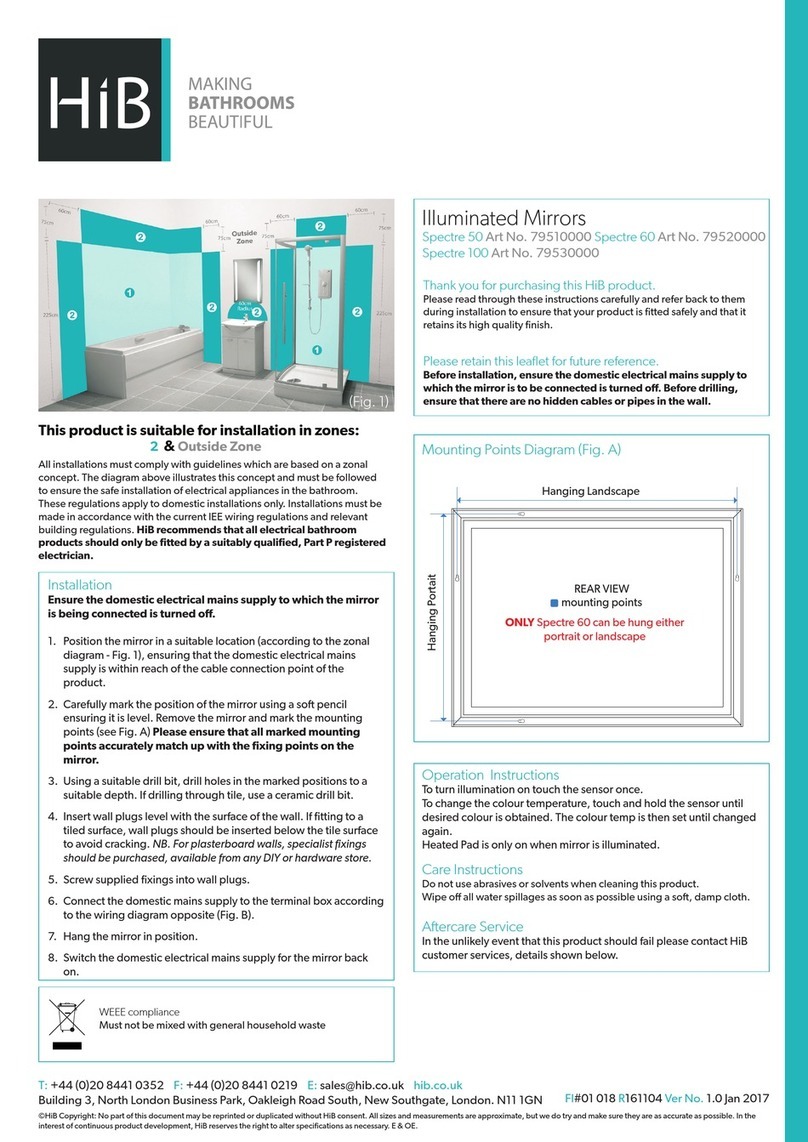
1. unlock the buttons by sliding the switch to
the left
2. briey press the but-
ton; the symbol will
appear in the display
3. place the top of your
index nger on the sen-
sor (completely cover the
sensor); the starts ashing
4. after 15 to 60 seconds, a beep tone
will sound and your heart rate will be
shown in the display.
The screen will return to the time display after
several seconds.
Key-lock:
At the side of the pill box, slide the switch in the
direction of the arrow to lock the buttons, to ensure
you cannot change your settings by accident.
Display lighting:
1. unlock the buttons by sliding the switch to
the left
2. briey press the button to switch on the dis-
play lighting for 10 seconds.
Table stand:
You can detach the clock/alarm part of the
FC-55 from the medicine part and use it as
a separate clock using the table stand.
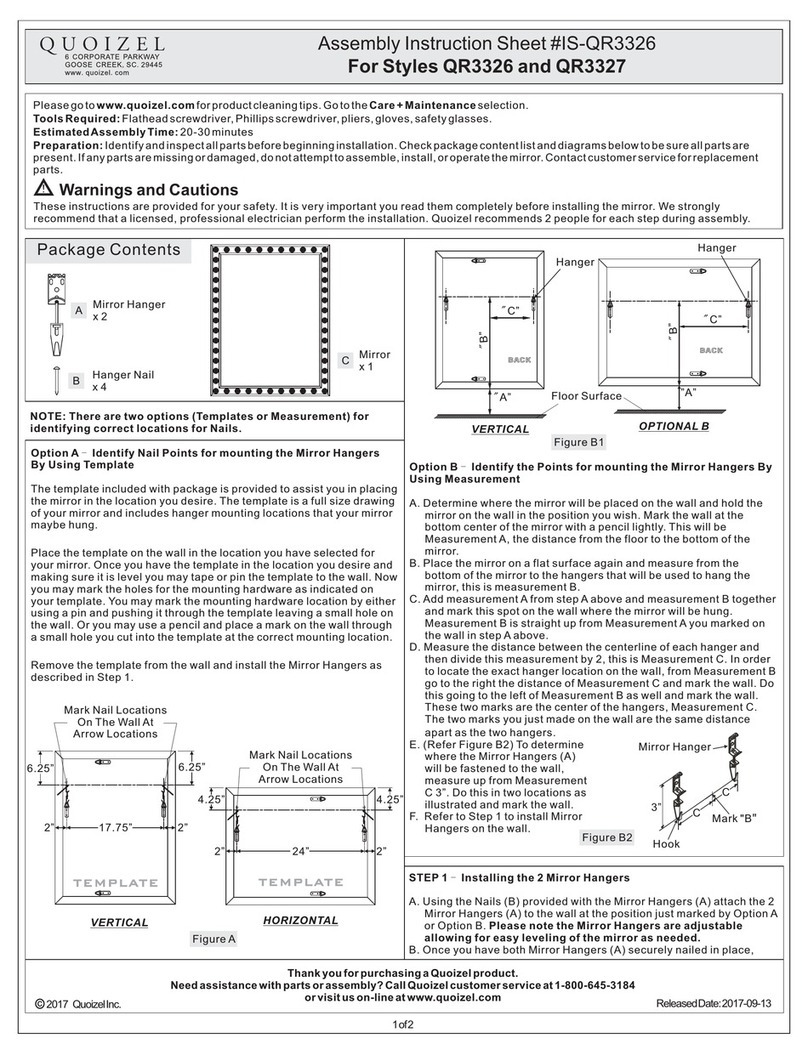
Manual reset:
In case of a possible error in the FC-55, you might
need to reset the electronics.
1. use the slider to open the
FC-55
2. use a sharp object to briey
press the RESET button
3. the FC-55 will be reset after
several seconds
Attention: both the clock and the alarm times will
now be deleted and must be programmed again.
Service:
• If the alarm signal is weak or doesn’t function
at all and the display lighting is poor or non-
functional, please replace the 1.5V AAA battery.
• If the display read-out of the clock and
programmed alarm times becomes weak,
please replace the button cell.
• In case of a possible error, please rst press
the RESET button to reset the electronics.
• Keep in mind that the non-functioning of a
button can also be caused by the switch in
the right position.
• In case the non-functioning is still not solved,
please contact the Fysic service department on
telephone number +31-73-6411355.
Declaration of conformity:
The Fysic FC-55 complies with the EC
directive 1999/5/EC.
The declaration of conformity is
available at WWW.FYSIC.COM
v2.04 5 6