Page 7
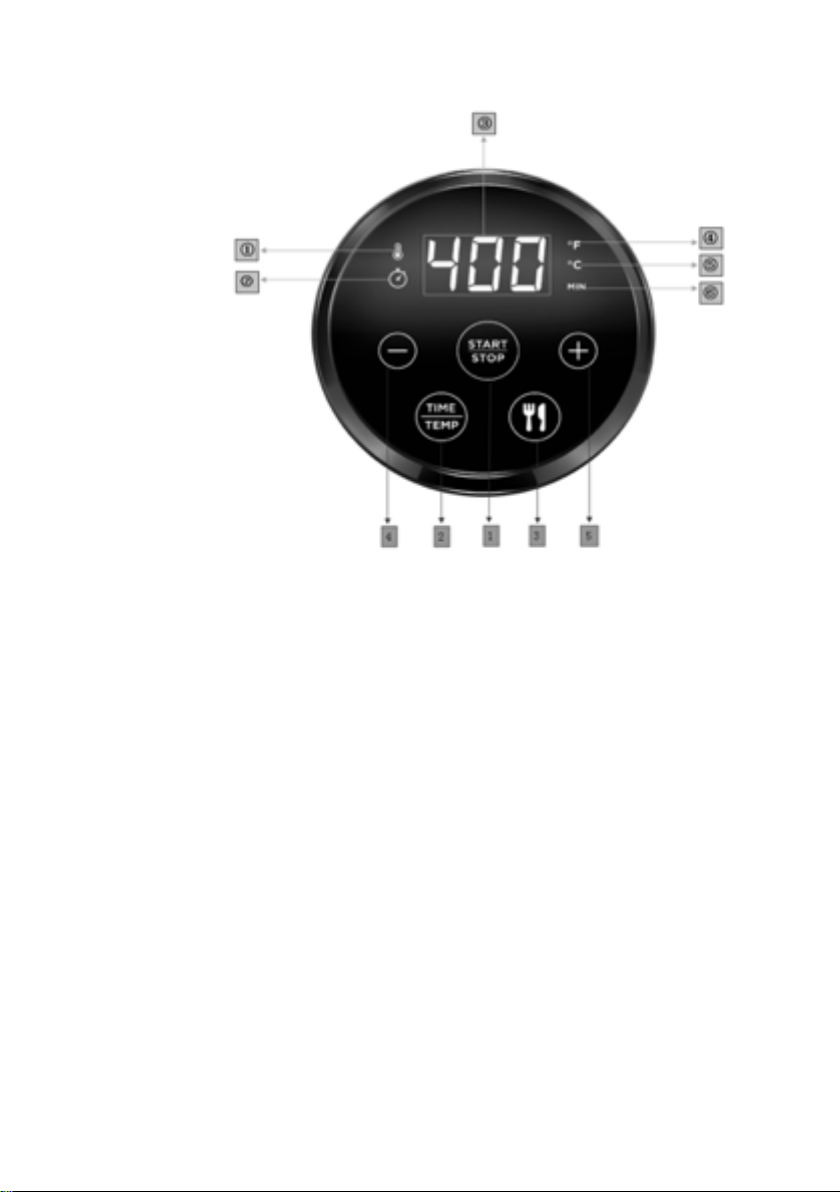
⑤:Degree centigrade icon(when it light up, means now the
temperature displayed is in Degree centigrade)
⑥:Time icon (when it light up, means now the the number
displayed is the remaining cooking time)
Using the appliance
The air fryer can be used to prepare a large range of ingredients.
The recipe booklet included serves as a guide to using the
appliance better.
Part 1
1- Carefully pull the pot out of the fryer horizontally, and put
the ingredients into the basket.
Note: Never fill the basket exceed the amount indicated in the
table, as this could affect the quality of the end result.
2- Slide the pot back into the fryer.
Never use the pot without the basket in it.
Warning: Do not touch the pot during and some time after use, as
it gets very hot. Only hold the pot by the handle.
3- Standby mode: connect the mains plug to an earthed wall
socket, then hear chord ringtone notice, the display will show
nothing, the light of button 1 “ ” will light on in white color. After
nish cooking or without any operation for 1min, the fryer will turn
to standby mode automatically.
4- Unlock: press button 1“ ” to unlock, then display will
light on and show “400 ℉”or“10Min” circularly every 5 seconds.(all
buttons can not be operated before the item was unlocked)
5- Temperature type switching: Press button 2 “ ” for 5
seconds, to switch the temperature type from “ ℉”to“℃” and with
have 1 second ring, temperature display will also change from
“400 ℉” to “200℃”
6- Temperature setting: Press button 2 “ ” enter the
temperature setting(when icon ①light up), and use button