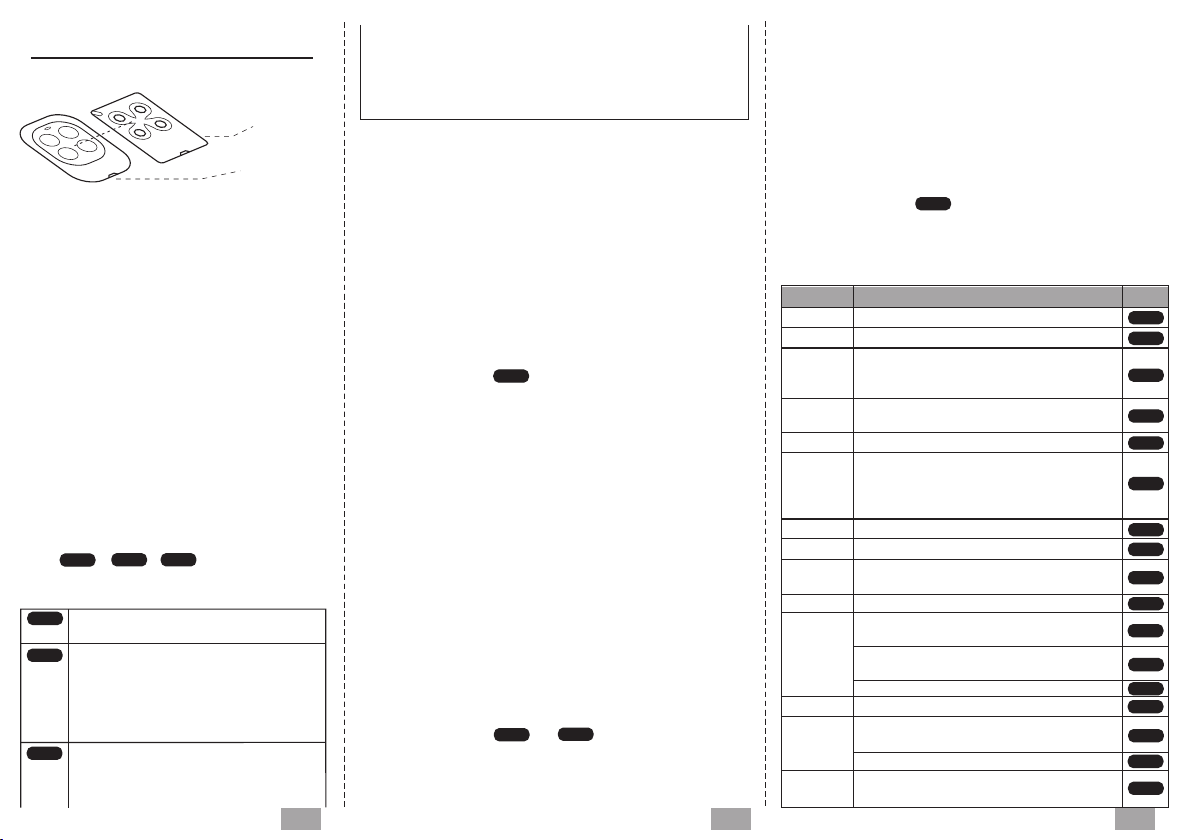
UNIVERSAL REMOTE
Best position for duplication
Auto-scan Type
Multi-frequency 280~870Mhz
Up to 4 different remotes in 1
Duplicating procedures:
COMPATIBILITY LIST
ACM TX2, TX2 COLOR, TX4
ADYX TE4433H BLUE, 433-HG BRAVO
AERF
ALLMATIC
APERIO GO, GO PRO, GO MINI
APERTO
(Sommer)
APRIMATIC TR2, TR4, TM4, TXM
ATA PTX4 BLUE, PTX4 PINK
AVIDSEN
BALLAN FM400, FM400E, FM404B, 4013
BENINCA
BESIDE BEZAP, HIT
BFT
(Original remote control on the top of Duplicator)
Original
Duplicator
S C
-Standard (duplicating)
1. Press and hold button A of the Duplicator,
meanwhile press 4 times the button B, then
release both buttons, the LED emits a short
flash every 2 sec.
2. Place the Original remote control on the
top of Duplicator.
3. Keep pressing the button of the original re-
mote control until the L ED starts flash quickly.
4. While the LED is flashing, press the button
of the Duplicator where you want to store the
remote’s code just copied, until the led will
turn off.(Step 1 to 4 video link:
https://youtu.be/mOxFoAC9Etc)
5. Select and activate the correct procedure
in the , , procedures to
complete the final step(see the compatibility
list present in this manual).
means simple code, the duplicator
can be used directly after duplicating
means rolling code simple, You need
to insert the new remote into the rec-
eiver according to the steps given by
the automation manufacturer.
(Video link reference:
https://youtu.be/OdSzvA1jl00)
means rolling code complex,
1. First of all you must be closed to
the automation.
2. Keep pressing the programmed
button during 10seconds, when the LE D start to flash,
release the button.
3. Wait until the L ED will turn off. The operation has been
done, now you can use your new remote control.
(Video link reference:
https://youtu.be/c1Y2VCKM_mw)
-BFT (duplicating)
1. Press and hold button A of the Duplicator, meanwhile
press 4 times the button B, then release both buttons, the
LED emits a short flash every 2 sec.
2. Place Original remote control on the top of Duplicator.
3. Keep pressing the button of the original remote control
until the LED turn on with a fix light and then emits a doub-
le flash every 2 sec.
4. Place Original remote control on the top of Duplicator.
5. Emit now the SEE D CODE of the BFT original remote
control, press the 1 and 2 buttons simultaneously until the
original remote control LED switches on.
6. Now the Duplicator L ED will flash quickly, press the
button where you want to store the code just copied, until
the LED will turn off.
7. Activate now the procedure to insert the new
remote control on the receiver.
-FA AC / GENI US (duplicating)
Attention: verify the programming remote control is a
MAST ER. Pressing whatever button, the LE D has to emit
a double flash rather than to switch on as a fixed light.
1. Press and hold button A of the Duplicator, meanwhile
press 4 times the button B, then release both buttons, the
LED emits a short flash every 2 sec.
2. Place Original remote control on the top of Duplicator.
3. Keep pressing the button of the original remote control
until the LED turn on with a fix light and then emits a doub-
le flash every 2 sec.
4. Emit now the S EED CO DE of the FAAC/GEN IUS origi-
nal remote control, press the 1 and 2 buttons simultaneo-
usly until the original remote control L ED flashing.
5. While the FAAC/GEN IUS LE D is flashing, place it on
the top of the Duplicator and press the button that you
want to copy.
6. Now the Duplicator L ED will flash quickly, press the
button where you want to store the code just copied, until
the LED will turn off.
7. Activate now the or procedure to insert
the new remote control on the receiver.
-V2 (duplicating)
1. Press and hold button A of the Duplicator, meanwhile
press 4 times the button C, then release both buttons,
the LED emits a short flash every 2 sec.
2. Place Original remote control on the top of Duplicator.
3. Keep pressing the button of the original remote control
until the LED turn on with a fix light and then emits a doub-
le flash every 2 sec.
4. Keep pressing once again the same button of the origi-
nal remote control until the LED starts flash quickly.
5. While the LE D is flashing, press the button of the Dupl-
icator where you want to store the remote’s code just
copied, until the led will turn off.
6. Activate now the procedure to insert the new
remote control on the receiver.
BRAND M O D E L M A R K
RCS RCC
RCC
RCC
RCC
S C
S C
RCS
RCC
IO
RCS
RCC
RCC
RCC
S C
RCS
RCC
RCS
RCS
RCS
RCC
RCS
S C
RCC
123
COMPACT, HY-DOM, MERCURI B/C,
SABUTON, MARS, SATURN, ST3/N,
TERRA, TMP-1/2, UNITECH
BROWN, BROWN RED, BRO.OVER,
PASS, MINIPASS, TECH3
TX02-868-2 BLUE, 4025 TX02-868-2,
TX02-434-2, 4022 TX02-434-2,
TX-03-868-4, 4020 TX03-434, 4013,
TX03-434-4
104250, 104250 RED, 104250 OLD,
104251, 104257, 104350, 654250
TO GO. WV, TWV, ROLLKEY, APPLE,
CUPIDO, TO.GO. QV
MITTO, MITTO M/A/B/RCB, GHIBLI,
MURALE, KLEIO
CAME S C
T431/434, TAM432SA, TOP 432/432A
/434A/432NA/432EE/432EV
LOT 1W/2W/4W/1WM/2WM/
WCV/2WCV, T2W,T4W S C
TRC, TE 01/02/04, RB4 MURALE S C
AB
CD



















