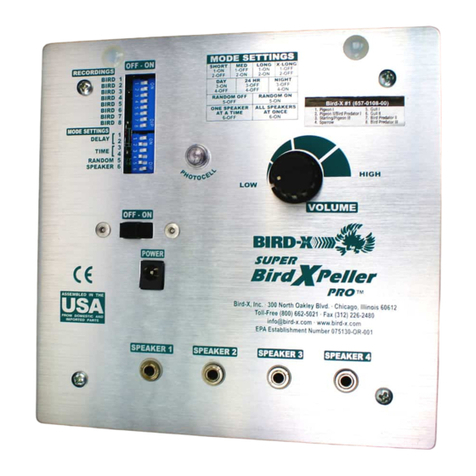
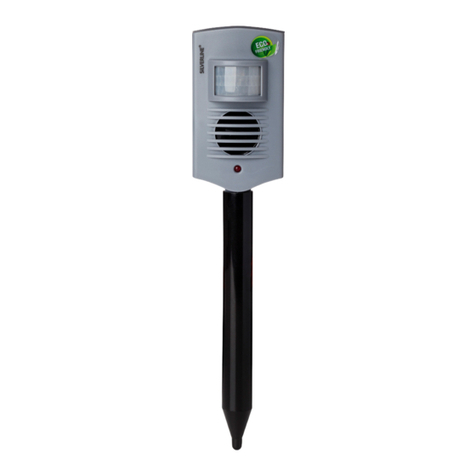
1 - P wer butt n;
2 - Jack f r external p wer s urce;
3 - LEDs;
4 - LED indicat r f «TURBO» m de;
5 - LED indicat r f p wer level;
6 - LED indicat r f «SILENT» m de;
7 - «TURBO» - « SILENT» m de selecti n butt n;
8 - Ultras nic emissi n level selecti n butt n «POWER»;
9 - LED indicat r f active «OPTICAL» m de;
10 - «OPTICAL» m de LEDs p wer n butt n;
11 - Device h using;
12 - Ultras nic emitters.
1.4 Structure and functioning
1.4.1 Operating principle is based n int lerance f r dents t ultras nic waves generated by the device.
C nstant change f emissi n parameters and unique specially devel ped alg rithm f their change eliminates ha-
bituati n f r dents and ensures even greater pr tecti n area with safe f r pe ple p wer level f emissi n. Be-
sides, the efficiency f the device has been further enhanced by high brightness flashes generated by the device
acc rding t special alg rithm with built-in LEDs.
1.4.2 The device runs under c mmand f micr c ntr ller with embedded s ftware.
1.4.3 The device is p wered by an external p wer s urce with an utput DC v ltage 12V. P larity f
p wer jack is sh wn in Figure 3.
Figure 3 – P larity f jack f r external p wer s urce.
1. INTENDED USE.
. .1 Operating restrictions
2.1.1Av id damaging ultras nic emitters, placed behind the net-screens, with f reign bjects. Damaging
emitters may cause device malfuncti n, reduce its effectiveness and make the device in perative.
2.1.2 Av id c vering w rking ultras nic emitters with hand, cl thes, etc. This may cause device malfuncti n.
2.1.3 D n t pen r disassemble device.
2.1.4 Av id t penetrate water, m isture and f reign bjects inside the device.
. Device usage.
2.2.1 Swtching n and preparing the device f r w rk.
Plug the external p wer s urce int the jack (item 2, fig. 2). Switching the device n is d ne by pressing and
h lding (m re than 2 sec nds.) the p wer butt n (item 1, fig. 2).
When the device is switched n, y u can select the needed level f emissi n p wer by repeatedly pressing the