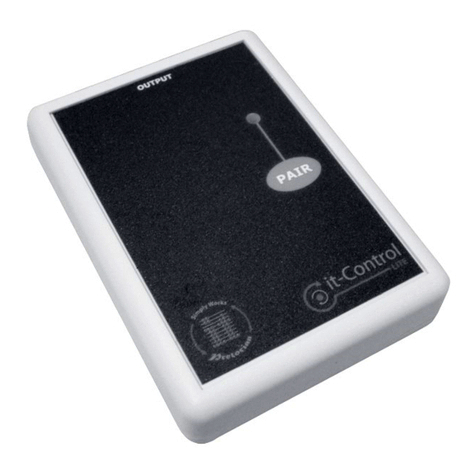
Inclusive Technology it-Control User manual

Inclusive Technology
www.inclusive.co.uk

Compatibility
The it-Control is compatible with any Simply Works transmitter.
These include:
• it-Switch - a wireless switch.
• it-Send and it-Send Pro - to enable connection of wired
switches.
• it-Stick - can be used as a ‘wobble switch’.
Batteries
The it-Control requires 2 x AAA batteries. These are tted by
removing the battery cover on the underside of the device.
Ensure the batteries are inserted correctly - match the + and –
symbols on the battery with those in the battery compartment.
Replace the battery cover and screw. It is recommended that
good quality batteries are used (such as Energiser or Duracell).
If you are not intending to use the it-Control for an extended
period (e.g. a number of weeks) it is advisable to remove the
batteries to prevent leakage, which may damage the device.

Pairing it-Control with a transmitter (e.g. it-Switch)
1. Place the it-Control close to the transmitter device.
2. Press and release the PAIR button on the front of the it-
Control. The red light next to it will begin ashing.
3. Within 10 seconds press and release the PAIR button on the
transmitter.
4. The light on the it-Control will continue to ash while the
devices communicate with each other.
5. Once the pairing is successful the red light on the it-Control
will stay on for 5 seconds.
6. If the light continues to ash for 30 seconds and then stops,
repeat the process above. If it still does not pair successfully,
refer to the troubleshooting section.
Pairing information is retained in the it-Control’s memory even
after changing the batteries.

Operation
If you have paired the it-Control with the it-Send or it-Switch, you
must ensure the mode on these devices is set to 0.
Use the lead supplied to connect the it-Control to your preferred
device. This may be an adapted battery toy or a mains control
device.
The it-Control offers four modes of operation:
• Direct - sometimes also called ‘momentary’, this mode
means the attached toy is activated while the switch is held
down. When the switch is released the toy will stop. This
mode is good for individuals learning about cause and effect
as it provides a concrete link between the switch press and
toy activation.
• Latched - the rst switch press will activate the attached toy.
Pressing again will stop it.
• Timed (sec) - when the switch is pressed the attached toy
is activated for the selected number of seconds. This mode
is good for an extended reward or for individuals who are
unable to hold down a switch.
• Timed (min) - when the switch is pressed the toy is activated
for the selected number of minutes.
Press the MODE button on the front of the it-Control to view the
current mode of operation. A light will show next to the current
mode. To change mode, continue pressing the MODE button
until the mode you require is selected.
To change the timer period press and hold the MODE button (for
about 2 seconds) until the lights come on. To change the amount
of time set, continue pressing the MODE button until the time
you want is shown. The lights show what time is selected either
on the blue scale in seconds or the red scale in minutes. After 4
seconds the lights will extinguish.
In timed modes the activation can be interrupted by pressing the
MODE button. This will enable you to stop a long timed period
when it is not required.

Output rating
The output rating of the jack socket is 1 amp at up to 30V.
Exceeding this rating may cause permanent damage and is not
covered by the warranty.
it-Control troubleshooting
Possible cause
• Not paired with a transmitter - see
pairing instructions.
• Transmitter not set to 0 - set mode
on transmitter to 0.
• No batteries in it-Control, or batteries
are at - insert or replace batteries.
• Batteries in it-Control at - replace
batteries.
• Out of range - move transmitter
closer to it-Control.
• Interference - move it-Control and
transmitter away from sources of
interference (e.g. mobile phone).
• No batteries in it-Control, or batteries
are at - insert or replace batteries.
• No batteries in transmitter, or
batteries are at - insert or replace
batteries.
• Ensure it-Control is close to
transmitter while pairing (within 1
metre).
Problem
it-Control not functioning.
it-Control works erratically or
intermittently.
Devices will not pair.

Maintenance
Your Simply Works device contains no user serviceable parts. If
it does not work as expected consult the troubleshooting guide.
If there are still problems with the device please contact your
supplier.
Warranty
Your Simply Works device is warranted against defects in
manufacture or component failure. The unit is designed for
domestic and educational applications. Use outside these areas
will invalidate the warranty. Unauthorised repair or modication,
mechanical abuse, immersion in any liquid or connection to
incompatible equipment will also invalidate the warranty.
Technical support
If you need further support with any of the Simply Works range,
please contact us:
Inclusive Technology Ltd
Riverside Court, Huddersfield Road
Delph
Oldham OL3 5FZ
United Kingdom
Tel: +44 (0)1457 819790
Fax: +44 (0)1457 819799
email: [email protected]
www.inclusive.co.uk

Notes

Inclusive Technology Ltd
Riverside Court, Huddersfield Road
Delph, Oldham OL3 5FZ
United Kingdom
Tel: +44 (0)1457 819790
Fax: +44 (0)1457 819799
email: [email protected]
www.inclusive.co.uk
Table of contents
Other Inclusive Technology Remote Control manuals