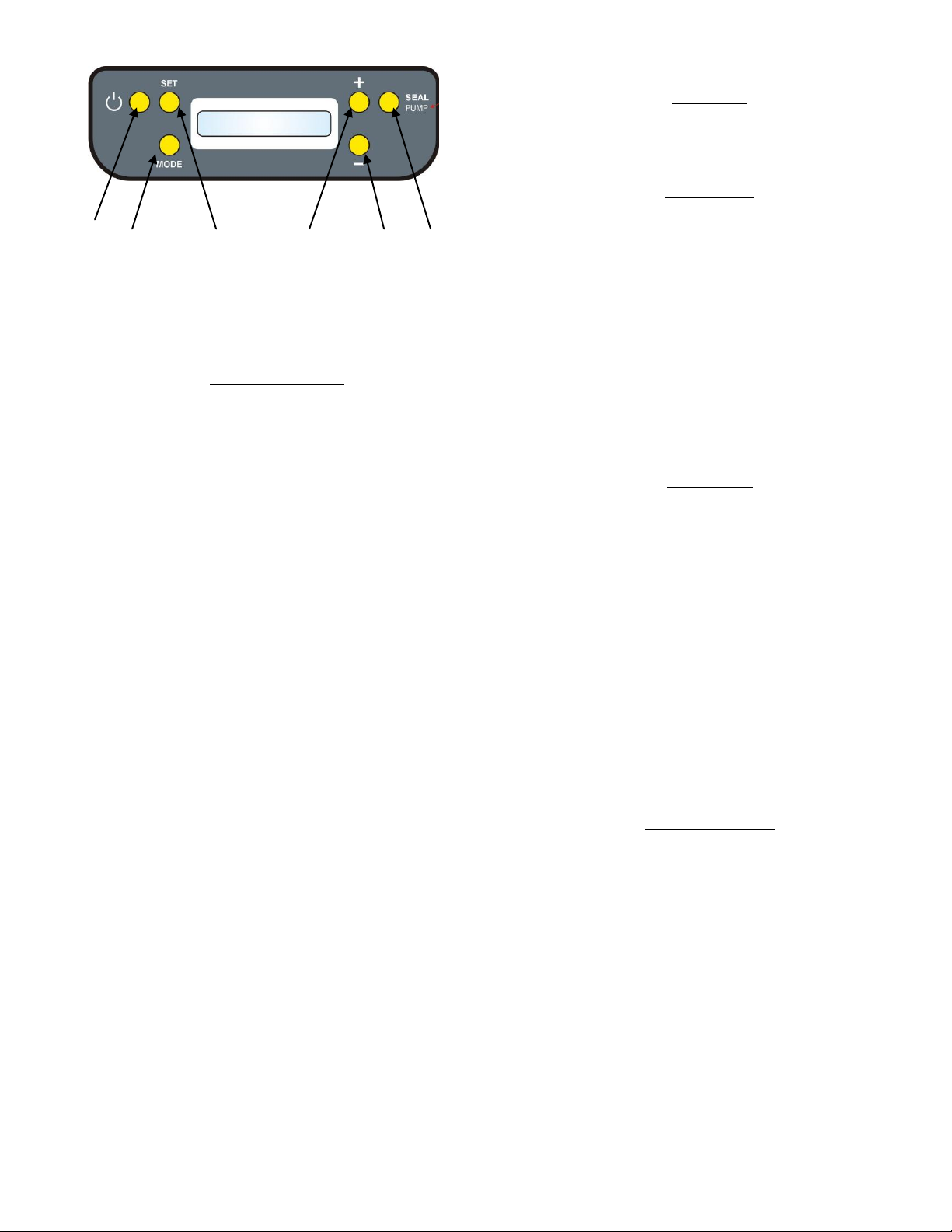
To view the chosen language, press the 'SET key" (3)
for 2 sec., or wait for a few seconds (the machine will
automatically set the language).
OPERATING MODES
VACUUM PACKAGING WITH AUTOMATIC CYCLE
With the machine on, press the "MODE key" (2)
repeatedly until the wording “automatic cycle” is
shown. You are now in the automatic cycle operating
mode.
Insert the product to be packaged into the bag.
Place the bag about 1 cm inside the lower part of the
decompression chamber - the chamber is delineated by
the gasket. Make sure that the bag content does not go
between the bag and the sealing bar.
Closing the lid, the suction pump will start
automatically; apply a slight pressure until it closes
onto the bag opening. The lid can be released after 2
secs.
The display will show the “vacuum level” from 0 to 8.
The optimum vacuum level is achieved when the
display shows the wording “vacuum level: 7”.
At the end of the vacuum process, the bag sealing
resistance turns on automatically. The display will show
the wording “sealing” and the numerical sealing value
set will decrease until 0. Then the pump will stop and
the lid will open automatically.
The machine is now ready to process another bag.
VACUUM PACKAGING WITH MANUAL CYCLE
This operating mode can be used to obtain a partial vacuum
in bags when the packaged food might be damaged by
over-compression of the bag (e.g. soft, salad vegetables,
soft bread or cheese).
Switch on the machine, press the "MODE key" (2)
repeatedly until the wording “manual cycle” is shown.
You are now in the operating mode with manual cycle.
Insert the product to be packaged in the bag.
Place the bag about 1cm within the lower
decompression chamber area - the chamber is
delineated by the rubber gasket. Make sure that the
the part to be sealed is free from food or any
substance or product.
On closing the lid, the suction pump will start
automatically; press gently and wait for it to close onto
the bag opening, then realease it.
The display will start to scan the “vacuum level
starting” from 0 to a maximum of 8. Choose the
vacuum level required.
The air suction will stop when the operator presses the
“SEAL PUMP” key (6) to start sealing the bag.
Pressing the “SEAL/PUMP” key (6) the wording
“sealing” will appear on the display and the sealing
value chosen will decrease gradually to zero.
NOTE: the sealing operation interrupts immediately the
suction of air from the bag, though the suction pump
continues to work.
Depending on the operator’s promptness in pressing the
“SEAL PUMP” key (6) it is possible to avoid creating a total
vacuum in the bag, leaving a minimum quantity of air, for
example to prevent compressing or distorting the food.
Please, however, be reminded that the food is preserved
longer with the highest level of vacuum which occurs when
the display shows the wording “vacuum level: 7”.
The pump will stop and the lid will open automatically at
the end of the sealing process.
The machine is now ready to process another bag.
VACUUM PACKAGING WITH VACUUM ONL Y CYCLE
This operating mode can be used to create vacuum in
containers (provided by the manufacturer and described in
the optional accessories section for packaging liquid food or
products with a high liquid content.
With the machine on, press the "MODE key" (3)
repeatedly until the wording "vacuum only" is shown.
You are now in the operating mode with vacuum only
cycle.
Connect the vacuum tube to the suction fitting in the
lower chamber.
Place the food inside the container and close it with the
special container lid.
Rest the suction sensor in such a way as to close the
tub on the lid, making sure that the rubber ball is
inside the special tub on the lid itself.
Start suction with the "SEAL PUMP key" (6), without
closing the mobile lid.
The display will start to scan the "vacuum level” from 0
to 8.
The machine stops when the vacuum has been
created. At this point it is possible to remove the
sensor from the lid on the jar. It's a good rule to
slightly press the rubber ball with your fingers.
The optimum vacuum level is achieved when the
display shows the wording "vacuum level: 7".
The machine is now ready to process another bag or
jar.
This operating mode does not activate the sealing bar
(which does not need to work) to avoid that the user gets
burned accidentally touching the open the mobile lid.
To open a jar in which a vacuum has been created by this
system, merely push slightly with your finger the ball in the
lid. This will allow air back into the jar and you will be able
to remove the lid.
IMPORTANT
Always use bags proportionate with the product to be
vacuum packed, otherwise (e.g.: if a very large bag is used
for only a little product), the device will take longer to
complete the cycle.
Therefore, after you have finished the sample bags
provided with the machine, select the most suitable bag
size for your packing needs from the attached list and order
the bags from the BESSER VACUUM retailers.
SEALING BAR TEMPERATURE SETTING
Sealing bar temperature adjustment takes place by
controlling the time the sealing bar stays on: the higher the
time the more the temperature increases, the lower the
time the more the temperature decreases.
Setting takes place using the "SET key" (3) as follows:
Press the "SET key" (3) for two seconds to view the
wording "temperature" on the display and the current
machine setting.
Press the "increase multifunction key (+)" (4) to
increase the sealing temperature (time), press the
decrease multifunction key (-)" (5) to decrease the
sealing temperature (time).