logo
Brands
  1. Home
  2. •
  3. Brands
  4. •
  5. Jensen
  6. •
  7. Car Receiver
  8. •
  9. Jensen JWM72A User manual

Jensen JWM72A User manual

Other Jensen Car Receiver manuals

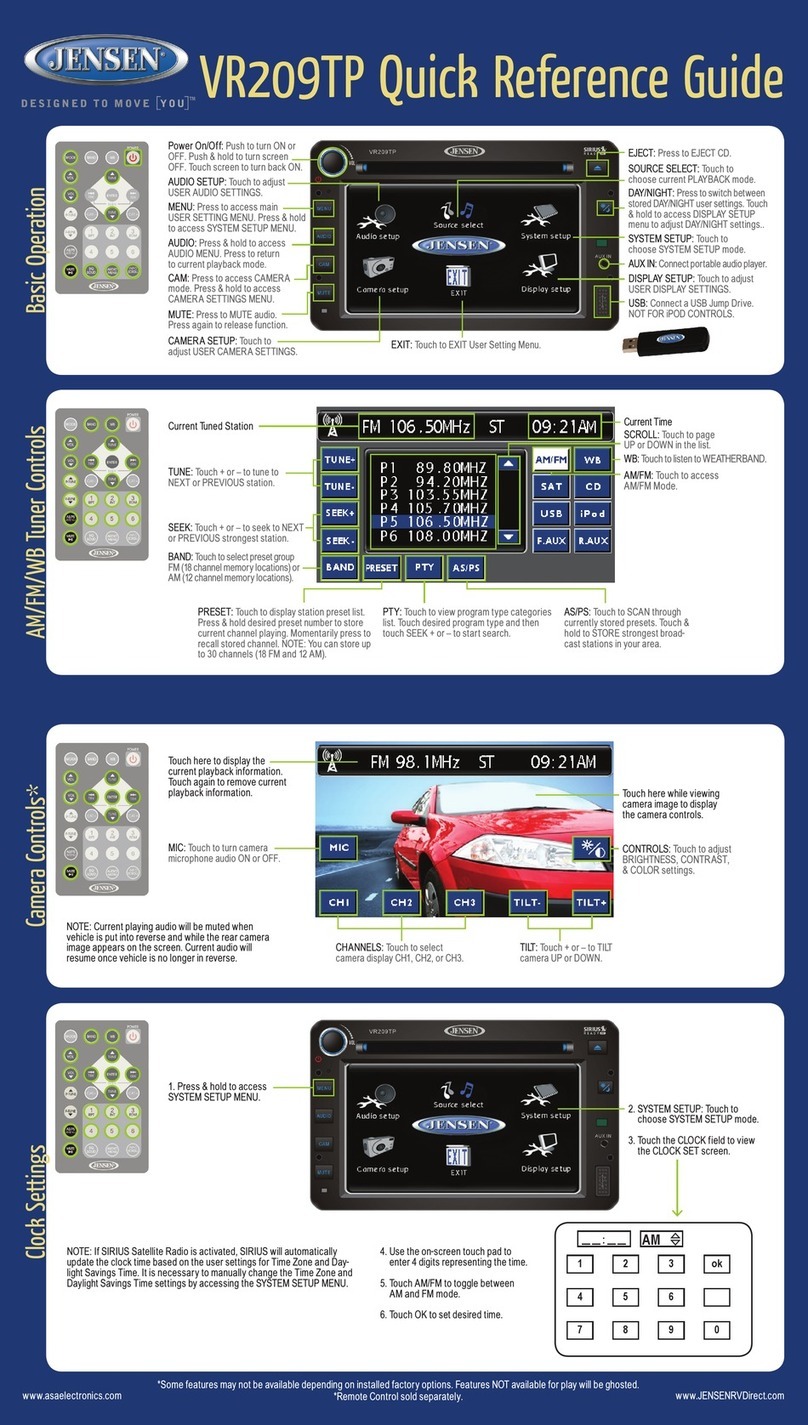
Jensen VX6628 Datasheet

Jensen

Jensen VX6628 Datasheet

Jensen VM9022 - DVD Player With LCD Monitor User manual

Jensen

Jensen VM9022 - DVD Player With LCD Monitor User manual

Jensen MP1524 User manual

Jensen

Jensen MP1524 User manual

Jensen VM8012 User manual

Jensen

Jensen VM8012 User manual

Jensen VM9424 User manual

Jensen

Jensen VM9424 User manual

Jensen VX6020 User manual

Jensen

Jensen VX6020 User manual

Jensen HR9000PKG User manual

Jensen

Jensen HR9000PKG User manual

Jensen MSR4050G - Radio / CD Player User manual

Jensen

Jensen MSR4050G - Radio / CD Player User manual

Jensen CR1610 User manual

Jensen

Jensen CR1610 User manual

Jensen VM9224 User manual

Jensen

Jensen VM9224 User manual

Jensen VX7020 User manual

Jensen

Jensen VX7020 User manual

Jensen cd3010x User manual

Jensen

Jensen cd3010x User manual

Jensen Phase Linear CD1213 User manual

Jensen

Jensen Phase Linear CD1213 User manual

Jensen VX3012 User manual

Jensen

Jensen VX3012 User manual

Jensen CMR3710 Operating instructions

Jensen

Jensen CMR3710 Operating instructions

Jensen JRV210 User manual

Jensen

Jensen JRV210 User manual

Jensen VM8012 User manual

Jensen

Jensen VM8012 User manual

Jensen VX7010 User manual

Jensen

Jensen VX7010 User manual

Jensen CD3720XM User manual

Jensen

Jensen CD3720XM User manual

Jensen Heavy Duty JHD40BT Operating and installation instructions

Jensen

Jensen Heavy Duty JHD40BT Operating and installation instructions

Jensen VM9213 - Touch Screen MultiMedia Receiver User manual

Jensen

Jensen VM9213 - Touch Screen MultiMedia Receiver User manual

Jensen VX7020A User manual

Jensen

Jensen VX7020A User manual

Jensen VM9022 - DVD Player With LCD Monitor User manual

Jensen

Jensen VM9022 - DVD Player With LCD Monitor User manual

Jensen AWM975 User manual

Jensen

Jensen AWM975 User manual

Popular Car Receiver manuals by other brands

Panasonic CQ-C3301N null

Panasonic

Panasonic CQ-C3301N null

Alpine CDE-133BT null

Alpine

Alpine CDE-133BT null

JVC CD Receiver KW-XG701 null

JVC

JVC CD Receiver KW-XG701 null

JVC KD-LH7R null

JVC

JVC KD-LH7R null

Panasonic CQ-C8803N null

Panasonic

Panasonic CQ-C8803N null

Panasonic CQ-C5302W null

Panasonic

Panasonic CQ-C5302W null

Panasonic CQ-C5355N null

Panasonic

Panasonic CQ-C5355N null

Panasonic CQ-C7703W null

Panasonic

Panasonic CQ-C7703W null

Panasonic CQ-C7703N null

Panasonic

Panasonic CQ-C7703N null

JVC KD-G407 null

JVC

JVC KD-G407 null

Clarion ADB365MP null

Clarion

Clarion ADB365MP null

Motorola VWA63 Service manual

Motorola

Motorola VWA63 Service manual

Nextar D3201 instruction manual

Nextar

Nextar D3201 instruction manual

Alpine CDE-163BT owner's manual

Alpine

Alpine CDE-163BT owner's manual

Pioneer DEH-P645R installation manual

Pioneer

Pioneer DEH-P645R installation manual

Axxera XDMA7600 Installation & owner's manual

Axxera

Axxera XDMA7600 Installation & owner's manual

XM OnyX quick start guide

XM

XM OnyX quick start guide

Sound Storm STM93R user manual

Sound Storm

Sound Storm STM93R user manual

https://manuals.online logo
https://manuals.online logoBrands
  • About & Mission
  • Contact us
  • Privacy Policy
  • Terms and Conditions

Copyright 2025 Manuals.Online. All Rights Reserved.

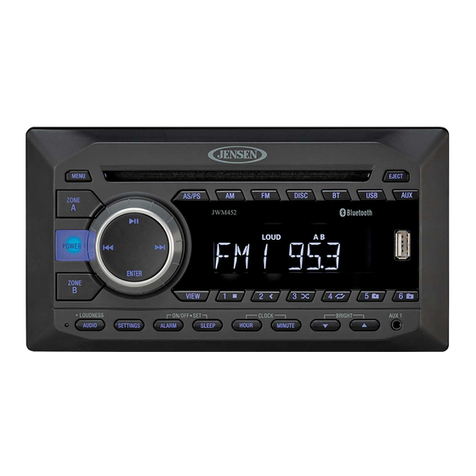
JWM72A
QUICK REFERENCE GUIDE
AM/FM Tuner Controls
Basic Operation
RESET: Use a ball
point pen or thin
metal object to press
the reset button.
ZONES: Press ZONES button to enter
the Zone Menu and select the active
zone (ZONE A, ZONE B, and ZONE C)
for volume adjustment control.
ZONE MUTE: While in Zone Menu,
Press and hold the ENTER knob to
quickly mute the zone.
AUX IN: Insert
3.5mm cable from
your portable
media device.
MODE: Press to cycle through
source mode. Press ENTER
KNOB to select. Radio will
auto-select after a couple
seconds of inactivity.
SETTINGS: Press to bring up
AUDIO ADJUSTMENT options:
BASS, TREBLE, BALANCE
(left to right), Fade (front to
rear), LOUDNESS (on/off), EQ:
User, Flat, Pop, Classic, Rock.
Press & Hold to bring up
SETTING MENU options:
BLUETOOTH (ON/OFF), BEEP
(ON/OFF), TUNING REGION,
PRESET VOLUME and
RESET. VOLUME KNOB will
adjust each MENU option
except for 'RESET'.
POWER/MODE:
Push to turn ON or
OFF.
VOLUME : Rotate
clockwise to increase
volume or counter-
clockwise to decrease
the active zone's
volume.
BACK: Press to exit
any menu.
App Control
App download
and operation:
jControl app
controls all of
the primary
functions of the
JWM72A
directly from your phone or table. It
can be downloaded from the App
Store on iTunes for Apple devices,
or the Google Play Store for Android
devices, and found by searching for
jControl.
After downloading and installing the
app, pair your device to the
JWM72A as instructed in the
Bluetooth Operation section in this
guide. Once your device is paired,
open the app and use as
instructed.(Device must be paired to
JWM72A before the app can be
used).
MODE: Press repeatedly to
cycle through available modes
until Radio is reached, and
press ENTER KNOB to
select.Rotate knob to desired
band and press ENTER KNOB
to select.
PRESETS MENU: Press to
bring up PRESET menu. Press
repeatedly to cycle through the
stored channels. Press ENTER
KNOB to recall stored channel.
AS/PS: Press to SCAN through
currently stored presets.
Press & Hold to STORED
strongest broadcast stations in
your area.
STATION STORE PRESETS:
1. Press PRESET button to bring up PRESET menu.
2. Press & Hold the ENTER KNOB store current station.
NOTE: Up to 18 FM & 12 AM channels can be stored.
TUNE/SEEK/TRACK:
Press button to tune
frequency higher.
Press button to tune
frequency lower. Press
and hold to scan to next
strongest station.
VOLUME: Rotate clockwise
to increase volume or
counter-clockwise to
decrease the active zone's
volume.
BACK: Press to exit
PRESET menu.
Mode Menu
Back
Power
Forward
App Info
Play/ Pause/ Mute
Mode Menu
Zone
Volume
and
Settings
CD/DVD Player Controls
PLAYBACK MENU: Press
to bring up PLAYBACK
MENU options: RANDOM
(on/off), REPEAT
(one/dir/all/off), INTRO
(on/off) for CD/MP3
playback.
TITLE menu, REPEAT
(title/all/off) for DVD
playback. Rotate VOLUME
KNOB will adjust each
playback menu option.
Press or to navigate
menu options.
BACK: Press to exit
playback menu.
VOLUME: Rotate clockwise to increase
volume or counter-clockwise to decrease
the active zone's volume.
TUNE/SEEK/TRACK: Press
button to advance to NEXT
TRACK or CHAPTER/TITLE.
Press button to go back to
PREVIOUS TRACK or
CHAPTER/TITLE. In CD mode,
press & hold to FAST
FORWARD or REVERSE
current play. In DVD mode,
press & hold to enter FAST
FORWARD/REVERSE. Press
& Hold additional times to step
through x2, x4, x8, x20. Press
PLAY ( ) to resume.
MODE: Press repeatedly to
cycle through available modes
until Disc is reached, and press
ENTER KNOB to select.
EJECT: Press to eject the disc
select.
: Press to PLAY or PAUSE
current audio or video.

For owner’s manual, please visit http://www.asaelectronics.com/manuals-guides.
QRG-JWM72A-0717
©Copyright 2019 ASA,LLC
USB Playback
Clock with Alarm
Bluetooth Operation
ANSWERING PHONE: BT
audio will automatically
pause when a call is
answered.
It will then resume once call
has ended. In some cases, it
may be necessary to press
the play button to resume
the BT audio.
MODE: Press repeatedly to
cycle through available modes
until Bluetooth is reached, and
press ENTER KNOB to select.
MODE: Press repeatedly to
cycle through available modes
until USB is reached, and
press ENTER KNOB to select.
SLEEP TIMER /ALARM/CLOCK SET:
Repeated presses will cycle through the
TIME menu setting options: SLEEP timer
(OFF, 15, 30, 45, 60 minutes), ALARM
(on/off), ALARM SET, CLOCK SET.
Rotate the VOLUME KNOB to adjust hour
or minute when setting either CLOCK or
ALARM time. Press ENTER KNOB to
change to minute adjustment.
PLAY/PAUSE: Press to PLAY
or PAUSE current audio or
video.
USB: Connect a USB
flash/thumb drive for audio
playback or mobile device for
charging.
DIMMER: Press to switch the
DIMMER (on/off).
Press & Hold to bring up
brightness setting. Rotate the
VOLUME KNOB to adjust the
brightness (Off, 1, 2, 3, 4, 5, 6,
7, 8).
TUNE/SEEK/TRACK: Press button to
advance to NEXT TRACK. Press button
to advance to PREVIOUS TRACK. Press &
Hold additional times to step through x2, x4,
x8, x20. Press PLAY (▶II) to resume.
SETTINGS: Press & Hold to
bring up setting menu and
press to navigate through
menu options, until BT menu
is reached Press ENTER to
select DEVICE LIST or PAIR.
PAIR DEVICE VIA BLUETOOTH: Make sure the
device you intend to pair with is on and ready to pair.
1.Press PAIR button to enter Bluetooth mode.
2.Press & Hold PAIR button to start Bluetooth
pairing process.
The JWM72A will display “PAIRING” and will be
available to pair for 120 seconds.
3.In your device Bluetooth settings, select
“JWM72A” to connect.
: Press to PLAY or
PAUSE current audio or
video.
TUNE/SEEK/TRACK:
Advance or reverse
tracks on your device.

PLAYBACK MENU: Press to
bring up PLAYBACK MENU
options: RANDOM (on/off),
REPEAT (one/dir/all/off),
INTRO (on/off) and
FOLDER/FILE select.
Rotate VOLUME KNOB will
adjust each playback menu
option. Press or to
navigate menu options.
BACK: Press to exit playback
menu.
BACK: Press to exit time
menu.
VOLUME: Rotate clockwise to
increase volume or counter-
clockwise to decrease
corresponding zones volume.