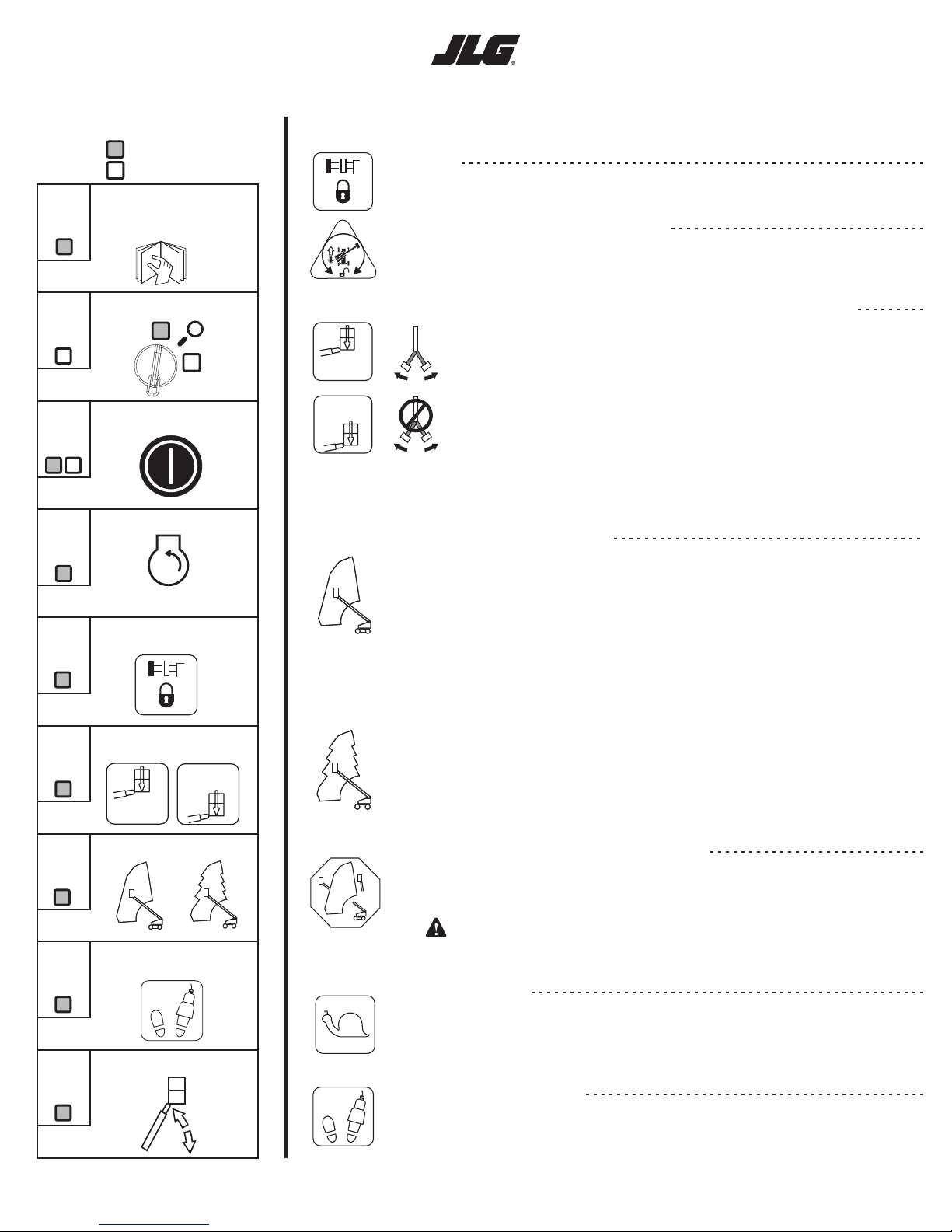
1200SJP/1350SJP Quick Reference
Getting Started Controls and Indicators
Footswitch/Enable
Axles
Drive Orientation Override
1
2
3
4
5
6
7
8
9
Select platform controls
Pull out both E-Stops
Verify axles are extended
before lifting boom
Select appropriate platform
capacity
Enable footswitch
Select desired Boom Control
Operate Machine
- Ground Station
- Platform Station
Located at:
To enable the platform controls, step on the footswitch FIRST and then choose a function within
7 seconds. If no function is selected within 7 seconds, the Footswitch/Enable light will turn off and
the footswitch must be released and depressed again.
Axles must be extended and the Axle Set Light must be on to elevate the boom. To extend the axles,
select the axle extend switch while driving forward or reverse.
If operating drive and the Drive Orientation Light flashes, the drive controls may be opposite from the
intended driving direction. To continue: 1) verify the intended drive direction, 2) push and release
the Drive Orientation Override switch, and 3) operate drive within 3 seconds.
When the Platform Capacity is selected to the 500 lb (230 kg) position, the 500 lb
(230 kg) light will be on and the JLG control system will allow operation within the larger
envelope. The side swing jib can be used with this selection.
Platform Capacity Select/Jib Swing Function
Note: If both capacity lights are flashing, the boom or jib is out of the allowable
envelope. Remove platform load over 500 lb (230kg) and select the 500 lb
(230kg) capacity position.
When the Platform Capacity is properly selected to the 1000 lb (450 kg) position, the
1000 lb (450 kg) light will be on, and the JLG control system will allow operation within
the smaller envelope. The side swing jib must remain in the centered position with
this selection.
Boom Control Select
When the Boom Control is selected to the position, lift and telescope movements are
coordinated by the JLG control system and the automatic platform leveling feature is active during
lift, swing, and drive movements.
Automatic
•
•
•
•
While operating Lift Up, the boom may also telescope out
While operating Lift Down, the boom may also telescope in
While operating Swing or Drive, the boom may lift up or lift down
While operating Telescope In, the boom may lift down when at
high boom angles and the creep light is flashing
When the Boom Control is selected to the position, lift and telescope movements are
controlled separately by the operator and the automatic platform leveling feature is active only
during lift movements.
Manual
Note: When selected to the Manual position, the boom movements will be stopped
when the envelope limits are reached. If this occurs, operate the function in the
opposite direction, operate a different function, or select the Automatic position.
Boom Control System Warning
If operating a function causes the Boom Control System Warning Light to flash and the platform
alarm to sound, the selected movement is not allowed. To continue movement, operate the
function in the opposite direction or operate a different function.
WARNING! The Boom Control System Warning Light may indicate contact
of the machine with another structure and continued movement
may result in damage to the machine or machine tip over.
!
JLG - 3128412 - 1-11-2006
500 lb MAX
230 kg MAX
1000 lb MAX
450 kg MAX
Creep Speed
The creep light acts as a reminder that all functions are set to the slowest speed. The light will be
on continuously if the creep switch is selected by the operator. The creep light will flash if the JLG
control system has selected this creep speed automatically. This occurs when the boom is near the
edge of the envelope or the Boom Control System Warning is active.
500 lb MAX
230 kg MAX
1000 lb MAX
450 kg MAX
STEP
STEP
STEP
STEP
STEP
STEP
STEP
STEP
STEP
Automatic
Manual
Note: When selected to the Automatic position, the coordination of boom movements
within the envelope is as follows:
Read the Operation and
Safety Manual. Perform
pre-start inspection.
Start Engine
Below 20°F (-7°C) run engine for
15 min. before operating machine.