① ② ③
Thank you very much for purchasing our product.
Please read the User Manual carefully before using Rock House. In addition, please keep this User
Manual so that you can read it at any time when necessary. The Rock House noiseless rehearsal
studio is designed for music lovers, and it is a great companion to every music lover for teaching,
practicing and band rehearsal. It has 5 instrument inputs, 5 mic inputs, 5 headphone outputs, and
USB connector to computers, and it extends the function of a mixer. Being compact and exquisite in
design, Rock House is unexpectedly powerful! It has five separate color-coded sections, and each
musician picks a color section and plugs in their instruments, microphones and headphones, then
using their section's Moni Mixer controls to create their own perfect mix. In addition, Rock House
has a very special handle, which facilitates portable handling and perfect space allocation of the
five color-coded sections. Rock House is equipped with low noise preamplifiers, separate channel
mixing, high dynamic headphone amplifiers, and full conductive coatings to ensure clean signal
transmission. Our Rock House noiseless rehearsal studio is your best choice!
WARNING
IMPORTANT SAFETY INSTRUCTIONS
Safety Guide
■
■Rock House should be used with the accompanying power supply cords or other “standard compliant”
power supply cords.
■The power supply cords should be situated away from the heat sources or radiators, and placed
properly to avoid trample, stumbling, or grinding. It should not be overbended or overloaded.
■Please unplug the power cord of Rock House from the outlet when left unused for a long period of time
or under thunder and light.
■Please hold the plug when unplugging the power cord from the outlet to avoid damage of the power
cord.
■Unplug the Rock House power adapter if any of the following conditions exist:
The power cord or plug has become frayed or damaged.
The Rock House has been dropped or damaged.
Sudden loss of sound happened or suspicious burning smells or smoke emitted.
Then ask qualified service personnel for maintenance.
■Please do not expose Rock House to rain, liquids or excessive moisture. Do not put any liquid
containers on it in case of spilling any liquid into or onto Rock House.
■Please place Rock House away from heavy dust, vibration, extreme cold or hot places (such as direct
sunlight, near heaters, or in the car in the sun) to avoid panel disfiguration or damage to the internal
components.
■Please avoid any foreign objects (paper, plastic, metal, etc) dropping into the gap or opening
apertures. If this happpens, please immediately unplug the power plug from the power outlet to cut off
power.
■Please keep the equipment reliably grounded for your safety. Please do not remove the grounding of
the equipment or disable the grounding.
■Please connect Rock House to power followed by grid connection.
■Please do not use excessive force to operate Rock House so as not to damage it.
■Please ask service personnel to check the performance of wear-prone parts, like switches, control
buttons, and connectors.
■Please clean Rock House with a clean, dry cloth. Never use benzene, thinner, detergent, or any
flammable polishing liquid detergent.
■Please do not dispose Rock House with your household waste. The correct disposal can reduce the
environmental pollution and health hazards. The disposal methods are different in different areas,
please contact with us when it is necessary.
■Rock House is manufactured strictly with the specifications and voltage conditions in certain areas. If
you purchased Rock House through network, mail, or telphone sales, please double check whether it
can be used in your area or not. It is dangerous to use this item in any invalidated area and you can
not enjoy the rights of manufacturer or dealer warranty. In addition, please keep your invoice as
proof of purchase, otherwise you can not enjoy the rights of manufacturer or dealer warranty.
Hearing damage may occur if the Rock House or headphones are used at high volume. Please
turn the volume to a comfortable volume.
Rock House should be used under specified rated voltage which is printed on the nameplate.
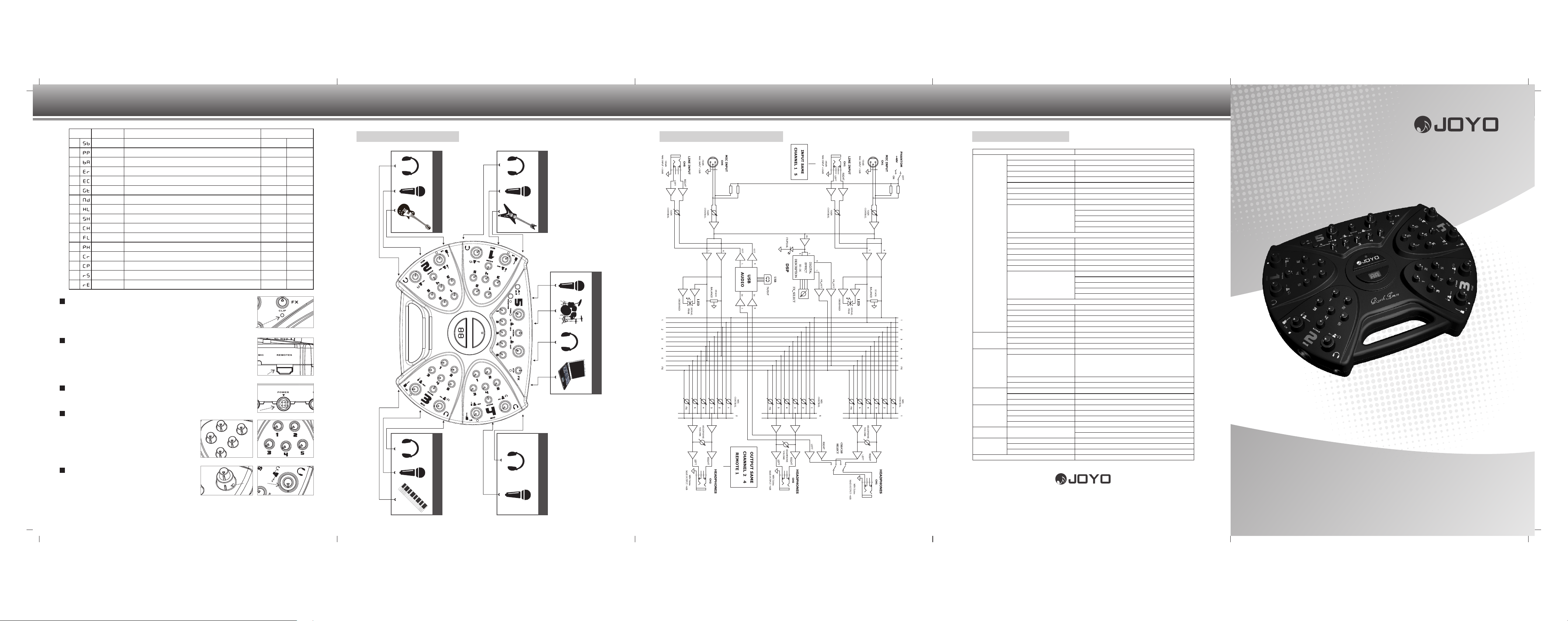
Rock House general functions:
Signal processing: Preamplifier, Signal level matching, effects mixing
Signal distribution: Collect every processed signal and distribute to every channel
Mixing: Mix signals from every channel and adjust the volume and effects
Headphone driver: Power amplifier
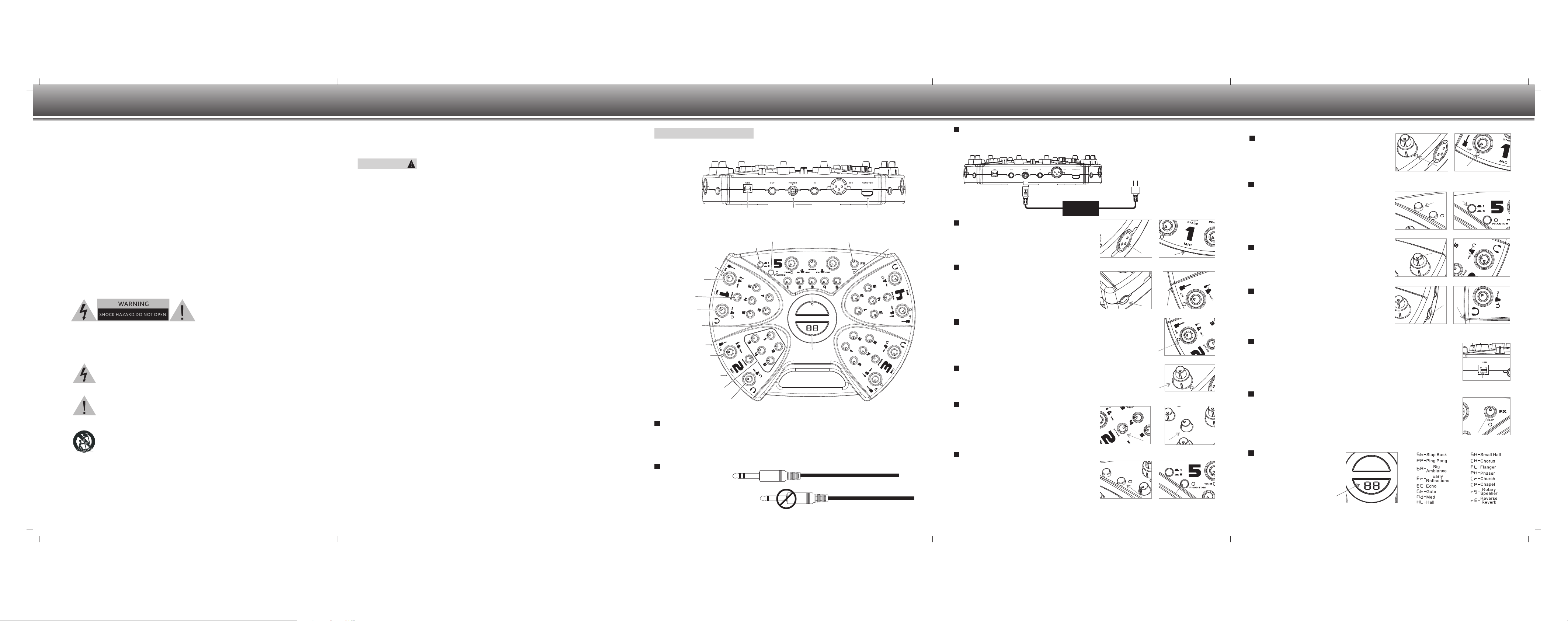
Function Description
Stage Control
The stage control is simply a balance control that
helps adjust the sonic location between musicians’
ears to guarantee the optimized sound clarity. When
turning it to the left, the sound signal will be
received by your left ear, when turning it to the right;
the sound signal will be received by your right ear.
When turning it to the middle point, both your ears
will receive the sound signals.
Phantom power
The Rock House provides +48V phantom power for
condenser mics. Simply press the Phantom power
button and the LED will illuminate red, then all the
XLR jacks are supplied with +48V phantom power.
The balanced connection between the condenser
mics and the XLR jacks is required when the
phantom power supplies power. The PIN 2 and PIN
3 of the XLR jack are supplied with the same +48V
DC (PIN 1 is Grounded).
1/5 Channel switch control
To the musicians, the band leader or recording
specialist may want to monitor one channel,
especially the channel that records and amplifies.
The Rock House monitoring system is basically for
th
the 5 channel. You can have free option of 1 or 5 by
pressing the switch control button. When the button
is pressed down, what you are monitoring is the mix
from channel 5. When the button is bounced, it is the
st
monitoring of the 1 channel.
Headphone volume control
Headphone volume knob is set to control the
headphone output. Start with the headphone output
control at zero (100% counterclockwise) and slowly
turn it up. You can adjust the headphone output
according to your requirement.
Headphone output jack
1/4 TRS stereo headphone jack connects to more
than 32 omhs stereo power headphones. Human
voice from the mics, the sound output from guitar,
bass, drum, etc. will be mixed you can hear them via
your headphones or by other amplifiers or recording
equipments.
USB Connector
The USB 1.1 connector connects Rock House to Windows or Mac computer, and
it realizes the transfer of analog signals to digital signals. It has two transfer
delicacies: 16 bit/44.1KHz and 16 bit/48KHz. The USB connector facilitates the
dual stereo audio transmission between the computer and Rock House. Rock
House is compliant with the asio (Audio Stream Input Output) when the driver is
loaded.
FX button-Effect Type Selector
You can get your ideal sound effect by switching the FX button. Rock House
noiseless rehearsal studio has built-in 16 kinds of sound effect, including reverb,
delay, chorus, flanger, etc. When the Rock House is power on, there is no sound
effect. You should turn the FX button to choose your ideal sound effect as shown
on the digital display LED, and then slightly press the FX button. The red dot on
the display LED will illuminate, and you get the effect you want. The FX button is
360 rotary and 16 sound effects will display continually. FX button-Effect Type SelectorFX button-Effect Type Selector
01:
02:
03:
04:
05:
06:
07:
08:
09:
10:
11:
12:
13:
14:
15:
16:
USB connector Power connector Remote connector
④ ⑤
Connect your instrument
with a stereo cable.
Rock House noiseless rehearsal studio User Manual
Never use with a cart, stand, tripod, bracket, or table except as specified by
the manufacturer, or sold with the apparatus. When a cart is used, use
caution when moving the cart/apparatus combination to avoid injury from
tip-over.
The exclamation point within an equilateral triangle is intended to alert the
user to the presence of important operating and maintenance (servicing)
instructions in the literature accompanying the product.
The lightning flash with arrowhead symbol, within an equilateral triangle, is
intended to alert the user to the presence of uninsulated “dangerous
voltage” within the product’s enclosure that may be of sufficient magnitude
to constitute a risk of electric shock to persons.
CAUTION: TO REDUCE THE RISK OF ELECTRIC SHOCK,
DO NOT REMOVE COVER (OR BACK).
NO USER-SERVICEABLE PARTS INSIDE.
REFER SERVICING TO QUALIFIED SERVICE PERSONNEL.
Please do not open the Rock House, and attempt to disassemble the internal parts or
conduct any reconstructions. Rock House does not contain any user-serviceable
parts. When Rock House appears unusual, please turn off it and ask qualified service
personnel for maintenance.
Effects controls
1/5 channel switch control
Mic inputs jack
Signal LED
INstruments inputs
Headphone
output jack
Headphone
volume control
Stage controls
Mic input
trim controls
INstrument
input trim controls
1-5 Moni Mixer control
Effect type selector
Effect peak LED
Power LEDPower LED
Effects digital display LEDEffects digital display LED
Instrument input connection
Stereo
Mono
Power Connection
Turn the Stage knobs on Rock House at the middle point, turn down all other knobs to zero (100%
counterclockwise) and bounce all the switches. Then plug in the power adapter. The blue LED light
and red digital display LED tells you when the Rock House is ready.
Plug in the power adaptor
as illustrated below
Power adapter
AC 100-240V~50/60Hz 1.6A
Mic Input jack
Mic inputs signals via XLR jack and the XLR jack can
transmit balanced or unbalanced low or high level
signals to Rock House. Dynamic mics, condenser
mics, and low impedance mics can all be used here
for signal input. Please use short mic cable to avoid
noise when unbalanced mics are used.
Instrument input jack
Connect your instrument via the 1/4 TRS stereo
socket to transmit balanced or unbalanced low or
high level signals to Rock House. Please use short
instrument cable to avoid noise interference when
transmitting unbalanced signals. As most of the
instruments are mono output, we have developed
one cable (CM-06) to transfer 1/4 mono to 1/4 stereo
to satisfy the Rock House stereo instrument input.
The dual trim knobs design (outer/bottom for mic
input and inner/top for instrument input) allows
separate a d j u s t m e n t of mic input t r i m a n d
instrument input trim.
Trim Controls
Use the Trim knobs to set your input trim levels. The
LED light under the trim knobs will guide you to set
the trim to the right level. Proper trim level set is
vital for the normal operation of Rock House Mute
Rehearsal Studio. Trim Controls
Stage ControlStage Control
Phantom power Phantom power
Mic Input jackMic Input jack
Instrument input jackInstrument input jack
Effects Digital Display LED
Rock House noiseless rehearsal
studio has built-in 16 effects, and
they will be displayed in form of
16 di ffe rent c har a cte r s. The
characters will be shown on the
digital display LED.
Trim LED
Trim LED indicates the input trim level. You can
refer to the table below for your guide:
No color: No signal or weak signal Green: good
Yellow: caution Red: bad
When the LED light turns yellow or red, please turn
the dual trim knobs down a little till it turns green.
Effects Digital Display LEDEffects Digital Display LED
USB ConnectorUSB Connector
Headphone output jackHeadphone output jack
Headphone volume controlHeadphone volume control
1/5 Channel switch control1/5 Channel switch control
Trim LED Trim LED
Dual trim knobs
Phantom power control