manuals.online logo
Brands
  1. Home
  2. •
  3. Brands
  4. •
  5. JR ProPo
  6. •
  7. Switch
  8. •
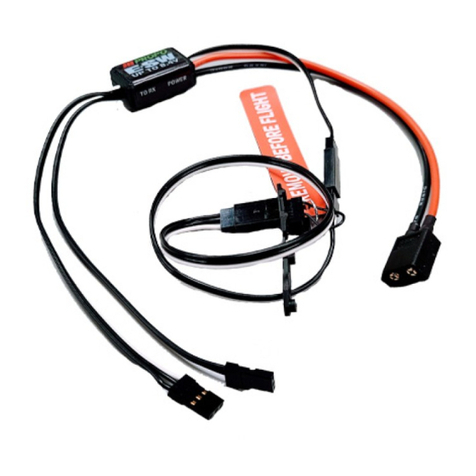
  9. JR ProPo E-SW-G User manual

JR ProPo E-SW-G User manual

Other JR ProPo Switch manuals

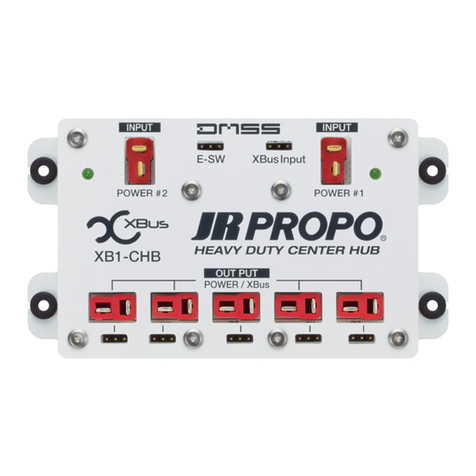
JR ProPo XBus Series User manual

JR ProPo

JR ProPo XBus Series User manual

JR ProPo E-SW XT60 User manual

JR ProPo

JR ProPo E-SW XT60 User manual

Popular Switch manuals by other brands

SMC Networks SMC6224M Technical specifications

SMC Networks

SMC Networks SMC6224M Technical specifications

Aeotec ZWA003-S operating manual

Aeotec

Aeotec ZWA003-S operating manual

TRENDnet TK-209i Quick installation guide

TRENDnet

TRENDnet TK-209i Quick installation guide

Planet FGSW-2022VHP user manual

Planet

Planet FGSW-2022VHP user manual

Avocent AutoView 2000  AV2000BC AV2000BC Installer/user guide

Avocent

Avocent AutoView 2000 AV2000BC AV2000BC Installer/user guide

Moxa Technologies PT-7728 Series user manual

Moxa Technologies

Moxa Technologies PT-7728 Series user manual

Intos Electronic inLine 35392I operating instructions

Intos Electronic

Intos Electronic inLine 35392I operating instructions

Cisco Catalyst 3560-X-24T Technical specifications

Cisco

Cisco Catalyst 3560-X-24T Technical specifications

Asante IntraCore IC3648 Specifications

Asante

Asante IntraCore IC3648 Specifications

Siemens SIRIUS 3SE7310-1AE Series Original operating instructions

Siemens

Siemens SIRIUS 3SE7310-1AE Series Original operating instructions

Edge-Core DCS520 quick start guide

Edge-Core

Edge-Core DCS520 quick start guide

RGBLE S00203 user manual

RGBLE

RGBLE S00203 user manual

Thrustmaster FLIGHT SIMULATOR X quick guide

Thrustmaster

Thrustmaster FLIGHT SIMULATOR X quick guide

Southwire SURGE GUARD 41390 RVC troubleshooting guide

Southwire

Southwire SURGE GUARD 41390 RVC troubleshooting guide

Buhler Nivotemp NT 61 Brief instructions

Buhler

Buhler Nivotemp NT 61 Brief instructions

Kramer VS-41HDCP user manual

Kramer

Kramer VS-41HDCP user manual

Techly IDATA AU-270 user manual

Techly

Techly IDATA AU-270 user manual

Belkin F1U109 user manual

Belkin

Belkin F1U109 user manual

manuals.online logo
manuals.online logoBrands
  • About & Mission
  • Contact us
  • Privacy Policy
  • Terms and Conditions

Copyright 2025 Manuals.Online. All Rights Reserved.

Features
・The electronic switch avoids problems with
faulty switch contacts.
・Fail safe design - removing the switch plug
powers up your radio system.
・Two choices of connector available
 : Deans Ultra Plug or XT60
Thank you for purchasing
this product
To allow correct and safe use of this product,
Please be certain to read this operation manual.
1. Be sure to close the switch hatch to avoid damage
from water, or oil orother substances which may aff-
ect the operation of
the switch.
2. Securely mount the switch to the aircraft using
the supplied screws and switch cover.
3. Please be sure to respect connector polarity.
Reverce conne ction will damage the switch
Be sure to completely
close the cover when flying.
“Caution Items” are explained
using this indication.
“Obligatory Items” are explained
using this indication.
“Prohibited Items” are explained
using this indication.
The informtion is divided and explained using the following symbols.
If the product is used with a voltage other
than the rated voltage,it will be damage.
Pay adequate attention to the remaining
battery capacity during flights.
Do not disassemble or modify this product.
Do not get the product wet or damage may
occur. Do not use the product in environm-
ents where condensation occurs.
Do not use any component which has been
damaged, included wires or connectors.
Be sure to securely mount the switch to the
airframe.
For your safety, be sure to observe
the following points
In order to protect against injury to users or third parties,
or damage to property, please observe the following.
Product name:E-SW-G
Weight:0.56 oz / 16g
Dimensions:0.77x1.16x0.37 inch
(w/o Cable) 19.5x29.5x9.5mm
Length:12.6 inch / 320 mm
Operating voltage:4.5-8.5V
●Main Unit ●E-Switch Adapter L150
●E-Switch Pulg ●Tap Screw(2)
●Manual
Contents
OPERATION MANUAL
Cautions
CAUTION
Specifications
Please note this is not a voltage
regulator. When using voltages
above 6.0V, use high-voltage
compatible servo
Be sure to disconnect the battery from
switch unit between flying sessions.
Leaving the battery connected,even with the
switch plug inserted, results in a small resi-
dual current draw that will eventually flatten
the receiver battery and potentially damage it.
UP TO 8.4V
DMSS
8ch
RECEIVER
UP TO 8.4V
ESW
Power supply connector
*Connect to BIND / BATT / SENS
ON/OFF Switch plug
*Removing the switch plug turns power ON.
Note: The plug is not sensitive to insertion direction.
To the batteryTo the receiver
E-SW Port
E-Switch
Adapter
Battery Port
Configuration and Installation
■
Example of connection to the DMSS 8ch Receiver.
Receiver Battery
Li-Po 2cell / Li-Fe 2cell
(Sold separately)
Connector
For U.S.A.: [email protected] (Ph: 217-369-2854)
For Australia: [email protected] (Ph:07-3879-6692)
For other overseas Countries: [email protected]
ELECTRONIC SWITCH

品番:T0078189
品名:ESW-G
重量:16g
本体寸法:19.5x29.5x9.5mm
全長:320㎜
発売元:小西模型株式会社(RCDEPOT)
〒270-0239千葉県野田市泉1-3-17
TEL:04-7197-2948 FAX:04-7127-8010
【RCDEPOTラジオサービスセンター】
TEL:04-7157-0159
■修理アフターサービスに関するお問合せ
受信機側 バッテリ側
ON/OFF用スイッチプラグ
Eスイッチポート
Eスイッチアダプタ
バッテリーポート
※引き抜くとONになります。
 極性は有りません。
接 続 図
電源用コネクタ
※BIND/BATT/SENS端子へ接続
UP TO 8.4V
■8ch受信機の接続例
DMSS
8ch
RECEIVER
UP TO 8.4V
受信機用電池
Li-Po2cell/Li-Fe2cell
(別売)
ESW
コネクタA
●本体●EスイッチアダプタL150
●Eスイッチプラグ●タッピングネジ(2)
●取扱説明書

特 徴 構 成
仕 様
・電子スイッチは接点のトラブルを100%回避可能
・スイッチプラグを引き抜くことで電源投入
・搭載場所を選ばないスリム設計
このたびは、弊社製品お買い上げいただき
誠にありがとうございます。
本製品を正しく安全にご使用いただくために
取扱説明書を必ずお読みください。
OPERATIONMANUAL
使用者もしくは第三者への危害・財産への損害を未然に防止
するため必ずお守りいただくことを次のように表示します。
お守りいただく内容を、次の表示で区分し説明します。
安全にご使用いただくために必ずお守りください。
使用方法
分解、改造等をしないこと。
水に濡らさない。結露の生じる環境では使用しない。
本体及びハーネスの固定を確実にしてください。
ハーネスが絡まって事故の原因となる可能性があります
また、振動でハーネスの根元が切れる可能性があります
定格電圧以外で使用すると、回転センサーの誤検出や破
損の原因となります。
飛行中は電池残量に十分注意してください。
この表示で「注意事項」を説明します。
この表示で「義務事項」を説明します。
この表示で「禁止事項」を説明します。
1.SWプラグを外した時は、キャップを
 しっかり閉じてオイルや液体などの進
 入を防いでください。
2.機体へ取り付ける際は付属のマウント
 パーツで期待を挟んでネジで固定して
 ください。
3.受信機へコネクタを接続する際には向
 きに十分注意して差し込んでください
 逆に接続しますと故障します。
(蓋を閉じた状態)
蓋を閉じてください
長期間電池をつないだまま放置すると
電池が破損します。使用しない場合は
必ず電池を外してください。
本製品にレギュレーター機能はあり
ません。6.0V以上の電源使用時には
必ずハイボルテージ対応サーボをご
使用ください
注 意
被覆チューブ、リード線やコネクタにキズがついた場合は
使用しない。
動作電圧:4.5-8.5V
ELECTRONIC SWITCH