manuals.online logo
Brands
  1. Home
  2. •
  3. Brands
  4. •
  5. Kaidan
  6. •
  7. Camera Accessories
  8. •
  9. Kaidan QuickPan QuickPan Panoramic Tripod Head User manual

Kaidan QuickPan QuickPan Panoramic Tripod Head User manual

This manual suits for next models

2

Other Kaidan Camera Accessories manuals

Kaidan KiWi-L User manual

Kaidan

Kaidan KiWi-L User manual

Kaidan QuickPan User manual

Kaidan

Kaidan QuickPan User manual

Kaidan Meridian TM-400 User manual

Kaidan

Kaidan Meridian TM-400 User manual

Kaidan KiWiTM 2900 User manual

Kaidan

Kaidan KiWiTM 2900 User manual

Kaidan KiWi 2000 User manual

Kaidan

Kaidan KiWi 2000 User manual

Kaidan KiWi KiWi Panoramic Tripod Head User manual

Kaidan

Kaidan KiWi KiWi Panoramic Tripod Head User manual

Kaidan KiWi 990 User manual

Kaidan

Kaidan KiWi 990 User manual

Kaidan QuickPan Magnum QPX-2 User manual

Kaidan

Kaidan QuickPan Magnum QPX-2 User manual

Popular Camera Accessories manuals by other brands

CamRanger CamRanger user manual

CamRanger

CamRanger CamRanger user manual

Custom Brackets HDV CAGE KIT Instructions for use

Custom Brackets

Custom Brackets HDV CAGE KIT Instructions for use

Aegis ABL052010P user manual

Aegis

Aegis ABL052010P user manual

Saft SRA Series Installation and operating instructions

Saft

Saft SRA Series Installation and operating instructions

Kodak TIB5200 technical information

Kodak

Kodak TIB5200 technical information

Videotec HEG instruction manual

Videotec

Videotec HEG instruction manual

Ikelite 6171.11 manual

Ikelite

Ikelite 6171.11 manual

Pentax Auto Bellows Slide Copier K user manual

Pentax

Pentax Auto Bellows Slide Copier K user manual

Nikon UT-1 user manual

Nikon

Nikon UT-1 user manual

dji RONIN 4D quick start guide

dji

dji RONIN 4D quick start guide

SLIK ABLE 300DX user manual

SLIK

SLIK ABLE 300DX user manual

Rebelcell 36V70 user manual

Rebelcell

Rebelcell 36V70 user manual

Trojan GC2 48V quick start guide

Trojan

Trojan GC2 48V quick start guide

Calumet 7100 Series CK7114 operating instructions

Calumet

Calumet 7100 Series CK7114 operating instructions

Ropox 4Single Series User manual and installation instructions

Ropox

Ropox 4Single Series User manual and installation instructions

Cambo Wide DS Digital Series Main operating instructions

Cambo

Cambo Wide DS Digital Series Main operating instructions

Samsung SHG-120 Specification sheet

Samsung

Samsung SHG-120 Specification sheet

Ryobi BPL-1820 Owner's operating manual

Ryobi

Ryobi BPL-1820 Owner's operating manual

manuals.online logo
manuals.online logoBrands
  • About & Mission
  • Contact us
  • Privacy Policy
  • Terms and Conditions

Copyright 2025 Manuals.Online. All Rights Reserved.

User’s Guide - V1.2 - 12 Jan 2005
QuickPan
Panoramic Tripod Head
®
QuickPan III / IV Panoramic Tripod Head Overview
Thank you for purchasing a Kaidan
QuickPan III / IV Panoramic Tripod
Head. This manual is designed to help
you understand how to use your
QuickPan III / IV to create quality
panoramas. This document will be re-
vised from time to time and updated
versions can be downloaded from the
QuickPan III / IV page on the Kaidan
web site.
QuickPan III / IV Overview
The QuickPan III / IV family is built
around a sturdy and precise Rotator
Base with interchangable indexing
ClickDiscs (or rings QP-III). There
are several camera brackets that slide
and lock onto the Rotator Base. The
QuickPan IV rotator design super-
sedes the QuickPan III rotator and
uses a new flat detent disc design.
A panoramic tripod head makes it
easy to capture a sequence of photos
that are stitched to form a complete
panoramic image. It holds the camera
in the portrait orientation, positions
the camera so that it rotates around
the optical center or nodal point of
the lens and provides a repeatable
and adjustable click-stop indexing
mechanism.
Welcome to the Kaidan QuickPan III / IV and Panoramic Photography
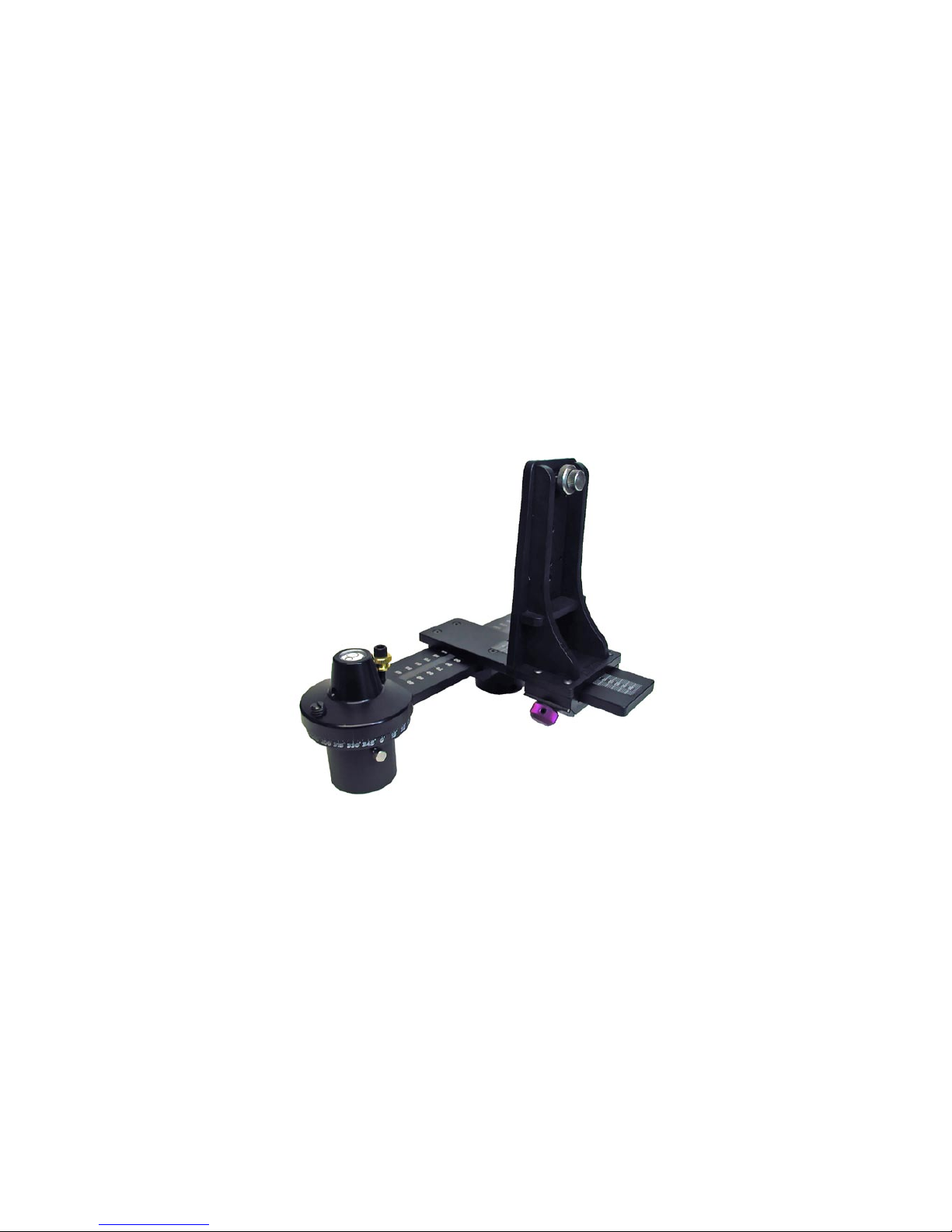
QuickPan IV Rotator with Optional Twin-Axis Adapter and Compact Camera Bracket
The QuickPan III / IV Family
Twin-Axis Adapter
The Twin-Axis Adapter is designed to support most
digital and film cameras that are equipped with
fisheye lenses, or will appeal to those users who de-
sire two independent axes of adjustment. It can be
used with either the Standard Camera Bracket or
with the Compact Camera Bracket. The two axes
of adjustment positions the lens in such a manner
so as not to capture any more of the Rotator Base
than necessary. When a camera equipped with a
circular fisheye lens is installed on the bracket, only
a small segment of the Rotator Base will appear in
the image. This feature makes the Twin-Axis Adapter
ideal for those using iPIX software, Panoweaver and
other software applications that use circular fisheye
images. Both camera brackets support optional
Quick Release Camera Plates.
Spherical Camera Bracket
The Spherical Camera Bracket is designed to
support most digital and film cameras and to
permit the angular up/down elevation for the
capture of multirow spherical and QuickTime®
VR Cubic panoramas. This bracket is ideal for
those software applications that stitch multiple
rows of images, including up/down "cap" shots
such as REALVIZ Stitcher. The Spherical Camera
Bracket can also be positioned at a level zero
degrees, thus fulfilling the same functions as the
Standard Camera Bracket. You can also use the
Spherical Camera Bracket for shooting single-
row cylinders as well. An optional Arca-Quick
Release Camera Plate is also available.
Standard Camera Bracket
The Standard Camera Bracket is designed
to support most digital and film cameras in a
portrait orientation. Used primarily to shoot
single-row cylindrical panoramas it is adjusted
along the horizontal arm to locate the camera
in the side-to-side orientation. There are three
slots in the bracket, that when used with various
positioning aids, provide the fore-aft adjustment
of the camera's nodal point, over the rotational
center of the tripod head. Earlier models used
an aluminum bracket while recent models use a
high-strength composite material (inset). A Quick
Release Plate is optional.
Rotator Base (QuickPan L, III & IV)
This heavy-duty design is lighter and more com-
pact than previous models and the competition.
The QuickPan bases employ interchangeable
indexing ClickDiscs or rings that support various
click-stop positions. These can be easily swapped
at any time and contribute to the light weight.
The indexing mechanism requires no lubrication
or adjustments and has no loose parts. The base
contains an integral circular bubble level and ac-
commodates either 1/4” or 3/8” tripod threads.
The latest QuickPan IV Rotator Base (Aug 04)
will also accept older Kaidan camera brackets
(i.e. KiWi+, QuickPan).
Introducing the QuickPan III / IV Components

QuickPan III Rotator Base
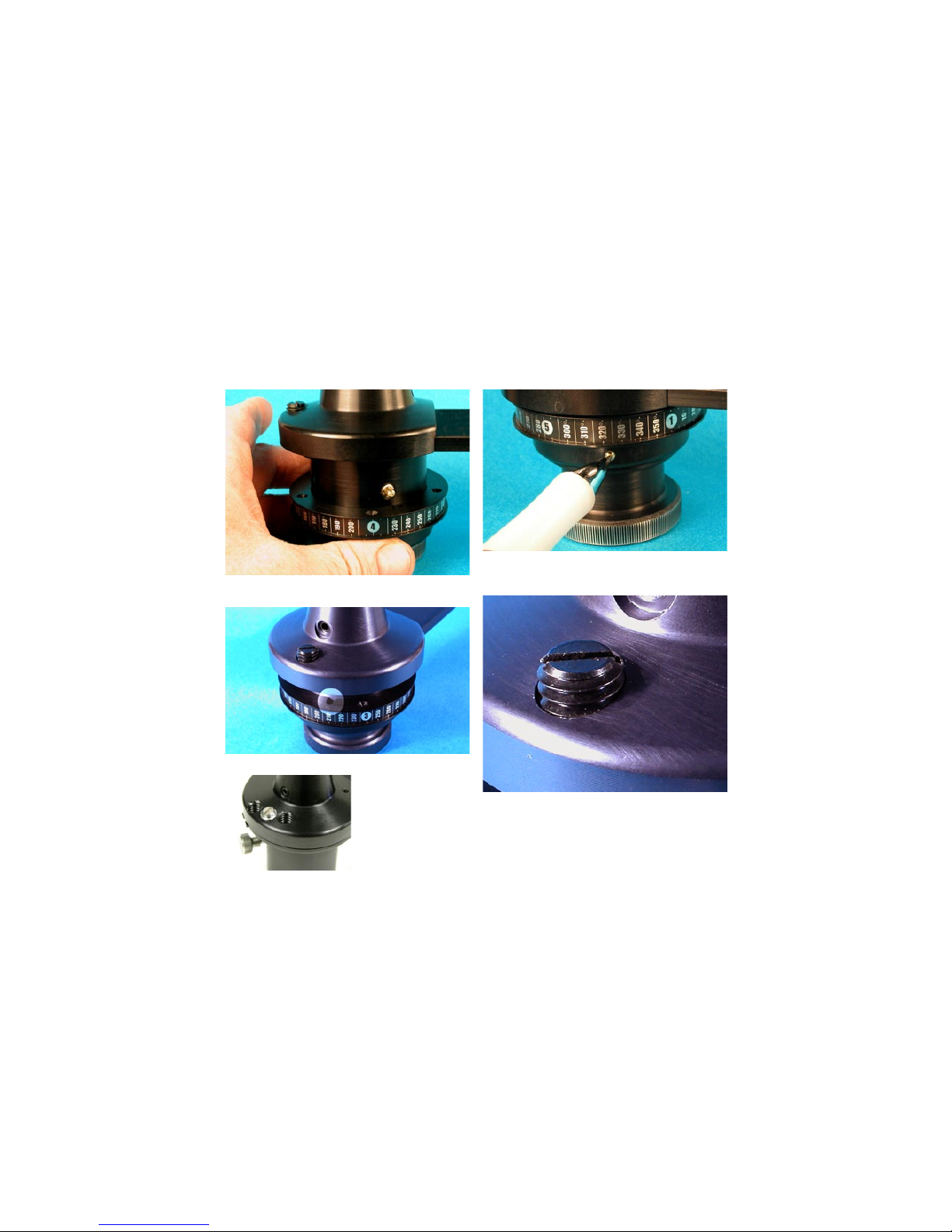
Installing
Indexing Rings
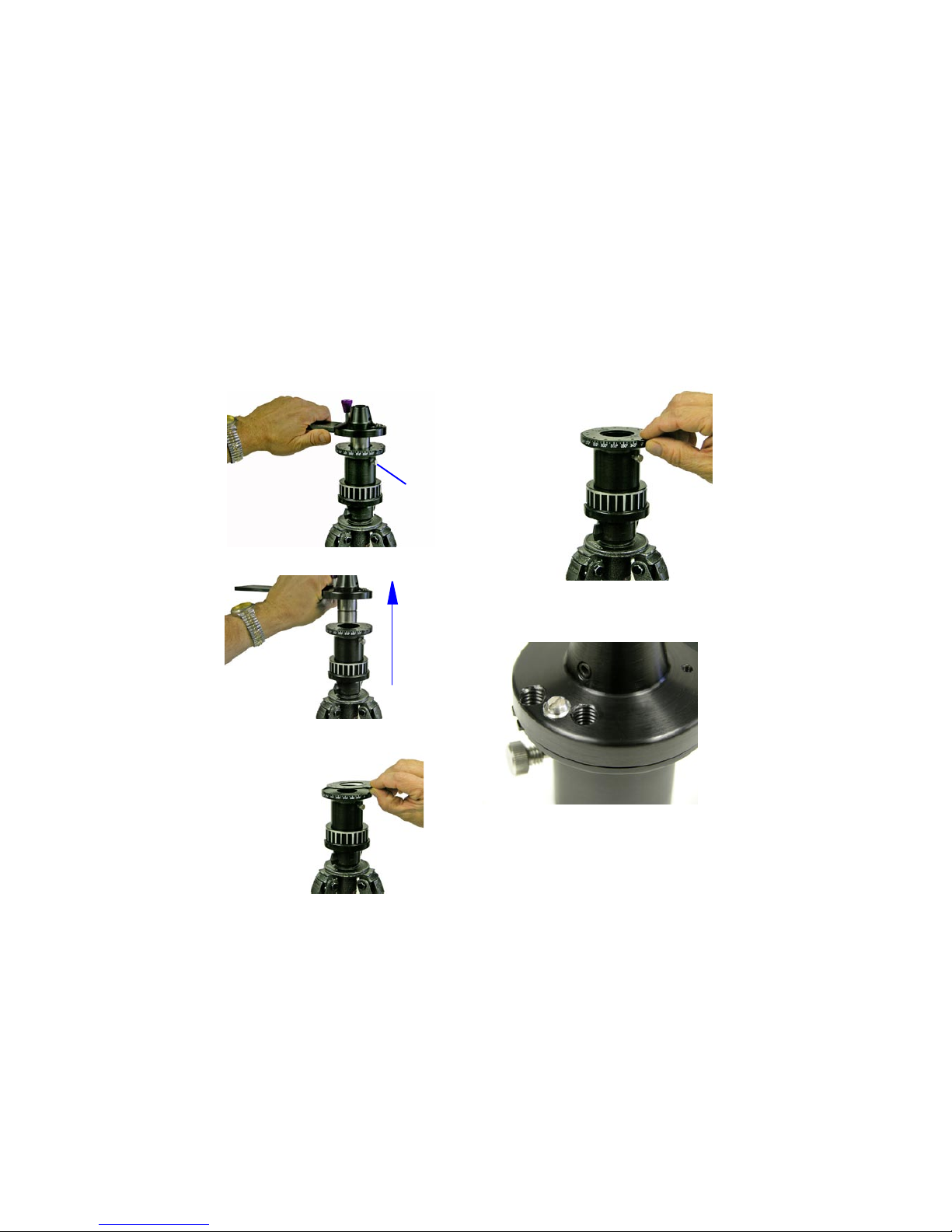
1) Slide the Indexing Ring onto
the Rotator Base from the bot-
tom, keeping the portion of the
Indexing Ring with the degree
label facing up until it makes
contact with the brass plunger.
The brass plunger will eventu-
ally snap into the hole that is in
the side of the Indexing Ring.
2) Rotate the Indexing Ring
to line up the notch on the top
of the Indexing Ring with the
black slanted alignment pin at
the top of the Rotator Base.
The pin will eventually go into
the notch.
3) Depress the brass plunger
and push up on the Indexing
Ring until the brass plunger
pops into the plunger hole and
the pin slides into the notch.
Removing
Indexing Rings
On the lower portion of the
black Indexing Ring, there is
gold colored pin visible through
the hole in the side. Insert the
tip of a ball point pen or a pa-
per clip end into the hole and
push the gold pin inward till the
Indexing Ring drops down, then
slide the Indexing Ring off the
Rotator Base.
Adjusting the Force
of the Spring Plunger
The screw, shown at left, can
be used to position the spring
plunger up and down. You can
use a screwdriver (or a coin) to
adjust the indexing or click-stop
force. The spring plunger is set
from the factory, but you may
find that you prefer a harder
click-stop action.
Be sure to not overtighten the
plunger so that the metal body
of the plunger would come in
contact with the indexing ring.
Also be sure that the plunger
is not set deep enough as this
will cause excessive play in the
indexing action.
How to install and remove the indexing rings and adjusting the indexing force
QuickPan IV Rotator Base
Installing Detent Discs
1) To install or change the
Detent Discs simply loosen
the silver thumbscrew on
the side of the black Rotator
Hub by turning it in a counter
clockwise direction. Do not
remove the screw, just turn
several times. You do not need
to remove the head from the
tripod.
2) Once the thumbscrew is
loosened, pull the Horizontal
Bracket Assembly upward out
of the Rotator Hub. You may
need to wiggle it a bit as you
lift it out of the hub.
3) Once the Horizontal
Bracket Assembly is removed,
the Detent Disc can be
changed by grabbing the
protruding tab on the detent
ring and pulling it up out of
the Rotator Housing.
4) The new Detent Disc is
installed by pushing it into
the recessed area in the top
of the Rotator Hub as shown
at left.
5) Replace the Horizontal
Bracket Assembly into the
Rotator Hub. Push the as-
sembly down into the hub
to fully engage and collapse
the plunger, then tighten the
thumbscrew.
Adjusting the Force
of the Spring Plunger
The screw, shown at left, can
be used to position the spring
plunger up and down. You can
use a screwdriver (or a thin
coin) to adjust the indexing
or click-stop force. The spring
plunger is set from the factory,
but you may find that you pre-
fer a harder click-stop action.
Be sure to not overtighten
the plunger so that the metal
body of the plunger would
come in contact with the
indexing ring. Also be sure
that the plunger is not set
deep enough as this will cause
excessive play in the indexing
action.
How to install and remove the indexing discs and adjusting the indexing force
Silver
Thumbscrew
Note: The QuickPan IV rotator uses a stainless steel
ball plunger that is different from the plastic nosed
plunger on the QuickPan III. Be sure to use only the
stainless steel ball plungers (available from Kaidan) on
the QuickPan IV rotators.
QuickPan III / IV Rotator Base
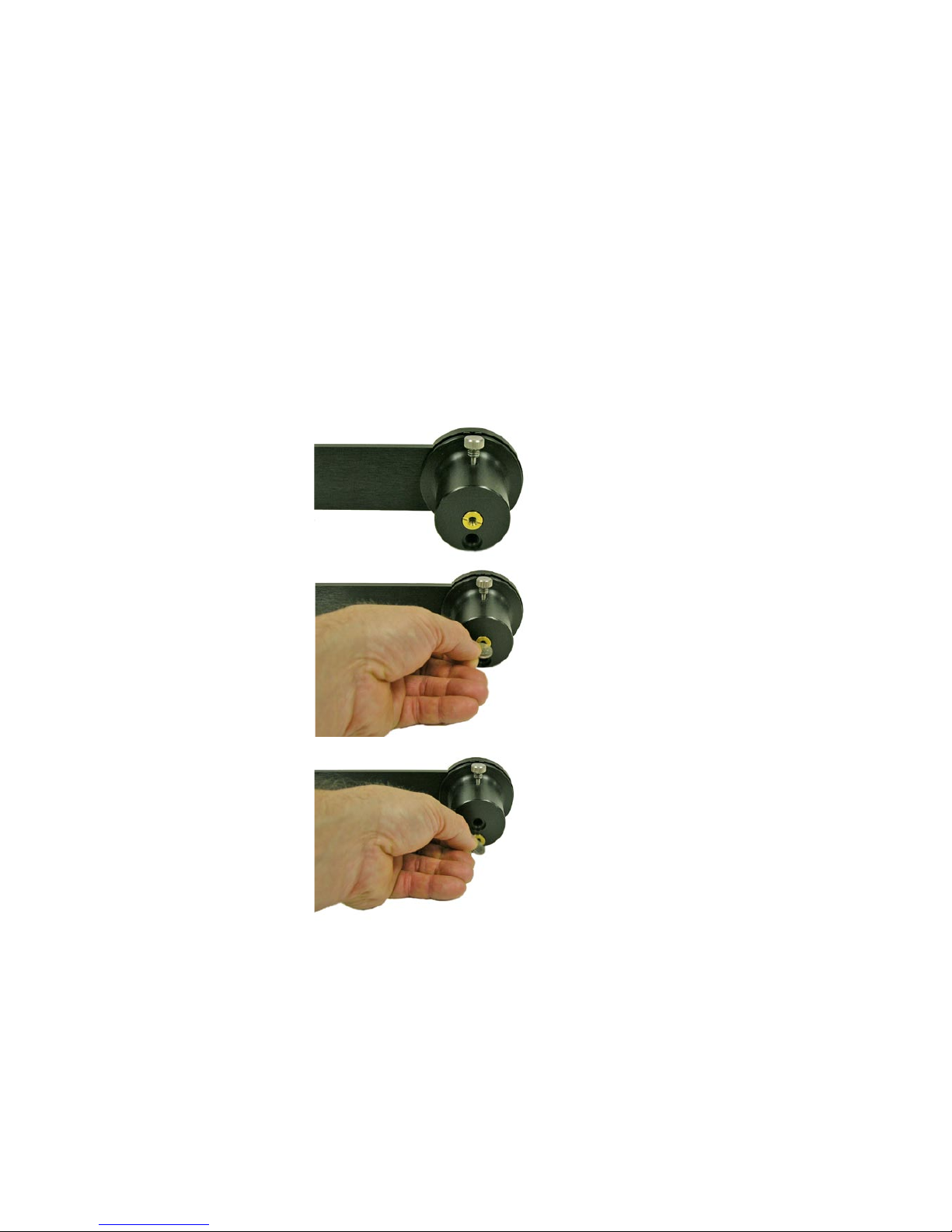
Tripod threaded bushing adapter
The QuickPan III / IV Rotator Bases comes
with a tripod adapter bushing which ac-
commodates both 1/4 inch and 3/8 inch
tripod mounts.
1/4 inch Tripod
If your tripod has a 1/4 inch threaded
mount, leave the brass bushing in the
center hole in the bottom of the rotator as
shown at right.
3/8 inch Tripod
If your tripod has 3/8 inch threaded mount,
remove the brass bushing by unscrewing it
in a counterclockwise direction and screw-
ing it into the adjacent hole in a clockwise
direction using a coin (or large screwdriver)
as shown at right.
Use the spare outer hole to store the brass
bushing when you're using the 3/8 inch thread.
That way, you won't lose the bushing!
Standard Camera Bracket - Camera Mounting
Mounting your camera on the Standard Camera Bracket
To mount your camera, first select
the appropriate slot in the Vertical
Camera Bracket that will best
locate the tripod mounting thread
on your camera. You may need to
reposition the Captive Camera
Knob. To remove the knob simply
slide it along the slot to the end
that has the threaded hole. Care-
fully unscrew the knob out of the
threaded hole, being careful not to
crossthread the knob. Replace the
knob into the appropriate slot by
reversing the procedure.
Note: Whatever side of the
Vertical Bracket you mount your
camera on always keep the offset
portion of the Vertical Bracket
towards the rear of the camera.
The camera knob is a two piece
knob, with a inner and outer knob.
Before installing the camera knob
in the Vertical Bracket, turn the in-
ner knob clockwise into the outer
knob until it won’t turn anymore.
Next, install the knob into the ap-
propriate slot then into the tripod
mounting hole of your camera.
Turn the inner knob into the cam-
era until it bottoms out, then turn
the outer knob clockwise until
the camera is tight on the Vertical
Bracket. Don’t worry about get-
ting the camera level at this time,
as this is a task you’ll need to do
when you’re ready to shoot.
The left-right adjustment to center
your lens over the pivot point is
accomplished by loosening the
purple knob and sliding the brack-
et. Be sure to tighten the knob to
lock the bracket in place.
The fore-aft adjustment is made
by loosening the camera knob
and sliding the camera along the
slot. There are camera adjustment
shoes and lugs to locate your
camera on the bracket and to help
position the camera along the slot.
These devices will also make it
easy to remove and replace your
camera when you use it for other
tasks.
Standard Camera Bracket
Aluminum Design (up to 2004)
Standard Camera Bracket
High-Strength
Composite Design
(starting in 2005)
Mounting your camera on the Spherical Bracket
The Spherical Camera Mounting
Bracket has a rotating swing arm
which is held into position by large
black locking knob. The knob allows
you to position the arm and your
camera from plus 90 degrees to minus
90 degrees .
Mounted on the swing arm is an
adjustable camera mount. This mount
can be adjusted along the length
of the swing arm by loosening and
tightening the purple clamping knob.
To remove the camera mount, simply
loosen the knob and slide the mount
off of the swing arm. There is a spring-
loaded plastic ball which provides drag
on the camera mount as well as the
camera bracket. When you replace the
mount or the camera bracket onto
their respective arms, you’ll need to
push it sharply so as to overcome the
spring force.
The standard camera mount (shown)
has a number of slots for you to
choose from to mount your cam-
era. It’s important to make sure that
the centerline of your camera’s lens
intersects the pivot axis of the swing
arm. Since some cameras have tripod
mounting threads that are not inline
with the center of the camera, it may
Spherical Camera Bracket - Camera Mounting
be necessary to use one of the various
slots on the bracket.
There are camera mounting shoes (flat
shaped) and lugs (triangle shaped) that
are provided for you to help locate
and position the camera. These are
also helpful when you want to remove
and replace the camera and return it
to the proper location.
An optional camera mount is also
available with a quick-release mount. In
this case you would attach the a plate
(Arca-Swiss) to your camera and this
plate would then dovetail into a mating
plate on the optional camera mount.
Adjusting the camera position for the
nodal point is made by loosening the
appropriate locking knobs and sliding
either the camera mount plate along
the swing arm, or sliding the entire
assemblage along the arm of the
Rotator Base. Be sure to tighten the
knobs when you’re done positioning
the camera.
Camera Mounting - Standard Camera Bracket
Mounting your camera on the camera brackets
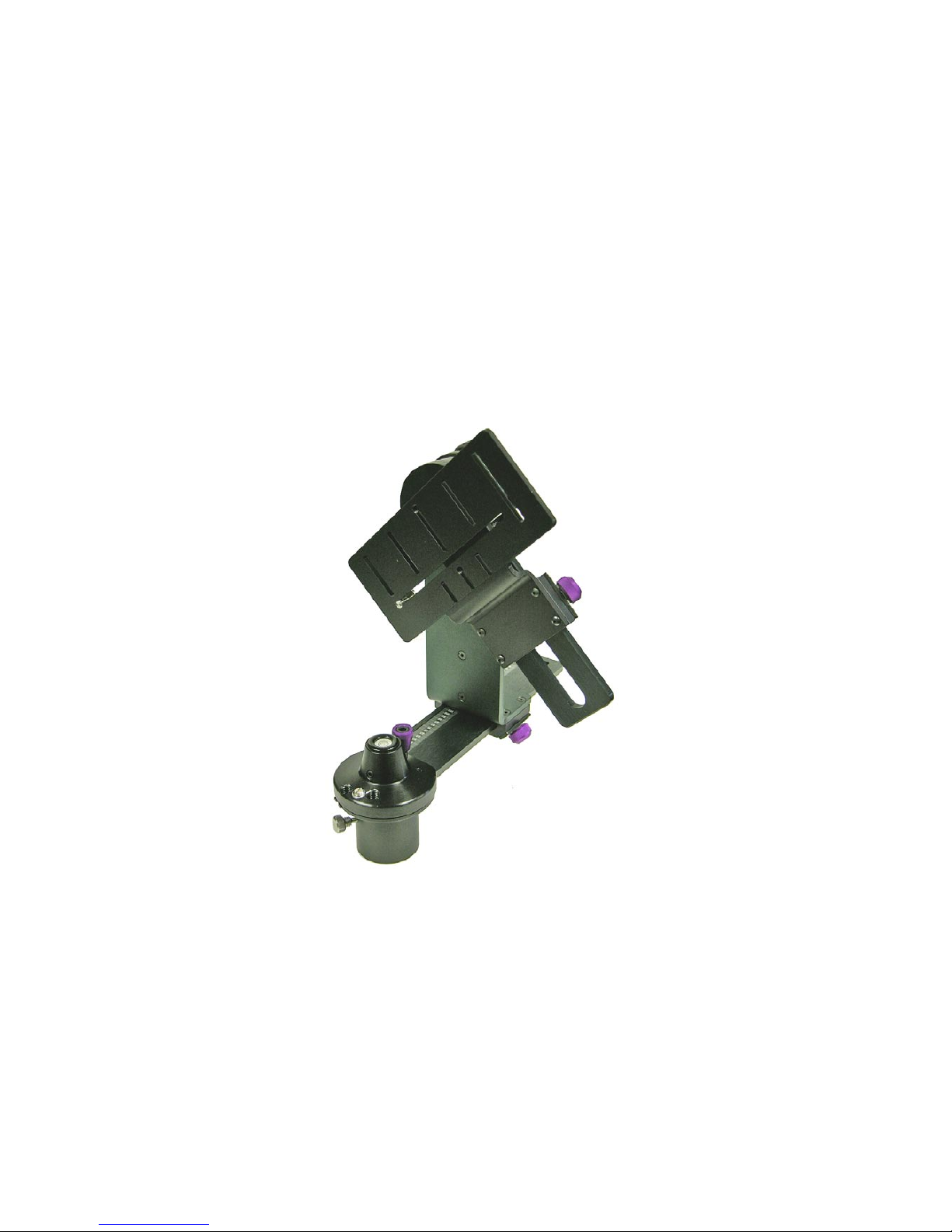
For the Standard Camera Bracket,
shown at right, select the appropriate
slot in the bracket that will best locate
the tripod mounting thread on your
particular camera. You may need to re-
position the camera knob to another
slot in order to achieve this. To re-
move the knob simply slide the knob
along the slot to the end that has the
threaded hole. Carefully unscrew the
knob out of the threaded hole, being
careful not to crossthread the knob.
Replace the knob into the appropriate
slot by reversing the procedure.
The camera knob is a 2 piece knob,
with an inner and outer knob. Before
installing the camera knob in the
bracket, turn the inner knob clockwise
into the outer knob until it won’t turn
anymore. Install the knob into the
appropriate slot then into the tripod
mounting hole of your camera. Turn
the inner knob into the camera until
it bottoms out, then turn the outer
knob clockwise until the camera is
tight on the bracket. Don’t worry
about getting the camera level at this
time, as this is a task you’ll need to do
when you’re ready to shoot.
The left-right adjustment to center
your lens over the pivot point is ac-
complished by loosening the purple
knob and sliding the camera bracket
in and out of the slider. Be sure to
tighten the knob to lock the bracket
in place.
The fore-aft adjustment is made by
loosening the other purple knob on
the slider and then moving the entire
assembly along the arm of the Rotator
Base.
There are camera adjustment shoes
and lugs (shown at left) to help locate
your camera on the bracket and to
help position the camera along the
slot. These devices will also make it
easy to remove and replace your cam-
era when you use it for other tasks.
Note: You can also mount the optional
Quick Release Plate onto the Standard
Camera Bracket.
QuickPan IV Rotator with Standard Camera Bracket and
optional Twin-Axis Adapter.
Camera Mounting - Compact Camera Bracket
Mounting your camera on the camera brackets
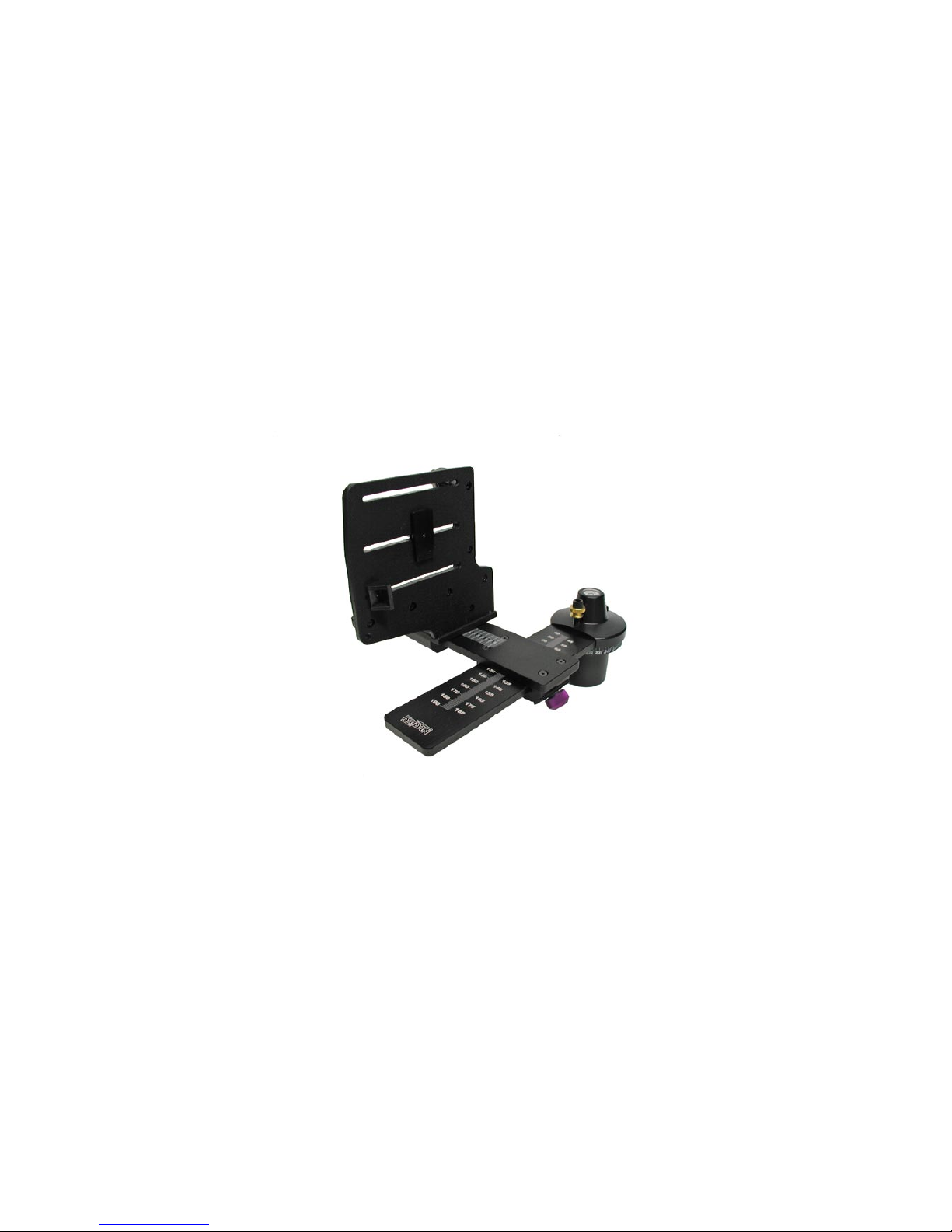
For the Compact Camera Bracket,
shown at right, select the ap-
propriate mounting hle in the
bracket that will best locate the
tripod mounting thread on your
particular camera. You may need
to reposition the camera knob to
another hole in order to achieve
this. Carefully unscrew the knob
out of the threaded hole, being
careful not to crossthread the
knob. Replace the knob into the
appropriate hole by reversing the
procedure.
The camera knob is a 2 piece
knob, with an inner and outer
knob. Before installing the camera
knob in the bracket, turn the inner
knob clockwise into the outer
knob until it won’t turn anymore.
Install the knob into the appro-
priate hole then into the tripod
mounting hole of your camera.
Turn the inner knob into the cam-
era until it bottoms out, then turn
the outer knob clockwise until
the camera is tight on the bracket.
Don’t worry about getting the
camera level at this time, as this
is a task you’ll need to do when
you’re ready to shoot.
The left-right adjustment to center
your lens over the pivot point is
accomplished by loosening the
purple knob and sliding the camera
bracket in and out along the Twin-
Axis Adapter. Be sure to tighten
the knob to lock the bracket in
place.
The fore-aft adjustment is made by
loosening the other purple knob
on the Twin-Axis Adapter and then
moving the entire assembly along
the arm of the Rotator Base.
The Compact Camera Bracket
can also be equipped with a Quick
Release Plate. Compared to the
Standard Bracket, the Compact
Bracket has no camera shoes or
lugs to retain the camera. There-
fore, the Compact Camera Bracket
is best used in combination with
the Quick Release option. The
main advantage to the Compact
bracket is the smaller size and
lighter weight.
QuickPan IV Rotator with Compact Camera Bracket and
optional Twin-Axis Adapter. Quick Release Plate not shown.