manuals.online logo
Brands
  1. Home
  2. •
  3. Brands
  4. •
  5. Kogan
  6. •
  7. TV DVD Combo
  8. •
  9. Kogan KALED24DVDZC User manual

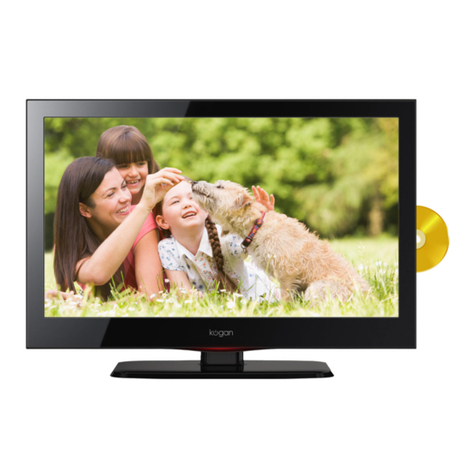
Kogan KALED24DVDZC User manual

Other Kogan TV DVD Combo manuals

Kogan KALED32DVDZC User manual

Kogan

Kogan KALED32DVDZC User manual

Kogan KALED19DVDZA User manual

Kogan

Kogan KALED19DVDZA User manual

Kogan HDMI PRO22 User manual

Kogan

Kogan HDMI PRO22 User manual

Kogan 6 Series User manual

Kogan

Kogan 6 Series User manual

Kogan KALED19DVDWA User manual

Kogan

Kogan KALED19DVDWA User manual

Kogan KALED24DVDZA User manual

Kogan

Kogan KALED24DVDZA User manual

Kogan KALED24DVDWB User manual

Kogan

Kogan KALED24DVDWB User manual

Kogan KALED28DVDZA User manual

Kogan

Kogan KALED28DVDZA User manual

Kogan KULED32DVDYA User manual

Kogan

Kogan KULED32DVDYA User manual

Kogan 1080p PRO32 User manual

Kogan

Kogan 1080p PRO32 User manual

Kogan PRO26 User manual

Kogan

Kogan PRO26 User manual

Kogan 1080P-PRO22 User manual

Kogan

Kogan 1080P-PRO22 User manual

Kogan PRO19 User manual

Kogan

Kogan PRO19 User manual

Kogan KALED16DVDYA User manual

Kogan

Kogan KALED16DVDYA User manual

Kogan KALED19DVDYA User manual

Kogan

Kogan KALED19DVDYA User manual

Kogan KALCD22DVDAB User manual

Kogan

Kogan KALCD22DVDAB User manual

Kogan KALED24DVDVB User manual

Kogan

Kogan KALED24DVDVB User manual

Kogan 1080p PRO32 User manual

Kogan

Kogan 1080p PRO32 User manual

Kogan 6 LH6000 Series User manual

Kogan

Kogan 6 LH6000 Series User manual

Kogan KULED19DVDYA User manual

Kogan

Kogan KULED19DVDYA User manual

Popular TV DVD Combo manuals by other brands

Memorex MVDT2002SM Service manual

Memorex

Memorex MVDT2002SM Service manual

Akai ALED2609TWE user manual

Akai

Akai ALED2609TWE user manual

JVC LT-32D210 owner's manual

JVC

JVC LT-32D210 owner's manual

Toshiba VTD1432 user guide

Toshiba

Toshiba VTD1432 user guide

Haier DTA-2189 owner's manual

Haier

Haier DTA-2189 owner's manual

Philips DVD 580M Directions for use

Philips

Philips DVD 580M Directions for use

RCA RLEDV2238A-B instruction manual

RCA

RCA RLEDV2238A-B instruction manual

LENCO DVT-1933 user manual

LENCO

LENCO DVT-1933 user manual

LG KU-17WDVD Service manual

LG

LG KU-17WDVD Service manual

Sylvania SKCR2706BT instruction manual

Sylvania

Sylvania SKCR2706BT instruction manual

Memorex MVDT2002A owner's manual

Memorex

Memorex MVDT2002A owner's manual

Akura AXDVD1515W-ID instruction manual

Akura

Akura AXDVD1515W-ID instruction manual

Wintal 27LDVD05 operating manual

Wintal

Wintal 27LDVD05 operating manual

Toshiba 23HLV84 owner's manual

Toshiba

Toshiba 23HLV84 owner's manual

AOC LC19W060C user manual

AOC

AOC LC19W060C user manual

iLive ITDE2288 user guide

iLive

iLive ITDE2288 user guide

Magnavox CD130MW9 owner's manual

Magnavox

Magnavox CD130MW9 owner's manual

Akura ATLDVD2630W-HDID instruction manual

Akura

Akura ATLDVD2630W-HDID instruction manual

manuals.online logo
manuals.online logoBrands
  • About & Mission
  • Contact us
  • Privacy Policy
  • Terms and Conditions

Copyright 2025 Manuals.Online. All Rights Reserved.

Table of Contents
Safety Instructions.............................................................................................................................2
General Safety Instructions.......................................................................................................2
Installation........................................................................................................................................3
Cleaning............................................................................................................................................4
General Description..........................................................................................................................5
Specifications & Accessories.........................................................................................................5
Specifications..................................................................................................................................5
Accessories......................................................................................................................................5
Overview...............................................................................................................................................
Remote Control..............................................................................................................................7
Antenna Connection.........................................................................................................................9
Basic Operation................................................................................................................................10
Changing the Input Source.....................................................................................................10
Navigating the Menu..................................................................................................................10
Menu Operation................................................................................................................................10
Picture Menu.................................................................................................................................10
Sound Menu...................................................................................................................................10
Channel Menu.................................................................................................................................11
Lock System Menu.......................................................................................................................11
Setup Menu.....................................................................................................................................11
PVR Settings...................................................................................................................................11
EPG Menu.........................................................................................................................................11
Media Operating Interface........................................................................................................11
DVD........................................................................................................................................................12
General Settings Page...............................................................................................................12
TV DISPLAY...................................................................................................................................12
Audio Setup...................................................................................................................................12
Dolby Setup...................................................................................................................................13
Video Setup...................................................................................................................................13
Preference Setup.........................................................................................................................14
PVR.........................................................................................................................................................15
Personal Video Recorder File System.................................................................................15
Formatting the USB....................................................................................................................15
PVR Guide......................................................................................................................................1
DTV EPG (Electronic Program Guide)................................................................................17
External Connection........................................................................................................................18
Assembling the Stand................................................................................................................18
Stand or wall mounted (optional)........................................................................................18
Troubleshooting................................................................................................................................19
1

Safety Instructions
General Safety Instructions
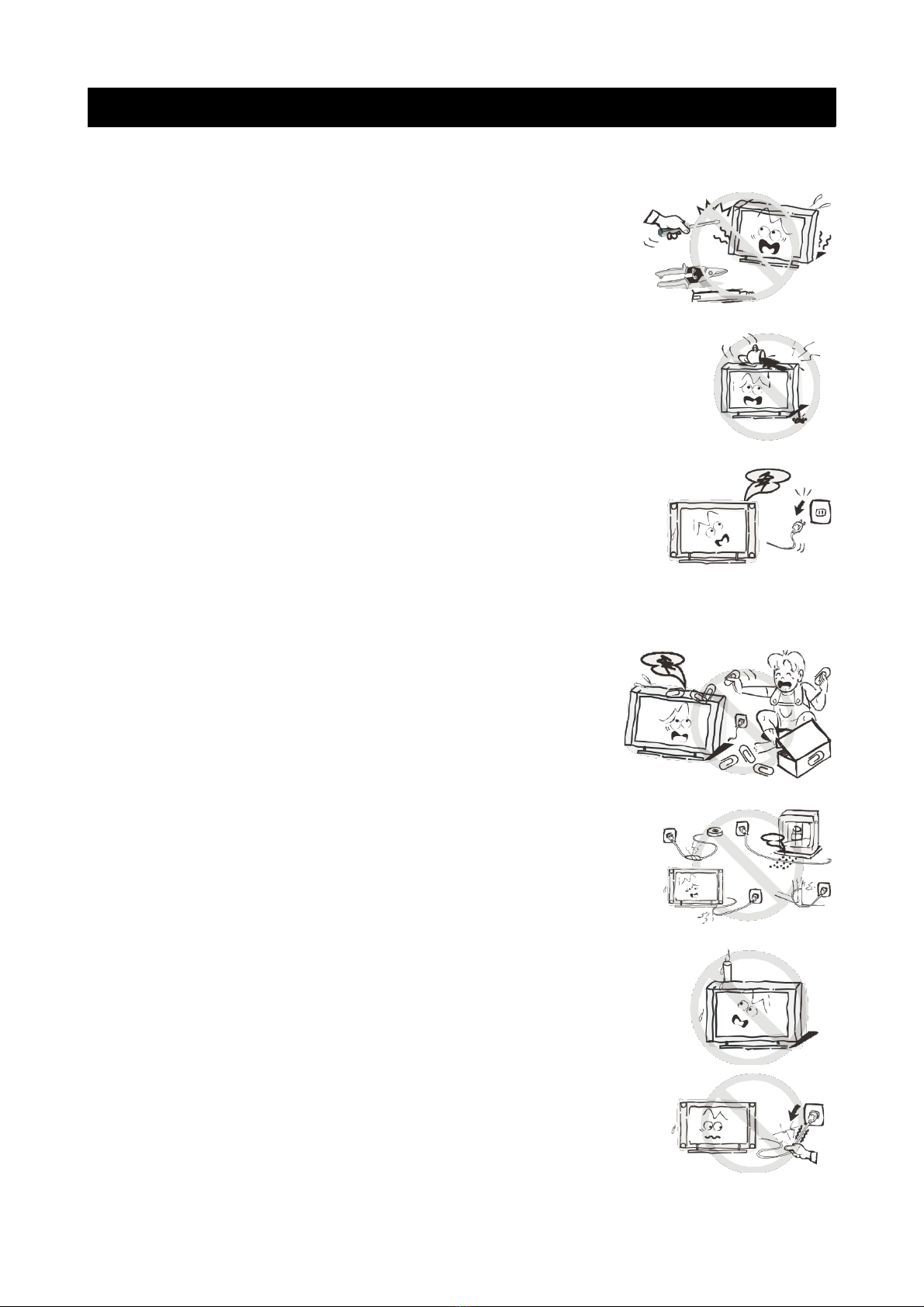
Risk of electric shock. DO NOT OPEN!
Do not attempt to service the television yourself, as
opening or removing the covers may expose you to
dangerous voltage or other hazards. Refer all servicing to
the Kogan customer support team.
To reduce the risk of fire or electric shock, do not expose this
product to rain or moisture. The television should not be
exposed to dripping or or splashing, and no liquid filled objects
such as vases should be placed on the case.
In the event of smoke, strange noises or a strange smell from
the unit, you should follow these steps:
•Turn off the unit immediately.
•Disconnect the power plug from the power outlet.
•Contact the Kogan customer support team. Never
attempt to make repairs yourself.
Never push objects of any kind into the set through the
cabinet slots as they may touch dangerous voltage
points or short-circuit parts that could result in a fire or
electric shock. Never spill any liquids onto the set. Use
special caution in households where children are
present. The television is not suitable for children under
4 years old to operate.
Power supply cords should be routed safely to prevent
dangers due to damaged cords.
The mains plug is the main disconnect method, so it should
be easily accessible and not be obstructed during use.
To avoid fires, no naked flame sources such as lit candles or
burning incense should be placed onto the casing of the
television.
Do not pull the plug out of a power outlet by pulling on the
power cable. Always grasp the plug and pull.
Never touch the plug with wet hands.
2
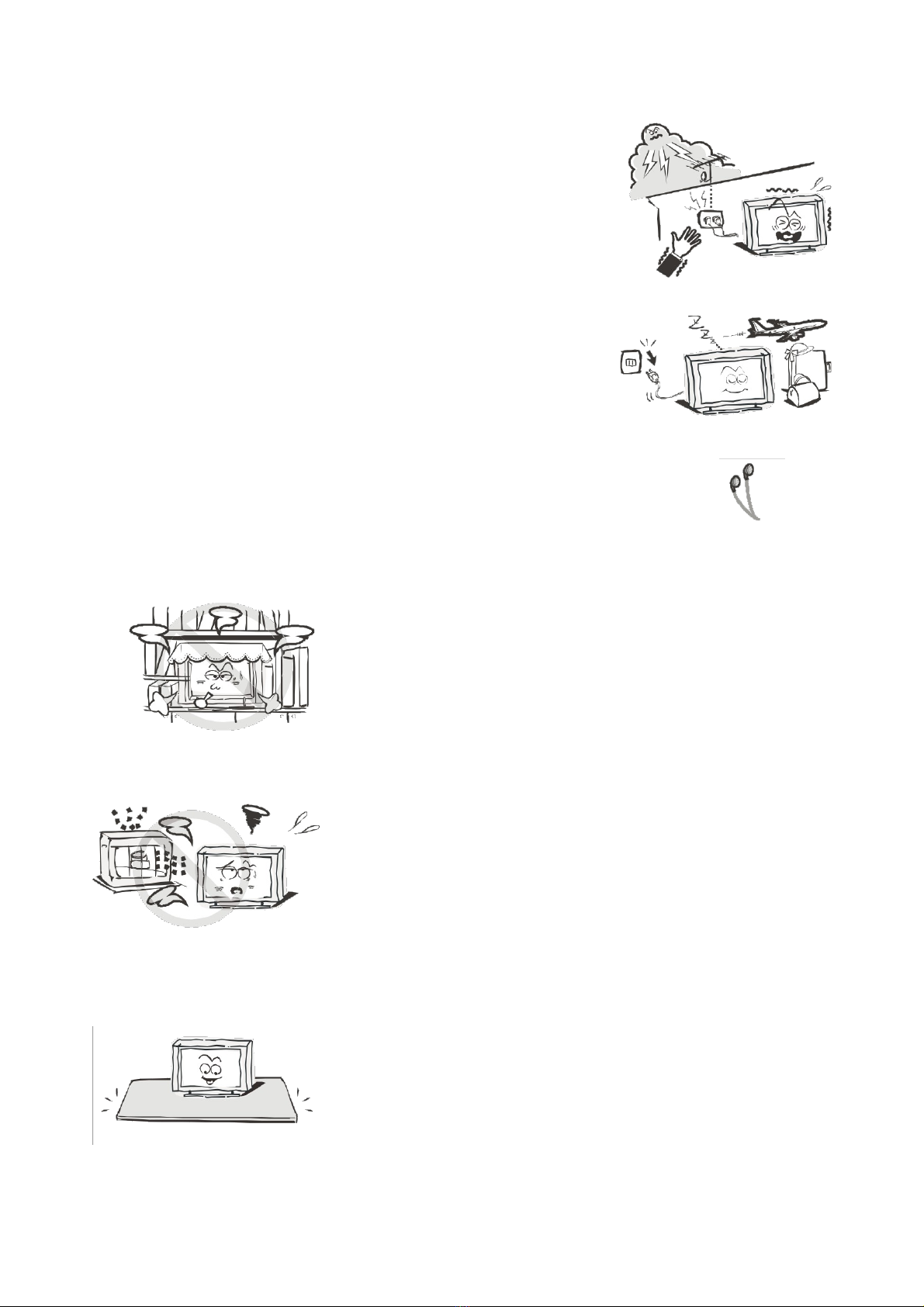
An outside antenna system should not be located in the
vicinity of overhead power lines or other electric light or
power circuits.
When installing an outside antenna system, extreme
care should be taken to keep from touching such power
lines or circuits, as contact with them may be fatal.
Always turn the set off when it is not being used.
Unplug the television from the power outlet when it will
not be used for a long time or when there is an
electrical storm.
Never touch the antenna cable during a lightning storm.
Excessive volume from earphones and headphones can
cause permanent hearing loss. Always monitor the volume of
noise from these devices, especially when children are using
them.
Installation
Ventilation should not be impeded or limited by
covering the ventilation slots with items such as
newspapers, tablecloths, curtains etc..
At least 10cm of space should be left around the
apparatus for sufficient ventilation.
The television should be situated away from heat
sources such as radiators, heaters, stoves or other
products that product heat.
Place the television in a position where the screen is
not exposed to direct sunlight. It is best to have soft
indirect lighting while watching, and you should avoid
a completely dark viewing environment and
reflections to avoid eye fatigue.
Keep the product away from high magnetic fields
(such as near an amplifier speaker) to avoid affecting
the tint.
Do not place the television on an unstable table, stand
or shelf. The set may fall, causing serious injury as well
as damage to the television itself.
If moving the television on a cart, move the unit with
care as sudden stops and starts may cause the
television to overturn.
3
Do not place this television near water, for example
near a bathtub, wash bowl, kitchen sink, laundry tub,
swimming pool or in a damp basement etc..
When moving the television to a warm location from
a cold location, allow some time for any dew or
condensation inside the television to evaporate fully
before you turn the unit on.
To prevent injury, the television must be securely
attached to the floor/wall in accordance to the
supplied installation instructions.
Cleaning
Unplug the television from the power supply before
cleaning. Do not use any liquid cleaners or harsh
chemicals. Use a soft, damp cloth.
4
General Description
•Zero X radiation complies to green environment protection requirements.
•Auto tuning and fine tuning.
•One PC VGA input socket.
•One YpbPr input socket.
•One HDMI input socket (HDMI 1.4)
•One composite input socket.
•USB support.
•Headphone support
Specifications & Accessories
Specifications
Model KALED24DVDZC
Display Screen Size 24” Diagonal
Maximum Resolution 1920 x 1080
Power Supply DC 12V - 3A
TV Receive System PAL/SECAM: BG, DK, I DVB-T
Frequency Range DTV:VHF(174MHz-230MHz)
UHF(474MHz-8 2MHz)
Video In PAL/NTSC
Antenna Input Impedance 75ohm
Sound Output 2 x 3W
Remote Power Input DC 3V (Two AAA batteries)
Power Consumption 3 W
Operating Temperatures 0°C ~ 40°C
Accessories
Remote Control
5
Overview
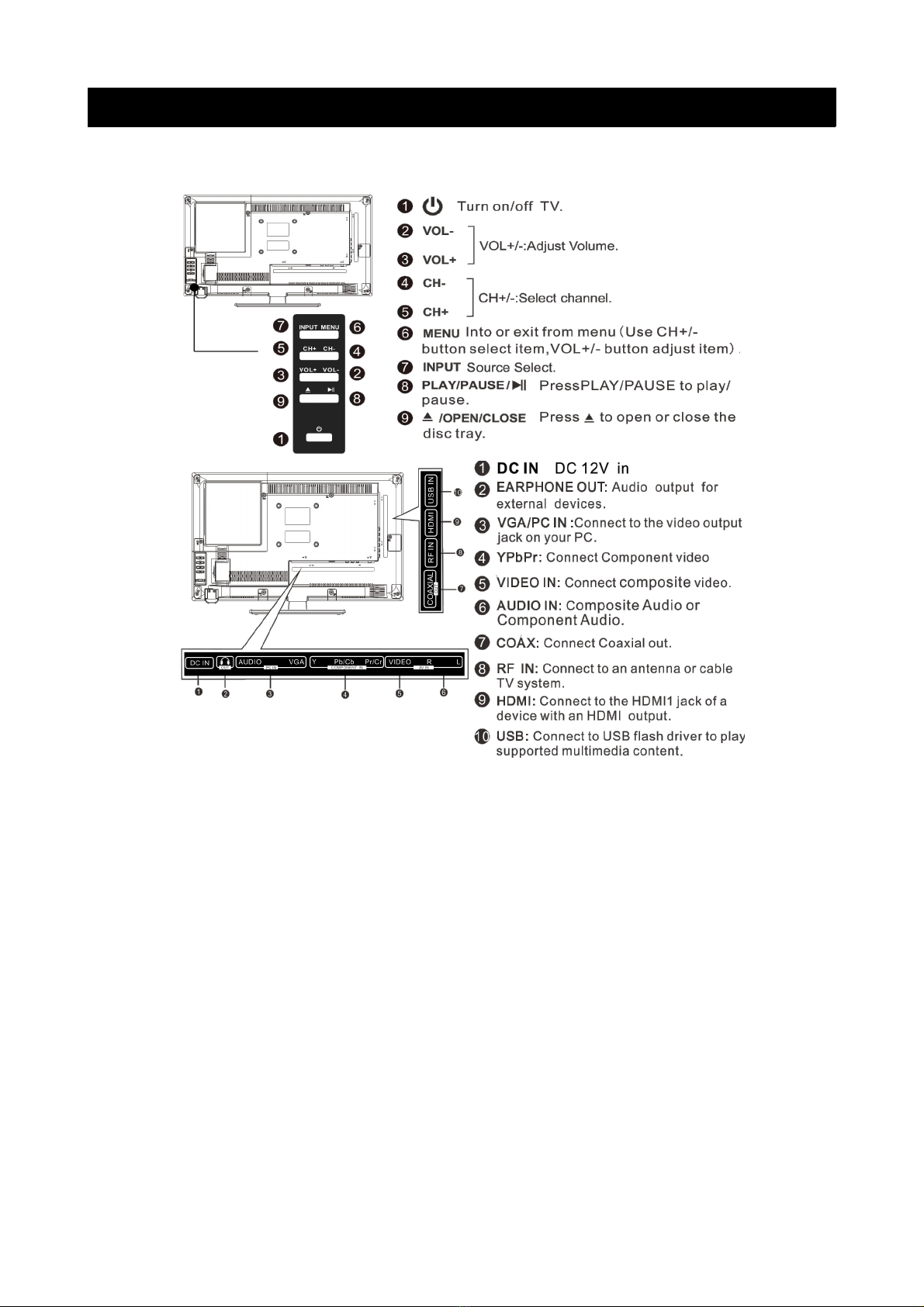
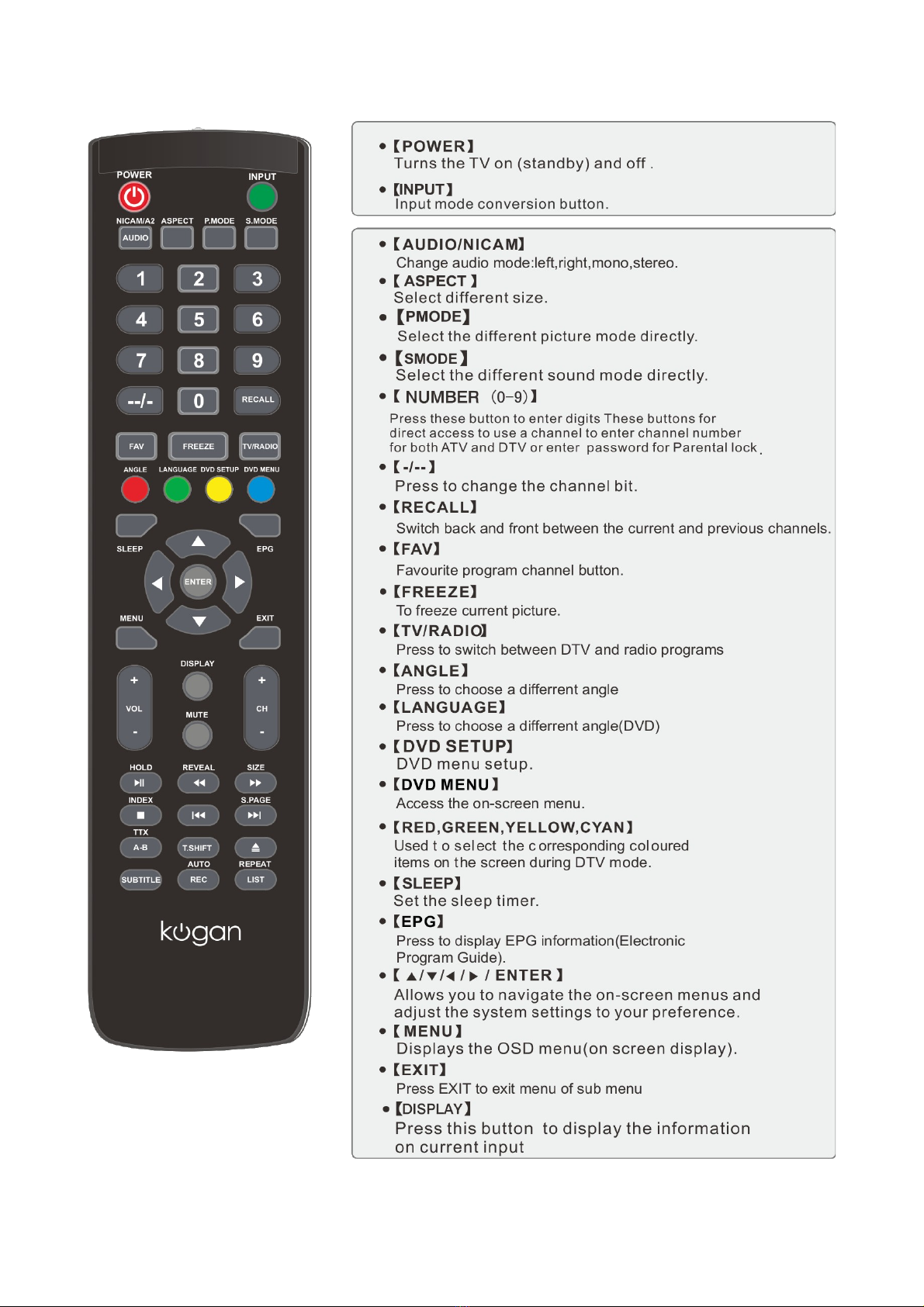
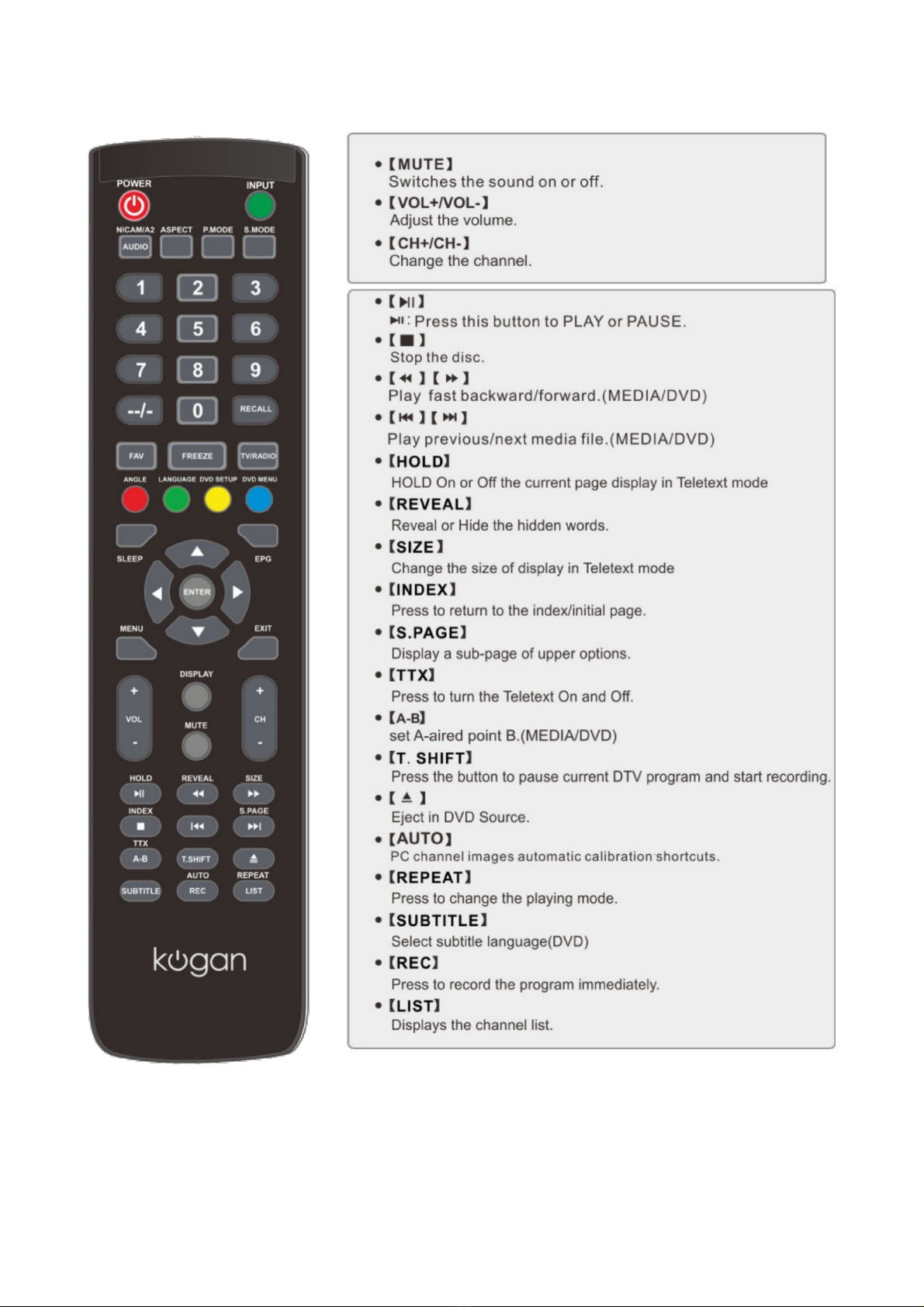
The buttons on the lower-right panel control your TVs basic features, including the on-screen
menu. To use the televisions more advanced features, you must use the remote control.
Remote Control
7
8
Note:
Before turning off the main power, or turning off the power supply, you must
switch the television into standby mode by pressing the POWER button on
the remote control or on the television set itself.
Once the television is in standby mode, you may turn off the mains power
supply.
Note
•One set of batteries will last for 1 year under normal use.

•If you do not intend to use the remote for a long period of time, please
remove the batteries to avoid damage due to leakage.
•Do not use old and new batteries together.
•Batteries should not be exposed to excessive heat such as sunshine, fire or
similar.
Antenna Connection
Antenna input impedance of this unit is 75ohm. VHF/UHF 75ohm coaxial cable
can be connected to the antenna jack directly. If the antenna cable is 300ohm
parallel flat feeder cable, you will need to use the 300ohm/75ohm converter to
connect the antenna cable to the antenna jack.
For details, please refer to the following images.
Antennas with 300 flat twin leads Antennas with 75 round leads
9