manuals.online logo
Brands
  1. Home
  2. •
  3. Brands
  4. •
  5. Kollmorgen
  6. •
  7. DC Drive
  8. •
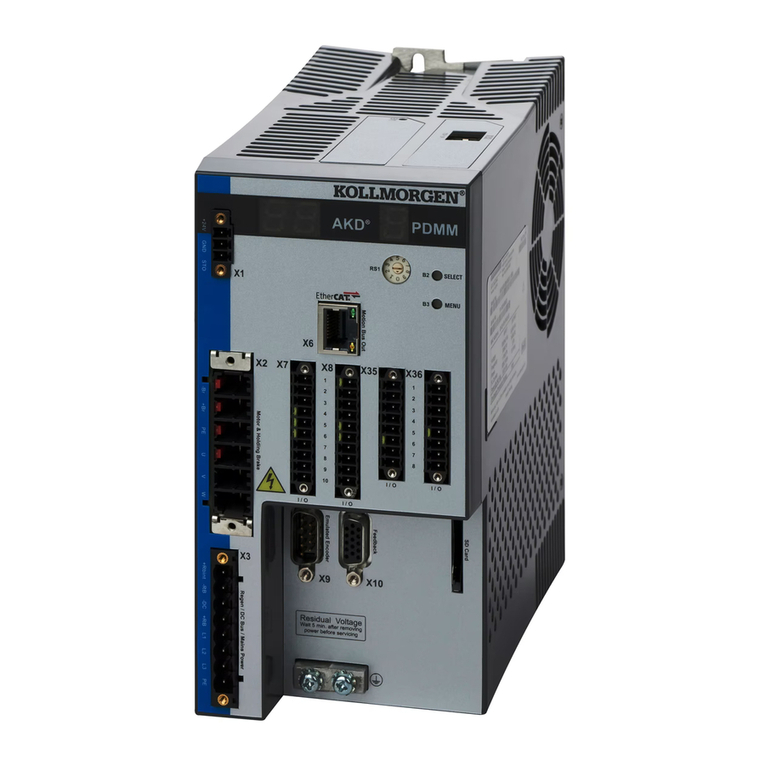
  9. Kollmorgen AKD PDMM User manual

Kollmorgen AKD PDMM User manual

Other manuals for AKD PDMM

2

Other Kollmorgen DC Drive manuals

Kollmorgen BDS5 User guide

Kollmorgen

Kollmorgen BDS5 User guide

Kollmorgen AKD User manual

Kollmorgen

Kollmorgen AKD User manual

Kollmorgen MMC Smart Drive Series User manual

Kollmorgen

Kollmorgen MMC Smart Drive Series User manual

Kollmorgen P50330 User manual

Kollmorgen

Kollmorgen P50330 User manual

Kollmorgen AKD-x00306 User manual

Kollmorgen

Kollmorgen AKD-x00306 User manual

Kollmorgen AKD series User manual

Kollmorgen

Kollmorgen AKD series User manual

Popular DC Drive manuals by other brands

National Instruments NI MID-7604 user guide

National Instruments

National Instruments NI MID-7604 user guide

SOMFY Maestria WT Series instructions

SOMFY

SOMFY Maestria WT Series instructions

Danfoss VLT HVAC Design guide

Danfoss

Danfoss VLT HVAC Design guide

Trane TR150 Service manual

Trane

Trane TR150 Service manual

Chamberlain Garog D Series operating manual

Chamberlain Garog

Chamberlain Garog D Series operating manual

Parker PDS Series user guide

Parker

Parker PDS Series user guide

Binks QS-5012-1-CE Service manual

Binks

Binks QS-5012-1-CE Service manual

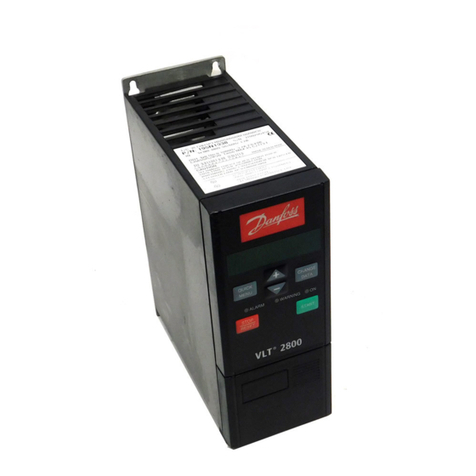
Danfoss VLT 2800 Series Quick setup

Danfoss

Danfoss VLT 2800 Series Quick setup

YASKAWA CANopen SI-S3 Technical manual

YASKAWA

YASKAWA CANopen SI-S3 Technical manual

GE D20A6 instructions

GE

GE D20A6 instructions

Danfoss VLT AQUA Drive FC 202 operating manual

Danfoss

Danfoss VLT AQUA Drive FC 202 operating manual

Lenze PositionServo 940 user manual

Lenze

Lenze PositionServo 940 user manual

Unex MC-D-250-1000-050W-TW operating manual

Unex

Unex MC-D-250-1000-050W-TW operating manual

Geckodrive G213V manual

Geckodrive

Geckodrive G213V manual

ABB RSYC-01 user manual

ABB

ABB RSYC-01 user manual

Rockwell Automation PowerFlex 700S Programming manual

Rockwell Automation

Rockwell Automation PowerFlex 700S Programming manual

WEG DeviceNet CFW500 user manual

WEG

WEG DeviceNet CFW500 user manual

Siemens SINAMICS G List manual

Siemens

Siemens SINAMICS G List manual

manuals.online logo
manuals.online logoBrands
  • About & Mission
  • Contact us
  • Privacy Policy
  • Terms and Conditions

Copyright 2025 Manuals.Online. All Rights Reserved.

AKD PDMM™
Fault Card
Edition: December 2015, Revision G
Valid for Hardware Revision EB
Part Number 903-200015-00
Keep all manuals as a product component during the life span of the product.
Pass all manuals to future users / owners of the product.
Record of Document Revisions:
Revision Remarks
A, 04/2012 Launch version.
B, 12/2012 Error E24, E53, and alarm A38 was added. A30 was revised.
C, 09/2013 Added F127, F312, F421, F423, F451 – F469, F493, F560, and
F621 – F627.
D, 05/2014 Added F630, E53, and A53.
E, 12/2014 Added F465, F470, F570 and n582.
F, 05/2015 Hardware revision changed from DB to EB and faults updated to
rmware version 1.13.
G, 12/2015 Added F256, and F257. N107, n108, F306, F423, F452, F467,
and F536 were revised.
Registered Trademarks
AKD is a registered trademark of Kollmorgen™ Corporation
Technical changes which improve the performance of the device may be made
without prior notice.
Printed in the United States of America
This document is the intellectual property of Kollmorgen™. All rights reserved. No part
of this work may be reproduced in any form (by photocopying, microlm or any other
method) or stored, processed, copied or distributed by electronic means without the
written permission of Kollmorgen™.
December 2015
3
Table of Contents
1. AKD Fault and Warning Messages
F0 – n108 . . . . . . . . . . . . . . . . . . . . . . . . . . . . . . . . . . . . . . . 4
F121 – F138 . . . . . . . . . . . . . . . . . . . . . . . . . . . . . . . . . . . . . 5
F139 – n154 . . . . . . . . . . . . . . . . . . . . . . . . . . . . . . . . . . . . . 6
n156 – n168 . . . . . . . . . . . . . . . . . . . . . . . . . . . . . . . . . . . . . 7
n169 – F249 . . . . . . . . . . . . . . . . . . . . . . . . . . . . . . . . . . . . . 8
F250 – F312 . . . . . . . . . . . . . . . . . . . . . . . . . . . . . . . . . . . . . 9
F401 – n439 . . . . . . . . . . . . . . . . . . . . . . . . . . . . . . . . . . . .
F450 – F467 . . . . . . . . . . . . . . . . . . . . . . . . . . . . . . . . . . . .
F468 – F486 . . . . . . . . . . . . . . . . . . . . . . . . . . . . . . . . . . . .
F487 – n521 . . . . . . . . . . . . . . . . . . . . . . . . . . . . . . . . . . . . .13
F523 – F534 . . . . . . . . . . . . . . . . . . . . . . . . . . . . . . . . . . . . .14
F535 – n601 . . . . . . . . . . . . . . . . . . . . . . . . . . . . . . . . . . . . .15
F602 – F703 . . . . . . . . . . . . . . . . . . . . . . . . . . . . . . . . . . . . .16
2. AKD PDMM Errors and Alarms
E01– E21. . . . . . . . . . . . . . . . . . . . . . . . . . . . . . . . . . . . . . . 17
E22 – E37 . . . . . . . . . . . . . . . . . . . . . . . . . . . . . . . . . . . . . . 18
E50 – A53 . . . . . . . . . . . . . . . . . . . . . . . . . . . . . . . . . . . . . . 19
10
11
12
4
When a fault occurs, the drive fault relay is opened, the output stage is switched off (motor
loses all torque), or the load is dynamically braked. The specic drive behavior depends on
the type of fault. The LED display on the front panel of the drive shows the number of the
fault that occurred. If a warning is issued prior to the fault, the warning is shown on the LED
and has the same number as the associated fault. Warnings do not trip the power stage of
the drive or fault relay output.
The left side of the LED displays F for a fault or n for a warning. The right side displays the
fault or warning number as follows: 1-0-1-[break]. The highest priority fault is displayed
on the LED, but multiple faults may be present when a fault condition is occurring. Check
the AKD Faults screen or read the status of DRV.FAULTS through the controller or HMI
for the entire list of faults.
1. AKD Fault and Warning Messages
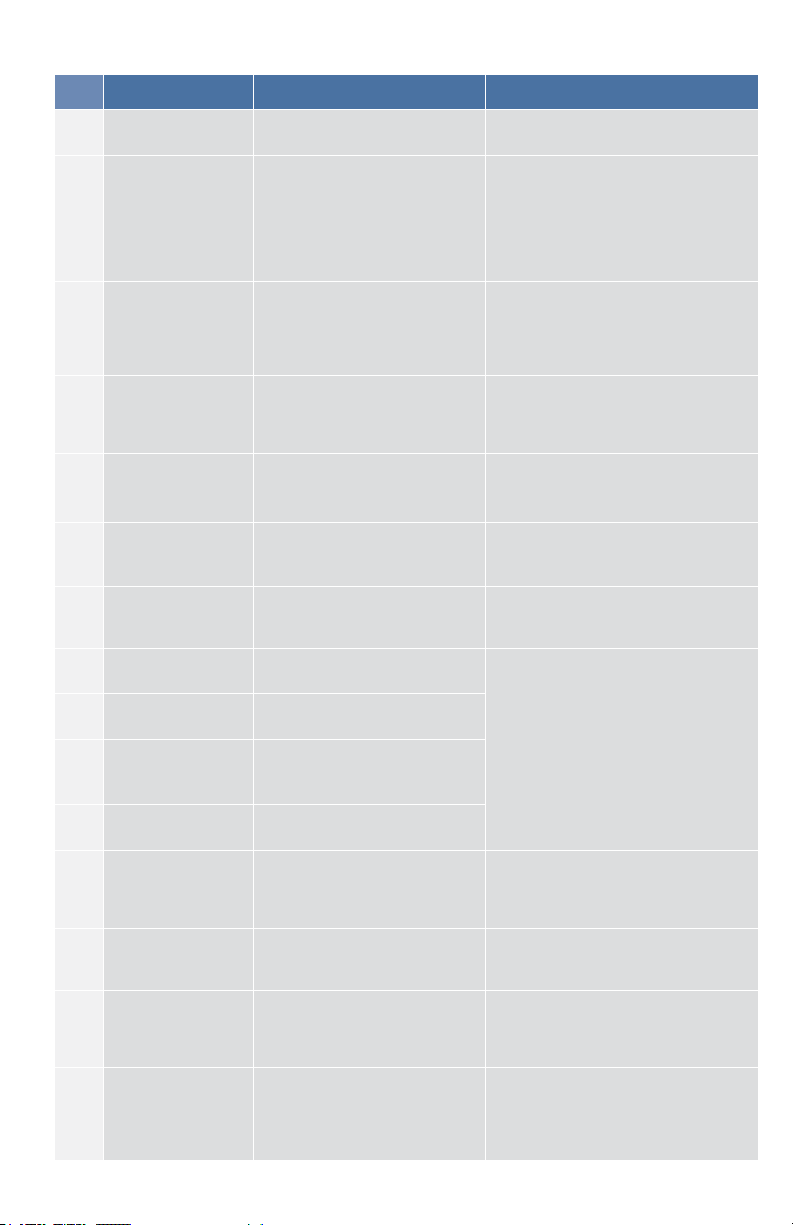
Fault Message/Warning Cause Remedy
..
1. 24V Control Power input
voltage dip.
or
2. Auxillary encoder 5V (X9-9)
shorted.
1. Insure adequate 24V supply
current capacity for the system.
or
2. Check and x X9 wiring.
F0 N/A Reserved. N/A
F101 Firmware
incompatible.
Installed rmware is
not compatible with the drive
hardware.
Load compatible rmware into the
drive.
n101 The FPGA is a lab
FPGA.
The FPGA is a lab version
FPGA.
Load the released FPGA version
that is compatible with the operation
rmware.
F102 Resident rmware
failed. Software failure detected. Restart drive. If issue persists,
contact technical support.
n102 Operation FPGA is
not a default FPGA
The FPGA minor version is
larger than the operational
rmware default FPGA minor
version.
Load the released FPGA version that
is compatible with the operational
rmware.
F103 Resident
FPGA failed.
Software failure detected. Load
resident FPGA failure occurred
(several cases according
to owchart, including
incompatible image to FPGA
type and eldbus type).
Restart drive. If issue persists,
contact technical support.
F104 Operational FPGA
failed.
Software failure detected.
Load operational FPGA failure
occurred (several cases
according to owchart).
Restart drive. If issue persists,
contact technical support.
F105 NV memory stamp
invalid.
NV memory stamp is corrupted
or invalid.
Reset the drive to default memory
values using Parameter Load.
F106 NV memory data
invalid.
NV memory data is corrupted
or invalid. This fault often
occurs when downloading
rmware.
Reset the drive to default memory
values using Parameter Load.
n107 Positive switch. Positive position limit is
exceeded. Move the load away from the limits.
n108 Negative switch. Negative position limit is
exceeded. Move the load away from the limits.
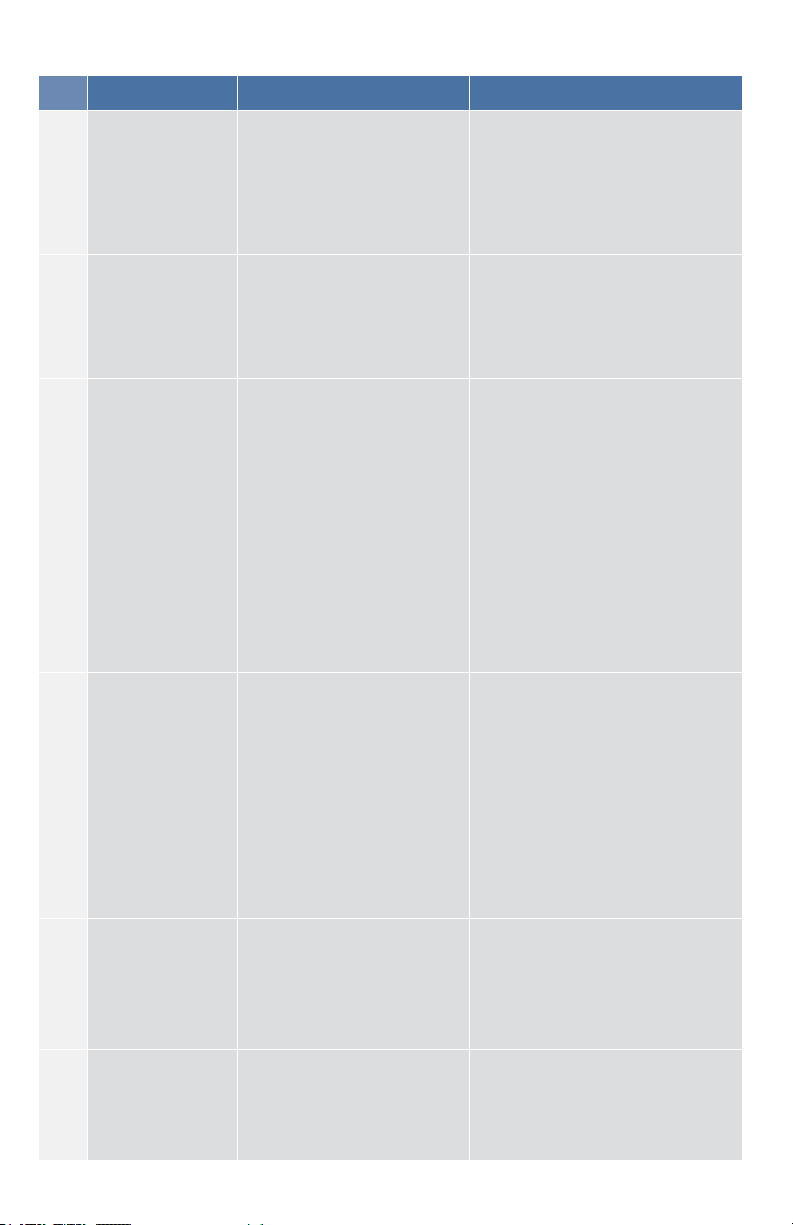
Fault Message/Warning Cause Remedy
F121 Homing error. Drive did not nish homing
sequence.
Check homing sensor, homing mode,
and homing conguration.
F123
n123
Invalid motion task.
Warning issued
prior
to fault.
Invalid motion task.
Check motion task settings and
parameters to make sure that the
values entered will produce a valid
motion task. Refer to the motion task
documentation for additional guidance
on specic causes of invalid motion
tasks.
F125
n125
Synchronization
lost. Warning issued
prior to fault.
The eldbus lost
synchronization.
Check eldbus connection (X5 and X6
if you are using EtherCAT; X12 and
X13 if you are using CANopen) or the
settings of your EtherCAT or CANopen
master.
F126
n126
Too much
movement. Warning
issued prior to fault.
Too much movement was
created during a Bode plot.
Motor is unstable and is not
following drive instructions.
Check that the system
is closed loop stable. Refer to the
system tuning guide.
F127
Incomplete
emergency
stop procedure.
Incomplete emergency stop
procedure (problem with the
emergency stop motion task).
Disconnect power from
drive and check emergency
stop procedure.
F128 MPOLES/FPOLES
not an integer.
Ratio of motor poles to feedback
poles must be a whole number.
Change to a compatible feedback
device.
F129 Heartbeat lost. Heartbeat lost.
Check CANopen cabling. Reduce bus
load or increase the heartbeat update
time.
F130 Secondary feedback
supply over current.
5V power supply was shorted
out on X9.
Check secondary feedback (X9
connection).
F131 Secondary feedback
A/B line break.
Problem in secondary feedback
detected.
F132 Secondary feedback
A/B line break.
Problem in secondary feedback
detected.
F134 Secondary feedback
illegal state.
Feedback signals were detected
in an illegal combination.
F135
n135
Homing is needed.
Warning issued
prior to fault.
Attempt to issue motion task
before the axis is homed. Axis
must be homed before motion
task can start.
Change opmode or home axis.
F136
Firmware and
FPGA versions are
not compatible.
The FPGA version does not
match the rmware FPGA
version constants.
Load the FPGA version that is
compatible with the rmware.
n137
Homing and
feedback
mismatch.
The congured homing mode
is not supported by the motor
feedback type used.
Change homing mode.
F138 Instability during
autotune.
Drive current (IL.CMD) or
velocity feedback (VL.FB)
exceeds allowable limit. This
fault only occurs in BODE.MODE
5.
Change BODE.MODE if appropriate.
Otherwise the motor is not stable and
may require manual tuning.
5
AKD PDMM Fault Card | F121– F138
AKD PDMM Fault Card | F139– F154
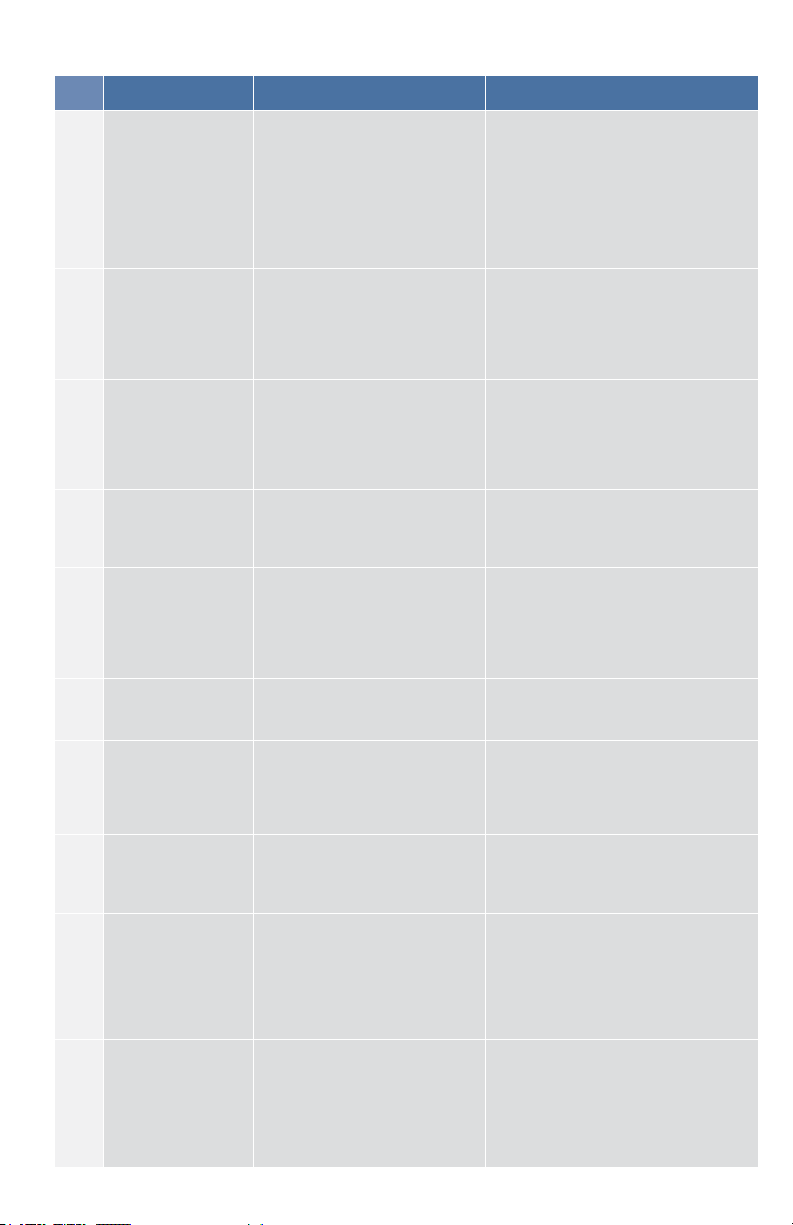
Fault Message/Warning Cause Remedy
F139
Target Position
over short due to
invalid motion task
activation.
The drive cannot decelerate
from its current speed to
reach the end point of the
second motion task without
moving past it. Increase the
deceleration rate in the move
or trigger the move earlier
Change Motion task prole and
clear fault with DRV.CLRFAULTS
or change the value of FAULT139.
ACTION = 1 to ignore this condition.
n140
VBUS.HALFVOLT
has changed. Save
the parameters and
reboot the drive.
The user has changed the
numerical value of VBUS.
HALFVOLT. This change
only takes effect after a DRV.
NVSAVE command and after a
reboot of the AKD.
Save the parameters in the non
volatile memory using the DRV.
NVSAVE command and turn off/
on the 24[V] power supply in order
to reboot the drive or restore the
original setting of VBUS.HALFVOLT.
n151
Not enough
distance to move;
motion exception.
For trapezoidal and customer
table motion tasks: The target
velocity specied in the motion
task cannot be reached via
using the selected acceleration
and deceleration since the
distance to travel is not
sufcient.
For a 1:1 prole: The selected
acceleration and deceleration
will be extended since there
is too much distance to travel
and the motion task would
exceed its maximum allowed
velocity.
Activation of any new motion or
using of DRV.CLRFAULTS will clear
the warning. Check motion task
settings and parameters to make
sure that the values entered will
produce a valid motion task.
n152
Not enough
distance to move;
following motion
exception.
A new motion task activated,
when one motion task is
already active and the target
position specied in the motion
task parameters cannot be
reached with specied target
velocity, acceleration and
deceleration parameters.
The motion task will directly
decelerate to into the target
position or ramps down to
velocity 0 and start another
move to reach target position
of the next motion task.
Activation of any new motion or
using of DRV.CLRFAULTS will clear
the warning. Check motion task
settings and parameters to make
sure that the values entered will
produce a valid motion task.
n153
Velocity limit
violation,
exceeding max
limit.
A new target velocity
calculated internally due to an
exception, and is being limited
due to user velocity limit.
Activation of any new motion or
using of DRV.CLRFAULTS will
clear the warning. Check motion
task target velocity settings and
parameters to make sure that the
values entered will not exceed the
VL.LIMITP and VL.LIMITN setting.
n154
Following motion
failed; check
motion parameters.
Activation of the following
motion task failed due to
incompatible parameters, or
motion task does not exist.
Activation of any new motion or
using of DRV.CLRFAULTS will clear
the warning. Check following motion
task settings and parameters to
make sure that the values entered
will produce a valid motion task.
6

AKD PDMM Fault Card | n156 – n168
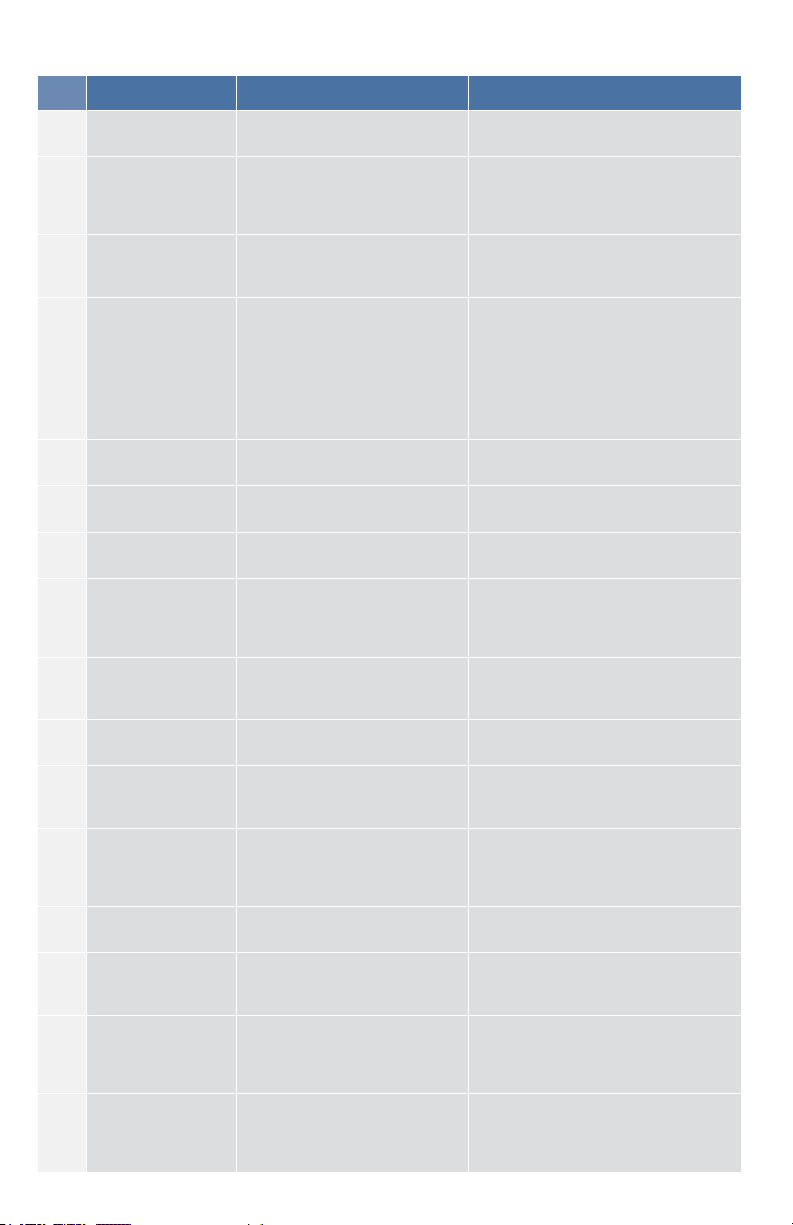
Fault Message/Warning Cause Remedy
n156
Target position
crossed due to
stop command.
The motion task crosses the
target position after triggering
a DRV.STOP command. This
situation can happen when
processing a change-on-the-
y motion task and triggering
a DRV.STOP command close
to the target position of the
currently running motion task.
Activation of any new motion or
using of DRV.CLRFAULTS will clear
the warning.
n157 Homing index
pulse not found.
A homing mode with index
detection is activated, and
index pulse is not detected
while moving across the range
determined by the hardware
limit switches.
Activation of any new motion or
using of DRV.CLRFAULTS will clear
the warning.
n158 Homing reference
switch not found.
A homing mode with reference
switch detection is activated
and the reference switch is not
detected while moving across
the range determined by the
hardware limit switches.
Activation of any new motion or
using of DRV.CLRFAULTS will clear
the warning.
n159
Failed to set
motion task
parameters
Invalid motion task parameters
assignment. This warning
can appear upon an MT.SET
command.
Activation of any new motion or
using of DRV.CLRFAULTS will clear
the warning. Check motion task
settings and parameters.
n160 Motion task
activation failed.
Activation of the motion task
failed due to incompatible
parameters, or motion task
does not exist. This warning
can appear upon an MT.MOVE
command.
Activation of any new motion or
using of DRV.CLRFAULTS will clear
the warning. Check motion task
settings and parameters to make
sure that the values entered will
produce a valid motion task.
n161 Homing procedure
failed.
Homing error observed during
the operation of homing
procedure.
Activation of any new motion or
using of DRV.CLRFAULTS will clear
the warning.
n163 MT.NUM exceeds
limit.
This warning appears with
n160. This warning is triggered
when you try to trigger a
motion task > 128 (such as
MT.MOVE 130).
Trigger only motion tasks between
0 and 128. Activation of any new
motion or using of DRV.CLRFAULTS
will clear the warning.
n164 Motion task is not
initialized.
This warning appears with
n160. This warning is triggered
when you try to trigger a non-
initialized motion task.
Initialize the motion task rst before
starting the task. Activation of
any new motion or using of DRV.
CLRFAULTS will clear the warning.
n165 Motion task target
position is out.
This warning appears with
n160. This warning is triggered
when you try to trigger a
motion task with an absolute
target position outside of the
selected modulo range (see
also MT.CNTL).
Move the absolute target position of
the motion task within the modulo
range.Activation of any new motion
or using of DRV.CLRFAULTS will
clear the warning.
n168
Invalid bit
combination in the
motion task control
word.
This warning appears with
n160. This warning is triggered
when you try to trigger a
motion task with an invalid
bit combination in the motion
task control word (see also
MT.CNTL).
Correct the MT.CNTL setting for the
specic motion task. Activation of
any new motion or using of DRV.
CLRFAULTS will clear the warning.
7
AKD PDMM Fault Card | n169 – F249
Fault Message/Warning Cause Remedy
n169
1:1 prole cannot
be triggered on
the y.
This warning appears with
n160. This warning is triggered
when you try to trigger a
1:1 prole table motion task
while another motion task is
currently running.
1:1 prole table motion tasks should
be started from velocity 0. Activation
of any new motion or using of DRV.
CLRFAULTS will clear the warning.
n170
Customer prole
table is not
initialized.
This warning appears with
n160. This warning is triggered
when you try to trigger a
motion task that uses a
customer prole table for
generating the velocity prole
and when the selected prole
table is empty (see MT.CNTL
and MT.TNUM.
Change the MT.TNUM parameter
for this specic motion task in order
to use an initialized prole table.
Activation of any new motion or
using of DRV.CLRFAULTS will clear
the warning.
F201 Internal
RAM failed. Hardware failure detected. Restart drive. If issue persists,
contact technical support.
F202 External
RAM failed. Hardware failure detected. Restart drive. If issue persists,
contact technical support.
F203 Code integrity
failed.
Software failure detected.
FPGA register access failure
occurred.
Restart drive. If issue persists,
contact technical support.
F204
–
F232
EEPROM
failure detected. EEPROM failure detected. Restart drive. If issue persists,
exchange drive.
F234
–
F237
Control
temperature sensor
high. Warning
issued prior to fault.
High temperature
limit reached. Check cabinet ventilation system.
n234
–
n237
Control
temperature sensor
high. Warning
issued prior to fault.
High temperature
limit reached. Check cabinet ventilation system.
F240
–
F243
Power temperature
sensor low.
Warning issued
prior to fault.
Low temperature
limit reached. Check cabinet ventilation system.
F245 External fault. This fault is user generated
and is caused by user settings.
Users can congure a digital input to
trigger this fault (DINx.MODE = 10).
the fault occurs according to this
input setting. Clear the input to clear
the fault.
F247
Bus voltage
exceed allowed
thresholds.
Hardware problem in bus
measurement.
Troubleshoot and repair hardware
problem.
F248
Option board
EEPROM
corrupted.
EEPROM failure detected. Restart drive. If issue persists,
exchange drive.
F249
Option board
downstream
checksum.
Communications with the I/O
on the option board failed.
DRV.CLRFAULTS. If issue persists,
contact technical support.
8
AKD PDMM Fault Card | F250 – F312
Fault Message/Warning Cause Remedy
F250
Option board
upstream
checksum.
Communications with the I/O
on the option board failed.
DRV.CLRFAULTS. If issue persists,
contact technical support.
F251 Option board
watchdog.
Communications with the I/O
on the option board failed.
DRV.CLRFAULTS. If issue persists,
contact technical support.
F252
Firmware and
option board FPGA
types are not
compatible.
The option board FPGA is not
compatible with this hardware.
Download the correct rmware le
for this drive.
F253
Firmware and
option board FPGA
versions are not
compatible
The version of the option
board FPGA is not compatible
with this rmware.
Download the correct rmware le
for this drive.
F256
n256
Analog Input over
voltage.
The analog input value is
above the AIN.OVFTHRESH
level.
Check the analog input signal or
change the AIN.OVFTHRESH value.
F257
n257
Analog Input under
voltage.
The analog input value is
below the AIN.UVFTHRESH
level.
Check the analog input signal or
change the AIN.UVFTHRESH value.
F301
n301
Motor overheated. Motor overheated. Check ambient temperature. Check
motor mounting heat sink capability.
F302 Over speed. Motor exceeded VL.THRESH
value.
Increase VL.THRESH or lower
velocity command.
F303 Motor foldback.
Maximum motor power has
been exceeded; the power
has been limited to protect the
motor.
Current command to the motor is
too high for too long. Reduce servo
gains, or reduce command trajectory
aggressiveness.
F304
n304
Motor foldback.
Warning issued
prior to fault.
Maximum motor power has
been exceeded; the power
has been limited to protect the
motor.
Change move prole to reduce load
on motor. Check for load jamming
or sticking. Check that current limits
are set correctly.
F305 Brake
open circuit. Motor brake open circuit. Check cabling and general
functionality.
F306 Brake
short circuit. Motor brake short circuit.
Check cabling and general
functionality. Check that MOTOR.
TBRAKERLS and MOTOR.
TBRAKEAPP are congured.
F307 Brake closed
during enable state.
Motor brake
closed unexpectedly.
Check cabling and general
functionality.
F308 Voltage exceeds
motor rating.
Drive bus voltage exceeds the
motor’s dened voltage rating.
Make sure that the motor ts the
driving rating.
n309 Motor I2t load.
Reduce load
Motor I2t load (IL.MI2T)
has exceeded the warning
threshold IL.MI2TWTHRESH.
This warning can only be
generated in the case that
the motor protection mode
IL.MIMODE has been set to 1.
Reduce the load of the drive by
adjusting lower acceleration /
deceleration ramps.
F312
Brake released
when it should be
applied.
Brake disengaged
unexpectedly.
Check cabling and general
functionality.
9
AKD PDMM Fault Card | F401 – F439
Fault Message/Warning Cause Remedy
F401 Failed to set
feedback type.
Feedback is not connected or
wrong feedback type selected.
Check primary feedback (X10
connection).
F402 Analog signal
amplitude fault.
Analog signal amplitude is
too low. Analog fault (resolver
signal amplitude or sin/cos
amplitude).
Check primary feedback (X10
connection), resolver and sine/cos
encoder only.
F403
EnDat
communication
fault.
General communication
problem with feedback.
Check primary feedback (X10
connection), EnDat only.
F404 Hall error.
Hall sensor returns invalid Hall
state (111, 000); either all Hall
sensors are on or off. Legal
Hall states are 001, 011, 010,
110, 100, and 101. This fault
can be caused by a broken
connection in any one of the
Hall signals.
Check the feedback wiring; check all
feedback connectors to ensure all
pins are positioned correctly.
F405 BiSS
watchdog fault.
Bad communication with the
feedback device.
Check primary feedback (X10
connection), Biss only.
F406 BiSS
multicycle fault.
Bad communication with the
feedback device.
Check primary feedback (X10
connection), Biss only.
F407 BiSS
sensor fault.
Bad communication with the
feedback device.
Check primary feedback (X10
connection), Biss only.
F408
–
F416
SFD Feedback
Fault
Bad communication with the
SFD device.
Check primary feedback (X10
connection). If fault persists,
internal feedback failure. Return to
manufacturer for repair.
F417 Broken wire in
primary feedback.
In primary feedback, a broken
wire was detected (incremental
encoder signal amplitude).
Check feedback
cable continuity.
F418 Primary feedback
power supply.
Power supply fault for primary
feedback.
Check primary feedback (X10
connection).
F419 Encoder init
procedure failed.
Phase nd procedure did not
complete successfully.
Check encoder wiring, reduce/
balance motor load prior to phase
nding.
F420
FB3 EnDat
Communications
Fault.
A communication error was
detected with the EnDat 2.2
device connected to the X9
connector.
Check tertiary feedback (X9
connection).
F421 SFD position
sensor fault.
Sensor or sensor wiring failure
inside motor.
Try resetting the fault. If it reappears
return motor for repair.
F423 NV Failure –
Extended Multiturn.
The position saved in memory
is corrupted.
Home axis or disable multiturn
overow. If the fault persists, send
the drive for repair.
F438
n438
Following error
(numeric) Warning
issued prior to fault.
Motor did not follow command
values. Motor exceeded
maximum allowed position
following error (numeric).
Check for increased load, jamming
or sticking. Is position error set too
low?
F439
n439
Following
error (user).
Motor did not follow command
values. Motor exceeded
maximum allowed position
following error (user).
Check feedback commutation setup
and tuning parameters.
10