Page. 4
P / N : 570-111802-03
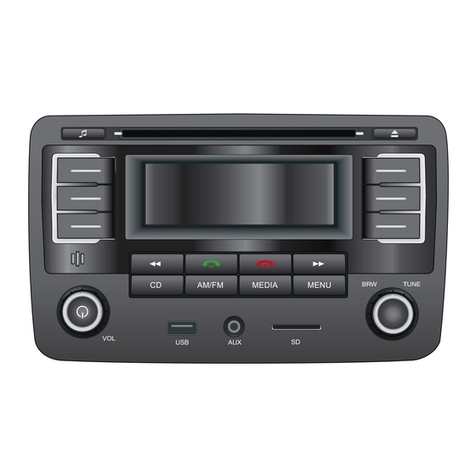
13. DSP CO TROL
Press this button to select the sound effect (Pop, Rock, Classic, Flat).
14. AS/PS CO TROL ( AUTO-STORE / PRE-SCA )
This button allows you to enjoy "Preset Memory Scan" function by pushing it within 2 seconds, and allows you enjoy "Auto-Store
Memory" function at pushing it continuously more than 2 seconds.
* AS (AUTO-STORE MEMORY )
It searches all station frequencies upward and memori e automatically 6 stations by catching the frequency which has scan-
stop level, the memori ed station is shown on LCD as "CH1...6". After memori ing, auto-store memory function will be
changed to "Preset Memory Scan" function automatically.
* PS (PRESET MEMORY SCAN )
It calls the memori ed station frequencies ( from 1-6 ) automatically every 5 seconds.
15. LOUD CO TROL
Press this button to activate the loudness circultry which compensates for loss of high and low frequencies during low volume
levels.
SUBWOOFER SOU D (OPTIO AL)
Hold this button more than 2 seconds, the super subwoofer sound will be heard from your subwoofer speaker. When the
subwoofer is selected, the "<<<.>>>" will appear on LCD display (#27).
ote: You need to connect the subwoofer jack directly to your amplifier in order to hear the subwoofer sound.
16. MUTE CO TROL
Press this button to mute the volume control and "MUTE" will appear on LCD display.
17. AUDIO SELECTOR
Press this button to select "VOLUME/BASS/TREBLE/BALANCE/FADER" adjustment modes. Each time button is pressed,
acessed selection is displayed. While selection is being displayed, press (within 5 sec.) AUDIO CONTROL buttons + or - to
adjust level as desired.
18/19. AUDIO LEVEL Down Control ( - Button ) / AUDIO LEVEL Up Control ( + Button )
With the exception of VOLUME, to access all other adjustment modes "BASS/TREBLE/BAL/FADER", first press SEL button then the
+ or - button . Press and release to change level slightly, repeatedly for slow adjustments, or press and hold to adjust rapidly. Display will
show level increments.
• VOLUME - Press the AUDIO CONTROL + button to increase, or - button to decrease sound level.
• BASS - While "BAS" is being displayed, press the AUDIO CONTROL + button to increase or - button to decrease the bass level.
• TREBLE - While "TRE" is being displayed, press the AUDIO CONTROL + button to increase or - button to decrease the treble level.
• BALANCE - While "BAL" is being displayed, press the AUDIO CONTROL + or - button to level balance of speaker right and left.
• FADER - While "FAD" is being displayed, press the AUDIO CONTROL + or - button to level balance of front speakers and rear
speakers /LINE OUT jacks.
ote : BASS A D TREBLE CO TROLS CA OT BE USED WHE DSP MODE IS SELECTED (ROCK, POP, CLASSIC, FLAT).
20/21. MA UAL UP/DOW TU I G / TRACK SEEK UP/DOW CO TROL
On radio mode, press this button will tune one frequency step higher or lower. On CD mode, press this button will locate the
beginning of the track being played or will locate the beginning of the next track. When pressing more than 2 seconds, it will
move fast forward or fast backward to a specific position of a CD track.
22. STATIO PRESET BUTTO (30 STATIO PRESET BUTTO )
The PRESET BUTTONS on the unit are used to store station frequencies which you may wish to recall. Each preset button can
store FM1, FM2, FM3, MW1, MW2 station frequency. Pressing the button momentarily recalls the station frequency which was
memori ed. There are 6 preset buttons, giving you capability of storing 18FM/12MW.
NOTE: When the preset button to be memori ed is kept pressed for more than 2 seconds, the receiving station frequency will be
stored in the button pressed. After this, the memori ed station can be recalled by tapping that button once.
On CD Mode
Preset knob 1, press this button to play the first track of the disc
Preset knob 2, press this button to repeat the specific track of the disc.
Preset Knob 3, press this button to scan the first 10 seconds of all the tracks on the currently selected disc. "INTR" will
indicate on LCD display.
Preset knob 4, press this button to play the disc at random order.
12. DETACHABLE RELEASE BUTTO
Press this button to release the detachable panel. To detach the front panel, press the button so that the left side of the panel is
released. Grasp the released side and pull it off of the chassis. To re-attach the panel, position the right side of the panel in
place first and then press the left side of the panel until the mechanism locks it into place.
11. CD EJECT BUTTO
Press this eject button will eject the compact disc.
ote: If you want to release the compact disc, press the release slide down button (# 24) first until the panel is in
horizontal slide position (Diagram B). Then, press the CD eject button and the compact disc will eject automatically.