PHASE 2
45"35
))
45"35
45"35 45"35
PROGRAMMING THE TRAVEL
PHASE 3
45"35
45"35
!"
AACKNOWLEDGMENT OF THE TOTAL OPENING RADIOCOMMAND
a) P
ress , the green led (SX) will light and the red one A will
switch on.
b) H
old down the key (P1) on the radio control until all five LEDs
light .
c) Wait 25 seconds or press two times again to quit.
ACKNOWLEDGMENT OF THE PEDESTRIANS’ OPENING
RADIOCOMMAND
a) P
ress , two times, the green (left) and the red (right)
led switch on.
b) K
eep the button (P2) pushed untile all the five leds switch on
.
The automation is now programmed.
SEMIAUTOMATIC mode is enabled: by giving the ‘STEP’ command, the automation changes movement following the sequence 1 – OPEN 2 – STOP 3 –
CLOSE 4 – STOP. Automatic re-closure is not enabled.
Once programming is complete, the key acts as a STEP command.
PHASE 1
PROGRAMMING THE CONTROL UNIT
DEFINING THE STOP PLATES
Ensure that the automation’s opening and closure stop plates have been fixed.
P1 P2
1
12
45"35
HSILGNE
OFF
230V
OFF
13
ON
ON
230V
2
OFF
230V
N.B. In case just one motor is utilised, choose from Menu Options 2 “Activate single motor” and connect on terminals 20-21-22
b) Press for 5 seconds, the 5 LEDs will light and
then start flashing.
c) P
ress and the gate starts rolling, if it opens
press
again to invert the movment.
T
he first activated limit switch has to be the one of the
closing system.
Finished the two flash programming
green LED will be lit and a steady light led the two
reds.
If the result was not satisfactory, you can
perform a programming manual to determine the
lags. See Section 3.3.4
a) Position the leaf gates at 45°.
STOP PLATES -
Ensure that the open and close stop plates are set to the correct position
Ensure that the open and close stop plates are set to the correct position
SINGLE MOTOR -
In the case of a single gate installation connect the motor into terminals 20-21-22
In the case of a single gate installation connect the motor into terminals 20-21-22
before programming enter the options 2 menu and select single motor activated (led 4
before programming enter the options 2 menu and select single motor activated (led 4
on)
AUTOMATIC PROGRAMING
•
Position the gate leafs at 45 degrees.
Position the gate leafs at 45 degrees.
•
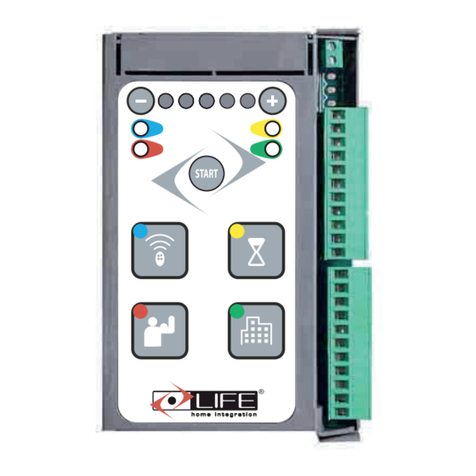
Press the start button for 5 seconds, the 5 leds at
Press the start button for 5 seconds, the 5 leds at
the top of the board will light and start to flash.
the top of the board will light and start to flash.
•
Press the start button and motor 2 should run
Press the start button and motor 2 should run
closed. If it runs open, press the start button a
closed. If it runs open, press the start button a
second time to invert the movement. The red and
second time to invert the movement. The red and
green led’s will flash.
•
Once motor 2 has closed, motor 1 will then close,
Once motor 2 has closed, motor 1 will then close,
once closed it will re-open followed by motor 2.
once closed it will re-open followed by motor 2.
Once both motors are open, motor 1 will start to
Once both motors are open, motor 1 will start to
close again followed by motor 2.
close again followed by motor 2.
•
Once both motors have completed this full close
Once both motors have completed this full close
cycle the programming is complete and the red
cycle the programming is complete and the red
led’s will light and green led’s will flash. The gates
led’s will light and green led’s will flash. The gates
will now operate on the start button in semi auto-
will now operate on the start button in semi auto-
matic mode.
OPEN-STOP-CLOSE-STOP
•
This programming will set a default leaf delay
This programming will set a default leaf delay
time. If you wish to change this please refer to the
time. If you wish to change this please refer to the
manual set up instructions
manual set up instructions
•
You can now encode the radio transmitters and
You can now encode the radio transmitters and
enter the programming menus to suit the type of
enter the programming menus to suit the type of
operation required.
PROGRAMMING RADIO TRANSMITTERS
PROGRAMMING RADIO TRANSMITTERS
TOTAL OPENING COMMAND
•
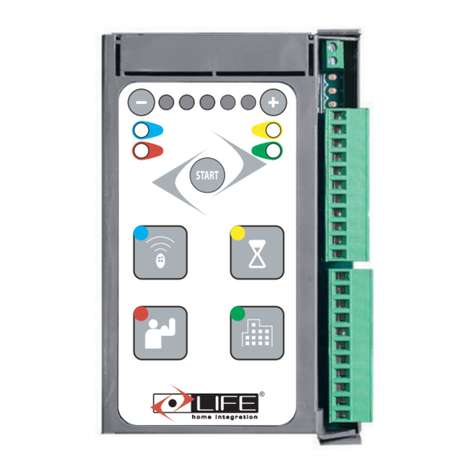
Press the radio icon button (top left) once the
Press the radio icon button (top left) once the
left green led will light and the first (L to R) of
left green led will light and the first (L to R) of
the top 5 led’s will light.
the top 5 led’s will light.
•
Hold down the button on the transmitter that
Hold down the button on the transmitter that
you want to perform a total opening of the
you want to perform a total opening of the
gates. Once the top 5 led’s light the trans-
gates. Once the top 5 led’s light the trans-
mitter has been coded.
•
To exit wait 25 seconds or push the radio icon
To exit wait 25 seconds or push the radio icon
button twice.
PEDESTRIAN OPENING COMMAND
PEDESTRIAN OPENING COMMAND
(ACTIVE ON MOTOR 1)
•
Press the radio icon button (top left) twice.
Press the radio icon button (top left) twice.
The left green led will light and the second (L
The left green led will light and the second (L
to R) of the top 5 led’s will light.
to R) of the top 5 led’s will light.
•
Hold down the button on the transmitter that
Hold down the button on the transmitter that
you want to perform a pedestrian opening of
you want to perform a pedestrian opening of
the gates. Once the top 5 led’s light the trans-
the gates. Once the top 5 led’s light the trans-
mitter has been coded.
POWERING UP - With the power off, hold the start button down ,reinstate the power supply and release the
button the red led’s will flash
Once programming is complete the START button acts as a step command
Once programming is complete the START button acts as a step command
Secs
PHASE 2
PROGRAMMING THE TRAVEL
a) Press start EXWWRQIor 5 seconds, the 5 LEDs will light and
then start flashing.
b) P
ressWKHVWDUWEXWWRQDJDLQand the gate starts rolling,
if it openV
press
againWo UHYHUVH the movment.
T
he first activated limit switch has to be the one of the
closing system.
The automation will perform, in sequence, a closure (1),
an opening (2), a closure (3).
Once programming is complete, the two green LEDs will
flash and the red led (/+)will light.
Should the result obtained not be satisfactory, repeat the
whole process.
SESOLC
SNEPO
SESOLC
123
Ensure gate is in central position (half open) and
Ensure gate is in central position (half open) and
manual release is locked before proceeding
manual release is locked before proceeding