2
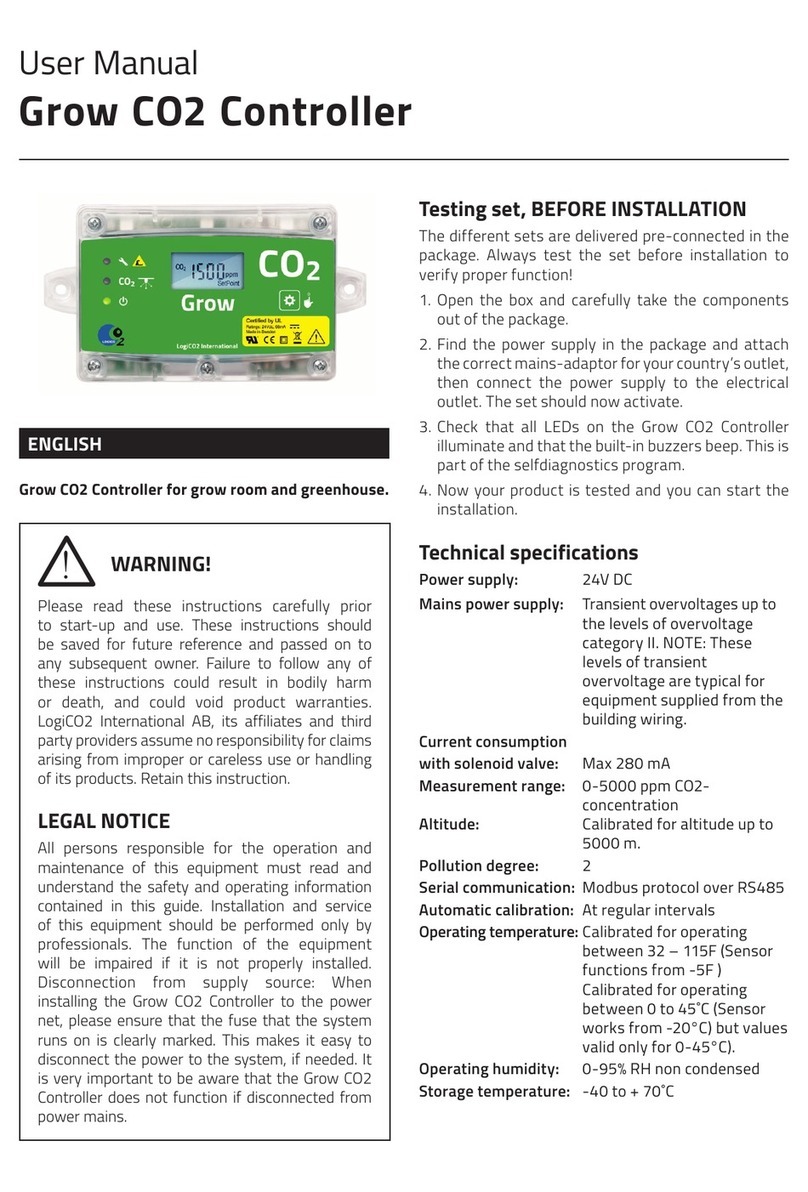
LED indications
Red: Alarm - CO2 concentration
over 5000 ppm
Green: Adding CO2 gas
Green: Power on
Installation: For indoor use
Dimensions (LxWxD): 90x161x38 mm 3.5”x6.3”x1.5”
Ingress protection: IP 56
Function
The LogiCO2 Grow CO2 Enrichment Controller is a
device that measures the concentration of CO2 in the
ambient environment of the room being controlled
and opens/closes our enrichment valve to achieve a
perfectly enriched CO2 environment in the grow room.
Mount the Grow CO2 Enrichment Controller at the
same height as the foliage of the plants, where the
photosynthesis is taking place. If plant lighting is used
in the greenhouse, make sure that the plant light hits
the Grow CO2 Enrichment Controller. An internal light
sensor in the Grow CO2 Enrichment Controller makes
it possible to activate the CO2-control only when the
plant lighting is on. It is possible to disable this function
via DIP-switch.
The system control the CO2 level with a “plug and
play” Enrichment Valve. If the CO2 gas for the grow
room is produced by burning gas, use the RCB external
relay box to start and stop the burner, instead of the
Enrichment Valve. Both the Enrichment Valve and the
RCB have RJ45 connectors for direct connection to the
Grow CO2 Enrichment Controller.
Just like the LogiCO2 Safety CO2 Sensor, the Grow CO2
Enrichment Controller can be adjusted for the correct
altitude.
Adaptive CO2-control
The Grow CO2 Enrichment Controller is default set to
use a fixed dosing time of 30 or 60 seconds every 5
minutes. The Grow CO2 Enrichment Controller also has
an Adaptive CO2-control algorithm that automatically
adjust the dosing time of CO2 between 10 to 120
seconds. This dosage of CO2 is done in intervals of 5
minutes. The initial dosage time is 30 seconds. It is
possible to enable the Adaptive CO2-control via DIP-
switch on the printed circuit board.
The Grow CO2 Enrichment Controller has an adjustable
CO2 setpoint via a push button on the outside of the
cover. The setpoint for the target CO2 concentration is
adjustable from 700 to 2000 ppm in steps of 50 ppm.
The default setpoint is 1200 ppm. Setpoint “OFF”
stops the CO2 regulation.
The hysteresis can be set to 40 or 100 ppm and default
setting is 40 ppm.
The display is alternately reading:
- The current CO2 concentration
- The CO2 target setpoint value
- The current altitude setting (height over the ocean)
It can also show “Low” if the current concentration is
200 ppm below the setpoint, indicating for example
that the CO2 container is empty. The green “Power
on” LED starts blinking to indicate this function. If
connected to a LogiCO2 Safety System Central Unit,
the Central Unit will also show “/Low”, after the
concentration value, on the display.
Optional Remote Connection box for fans
Use a RCB external relay box (0471) and connect it
to the Grow CO2 Enrichment Controller, to activate
greenhouse fans. The fans will be on when the Grow
CO2 Enrichment Controller actively is controlling the
CO2 concentration. If the light sensor in the Grow CO2
Enrichment Controller is enabled, the fans will be on
if it is light and off when it is dark in the greenhouse.
When it is dark, the Grow CO2 Enrichment Controller
will also stop the CO2 enrichment.
Connected with CO2 Safety System
The Grow CO2 Enrichment Controller can be used in
conjunction with the Mk9 CO2 Safety System to make
the perfect combination of safety and efficiency.
When the Grow CO2 Enrichment Controller is
connected to the Mk9 Central Unit the current CO2
concentration can also be read on the Central Unit’s
display.
LED indications on the Grow CO2 Enrichment
Controller
Red: Alarm - CO2 concentration
over 5000ppm.
Green: Adding CO2 gas
Green: Power on
If the display is showing “AbC0” at startup, the
automatic CO2 calibration is disabled.
The LogiCO2 Safety System Central Unit display
shows the ID number of the CO2 Sensor, its current
CO2 concentration followed by:
/Low: Concentration 200 ppm below the setpoint
/On: CO2-control activated
/Off: Only when light sensor is activated and it is dark