Controls – Front Panel
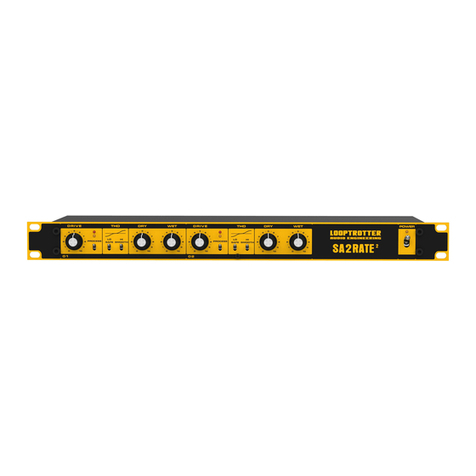
DRIVE – this knob controls signal level that goes to the Processor. Increasing the input
will result in more processing (depending on the settings of the other parameters). The
available range is 0 – 10. The knob is also the primary saturation controller.
At lower settings, apparent loudness is not as dramatic but processing still occurs,
producing a richer sound with minimal reduction of dynamic range. As DRIVE is increased,
the sound becomes more saturated with “sonically pleasing” distortion and perceived
loudness.
SIDECHAIN – the Sidechain buttons shape the signal that controls the Processor.
With Low Shelf engaged, it dips low frequencies allowing the device to process bass
instruments such as kick drum or bass guitar without distorting and overpumping low
frequencies of the input signal.
High Shelf button boosts high frequencies of the sidechain signal and makes EMPEROR to act
like an analog de-esser or a very fast compressor for bright dynamic instruments.
TIMING CIRCUIT - Below you will find EMPEROR's Timing Circuit button. Cycle through to
switch between three factory attack/release settings:
FAST: sets Processor's attack and release times to the fastest settings, making it behave
like a limiter. With this setting on, it is more likely to get rich, dense saturation of the
input signal.
MED: makes EMPEROR to act like a fast compressor.
SLOW: this setting makes the processor behave more like an analog compressor rather than
limiter.
DRY – sets the amount of an unprocessed signal fed to EMPEROR's output.
The range is 0 – 10.
WET – sets the amount of processed signal that goes to device's output. The range is 0 – 10.
These two knobs determine the balance between the original and the processed signal.
In EMPEROR's central section the 01 and 02 buttons engage processing equally on left and
right channels. The LINK button puts the Processor in stereo operating mode, to preserve
exact same settings for both left and right channels. When the LINK button is on, only left
section of the EMPEROR's controllers is active.
Getting Started
As a starting point for general enhancement, set EMPEROR's DRIVE knob to 5 with Low Shelf
engaged and FAST release time. Set DRY knob at 10 and WET at 4. These settings offer good
results under most conditions, producing more presence with a warmer sound and enhanced
detail (especially with lower frequencies), while retaining the apparent dynamic range of
the original signal.
The most natural warmth and tube-style distortion can be obtained with DRIVE at 6, with MED
release time, and both EQ shelves disengaged. Set DRY at 10 and WET at 6.
More overdrive may be obtained by setting DRIVE at 8 and with FAST release time, also often
with Low Shelf on. Set DRY controller at 10 and start to increase WET output level until you
achieve desired amount of distortion.
For optimum results make sure the source signal is not clipped before it arrives at the
EMPEROR's input.
Set WET at 10 and DRY at 0 in order to hear the full affect of the EMPEROR's process.
Increase DRY when blending in the original signal is desired.
LOOPTROTTER
AUDIO ENGINEERING
Contact:
www.looptrotter.com.pl
Distribution:
www.mjadiolab.pl