manuals.online logo
Brands
  1. Home
  2. •
  3. Brands
  4. •
  5. Luma Surveillance
  6. •
  7. Camera Accessories
  8. •
  9. Luma Surveillance LUM-MNT-CAP-IPPTZ-WH User manual

Luma Surveillance LUM-MNT-CAP-IPPTZ-WH User manual

Other Luma Surveillance Camera Accessories manuals

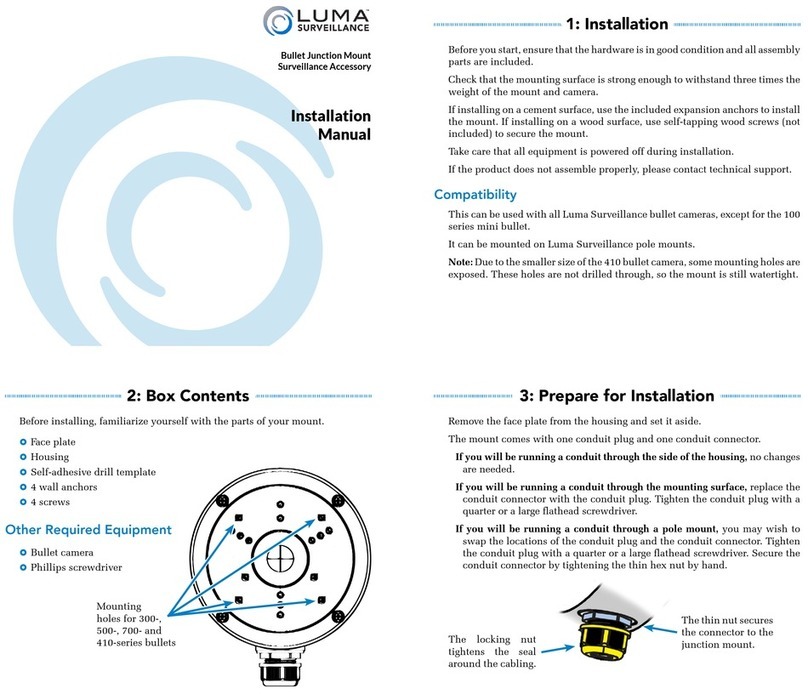
Luma Surveillance LUM-MNT-JNT-BUL-WH User manual

Luma Surveillance

Luma Surveillance LUM-MNT-JNT-BUL-WH User manual

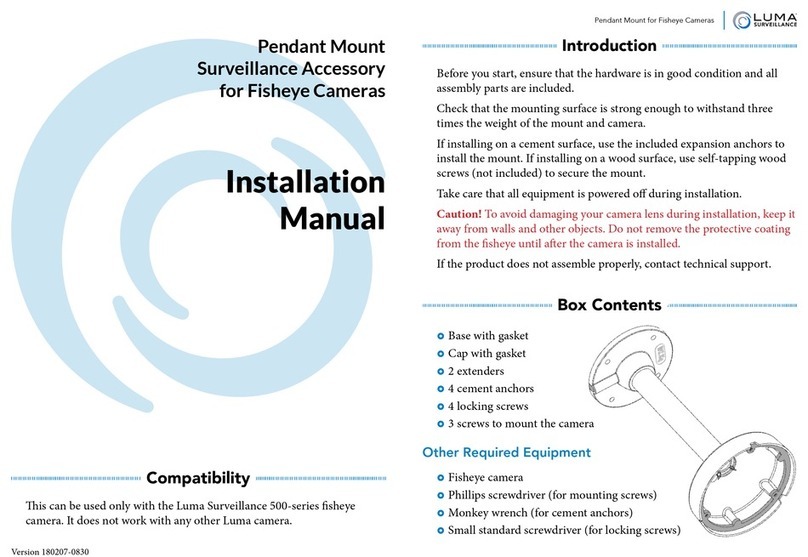
Luma Surveillance LUM-MNT-PND-FISH User manual

Luma Surveillance

Luma Surveillance LUM-MNT-PND-FISH User manual

Popular Camera Accessories manuals by other brands

CamRanger CamRanger user manual

CamRanger

CamRanger CamRanger user manual

Custom Brackets HDV CAGE KIT Instructions for use

Custom Brackets

Custom Brackets HDV CAGE KIT Instructions for use

Aegis ABL052010P user manual

Aegis

Aegis ABL052010P user manual

Saft SRA Series Installation and operating instructions

Saft

Saft SRA Series Installation and operating instructions

Kodak TIB5200 technical information

Kodak

Kodak TIB5200 technical information

Videotec HEG instruction manual

Videotec

Videotec HEG instruction manual

Ikelite 6171.11 manual

Ikelite

Ikelite 6171.11 manual

Pentax Auto Bellows Slide Copier K user manual

Pentax

Pentax Auto Bellows Slide Copier K user manual

Nikon UT-1 user manual

Nikon

Nikon UT-1 user manual

dji RONIN 4D quick start guide

dji

dji RONIN 4D quick start guide

SLIK ABLE 300DX user manual

SLIK

SLIK ABLE 300DX user manual

Rebelcell 36V70 user manual

Rebelcell

Rebelcell 36V70 user manual

Trojan GC2 48V quick start guide

Trojan

Trojan GC2 48V quick start guide

Calumet 7100 Series CK7114 operating instructions

Calumet

Calumet 7100 Series CK7114 operating instructions

Ropox 4Single Series User manual and installation instructions

Ropox

Ropox 4Single Series User manual and installation instructions

Cambo Wide DS Digital Series Main operating instructions

Cambo

Cambo Wide DS Digital Series Main operating instructions

Samsung SHG-120 Specification sheet

Samsung

Samsung SHG-120 Specification sheet

Ryobi BPL-1820 Owner's operating manual

Ryobi

Ryobi BPL-1820 Owner's operating manual

manuals.online logo
manuals.online logoBrands
  • About & Mission
  • Contact us
  • Privacy Policy
  • Terms and Conditions

Copyright 2025 Manuals.Online. All Rights Reserved.

Dome Cap Mount
IP PTZ Camera Accessory
Installation
Manual
1: Installation
Before you start, ensure that the hardware is in good condition and all assembly
parts are included.
Check that the mount is strong enough to withstand three times the combined
weight of this cap and the camera.
Take care that all equipment is powered off during installation.
Important Note: To avoid damaging the surface of your PTZ camera during
installation, keep it away from walls and other objects. Do not remove the
protective coating from the dome until after the camera is installed and the
dome is in place.
If the product does not assemble properly, please contact technical support.
Compatibility
This can be used with Luma Surveillance 500- and 510-series IP PTZ cameras,
as well as Luma Surveillance accessories for IP cameras.
In addition, thread adapters allow it to be used with third-party hardware.
2: Box Contents
Before installing, familiarize yourself with the parts of your mount.
}Cap mount
}4 mounting screws
}1 locking screw
Other Required Equipment
}IP PTZ camera
}Precision flathead screwdriver
}Phillips screwdriver
3: Aligning the Cap
Install your IP PTZ camera
using these screw holes.
Be sure that the front of the
camera is alinged with the
arrow at the center of the
mount.
LUM-MNT-CAP-IPPTZ-WH-broadsheet.indd 1 4/26/2019 1:49:06 PM

Version 190426-1257
Applications
Your capped IP PTZ is now ready for further installation.
It is designed to be used with the following Luma Surveillance accessories:
}LUM-MNT-LARM and LUM-MNT-LARM arm mounts, for attaching to a
wall to provide a greater field of view, and
}LUM-MNT-PND pendant mount, for attaching to a ceiling that has ducting
or other items that obscure vision.
If you are using third-party hardware, attach an adapter to the cap if needed.
Tighten it, then lock it in place by inserting a locking screw into the small hole
at the threads.
Support
If you need help, email support@SnapAV.com. For information, instructional
videos, support documentation, or ideas, visit our website.
5-Year Limited Warranty
This Luma Surveillance™ product has a 5-Year Limited Warranty. This warranty
includes parts and labor repairs on all components found to be defective in material
or workmanship under normal conditions of use. This warranty shall not apply to
products that have been abused, modified or disassembled. Products to be repaired
under this warranty must be returned to a designated service center with an assigned
return authorization (RA) number. Contact technical support for an RA number.
Copyright ©2019 Luma Surveillance. All rights reserved.
4: Attaching the Camera
Remove the dome from the PTZ camera (do
not remove the protective cover from the
dome at this time).
Thread the camera wires through the
housing and through the top of the cap.
Attach the camera housing to the cap mount
using the four Phillips screws provided with
the cap mount.
LUM-MNT-CAP-IPPTZ-WH-broadsheet.indd 2 4/26/2019 1:49:06 PM