manuals.online logo
Brands
  1. Home
  2. •
  3. Brands
  4. •
  5. Magnadyne
  6. •
  7. Remote Control
  8. •
  9. Magnadyne M9999-SWR2 User manual

Magnadyne M9999-SWR2 User manual

This manual suits for next models

1

Other Magnadyne Remote Control manuals

Magnadyne M9900-CCR User manual

Magnadyne

Magnadyne M9900-CCR User manual

Magnadyne M9900-SWR3 User manual

Magnadyne

Magnadyne M9900-SWR3 User manual

Popular Remote Control manuals by other brands

Bircher Reglomat RC Duo 2 user guide

Bircher Reglomat

Bircher Reglomat RC Duo 2 user guide

Emerson RCBT100 owner's manual

Emerson

Emerson RCBT100 owner's manual

BILDA Element-6 user manual

BILDA

BILDA Element-6 user manual

Absima CR7P manual

Absima

Absima CR7P manual

Mitsubishi Electric PAR-32MAAG Instruction book

Mitsubishi Electric

Mitsubishi Electric PAR-32MAAG Instruction book

RCA RCRTBL08BE1 quick start guide

RCA

RCA RCRTBL08BE1 quick start guide

US Electronics NOVARI user guide

US Electronics

US Electronics NOVARI user guide

Panasonic EUR7622KB0 Operation guide

Panasonic

Panasonic EUR7622KB0 Operation guide

Bang & Olufsen Beo4 user manual

Bang & Olufsen

Bang & Olufsen Beo4 user manual

Marantz RC101 user guide

Marantz

Marantz RC101 user guide

FUTABA 9ZAP - PART2 manual

FUTABA

FUTABA 9ZAP - PART2 manual

HR Matic HR MULTI 3 quick start guide

HR Matic

HR Matic HR MULTI 3 quick start guide

Anritsu MP1777A Operation manual

Anritsu

Anritsu MP1777A Operation manual

Niles WVC100 Installation & operating guide

Niles

Niles WVC100 Installation & operating guide

Bang & Olufsen BEO6 Getting started

Bang & Olufsen

Bang & Olufsen BEO6 Getting started

GE 94901 instruction manual

GE

GE 94901 instruction manual

FUTABA R7108SB Full manual

FUTABA

FUTABA R7108SB Full manual

Invacare G91S user manual

Invacare

Invacare G91S user manual

manuals.online logo
manuals.online logoBrands
  • About & Mission
  • Contact us
  • Privacy Policy
  • Terms and Conditions

Copyright 2025 Manuals.Online. All Rights Reserved.

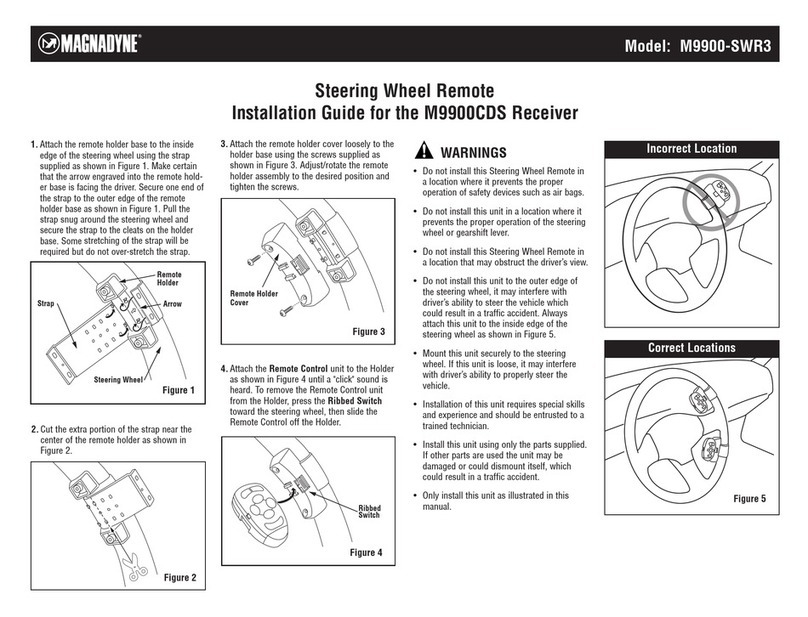
1. Attach the remote holder base to the inside
edge of the steering wheel using the strap
supplied as shown in figure 1. Make certain
that the arrow engraved into the remote
holder base is facing the driver. Secure one
end of the strap to the outer edge of the
remote holder base as shown in figure 1.
Pull the strap snug around the steering
wheel and secure the strap to the cleats on
the holder base. Some stretching of the strap
will be required but do not over-stretch the
strap.
3. Attach the remote holder cover loosely to the
holder base using the screws supplied as
shown in figure 3. Adjust/rotate the remote
holder assembly to the desired position and
tighten the screws.
4. Attach the Remote Control unit to the Holder
as shown in Figure 4 until a "click" sound is
heard. To remove the Remote Control unit
from the Holder, press the Ribbed Switch
toward the steering wheel, then slide the
Remote Control off the Holder.
WARNINGS
• Do not install this Steering Wheel Remote in
a location where it prevents the proper
operation of safety devices such as air bags.
• Do not install this unit in a location where it
prevents the proper operation of the steering
wheel or gearshift lever.
• Do not install this Steering Wheel Remote in
a location that may obstruct the driver’s view.
• Do not install this unit to the outer edge of
the steering wheel, it may interfere with
driver’s ability to steer the vehicle which
could result in a traffic accident. Always
attach this unit to the inside edge of the
steering wheel as shown in Figure 5.
• Mount this unit securely to the steering
wheel. If this unit is loose, it may interfere
with driver’s ability to properly steer the
vehicle.
• Installation of this unit requires special skills
and experience and should be entrusted to a
trained technician.
• Install this unit using only the parts supplied.
If other parts are used the unit may be
damaged or could dismount itself, which
could result in a traffic accident.
• Only install this unit as illustrated in this
manual.
Location and Function of Controls at a Glance
Steering Wheel Remote
Installation Guide for the M9999 Stereo
Model: M9999-SWR2 / M9999-SWR1
Figure 1
Strap
Remote
Holder
Steering Wheel
Arrow
Figure 3
Remote Holder
Cover
Figure 2

Figure 4
Ribbed
Switch
Incorrect Location
Correct Locations
Figure 5
2. Cut the extra portion of the strap near the
center of the remote holder as shown in
figure 2.
Location and Function of Controls at a Glance
PLAY/PAUSE
W.B. MODE
TRACK
SEEK
LEVEL
+
LEVEL
–
DISC
UP
DN
1
2
3
5
4
6
7
1. Weather Band Button:
Press the "W.B." button to access the
weather band radio.
2. Volume Buttons:
Press the "Level +" button to increase the
volume level.
Press the "Level –" button to decrease the
volume level.
3. Play/Pause Button:
In CD Mode, press the "Play/Pause" button to
start disc play.
Press the "Play/Pause" button again to pause
disc play.
In Radio Mode, press this button to access
preset station #1.
4. Track/Seek Buttons
In Radio Mode, press the "Track Seek"
buttons to search the tuned frequency
up/down.
In CD Mode, press the "Track Seek" buttons
to skip to the next lower/higher track on the
disc.
© Copyright 2004 Magnadyne Corporation M9999-SWR-IMUM Rev. C 2-17-04
Steering Wheel Remote
Functions and Controls for the M9999 Stereo
Model: M9999-SWR2 / M9999-SWR1
5. Mode Button:
Press the "Mode" button to change the play
source in the following sequence: Radio,
Tape, CD, CD Changer and AUX.
6. Battery Door:
Slide the door up to access the battery.
Note: When replacing the battery, make sure
the positive side of the battery is facing up.
7. Disc Up/Down Buttons: (not applicable to
units that do not have a separate CD
changer)
In CD Changer Mode, press the "UP" button
to play the disc that follows the one that is
currently playing. Press the "DN" button to
play the disc that precedes the one that is
currently playing.
In Radio Mode, press the "UP" button to
access preset station #5. Press the "DN"
button to access preset station #4.
Installing a New Battery
Note: Replace with battery number CR2032
only.
1. While pressing the button on the steering
wheel mount, slide the remote control
forward. CR2032
2. Slide battery cover off the remote control.
3. Remove the battery from the remote control.
4. Properly insert a new battery into remote.
Note: The positive side on the battery is
facing up.
5. Replace cover and slide the remote back
onto the steering wheel mount until it clicks
into place.