MATSUI 1408T
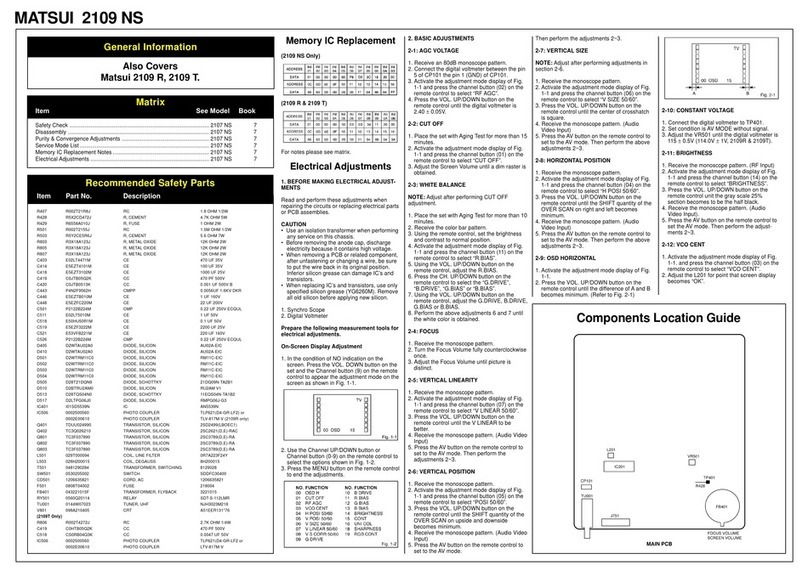
R408 R6558A1R5J R, FUSE 1.5 OHM 2W
R429 R655812R7J R, FUSE 2.7 OHM 1W
R448 R5Y2CD822J R, CEMENT 8.2K OHM 5W
R501 R002T2155J RC 1.5M OHM 1/2W
R502 R3X181R33J R, METAL 0.33 OHM 1W
R503 R5Y2CE5R6J R, CEMENT 5.6 OHM 7W
R504 R63584681J R, FUSE 680 OHM 1/4W
R513 R3X28B224J R, METAL 220K OHM 3W
R516 R3X28B150J R, METAL OXIDE 15 OHM 3W
R524 R3X28B3R3J R, METAL 3.3 OHM 3W or
R3K28B3R3J R, METAL 3.3 OHM 3W
R803 R3X18A153J R, METAL OXIDE 15K OHM 2W or
R3U18A153J R, METAL 15K OHM 2W
R805 R3X18A153J R, METAL OXIDE 15K OHM 2W or
R3U18A153J R, METAL 15K OHM 2W
R807 R3X18A153J R, METAL OXIDE 15K OHM 2W or
R3U18A153J R, METAL 15K OHM 2W
C501 P2222B224K CMP 0.22 UF 250V AC MMCA
C525 CB3930MH3M CC 0.0022UF 250V
D407 D28T10ELS6 DIODE, RECTIFIER 10ELS6TA1B2
D410 D28T10ELS6 DIODE, RECTIFIER 10ELS6TA1B2
D501 D2BTRM11C0 DIODE, RECTIFIER RM11C
D502 D2BTRM11C0 DIODE, RECTIFIER RM11C
D503 D2BTRM11C0 DIODE, RECTIFIER RM11C
D504 D2BTRM11C0 DIODE, RECTIFIER RM11C
D510 D28I15DF60 DIODE, SILICON 15DF6-FC
D511 D28T10ELS6 DIODE, RECTIFIER 10ELS6TA1B2
D512 D28T10ELS6 DIODE, RECTIFIER 10ELS6TA1B2
D515 D28I15DF60 DIODE, SILICON 15DF6-FC
IC401 I03SD78400 IC LA7840
IC402 I1KA978050 IC KIA7805PI
IC501 I2BT056520 IC STR-F5652
IC502 I1KA978050 IC KIA7805PI
Q401 TDUQ025990 TRANSISTOR, SILICON 2SD2599
Q503 TA3T1371A0 TRANSISTOR, SILICON 2SA1371(D,E)-AE
Q801 TC3T034680 TRANSISTOR, SILICON 2SC3468(D,E)-AE
Q802 TC3T034680 TRANSISTOR, SILICON 2SC3468(D,E)-AE
Q803 TC3T034680 TRANSISTOR, SILICON 2SC3468(D,E)-AE
L501 029K000001 COIL, LINE FILTER RB-20871
L502 029A000002 COIL, LINE FILTER AC FK0B160MH14
L503 028R140027 COIL, DEGAUSS 8R140027
T501 048135032W TRANSFORMER, SWITCH 8135032W
J801 066X120014 SOCKET, CRT HP S3200-010501
SW501 0530205002 SWITCH SDDFC30400
CD501 1206635818 CORD, AC 1206635818
F501 0808T04002 FUSE 218004
F502 0808T01002 FUSE 218001.
! FB401 043214029F TRANSFORMER, FLYBACK 3214029F
ICP501 083PC01002 MICRO FUSE 251001
V801 098P140479 CRT A34AGT13*78
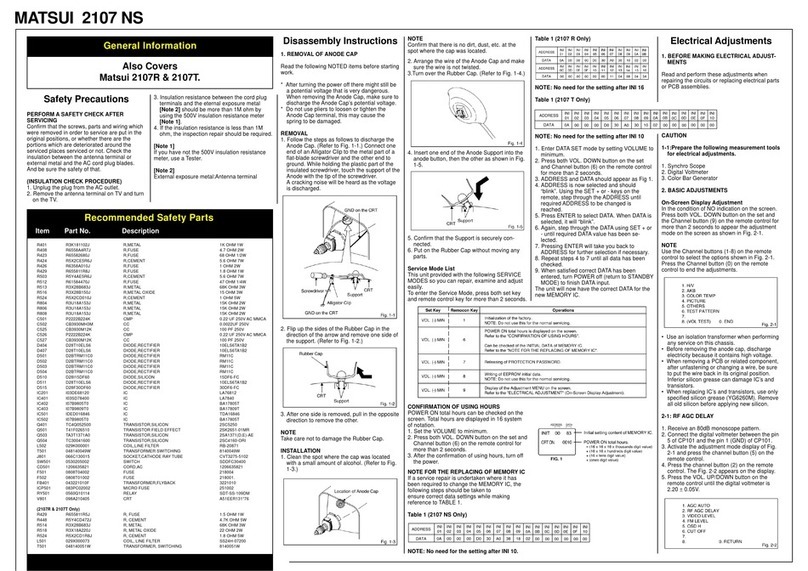
Service Mode List
This unit provided with the following SERVICE
MODES so you can repair, examine and adjust
easily.
To enter the Service Mode, press both set key
and remote control key for more than 2 seconds.
CONFIRMATION OF USING HOURS
POWER ON total hours can be checked on the
screen. Total hours are displayed in 16 system
of notation.
1. Set the VOLUME to minimum.
2. Press both VOL. DOWN button on the set
and Channel button (6) on the remote control
for more than 2 seconds.
3. After the confirmation of using hours, turn off
the power.
NOTE FOR THE REPLACING OF MEMORY IC
If a service repair is undertaken where it has
been required to change the MEMORY IC, the
following steps should be taken to ensure
correct data settings while making reference to
TABLE 1.
NOTE: No need the setting for after INI 10.
1. Enter DATA SET mode by setting VOLUME to
minimum.
2. Press both VOL. DOWN button on the set
and Channel button (6) on the remote control
for more than 2 seconds.
3.ADDRESS and DATA should appear as Fig 1.
4. ADDRESS is now selected and should “blink”.
Using the SET + or - keys on the remote, step
through the ADDRESS until required AD-
DRESS to be changed is reached.
5. Press ENTER to select DATA. When DATA is
selected, it will “blink”.
6. Again, step through the DATA using SET + or
- until required DATA value has been se-
lected.
7. Pressing ENTER will take you back to
ADDRESS for further selection if necessary.
8. Repeat steps 4 to 7 until all data has been
checked.
9. When satisfied correct DATA has been
entered, turn POWER off (return to STANDBY
MODE) to finish DATA input.
The unit will now have the correct DATA for the
new MEMORY IC.
Recommended Safety Parts
Item Part No. Description
Matrix
Item See Model Book
Adjustments ................................................................................................. 1408R 6
Deflection CRT Diagram ............................................................................. 1408R 6
Scart Diagram.............................................................................................. 1408R 6
Waveforms................................................................................................... 1408R 6
Table 1
This area is intentionally left blank.