XR77103-MoCA Universal PMIC 3 Output Buck Regulator EVB User Manual Introduction
February 14, 2022 010-MCUMR00 1
Introduction
The XR77103-MoCA PMIC is designed to power MaxLinear’s MoCA 2.0 MxL370x and MoCA 2.5 MxL371x along with a
single port Ethernet PHY such as the GPY241 device. It features three high efficiency synchronous buck regulators with
integrated power switches and sequencing engine to provide the 0.9V, 1.8V, and 3.3V rails of the MoCA SoC. The 0.9V
core rail can supply the 3A peaks demanded by the SoC and is compatible with the SoC DVS control.
The XR77103-MoCA can operate with 5V, 9V, and 12V powered systems with minimal required external components. The
XR77103-MoCA is also packaged in a 4x4mm QGN which provides the smallest size solution possible.
Quick EVB Set Up and Start Up
Factory Settings
The evaluation board has been set up with the following
factory default configuration for quick set up and operation:
■VIN = 5.5V to 14V, optimized for a 12V input rail.
■Maximum IOUT per channel is 2A.
■Hz Switching frequency.
■Two channels may be paralleled for output currents up
to 5A peak and 4A steady state (however additional
hardware modification is required for parallel
operation).
■Low power spectral density (PSM) mode operation
enabled.
Quick Start Up
To quickly see the regulator in operation:
1. Use the factory settings and default configuration. If
other settings or components are desired, apply them
before the next steps. For more information, see
“System Set-Up” on page 5 for more.
2. Connect a turned-off power supply that is within the
above VIN specification (from 5.5V to 14V, 12V typical)
to VIN+ and VIN- with short and thick leads. Use test
pins EXT. VIN (J39) and AGND (J7) to connect and
monitor VIN+ and VIN- respectively. See locations in
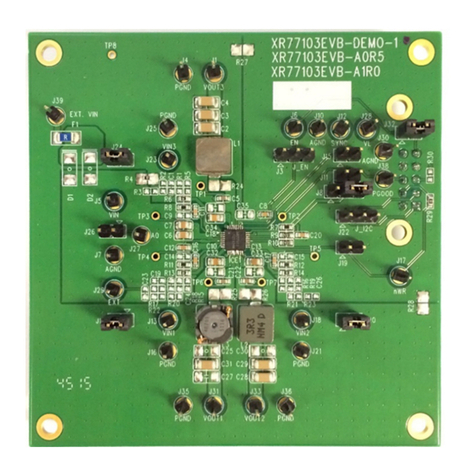
Figure 1 on page 2.
3. Initially set to 0A, connect electronic loads to each
desired channel that will be no more than the maximum
IOUT (2A) to VOUTx and PGNDx (where x = the
channel number) with short and thick leads. Use test
pins in Table 1 on page 1 to connect and monitor
VOUTx and PGNDx respectively. See locations in
Figure 1 on page 2. For all channels with the electronic
load connected, ensure that the respective VIN jumper
is installed per Table 1 on page 1.
4. Turn on the 12V power supply and check VOUT. The
EVB powers up and regulates the enabled outputs at
0.9V (Ch1), 1.8V (Ch2) and 3.3V (Ch3) (factory default
settings). PGOOD is asserted active high once
sequencing is done, outputs are in regulation, and
reset timer expires.
5. Set or vary the load (do not exceed the maximum IOUT)
and check VOUT and other desired performance levels
such as regulation and efficiency. For more information
about monitoring, see “I/O and Test Points” on page 4 .
1. Factory default: jumpers installed.
Table 1: Jumper Connections for VIN, VOUT and PGND
Channel VIN(1) VOUT PGND
1 J14 VOUT1, J31 PGND1, J35
2 J20 VOUT2, J33 PGND2, J36
3 J24 VOUT3, J1 PGND3, J4