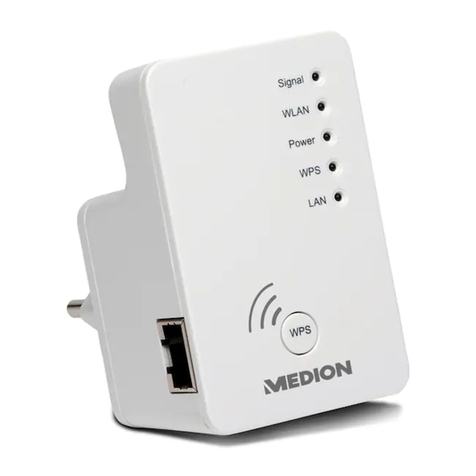
Medion P85032 User manual

03/2014
Wireless WIFI Extender
MEDION®P85032 (MD 87070)
Instruction Manual
87070 50046597 ALDI UK Cover final.indd 187070 50046597 ALDI UK Cover final.indd 1 14.03.2014 10:26:2814.03.2014 10:26:28

3 of 70
Table of contents
1. Notes on how to use these instructions........5
1.1. Symbols and keywords
used in these instructions...........................5
2. Proper use .......................................................7
3. Safety instructions..........................................8
3.1. Operational safety .........................................8
3.2. Data backup.................................................. 11
3.3. Power supply................................................ 11
4. Notes on conformity.................................... 12
4.1. Conformity information
as per R&TTE ................................................. 12
5. Before use..................................................... 13
5.1. Check package contents.......................... 13
5.2. System requirements ................................ 13
6. Overview of the device................................ 14
6.1. Overview of the LED displays................. 15
6.2. Overview of the operating modes .......17
7. Using the device for the first time .............. 19
7.1. Logging in to the web interface
for the repeater............................................ 19
8. Repeater mode............................................. 22
8.1. Installation as a repeater.......................... 22
9. Router mode................................................. 29
9.1. Installation as a router............................... 29
87070 50046597 ALDI UK content RC1.indd 387070 50046597 ALDI UK content RC1.indd 3 26.02.2014 11:35:2226.02.2014 11:35:22

4 of 70
10. AP mode ....................................................... 31
11. WISP mode ................................................... 33
12. Manually setting up DHCP on
a Windows PC ............................................... 35
13. Settings in the web interface...................... 38
13.1. Calling up the web interface ..................38
13.2. Basic wireless settings............................... 39
13.3. LAN settings.................................................. 39
14. Advanced settings in the web interface..... 40
14.1. Status............................................................... 41
14.2. Wireless operation...................................... 42
14.3. Network.......................................................... 48
15. Administration............................................. 50
16. Time zone ..................................................... 51
17. Backup & reset ............................................. 51
18. Firmware upgrade ....................................... 51
19. Do you need more help? ............................. 52
20. Cleaning........................................................ 53
21. Disposal ........................................................ 54
22. Technical data .............................................. 55
23. Glossary ........................................................ 56
24. Legal notice .................................................. 61
25. Licence information .................................... 62
26. GNU General Public Licence........................ 63
87070 50046597 ALDI UK content RC1.indd 487070 50046597 ALDI UK content RC1.indd 4 26.02.2014 11:36:1926.02.2014 11:36:19

5 of 70
1. Notes on how to use these
instructions
Read the safety instructions carefully before
use. Note the warnings on the device and in
the operating instructions.
Always keep the operating instructions
close to hand. If you sell the device or give
it away, make sure you also hand over these
instructions and the warranty card.
1.1. Symbols and keywords
used in these instructions
DANGER!
Warning: immediate mortal
danger!
WARNING!
Warning of possible risk of fatal
injury and/or serious irreversible
injuries!
87070 50046597 ALDI UK content RC1.indd 587070 50046597 ALDI UK content RC1.indd 5 26.02.2014 11:36:1926.02.2014 11:36:19

6 of 70
CAUTION!
Please follow the instructions
to prevent injuries and property
damage!
ATTENTION!
Please follow the guidelines to avoid
property damage!
NOTE!
Additional information on using the device.
NOTE!
Please follow the guidelines in the
operating instructions!
WARNING!
Warning of risk of electric shock!
• Bullet point/information on operating steps
and results
Tasks to be performed
87070 50046597 ALDI UK content RC1.indd 687070 50046597 ALDI UK content RC1.indd 6 26.02.2014 11:36:2026.02.2014 11:36:20

7 of 70
2. Proper use
This device is designed to amplify the signal in a WLAN
network. In addition, the device can be used as an
access point for devices that communicate wirelessly
or as a client for connected devices which do not
have their own WLAN adapter. You can also use the
device as a router so that the WLAN Repeater directly
establishes a connection with the Internet and clients
can log into the router. Never use the device for any
other purpose. Only use the device indoors.
This device is only designed for private use and is not
suitable for commercial purposes.
NOTE!
If you have a DSL connection and want to
use the WLAN Repeater as a router, you will
also require a DSL modem that needs to be
connected to the WLAN Repeater.
87070 50046597 ALDI UK content RC1.indd 787070 50046597 ALDI UK content RC1.indd 7 26.02.2014 11:36:2126.02.2014 11:36:21

8 of 70
3. Safety instructions
Please read through this section and all of
the documentation carefully and follow all of
the instructions given. The instructions will
help you to operate the device reliably and
help increase its service life.
Always keep these operating instructions
near at hand to the device, but store them
safely so that you can pass them on to a new
owner should you sell the device Should you
have any problems with the device, please
only contact our authorised service partners.
3.1. Operational safety
• This device is not intended for use by
people (including children) with reduced
physical, sensory or mental abilities or
by those without experience and/or
knowledge, unless they are supervised
by a person responsible for their safety
or they have been instructed in its use
by that person. Children should be
supervised to ensure they do not play
87070 50046597 ALDI UK content RC1.indd 887070 50046597 ALDI UK content RC1.indd 8 26.02.2014 11:36:2126.02.2014 11:36:21

9 of 70
with this device.
• Always adhere to the user instructions of
the devices that you connect to the WLAN
Repeater.
• Do not place liquid containers, e.g. vases,
on or near the device. The container may
tip over and the liquid may impair the
electrical safety of the device.
• Keep the device away from moisture and
from water in droplet or spray form. Avoid
vibrations, dust, heat and direct sunlight
in order to prevent malfunction. The
operating temperature is 5-35° C.
• Never open the housing of the device. This
would invalidate the warranty and may
render the device unusable.
87070 50046597 ALDI UK content RC1.indd 987070 50046597 ALDI UK content RC1.indd 9 26.02.2014 11:36:2126.02.2014 11:36:21

10 of 70
• After transporting the device, wait until
it has reached room temperature before
switching it on. Major fluctuations in
temperature or humidity can lead to
condensation which could cause an
electrical short-circuit.
• The device is intended to be connected
to computers with power supply fuse
protection (limited power source
according to EN60950)
• Position the cable so that it cannot be
stepped on or tripped over.
• To avoid damaging the cable, do not place
any objects on it.
• To avoid static charges, you should not
operate the device in extremely dry
conditions.
• In circumstances where there are
electrostatic discharges, the device could
malfunction. In this case, the device must
be reset to the factory settings.
87070 50046597 ALDI UK content RC1.indd 1087070 50046597 ALDI UK content RC1.indd 10 26.02.2014 11:36:2126.02.2014 11:36:21

11 of 70
3.2. Data backup
We do not accept any liability for claims for
compensation due to loss of data or any
damages that are incurred. Always backup
your data onto an external storage device
(e.g. CD-R) before updating it.
3.3. Power supply
• To disconnect the power supply to the
device or to isolate the product entirely
from voltage sources, disconnect the
device from the mains completely by
unplugging it from the mains socket.
• Only operate the WLAN Repeater from an
easily accessible and earthed socket with
an AC 100-240 V~ 50 Hz power supply.
87070 50046597 ALDI UK content RC1.indd 1187070 50046597 ALDI UK content RC1.indd 11 26.02.2014 11:36:2126.02.2014 11:36:21
This manual suits for next models
1
Table of contents
Other Medion Extender manuals