9
Before Using Your MWg Zinc II
1
1.4 SIM
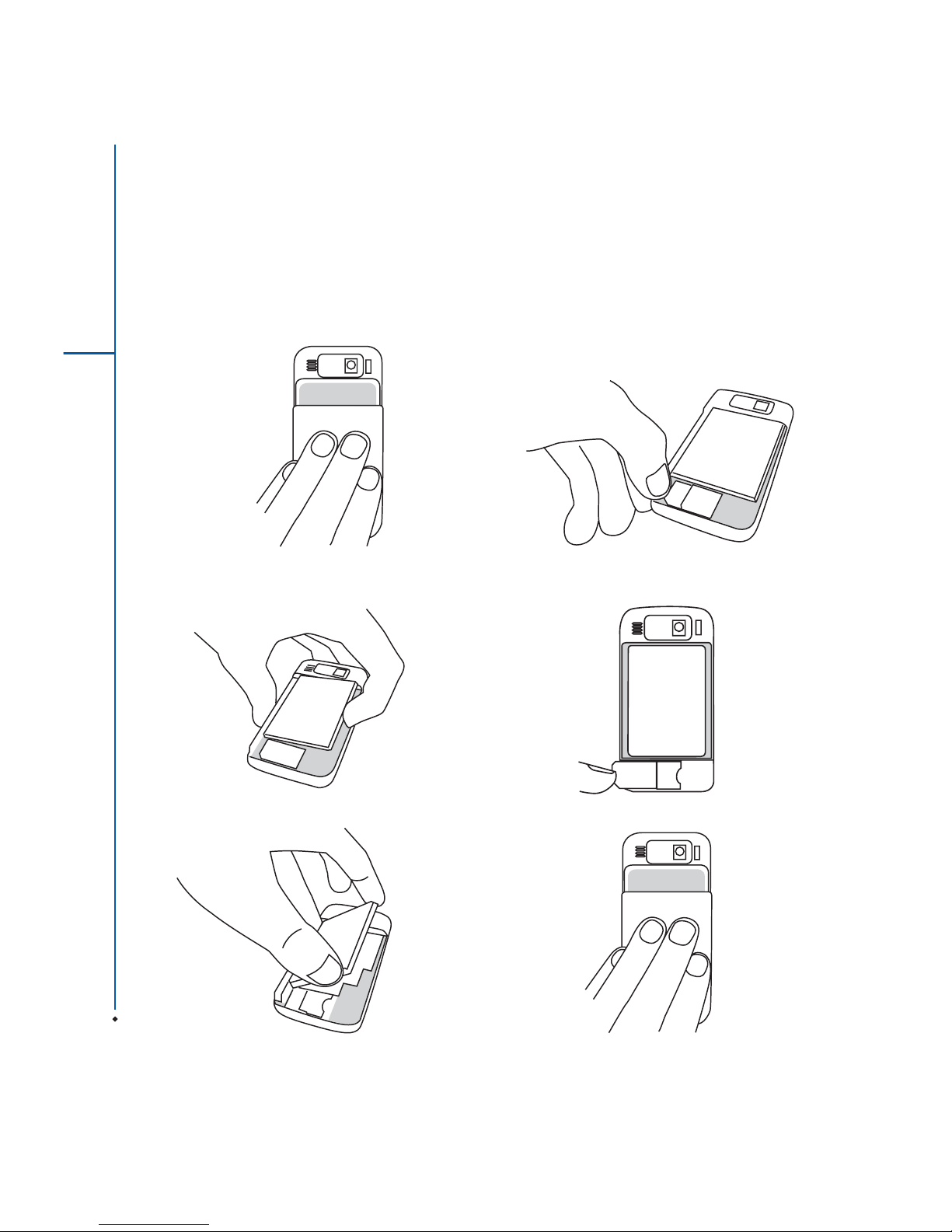
Before using your MWg Zinc II, you must contact a network
operator to get a personal SIM (Subscriber Identity Module).
The phone functions are unusable (except for emergency
calls) until a valid SIM card is inserted.
Please note: If the device or the SIM card is lost or stolen,
you should contact your network operator immediately in
order to prevent unauthorized use.
1.5 Battery
Your MWg Zinc II comes with a removable and rechargeable
Lithium Polymer battery. The standby time and talk time
will depend on your actual usage network coverage and
whether the device is in standby mode. The battery life may
also vary depending on how frequently the user switches
between functions.
Please note: Using any battery pack or AC adapter (charger)
not specified/endorsed by MWg on this phone may be
dangerous and may invalidate any warranty and approval
given to the device. Unplug the charger from the power
supply when it is not in use.
Charging the battery
Please make sure that the battery is installed and fully
charged when using your MWg Zinc II for the first time. You
may charge the battery in the following ways:
1. Universal AC Adapter: Plug your AC adapter into a
suitable main power socket and plug the connector to
the charging slot of your MWg Zinc II. The phone will
start charging automatically.
2. USB cable: Connect your MWg Zinc II to your PC's USB
port with the USB cable supplied in your package.
Note: Charging by USB is, however, slower than charging
from the mains power supply.