Function
Settin
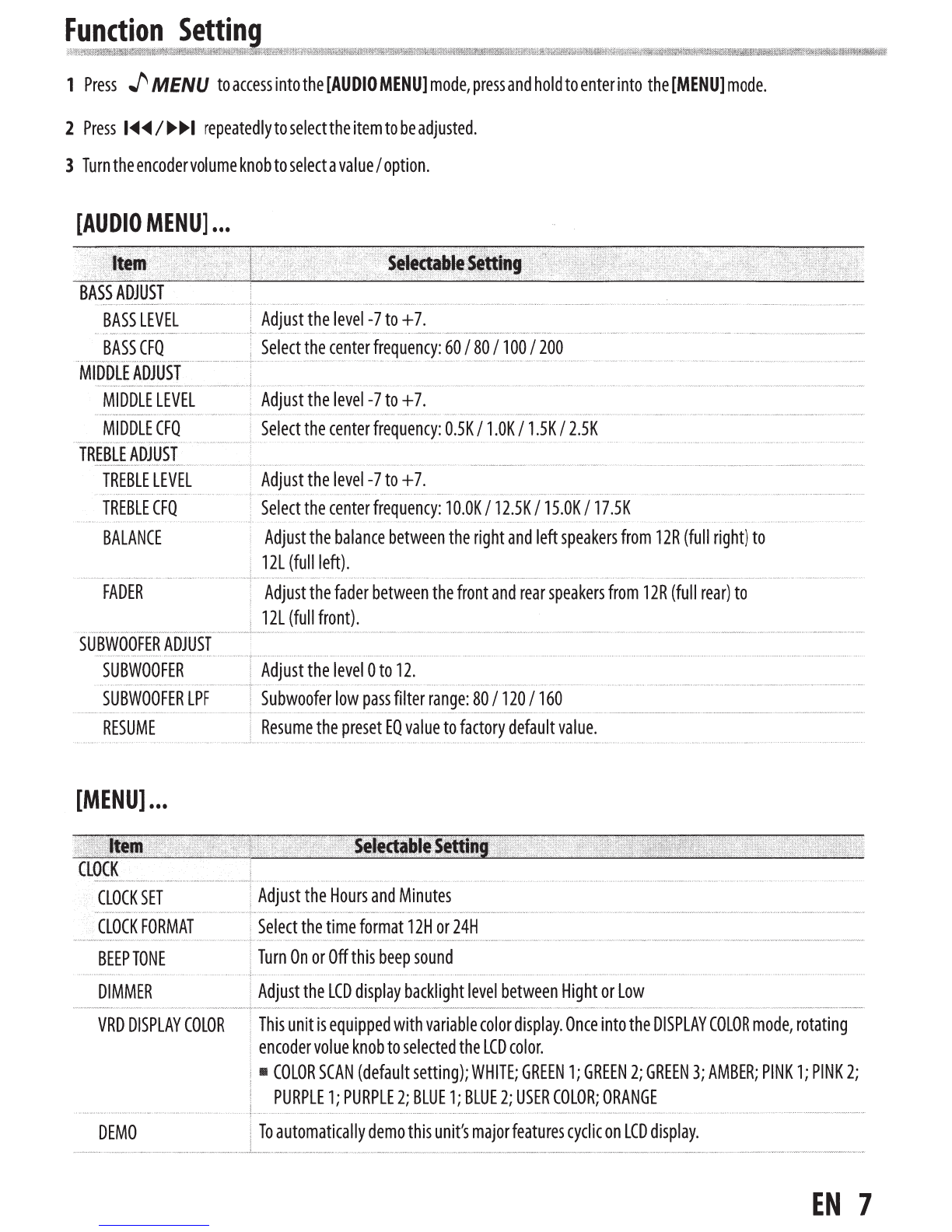
1
Press
_f,
MENU
to
access
into
the
[AUDIO
MENU]
mode,
press
and
hold
to
enter
into
the
[MENU]
mode.
2
Press
1.._.._
I
..-..-1
repeatedly
to
select
the
item
to
be
adjusted.
3
Turn
the
encoder
volume
knob
to
select
a
value
I
option.
[AUDIO
MENU]
...
SUBWOOFER
ADJUST
Adjust
the
balance
between
the
right
and
left
speakers
from
12R
(full
right)
to
12L
(full
left)
.
.................................................................
Adjust
the
fader
between
the
front
and
rear
speakers
from
12R
(full
rear)
to
12L
(full
front).
........................................... . ,.................................................................................................................................................................................................................................................................................................................................................................................................................................
SUBWOOFER
Adjust
the
level
0
to
12.
····················
·+
............
.
.......................................
.
....................
.
SUBWOOFER
LPF
80
I
120
I
160
.......
...
....
.
.. ..
........
RESUME
Resume
the
preset
EO
value
to
factory
default
value.
[MENU]
...
CLOCK
SET
Adjust
the
Hours
and
Minutes
CLOCK
FORMAT
Select
the
time
format
12H
or
24H
BEEP
TONE
Turn
On
or
Off
this
beep
sound
DIMMER
Adjust
the
LCD
display
backlight
level
between
Hight
or
Low
VRD
DISPLAY
COLOR
This
unit
is
equipped
with
variable
color
display.
Once
into
the
DISPLAY
COLOR
mode,
rotating
encoder
volue
knob
to
selected
the
LCD
color.
•
COLOR
SCAN
(default
setting);
WHITE;
GREEN
1;
GREEN
2;
GREEN
3;
AMBER;
PINK
1;
PINK
2;
PURPLE
1;
PURPLE
2;
BLUE
1;
BLUE
2;
USER
COLOR;
ORANGE
DEMO
To
automatically
demo
this
unit's
major
features
cyclic
on
LCD
display.
EN
7