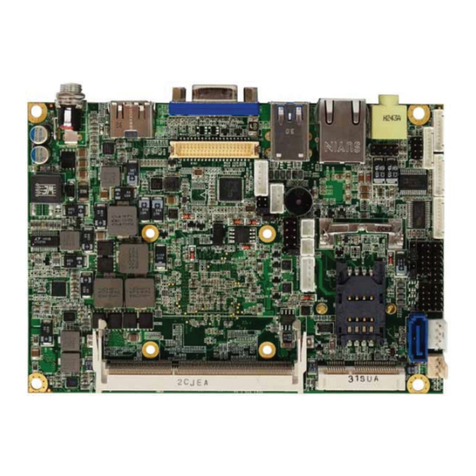
NI sbRIO-9601 User manual

USER GUIDE
NI sbRIO-9601/9602 and
NI sbRIO-9602XT
Single-Board RIO OEM Devices
This document provides dimensions, pinouts, connectivity information,
and specifications for the National Instruments sbRIO-9601, sbRIO-9602,
and sbRIO-9602XT. The devices are referred to inclusively in this
document as the NI sbRIO-9601/9602/9602XT.
Caution The NI sbRIO-9601/9602/9602XT must be installed inside a suitable enclosure
prior to use. Hazardous voltages may be present.
Caution National Instruments makes no product safety, electromagnetic compatibility
(EMC), or CE marking compliance claims for NI sbRIO devices. The end-product supplier
is responsible for conformity to any and all compliance requirements.
Caution Exercise caution when placing the NI sbRIO device inside an enclosure.
Auxiliary cooling may be necessary to keep the device under the maximum ambient
temperature rating for the NI sbRIO device. Refer to Specifications section for more
information about the maximum ambient temperature rating.
Figure 1 shows the NI sbRIO-9601/9602/9602XT.
Figure 1. NI sbRIO-9601/9602/9602XT

NI sbRIO-9601/9602/9602XT User Guide 2 ni.com
What You Need to Get Started
This section lists the software and hardware you need to start programming
the NI sbRIO device.
Software Requirements
You need a development computer with the following software installed
on it. Go to ni.com/info and enter the Info Code rdsoftwareversion
for information about software version compatibility.
❑LabVIEW
❑LabVIEW Real-Time Module
❑LabVIEW FPGA Module
❑NI-RIO
Hardware Requirements
You need the following hardware to use the NI sbRIO device.
❑NI sbRIO-9601/9602/9602XT
❑19–30 VDC power supply
❑Ethernet cable
Dimensions
This section contains dimensional drawings of the NI sbRIO devices. For
three-dimensional models, refer to the Resources tab of the NI sbRIO
product page at ni.com.
Note The plated mounting holes are all connected to P1, the ground lug. Connect P1 or
one of the plated mounting holes securely to earth ground. Refer to the Understanding
Ground Connections section for cautions about current loops through the grounding lug.

©National Instruments Corporation 3 NI sbRIO-9601/9602/9602XT User Guide
Figure 2 shows the dimensions of the NI sbRIO-9601/9602/9602XT.
Figure 2. NI sbRIO-9601/9602/9602XT Dimensions in Inches (Millimeters)
0.651 (16.54)
8.200 (208.28)
3.650 (92.71)
0.000 (0)
0.000 (0)
0.775 (19.69)
4.100 (104.14)
7.295 (185.29)
2.237 (56.81)
5.147 (130.72)
8.076 (205.13)
3.691 (93.75)
0.550 (13.97)
0.275 (6.99)
2.440 (61.98)
3.520 (89.41)
3.520 (89.41)
0.450 (11.43)
7X Ø 0.134 (3.4)
0.140 (3.56)
0.080 (2.03)
0.000 (0)
0.327 (8.31)
0.469 (11.91)
8.200 (208.28)
0.000 (0)
0.286 (7.26)
0.940 (23.88)
1.107 (28.12)
2.091 (53.11)
4.017 (102.03)
5.001 (127.03)
6.927 (175.95)
7.911 (200.94)
8.200 (208.28)
0.000(0)
1.705 (43.31)
2.386 (60.61)
2.905 (73.79)
3.100 (78.74)
4.100 (104.14)
4.659 (118.33)
5.633 (143.07)
6.617 (168.06)
7.502 (190.55)
8.137 (206.68)
0.625 (15.88)
0.000 (0)
0.180 (4.57)
0.380 (9.65)
0.220 (5.59)
0.365 (9.28)
0.080 (2.03)
0.242 (6.16)
0.327 (8.31)
0.810 (20.57)
2X 4-40 THREADS
2 MM CLEARANCE REQUIRED
ABOVE THIS CAPACITOR
–0.110 (2.79)
MINIMUM CLEARANCE
NEEDED BELOW BOARD
2 MM CLEARANCE REQUIRED
ABOVE THIS CAPACITOR

NI sbRIO-9601/9602/9602XT User Guide 4 ni.com
You can install up to three board-only C Series I/O modules on the
NI sbRIO device. The following figure shows the dimensions of the
NI sbRIO-9601/9602/9602XT with three board-only C Series I/O modules
installed.
Figure 3. NI sbRIO-9601/9602/9602XT with C Series Modules,
Dimensions in Inches (Millimeters)
Note To maintain isolation clearances on the C Series modules, do not use mounting
hardware larger than 0.240 in. (6.1 mm) in diameter and maintain an air gap of at least
0.200 in. (5.0 mm) from the modules to anything else.
1.212 (30.78)
0.000 (0)
0.285 (7.23)
6.565 (166.75)
2.885 (73.28)
2.514 (63.86)
3.965 (100.71)
3.650 (92.71)
0.000 (0)
8.200 (208.28)
2.889 (73.38)
2.910 (73.91)
5.799 (147.29)
5.820 (147.83)
8.709 (221.21)
6.442 (163.63)
3.340 (84.84)
Ø 0.512 (13)
8X Ø 0.125 (3.18)
4.265 (108.33)
5.515 (140.08)
2 MM CLEARANCE REQUIRED
ABOVE THIS CAPACITOR

©National Instruments Corporation 5 NI sbRIO-9601/9602/9602XT User Guide
I/O and Other Connectors on the NI sbRIO Device
Figure 4 shows the locations of parts on the NI sbRIO device.
Figure 4. NI sbRIO-9601/9602/9602XT Parts Locator Diagram
1 J11, Connector for C Series Module 3
2P5,3.3V Digital I/O
3Plated Mounting Holes
4 J10, Connector for C Series Module 2
5P4,3.3V Digital I/O
6 J9, Connector for C Series Module 1
7DIPSwitches
8Backup Battery
9P2,3.3V Digital I/O
10 J5, RJ-45 Ethernet Port
11 J1, RS-232 Serial Port
12 Reset Button
13P1, Ground Lug
14 LEDs
15 J3, Power Connector
16 P3, 3.3V Digital I/O
11 1012131415
8
9
16
1 2 4
3 3 3
33
3
3
5 6 7
3

NI sbRIO-9601/9602/9602XT User Guide 6 ni.com

Table 1 lists and describes the connectors on NI sbRIO devices and the part
number and manufacturer of each connector. Refer to the manufacturer for
information about using and matching these connectors.
Table 1. NI sbRIO Connector Descriptions
Connector Description
Manufacturer and
Part Number
Recommended
Mating Connector
J3, Power 2-position MINI-COMBICON
header and plug,
0.285 in. (7.24 mm) high
Phoenix Contact,
1727566
Sauro,
CTF02BV8-BN
(included)
J1,
RS-232 Serial
Port
9-pin DSUB plug,
0.318 in. (8.08 mm) high,
with 4-40 jacksockets
Tyco Electronics,
5747840-6
—
P2, P3, P4, P5 50-pin polarized header plug,
0.100 ×0.100 in.
(2.54 ×2.54 mm)
3M, N2550-6002RB 3M, 8550-4500PL

©National Instruments Corporation 7 NI sbRIO-9601/9602/9602XT User Guide
The following figures show the pinouts of the I/O connectors on the
NI sbRIO devices.
Figure 5. Pinout of I/O Connector P2, 3.3 V Digital I/O
Port5/DIOCTL
Port5/DIO9
5 V
D GND
5 V
D GND
D GND
D GND
D GND
D GND
Port6/DIOCTL
D GND
D GND
D GND
D GND
D GND
D GND
D GND
D GND
D GND
D GND
D GND
D GND
D GND
D GND
D GND
Port5/DIO1
Port5/DIO2
Port5/DIO4
Port5/DIO5
Port5/DIO6
Port5/DIO7
Port5/DIO0
Port5/DIO3
Port5/DIO8
Port6/DIO9
Port6/DIO0
Port6/DIO1
Port6/DIO2
Port6/DIO3
Port6/DIO4
Port6/DIO5
Port6/DIO6
Port6/DIO7
Port6/DIO8
Port2/DIO4
Port2/DIO5
Port2/DIO6
Port2/DIO7
Port2/DIO8
50 49
48 47
46 45
44 43
42 41
40 39
38 37
36 35
34 33
32 31
30 29
28 27
26 25
24 23
22 21
20 19
18 17
16 15
14 13
12 11
10 9
8 7
6 5
4 3
2 1
Pin 1
Pin 50

NI sbRIO-9601/9602/9602XT User Guide 8 ni.com
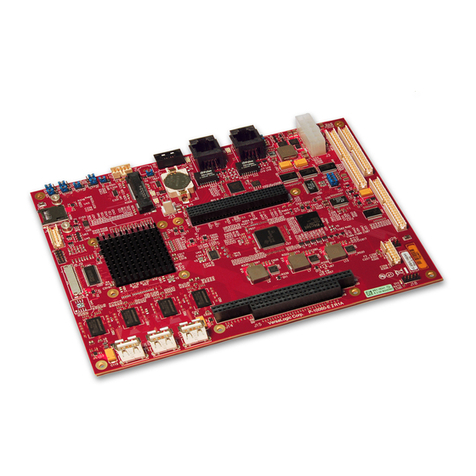
Figure 6. Pinout of I/O Connector P3, 3.3 V Digital I/O
Port7/DIO4
D GND
D GND
D GND
D GND
Port8/DIOCTL
D GND
D GND
D GND
D GND
D GND
D GND
D GND
D GND
D GND
Port9/DIOCTL
D GND
D GND
D GND
D GND
D GND
5 V
D GND
5 V
D GND
D GND
Port7/DIO6
Port7/DIO7
Port8/DIO9
Port8/DIO0
Port8/DIO1
Port8/DIO2
Port7/DIO5
Port7/DIO8
Port8/DIO3
Port8/DIO4
Port8/DIO5
Port8/DIO6
Port8/DIO7
Port8/DIO8
Port9/DIO9
Port9/DIO0
Port9/DIO1
Port9/DIO2
Port9/DIO3
Port9/DIO4
Port9/DIO5
Port9/DIO6
Port9/DIO7
Port9/DIO8
50 49
48 47
46 45
44 43
42 41
40 39
38 37
36 35
34 33
32 31
30 29
28 27
26 25
24 23
22 21
20 19
18 17
16 15
14 13
12 11
10 9
8 7
6 5
4 3
2 1
Pin 1
Pin 50

©National Instruments Corporation 9 NI sbRIO-9601/9602/9602XT User Guide
Figure 7. Pinout of I/O Connector P4, 3.3 V Digital I/O
Port0/DIOCTL
Port0/DIO9
5 V
D GND
5 V
D GND
D GND
D GND
D GND
D GND
Port1/DIOCTL
D GND
D GND
D GND
D GND
D GND
D GND
D GND
D GND
D GND
Port2/DIOCTL
D GND
D GND
D GND
D GND
D GND
Port0/DIO1
Port0/DIO2
Port0/DIO4
Port0/DIO5
Port0/DIO6
Port0/DIO7
Port0/DIO0
Port0/DIO3
Port0/DIO8
Port1/DIO9
Port1/DIO0
Port1/DIO1
Port1/DIO2
Port1/DIO3
Port1/DIO4
Port1/DIO5
Port1/DIO6
Port1/DIO7
Port1/DIO8
Port2/DIO9
Port2/DIO0
Port2/DIO1
Port2/DIO2
Port2/DIO3
50 49
48 47
46 45
44 43
42 41
40 39
38 37
36 35
34 33
32 31
30 29
28 27
26 25
24 23
22 21
20 19
18 17
16 15
14 13
12 11
10 9
8 7
6 5
4 3
2 1
Pin 1
Pin 50

NI sbRIO-9601/9602/9602XT User Guide 10 ni.com
Figure 8. Pinout of I/O Connector P5, 3.3 V Digital I/O
Figure 9 shows the signals on J1, the RS-232 serial port.
Figure 9. J1, RS-232 Serial Port Pin Assignments
Port7/DIOCTL
Port7/DIO9
D GND
D GND
D GND
Port3/DIOCTL
D GND
D GND
D GND
D GND
D GND
D GND
D GND
D GND
D GND
Port4/DIOCTL
D GND
D GND
D GND
D GND
D GND
5 V
D GND
5 V
D GND
D GND
Port7/DIO1
Port7/DIO2
Port3/DIO9
Port3/DIO0
Port3/DIO1
Port3/DIO2
Port7/DIO0
Port7/DIO3
Port3/DIO3
Port3/DIO4
Port3/DIO5
Port3/DIO6
Port3/DIO7
Port3/DIO8
Port4/DIO9
Port4/DIO0
Port4/DIO1
Port4/DIO2
Port4/DIO3
Port4/DIO4
Port4/DIO5
Port4/DIO6
Port4/DIO7
Port4/DIO8
50 49
48 47
46 45
44 43
42 41
40 39
38 37
36 35
34 33
32 31
30 29
28 27
26 25
24 23
22 21
20 19
18 17
16 15
14 13
12 11
10 9
8 7
6 5
4 3
2 1
Pin 1
Pin 50
DSR
RTS
CTS
RI
DCD
RXD
TXD
DTR
GND
1
2
3
4
5
6
7
8
9
This manual suits for next models
2
Table of contents