
OFFCARR FreeWheel User manual

Wheelchair Attachment
Set-Up Guide and Registraon
INDEX
Page 1: Four Easy Steps to Set-Up your FreeWheel
Page 5: TiLite™ Angle-Adjustable Footrest Modifications
Page 6: “Perch” Set-Up Guide
Page 7: How to Adjust the Steering Mechanism
Page 5: How to Remove Wheel for Tire/Tube Change
Page 9: How to Maintain your FreeWheel and
FreeWheel Warranty and Registration
TM
FreeWheel Wheelchair Aachment GoFreeWheel

How To Set-Up Your FreeWheel
This Set-Up Guide provides easy to follow, step-by-step, directions to setting up your
FreeWheel to fit your wheelchair. (Note: start on page 5 if you have a clamp plate
footrest or a TiLite Angle Adjustable footrest.):
1. Determine whether you need a cup shim? (page 1)
2. Does it need a straight shim and if yes, what thickness? (page 2)
3. Adjusting the angle based on how high your footrest is from the floor and whether
it is angled. This adjustment is to make sure the FreeWheel properly lifts the front
casters off the ground. (page 3)
4. Should you use a short or long rear end? (page 4)
Once your FreeWheel is set up, it is important to maintain it so it provides you with
years of enjoyment. (page 9)
Don’t forget to Order your FreeWheel RACK!
The FreeWheel with a RACK greatly increases your freedom and impendence.
Quickly attaches to your chair and allows you to carry up to 20 lbs. of gear.
www.gofreewheel.com

STEP 1: Cup Shim
(FreeWheel comes with cup shim installed.)
Check which footrest type you have and decide whether or not it needs a cup shim.
2 Tube: YES, you need a cup
shim. Make no change and go
to STEP 2.
2 Tube with Plate: YES, you need a cup shim.
Make no changes and go to STEP 2.
Clamp Plate: NO, you do not need a cup shim.
REMOVE CUP SHIM using small phillips –
head screw driver to remove screws and
GENTLY pry plastic cup shim out. Go to
STEP 2.
Footrest Types
Page 1

STEP 2: Which Straight Shim?
There are 3 separate straight shims with your FreeWheel package. Your foot rest type
determines which shim to use, or whether you do NOT need a shim.
2 Tube:
Thick Straight Shim
2 Tube with Plate:
Thinnest Straight Shim
Clamp Plate:
NO Straight Shim
1. Insert straight shim into dove-tail feature found in clamp base.
2. Rear end should be removed.
Footrest Types Shim Types
Page 2

STEP 3: Angle Adjustment to Li Front Casters
This adjustment is to make sure the FreeWheel properly lifts the front casters off the
ground. The adjustment is based on the height of your wheelchair’s footrest from the
ground. Make sure you have completed the Set-up Guide STEPS 1 and 2, BEFORE
you complete this step.
1. Find a flat/level floor. While holding the handle, arrange the FreeWheel in the
“tail dragger” position (shown above).
2. Move your feet apart. The clamp requires 3/4” of space between your feet.
3. Lower the clamp over your footrest, hooking the rear end first, then setting it down
with clamp cup just in front of the footrest tube.
4. Lock down by putting pressure on the handle. The
locking action should feel very solid and secure.
The FreeWheel tire should be touching the ground. If it
is NOT touching the ground, you will need to adjust the
Angle Bolt.
1. Loosen bolts A, B and C, both sides.
Do NOT REMOVE, just loosen.
2. Tighten Angle Bolt if wheel is off the ground.
Loosen the Angle Bolt if the tire is too low..
3. Re-tighten BOTH SIDES of bolts A, B and C.
Angle Bolt
A
C
B
Page 3

STEP 4: Which Rear End?
(ALL footrest types need a rear end. )
1. Measure from the front tube/plate to the back of the footrest to determine depth.
WARNING: Clamping the FreeWheel onto your
footrest with the Rear End set too short can
damage the Rear End. Make sure to follow Step 3
below!
Short
Long
Footrest Depths up to 5 inches:
Use SHORT Rear End
Footrest Depths from 5 to 6-7/8 inches:
Use a LONG Rear End
Page 4
2. Using a hack saw cut your straight
shim the same length as the footrest
depth.
3. Clamp FreeWheel on to footrest.
4. Using a 3/16” allen wrench adjust
the rear end by tightening bolt so the
rear end just touches the footrest
tube/plate.

CLAMP PLATE Footrests: Special Instrucons
To insure that your footrest does not rotate you will need to add 2 screws to lock the
footrest plate to your tube.
Use TWO #10-32 Self Tapper machine screws. Make a pilot hole with a 5/32” drill bit.
TiLite ANGLE-ADJUSTABLE FOOTREST ONLY: Special Instrucons
Use a dremel or file to modify your clamp so your FreeWheel clamps on securely.
Please contact us at info@gofreewheel.com if you have any questions or difficulty with
this step. Upon request we will provide a modified TiLite clamp.
Before Aer Use dremel or le to remove
material as shown.
Page 5
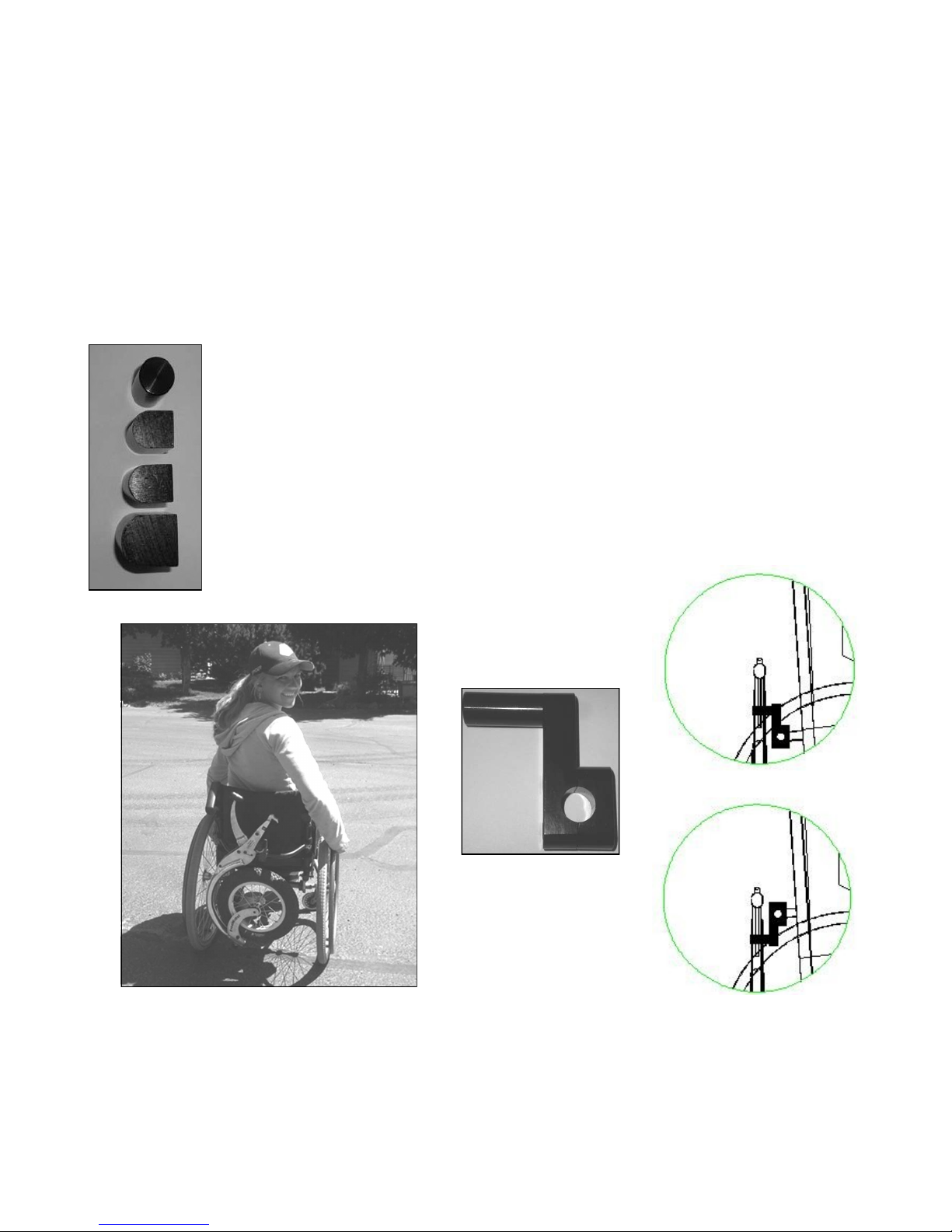
Perch Set-up Guide
Now that you have your FreeWheel adjusted for your specific footrest type and chair,
you’ll want to install the Storage Perch on the crossbar on the back of your chair.
Chose the perch post that matches your footrest set-up to make sure you pick the right
combination so your FreeWheel securely clamps to your storage Perch.
ROUND Perch Post—Tube only footrest, with THICKEST straight
shim and the cup shim has NOT been removed.
SMALL D Perch Post—Middle thickness straight shim and the cup
shim has NOT been removed.
MIDDLE D-Perch Post—Thinnest straight shim and the cup shim has
NOT been removed.
BIG D-Perch Post—NO straight shim and the cup shim has been
REMOVED.
With one hand cupping the clamp of the FreeWheel, hold
the clamp to the perch while the other hand grips the
handle and firmly close the clamp onto the perch.
Lacey Heward—2x Paralympic Athlete
Page 6
Low Cross Bar
High Cross Bar
Perch

How to Adjust for Steering
If your Freewheel is not tracking straight when coasting forward on level ground, the
steering should be adjusted. To do this you need to adjust two separate fasteners:
Front Set Screw, and;
Main Steering Stem Bolt
1. The Front Set Screw holds the steering adjustment.
2. After loosening the Front Set Screw (3/32" allen or 2.5mm allen wrench) and Main
Steering Stem Bolt, rotate the fork to adjust the steering straight..
3. If the internal bushing is not rotating relative to the frame, then tighten the ball ad-
juster knob to lock the fork to the internal bushing. Work the bushing loose from the
frame. I like to re-grease this joint to keep it from binding.
4. Set the steering and then tighten the Front Set Screw.
5. Finish by tightening the Main Steering Stem Bolt.
6. Test for straightness by coasting on a flat surface.
Note: The front ball adjuster knob can be backed off for light steering action or screwed
in for heavier steering action.
Front Set Screw
Ball Adjuster Knob
Main Steering Stem Bolt
Page 7
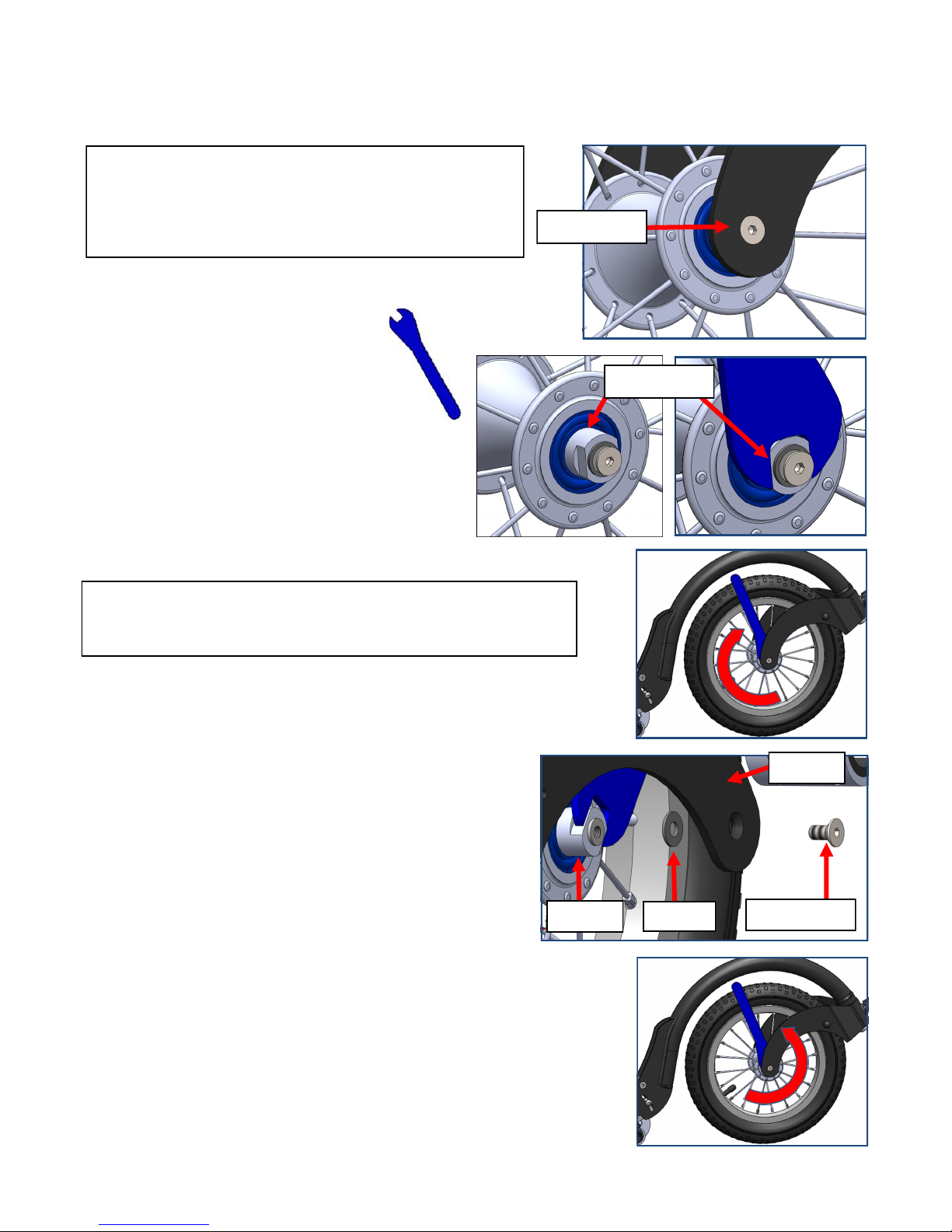
STEP TWO
A. Start by loosening the Bearing
Race using a 13 mmm flat
wrench (found at any bike
shop).
B. Turn wrench CLOCKWISE to loosen.
Do this on BOTH sides.
C. Once both sides are loosened, use 3mm
allen wrench to remove Axel Screw.
D. Once the Axel Screw is removed there
may be a washer that needs to be installed
between the Fork and the Axel when you
re-assemble.
STEP THREE
A. Assemble in the reverse order, remember-
ing to install the washer(s), if applicable.
B. Install Axle Screw all the way in.
C. Do the final tightening of the Bearing Race
by turning the 13 mm flat wrench COUN-
TER CLOCKWISE. This needs to be done
on BOTH sides (tightens the bearing race
against the inner side of the fork).
Page 8
How to Remove Wheel for Tire/Tube Change
Axel Screw
Bearing Race
Axel Washer Axel Screw
NOTE: The wheel may not spin as easily at this time. This is
normal and will spin easily after re-assembly.
STEP ONE: Do NOT use a 3mm allen wrench
and try to loosen the Axle Screw. It will not
move and is easily stripped.
Fork















