1.0 INTRODUCTION
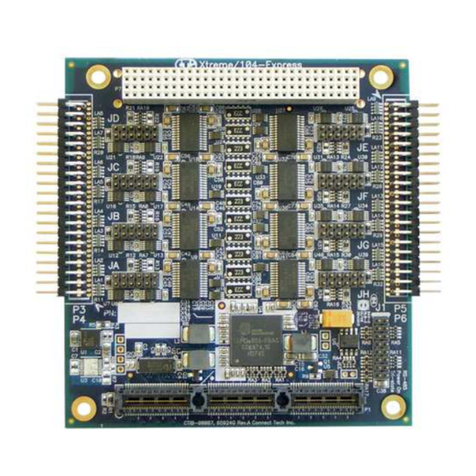
The PCI-DAS1602/16 is a multifunction measurement and control board designed to operate in
computers with PCIbus accessoryslots. The architecture of the boards is looselybased on the
original CIO-DAS16; the standard of ISA bus data acquisition. Much has changed though, and
all of it due to improvements in technology.
Higher qualityanalog components have made 16-bit measurements the standard. Dense packag-
ing technologyand custom ASICS allow a far greater range of control over programmable
options, such as calibration, triggering, synchronization and data transfer.
Even the connector has changed. New, denser connectors allow up to 100 signal lines where
once 37 was the the standard.
Because of the improvements in technology, the PCI-DAS1602/16 is easier to install and use
than anyprevious DAS16. There is not a single switch or jumper on the board, so go ahead and
install the PCI-DAS1602/16 into your computer then turn your computer on. Welcome to the
future!
2.0 INSTALLATION
2.1 Software Installation
2.1.1 Windows 95, 98, NT or above
If you will be installingthe Universal Librarywith your board, insert the Universal Library
diskette or CD in an appropriate drive, run the program SETUP.EXE, and follow the installation
instructions provided. This program will install both InstaCalTM (setup and
test utility) and the Universal Library. If you are using Windows 95, you will have the option of
installingthe 16-bit and/or 32-bit libraries. Unless you have a specific reason to use the 16-bit
library (e.g. compatibility with an exisiting program) install the 32-bit version.
If you are not using the Universal Library, insert the disk or CD labeled InstaCalTM into an
appropriate drive, and run SETUP.EXE. The install wizard will now launch and you will then be
prompted for additional information. Follow the instructions and, if possible, accept the defaults,
especiallyif this is your first installation. It will be easier for us to assist you in the unlikelyevent
of trouble during your system setup and operation.
2.1.2 UNIVERSAL LIBRARY INSTALLATION OPTIONS
The Universal Libraryprovides example programs for a wide varietyof programming languages.
If you are installingthe Universal Library, an "Installation Options" dialogbox will allow you to
select which languages' example programs are loaded onto your computer. Select the desired
example programs by checking the appropriate box(s).
Page 2