manuals.online logo
Brands
  1. Home
  2. •
  3. Brands
  4. •
  5. Panasonic
  6. •
  7. Adapter
  8. •
  9. Panasonic WV-QAT502-W User manual

Panasonic WV-QAT502-W User manual

This manual suits for next models

1

Other Panasonic Adapter manuals

Panasonic AW-PS550N User manual

Panasonic

Panasonic AW-PS550N User manual

Panasonic CA-PANSC1U User manual

Panasonic

Panasonic CA-PANSC1U User manual

Panasonic AW-AD500A User manual

Panasonic

Panasonic AW-AD500A User manual

Panasonic TY-WL20U User manual

Panasonic

Panasonic TY-WL20U User manual

Panasonic AW-PS301 User manual

Panasonic

Panasonic AW-PS301 User manual

Panasonic AJ-YA600 User manual

Panasonic

Panasonic AJ-YA600 User manual

Panasonic CF-AA6373A User manual

Panasonic

Panasonic CF-AA6373A User manual

Panasonic AG-MYA30G - XLR Mic Adaptor User manual

Panasonic

Panasonic AG-MYA30G - XLR Mic Adaptor User manual

Panasonic AWML600 - MULTIPLEX CONTROLER User manual

Panasonic

Panasonic AWML600 - MULTIPLEX CONTROLER User manual

Panasonic FZ-AAE184E1 Series User manual

Panasonic

Panasonic FZ-AAE184E1 Series User manual

Panasonic CF-AAV1601AW User manual

Panasonic

Panasonic CF-AAV1601AW User manual

Panasonic LUMIX DMW-AC10 User manual

Panasonic

Panasonic LUMIX DMW-AC10 User manual

Panasonic BB-HCA3 User manual

Panasonic

Panasonic BB-HCA3 User manual

Panasonic BT-MA900G User manual

Panasonic

Panasonic BT-MA900G User manual

Panasonic BL-PA300KTA - High Definition Power Line Communication Ethernet Adaptor... User manual

Panasonic

Panasonic BL-PA300KTA - High Definition Power Line Communication Ethernet Adaptor... User manual

Panasonic AW-PS600 User manual

Panasonic

Panasonic AW-PS600 User manual

Panasonic KXTGA575 - 5 Instruction Manual

Panasonic

Panasonic KXTGA575 - 5 Instruction Manual

Panasonic DMW-DCC17 User manual

Panasonic

Panasonic DMW-DCC17 User manual

Panasonic CF-AA5803A User manual

Panasonic

Panasonic CF-AA5803A User manual

Panasonic CF-AA6413C User manual

Panasonic

Panasonic CF-AA6413C User manual

Panasonic DVCPRO AJ-CA901P User manual

Panasonic

Panasonic DVCPRO AJ-CA901P User manual

Panasonic CF-AA6503A User manual

Panasonic

Panasonic CF-AA6503A User manual

Panasonic FZ-VLNG211 User manual

Panasonic

Panasonic FZ-VLNG211 User manual

Panasonic KX-TGA575 User manual

Panasonic

Panasonic KX-TGA575 User manual

Popular Adapter manuals by other brands

Mini Gadgets BB2Outlet user manual

Mini Gadgets

Mini Gadgets BB2Outlet user manual

LSI LSISAS3442E-R Quick installation guide

LSI

LSI LSISAS3442E-R Quick installation guide

Moeller BBA -16 Series installation instructions

Moeller

Moeller BBA -16 Series installation instructions

Acer MWA3 quick start guide

Acer

Acer MWA3 quick start guide

Connect Tech ADG095 user guide

Connect Tech

Connect Tech ADG095 user guide

cable matters 604002 user manual

cable matters

cable matters 604002 user manual

Solwise PL-85PEW Easy start

Solwise

Solwise PL-85PEW Easy start

HP Photosmart 7100 user guide

HP

HP Photosmart 7100 user guide

HP E2494A installation guide

HP

HP E2494A installation guide

StarTech.com USB150WN1X1 quick start guide

StarTech.com

StarTech.com USB150WN1X1 quick start guide

Lindy 43198 user manual

Lindy

Lindy 43198 user manual

A&D AD-8527 instruction manual

A&D

A&D AD-8527 instruction manual

Motorola WU830G user guide

Motorola

Motorola WU830G user guide

Hawking HUF2 Specifications

Hawking

Hawking HUF2 Specifications

Allen-Bradley E3 Plus installation instructions

Allen-Bradley

Allen-Bradley E3 Plus installation instructions

Trust BT-2210Tp manual

Trust

Trust BT-2210Tp manual

HP NC7170 overview

HP

HP NC7170 overview

Uconnect BLE-485C user manual

Uconnect

Uconnect BLE-485C user manual

manuals.online logo
manuals.online logoBrands
  • About & Mission
  • Contact us
  • Privacy Policy
  • Terms and Conditions

Copyright 2025 Manuals.Online. All Rights Reserved.

Caution:
󱾀Before attempting to connect or operate this product, please read these instructions
carefully.
Notice:
󱾀This product is not suitable for use in locations where children are likely to be present.
󱾀Do not install this product in locations where ordinary persons can easily reach.
󱾀For information about screws and other parts required for installation, refer to the
corresponding section of this document.
Standard accessories
Operating Instructions (this document) 1 pc.
Camera fixing screws 2 pcs.
(M4 × 8 mm {5/16 inches})
Screw caps 2 pcs.
Fixing screws 5 pcs.
(M4
×
8 mm {5/16 inches}) (of them, 1 for spare)
Precautions for installation
In order to prevent injury, the product must be securely mounted to a Gangbox/
Junction box according to installation guide.
Make sure to remove this product if it will no longer be used.
Note:
󱾀When installing outside, installation work shall be such that there is no exposure to water
into the architecture through the Gangbox/Junction box or conduits having been joined.
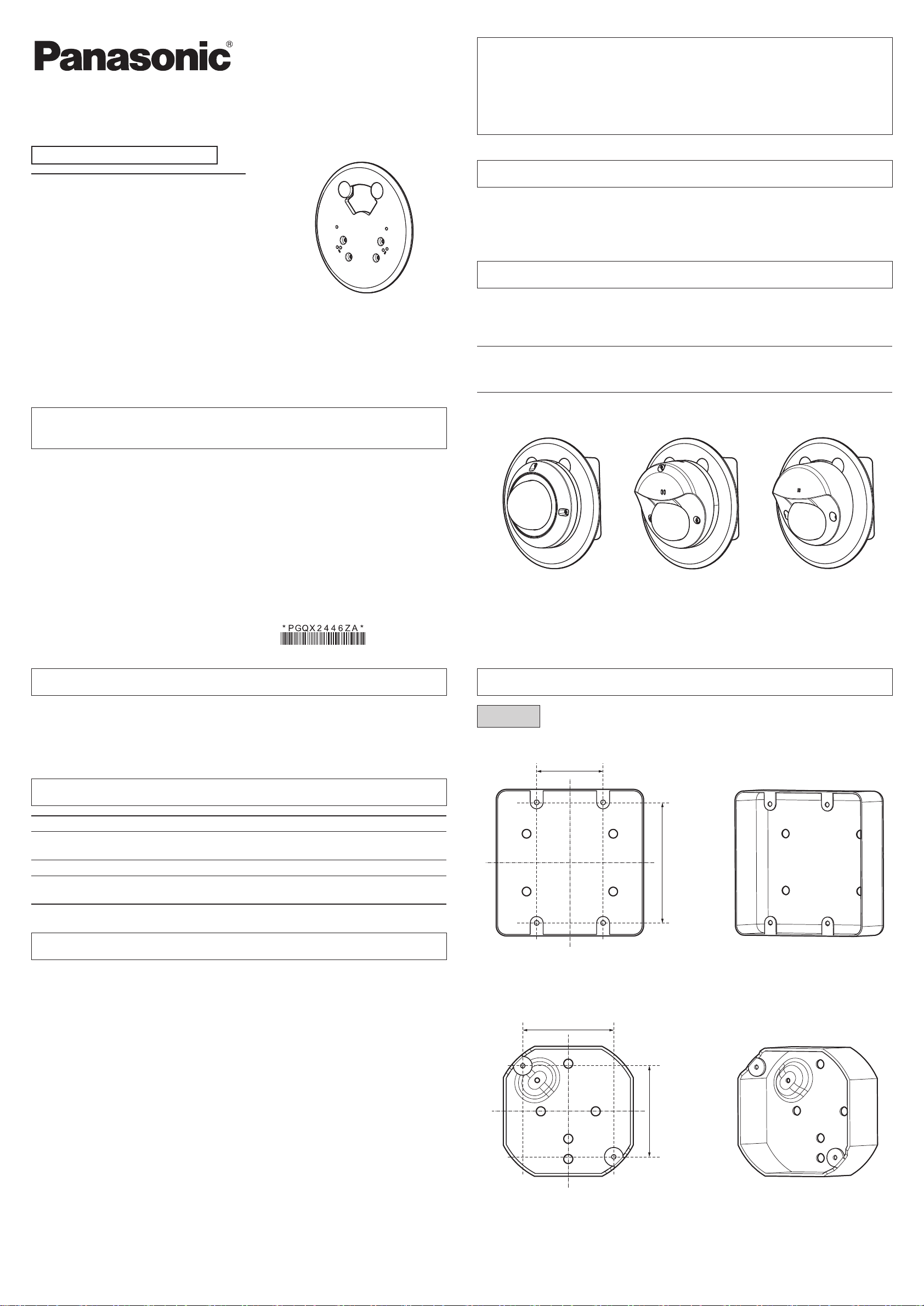
<WV-U25xxL series>
<WV-U21xxL series>
<WV-S35xxL series> <WV-S31xxL series>
<Installation example>
Installation
Step 1 Compatible Gangbox/Junction box
Operating Instructions
Included Installation Instructions
Gangbox Adapter
WV-QAT502-W
Model No. WV-QAT502-G
󱾀Before attempting to connect or install this product,
please read these instructions carefully
and save this manual for future use.
󱾀Be sure to read “Precautions” in this document before use.
󱾀The external appearance and other parts shown in this manual may differ from the actual
product within the scope that will not interfere with normal use due to improvement of the
product.
Panasonic i-PRO Sensing Solutions Co., Ltd. assumes no responsibility for injuries or
property damage resulting from failures arising out of improper installation or
operation inconsistent with this documentation.
Preface
This product is used when installing a compact dome type camera using a Gangbox/Junction
box.
For the latest information about the supported cameras, refer to our support website
(https://security.panasonic.com/training_support/support/info/<Control No.:C0501>).
Specifications
Ambient operating temperature: –50 °C to +60 °C {–58 °F to +140 °F}
Dimensions: ø162 mm × 6.2 mm (H)
{ø6-3/8 inches × 1/4 inches (H)}
Mass: Approx. 144 g{0.32 lbs}
Finish: Aluminum die cast WV-QAT502-W : i-PRO white
WV-QAT502-G : Light gray
Precautions
Refer installation work to the dealer.
Installation work requires technique and experience. Failure to observe this may cause fire,
electric shock, injury, or damage to the product.
Be sure to consult the dealer.
Install the product securely on a Gangbox/Junction box in accordance with the
installation instructions.
Failure to observe this may cause injury or accidents.
Do not use this product except with suitable cameras.
Failure to observe this may cause a drop resulting in injury or accidents.
Do not install this product on a place that is greatly influenced by wind.
Installation on a place where the wind speed is 60 m/s {approx. 134 mph} or more may cause a
fall of the product resulting in injury or accidents.
The screws and bolts must be tightened to the specified torque.
Failure to observe this may cause a drop resulting in injury or accidents.
When using this product, also read the “Precautions” described in the operating
instructions for the camera to be attached.
© Panasonic i-PRO Sensing Solutions Co., Ltd. 2021
Fs0321-0
Printed in China
For U.S. and Canada:
Panasonic i-PRO Sensing Solutions
Corporation of America
800 Gessner Rd, Suite 700 Houston, TX 77024
https://www.security.us.panasonic.com/
Panasonic Canada Inc.
5770 Ambler Drive, Mississauga, Ontario, L4W 2T3 Canada
1-877-495-0580
https://www.panasonic.com/ca/
For Europe and other countries:
Panasonic Corporation
http://www.panasonic.com
Panasonic i-PRO Sensing Solutions Co., Ltd.
Fukuoka, Japan
Authorised Representative in EU:
Panasonic Testing Centre
Panasonic Marketing Europe GmbH
Winsbergring 15, 22525 Hamburg, Germany
<Double-Gangbox/Junction box>
46 mm {1-13/16 inches}
83.5 mm
{3-9/32 inches}
<Octagon-Gangbox/Junction box>
63 mm {2-15/32 inches}
63 mm
{2-15/32 inches}
WV-QAT502_PGQX2446ZAxx_Gangboxアダプター.indd 1 2021/03/02 9:07:24

Step 2 196 N {44 lbf}

Step 4
Refer to the Installation Guide for each camera.
Step 6 1.37 N·m {1.01 lbf·ft}
Step 7
Power ON (PoE), remove the protection film from the lens.
Refer to the Installation Guide for the camera for detailed
adjustment methods.
Fixing screw (4 pcs.)
(M4: accessories)
<WV-U25xxL series>
<WV-U21xxL series>
<WV-S35xxL series> <WV-S31xxL series>
Step 5
Connect the cables to the camera.
Refer to Installation Guide for each camera.
Fixing screw (2 pcs.)
(M4: accessories)
<WV-S31xxL series>
Camera fixing screw (2 pcs.)
(M4: accessories)
<WV-U25xxL series>
<WV-U21xxL series>
Camera fixing screw (2 pcs.)
(M4: accessories)
Step 3
Screw cap (2 pcs.)
(accessories)
Step 8
<WV-S35xxL series>
Camera fixing
screw (2 pcs.)
(M4: accessories)
WV-QAT502_PGQX2446ZAxx_Gangboxアダプター.indd 2 2021/03/02 9:07:26