100 GILBANE STREET - WARWICK, RI - 02886
TEL: (401)738-7266 FAX: (401)738-0618
www.PMCLIGHTING.com
Specifications and Dimensions are subject to change without notice.
CONSULT FACTORY OR VISIT OUR WEBSITE FOR SPECIFIC INSTALLATION INSTRUCTIONS
2LEM-AURA - 000
INSTALLATION / WIRING
READ AND UNDERSTAND THESE INSTRUCTIONS BEFORE INSTALLING LUMINAIRE.
This luminaire is intended for installation in accordance with the National Electrical Code and local regulations.
To assure full compliance with local codes and regulations, check with your local electrical inspector before installation.
To prevent electric shock, turn off electricity at main power supply before proceeding. Retain these instructions for maintenance reference.
4LE-AURA-CT with "C" or "I" Setup / Control Option
0-10v DIMMER HARD WIRED CONTROL OF SCENE SET SETTING - NO SECONDARY DIMMING
FOR SCENE SET HARD WIRING USING 0-10V DIMMING DEVICE
Aura Fixtures are capable of storing 5 different preset output modes called
scenes - each mode being a combination of dimming level, color saturation,
color hue and color temperature. These levels are set wirelessly via the LCT or
using the iOS APP via a Bluetooth connection from an iOS Smartphone or iPad,
and are stored in the fixture LED module.
Once programmed - the "scene" can be recalled by use of a standard 0-10v wall
dimmer switch. The 0-10v wall dimmer switch is wired to the BLUE and WHITE
wires fron the LED Module. The slide range is recognized by the LED module as
being divided into 5 different zones corresponding to the 5 different preset
scenes. While the slide is on zone 1, the module reacts as programmed for
scene 1, and so on. To change from scene 1 to scene 2, slide the dimmer
control until the scene changes.
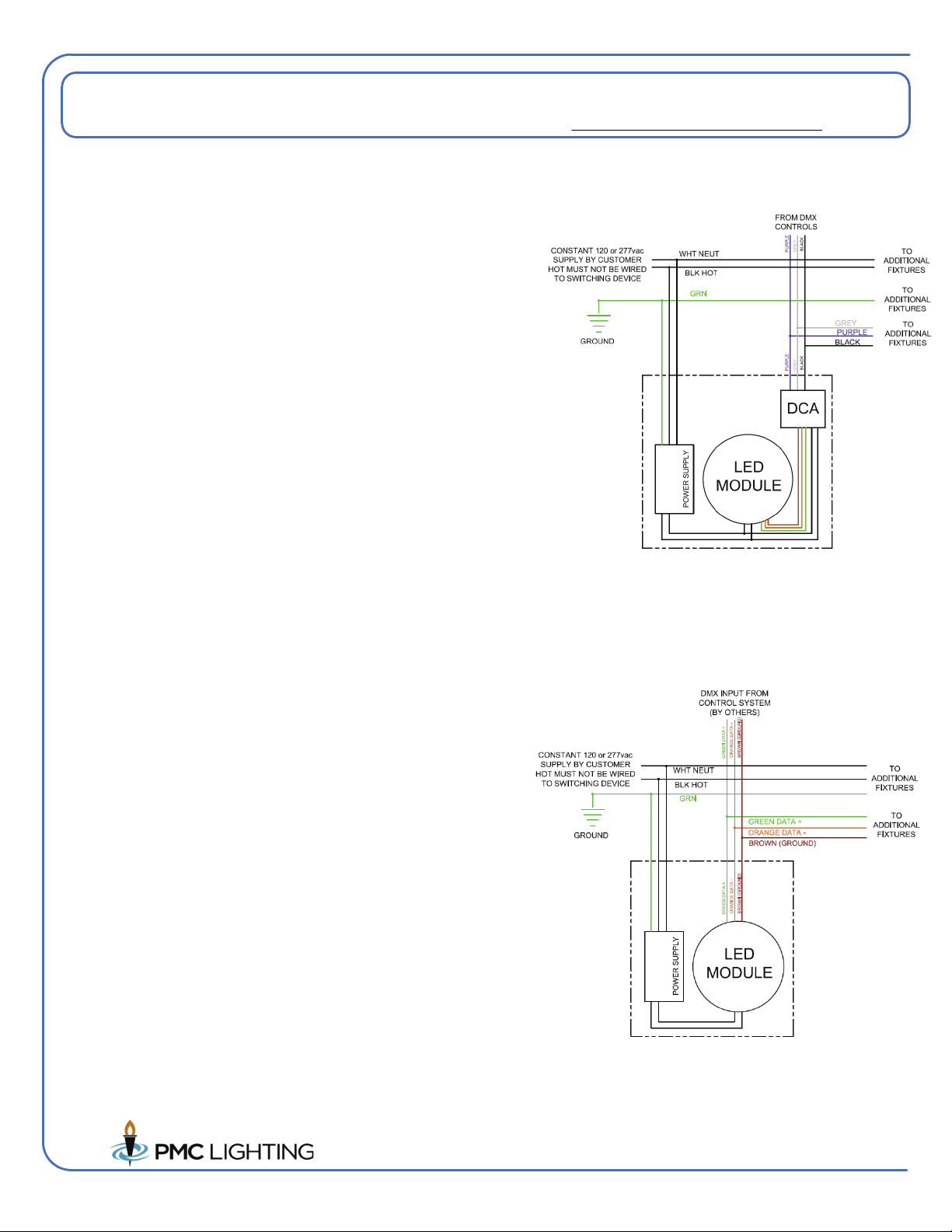
When no dimming is to be used, the LED Module purple and grey wires are tied
together.
DO NOT USE THE ON-OFF SWITCHING OF THE SCENE SET DIMMER TO
POWER THE FIXTURES.
4LE-AURA-CT with "C" or "I" Setup / Control Option
0-10v DIMMER HARD WIRED CONTROL OF SCENE SET SETTING AND SECONDARY PROPORTIONAL DIMMING
FOR SCENE SET HARD WIRING USING 0-10V DIMMING DEVICE
Aura Fixtures are capable of storing 5 different preset output modes called
scenes - each mode being a combination of dimming level, color saturation,
color hue and color temperature. These levels are set wirelessly via the LCT or
using the iOS APP via a Bluetooth connection from an iOS Smartphone or iPad,
and are stored in the fixture LED module.
Once programmed - the "scene" can be recalled by use of a standard 0-10v wall
dimmer switch. The 0-10v wall dimmer switch is wired to the BLUE and WHITE
wires fron the LED Module. The slide range is recognized by the LED module as
being divided into 5 different zones corresponding to the 5 different preset
scenes. While the slide is on zone 1, the module reacts as programmed for
scene 1, and so on. To change from scene 1 to scene 2, slide the dimmer
control until the scene changes.
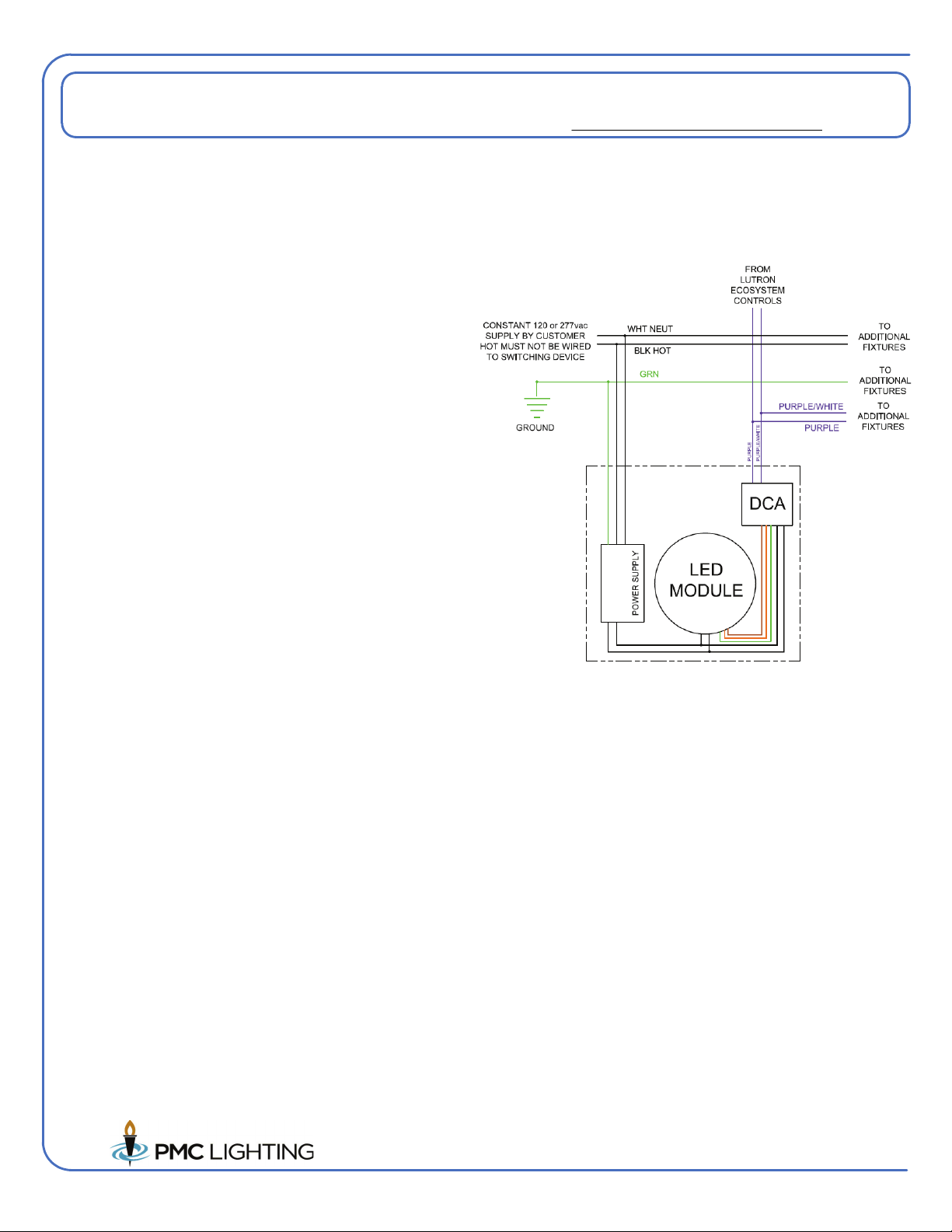
When dimming is to be used, the LED module purple and grey wires are tied to a
second 0-10v wall dimmer switch. DIMMING IS PROPORTIONAL TO THE
DIMMING LEVEL SET FOR EACH SCENE. At 100% on the dimming control
the brightness is as set for the particular scene chosen. The dimmer control
dims the light output down from that preset level. Minimum dimming level is 1%.
DO NOT USE THE ON-OFF SWITCHING OF THE SCENE SET DIMMER TO
POWER THE FIXTURES. FIXTURES MAY BE POWERED ON AND OFF
FROM THE DIMMER USED FOR DIMMING.