manuals.online logo
Brands
  1. Home
  2. •
  3. Brands
  4. •
  5. punch
  6. •
  7. Speakers System
  8. •
  9. punch P152-S Guide

punch P152-S Guide

This manual suits for next models

5

Popular Speakers System manuals by other brands

Monster MT-SB21 user manual

Monster

Monster MT-SB21 user manual

Monacor ESP-76AB/ WS manual

Monacor

Monacor ESP-76AB/ WS manual

Samsung HW-J430 user manual

Samsung

Samsung HW-J430 user manual

WILSON AUDIO WATT owner's manual

WILSON AUDIO

WILSON AUDIO WATT owner's manual

Hisense AX3125H user manual

Hisense

Hisense AX3125H user manual

EisSound KBSound iSelect user manual

EisSound

EisSound KBSound iSelect user manual

Boston Acoustics VRi793 manual

Boston Acoustics

Boston Acoustics VRi793 manual

Sven SPS-707bL Operation manual

Sven

Sven SPS-707bL Operation manual

Monacor DSM-26LAN instruction manual

Monacor

Monacor DSM-26LAN instruction manual

JVC CS-SR100 instructions

JVC

JVC CS-SR100 instructions

Samsung HW-C450 user manual

Samsung

Samsung HW-C450 user manual

TaoTronics evatronic ET-SK011 user guide

TaoTronics

TaoTronics evatronic ET-SK011 user guide

JVC HX-D7C instructions

JVC

JVC HX-D7C instructions

Pyle PBMSPG190 user manual

Pyle

Pyle PBMSPG190 user manual

Sven SPS-607 Operation manual

Sven

Sven SPS-607 Operation manual

iSP Technologies LT2 series owner's manual

iSP Technologies

iSP Technologies LT2 series owner's manual

Samsung Crystal Surround Air Track HW-F550 user manual

Samsung

Samsung Crystal Surround Air Track HW-F550 user manual

Bose Acoustimass 6 Series II owner's guide

Bose

Bose Acoustimass 6 Series II owner's guide

manuals.online logo
manuals.online logoBrands
  • About & Mission
  • Contact us
  • Privacy Policy
  • Terms and Conditions

Copyright 2025 Manuals.Online. All Rights Reserved.

LJ
N
COMPONENT
SPEAKERS
P152-S
•
P16-S
P165-SE
•
P165-SI
•
P1675-S
P1T-S
Serial
Number:
_____
_
Date
of
Purchase:
____
_
Installation
&
Operation
2
Introduction
Dear
Customer,
Congratulations
on
your
purchase
of
the
world's
finest
brand
of
audio
products.
At
Rockford
Fosgate
we
are
fanatics
about
musical
reproduc
-
tion
at
its
best
,
and
we
are
pleased
you
chose
our
product.
Through
years
of
engineering
expertise
,
hand
craftsmanship
and
critical
testing
procedures,
we
have
created
a
wide
range
of
products
that
reproduce
music
with
all
the
clarity
and
richness
you
deserve.
For
maximum
performance
we
recommend
you
have
your
new
Rockford
Fosgate
product
installed
by
an
Authorized
Rockford
Fosgate
Dealer,
as
we
provide
specialized
training
through
Rockford
Technical
Training
Institute
(RTTI).
Please
read
your
warranty
and
retain
your
receipt
and
original
carton
for
possible
future
use
.
Great
product
and
competent
installations
are
only
a
piece
of
the
puzzle
when
it
comes
to
your
system.
Make
sure
that
your
installer
is
using
100%
authentic
installation
accessories
from
Rockford
Fosgate
in
your
installation.
Rockford
Fosgate
has
everything
from
RCA
cables
and
speaker
wire
to
power
wire
and
battery
connectors
.
Insist
on
it!
After
all
,
your
new
system
deserves
nothing
but
the
best.
To
add
the
finishing
touch
to
your
new
Rockford
Fosgate
image
,
order
your
Rockford
accessories
,
which
include
everything
from
T-shirts
to
hats
.
Visit
our
web
site
for
the
latest
information
on
all
Rockford
products;
www.
rockfordfosgate.
com
or
,
in
the
U.S.
call1-800-669-9899
or
FAX
1-800-398-3985
.
For
all
other
countries
,
call
+001-480-967
-3565
or
FAX
+001-480-966-3983
Table
of
Content
2
Introduction
3-5
Specifications
6-9
Installation
Installation
Considerations
Mounting
Wiring
10-11
Additional
Languages
French
Spanish
German
Italian
12
Limited
Warranty
Information
If,
after
reading
your
manual,
you
still
have
questions
regarding
this
prod-
uct
,
we
recommend
that
you
see
your
Rockford
Fosgate
dealer
.
If
you
need
further
assistance,
you
can
call
us
direct
at
1-800-669-9899
.
Be
sure
to
have
your
serial
number,
model
number
and
date
of
purchase
available
when
you
call.
Safety
This
symbol
with
"WARNING
"
is
intended
to
alert
the
user
to
the
presence
of
important
4
WARNING
instructions
.
Failure
to
heed
the
instructions
~
will
result
in
severe
injury
or
death
.
This
symbol
with
"CAUTION"
is
intended
to
alert
the
user
to
the
presence
of
important
4
CAUTION
instructions
.
Failure
to
heed
the
instructions
~
can
result
in
injury
or
unit
damage
.
•
To
prevent
injury
and
damage
to
the
unit,
please
read
and
follow
the
instructions
in
this
manual
.
We
want
you
to
enjoy
this
system,
not
get
a
headache
.
•
If
you
fee
l
unsure
about
installing
this
system
yourself
,
have
it
installed
by
a
qualified
Rockford
Fosgate
technician.
•
Before
installation,
disconnect
the
battery
negative
(-)
terminal
to
prevent
damage
to
the
unit,
fire
and/or
possible
injury
.
r~,..
2014
Fic"Krord
C'WJC'
1L1'1
A
I
~i~r·~
Resc.rvPr,
RCCt<f
CJ~C
~uS
GATE
P
JNC~
'f~l
3nd
associated
oqos
where
apolicablc
are
reg1stered
trademarks
of
Rocktorri
C,1r
pcra
1
nr
r
the
U'l
t
~,
S.a
1• •
nOt!''
Ahe
~
r r
1'
1;
Ad
c
','
'
l
yyl1f'\S
ar0
t
1e
prcperty
0
1
:t"J~i·
·espective
')Wners.
Spec
ficat101s
SL.b
ect
to
change
w1t'lc
1!
J.
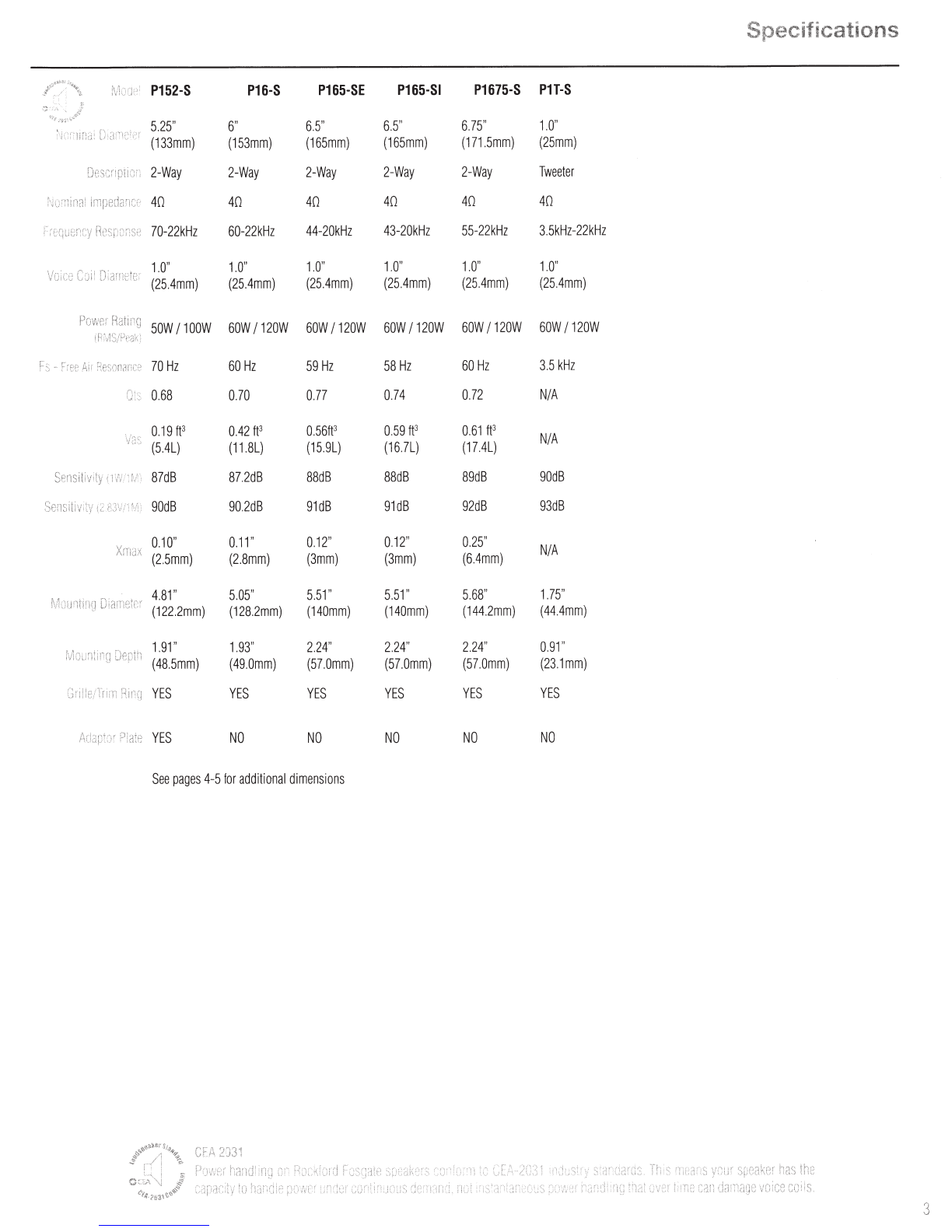
Specifications
l,<J
"'
~
'
~'·
'
·...._
~;;.
P152-S
P16-S
P165-SE
P165-SI
P1675-S
PH-S
~
5.25"
6"
6.5" 6.5"
6.75"
1.0
"
\jl·.:··
lif
i(
;:
(133mm)
(153mm)
(165mm)
(165mm)
(171.5mm)
(25mm)
2-Way
2-Way 2-Way
2-Way
2-Way
Tweeter
ho·:~i
n2l
40
40
40 40
40
40
70-22kHz
60-22kHz
44-20kHz
43-20kHz
55-22kHz
3.5kHz-22kHz
Voice
C~
;
ii
Di
anJH
t
er
1.0
"
1.0" 1.0"
1.
0"
1.0"
1.0"
(25.4mm)
(25.4mm)
(25.4mm)
(25.4mm)
(25.4mm) (25.4mm)
SOW
I
100W
60W
I
120W
60W
I
120W
60W
I
120W
60W
I
120W
60W
I
120W
F3
-
crfe
Air
R
e
::
n
n
Jnc:~
70Hz
60Hz
59
Hz
58
Hz
60Hz
3.5
kHz
0!:
0.68
0.70 0.77 0.74
0.72
N
IA
0.19f
P
0.42
fj3
0.
56fj3
0.59
IP
0.61
fj3
NIA
(5.4L)
(11.8L)
(15.9L)
(16.7L)
(17.4L)
S
~
:ns
i
ti
v: ty
87dB
87.2dB
88dB
88dB
89dB
90dB
Sem.~tivi:
y
i'-
90dB
90
.
2dB
91dB
91dB
92dB
93dB
Xmax
0.
10"
0.
11"
0.
12"
0.12"
0.25
"
NIA
(2.5mm)
(2.8mm)
(3mm)
(3mm)
(6.4mm)
fv
1
Jufl
tlri
rJ
D!a:·r
i
t:
"nr
4.81"
5.05"
5.
51"
5.51"
5.68"
1.75
"
(122.2mm)
(128.2mm)
(140mm)
(140mm)
(144.2mm)
(44.4mm)
1.
91
" 1.
93"
2.
24
"
2.2
4" 2.
24
" 0.91"
(48.5mm)
(49
.
0mm)
(57.0mm)
(57
.
0mm)
(57.
0mm)
(
23.
1mm)
YES
YES YES
YES
YES
YES
Ad&DtJr
P!ate
YES
NO NO NO NO
NO
See
pages
4-5
for
additional
dimensions
CFA
203
1
~;
y·::tJr
Sp8tlker
has
n·;~;
I
''•
'ljl
c
·
~~
{r
~:
·
;r
~.
::
:
Jr1111
a~
i
2 vo~
ce
c
ci:s.
3
4
Specifications
P152-S
P16-5
6.
69"
(170.0mm)
Diameter
P165-5E/P165-51
6.5"
c-
----
(185mm)
P1675-5
ill
us.-1.1
5.
43"
6.
22'
~I
~
(158.
0mm)
(138.0mm)
Diameter
"!/
\S
6.10"
(155.0mm)
Diameter
5.59'
(142.0mm)
Di
ameter
6.18"
(157.0mm)
Diameter
6.1"
(156mm)
6.8
"
(
17
2mm)
1:
SJ2
Z'
6.
97'
1----
(177.0mm)
I
~
"!/
0.88'
(22.3mm)
'S
=I
0.9"
(23mm)
0.8
0'
(20.
4mm
)
I
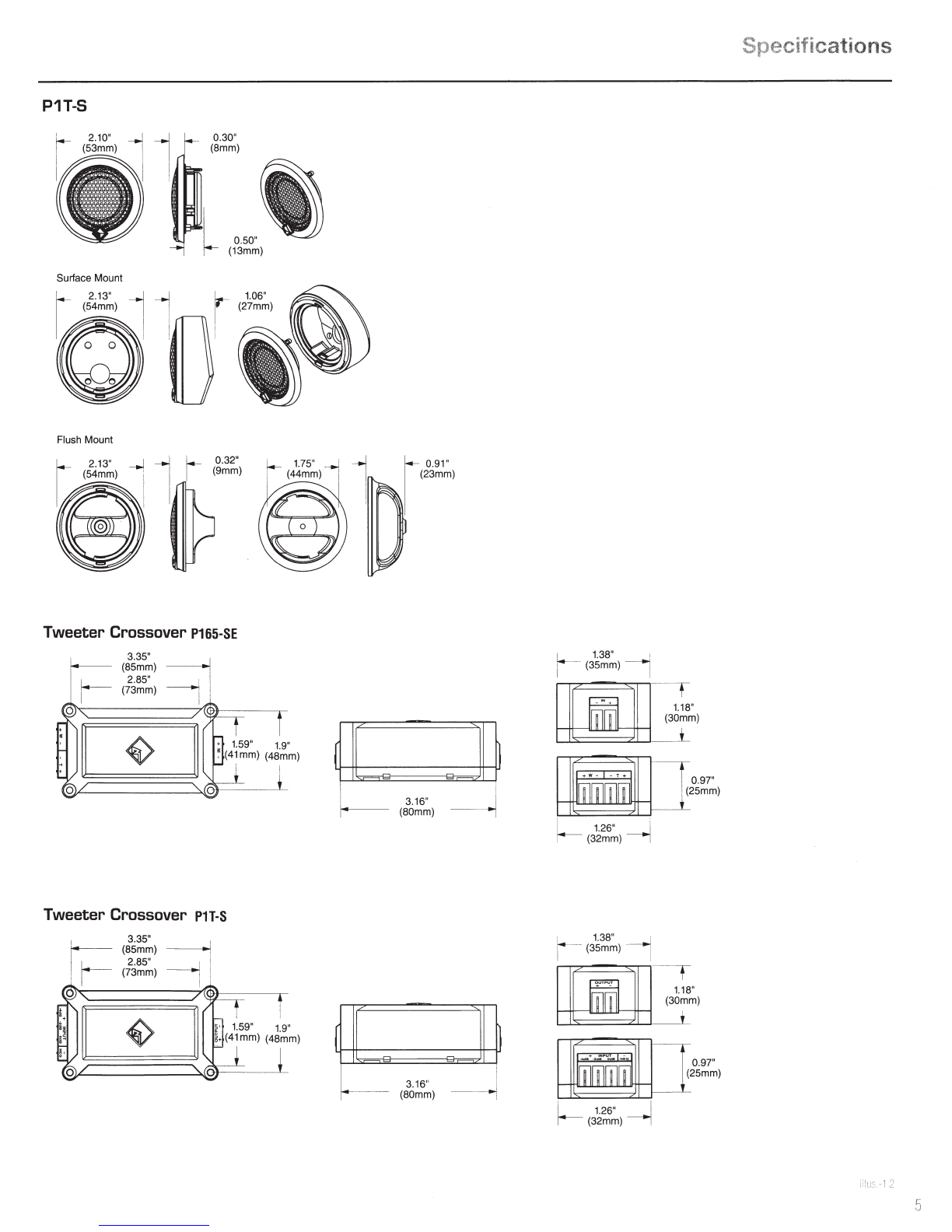
P1T-S
0.30"
(8mm)
I
0.50"
1--
(13mm)
Surface
Mount
I _
2.13"
-1
-.I
r-
1.06"
I,
(54mm)
~
I : I
(27mm)
~
~
u
F
lush
Mount
Tweeter Crossover
P165-SE
3.35"
(8
5mm)
---------1
2.85"
------j '
(7
3m
m)
I
Tweeter Crossover
PH-S
3.35"
(85mm)
2.85"
(73mm)
r
f
1.- 0.
91
"
(2
3m
m)
3.16"
(80mm) -
--
3.
16"
..
(80mm) ---
~
~
1.
38" '
r (35mm) !
~I
-
~
~,
~~~
I
t 26"
I
r--
(32mm)
-----J
1.
38"
1
r(35mm)
_.,..
~
~
t±;~±
L
~~
)
~
~
5
~~)
~
-
_r
I
t26
" I
r-- (32mm) ---1
Specifications
6
Installation
Contents
•
(1)
Pair
Punch
Series
Full
Range
Component
Speakers
•
(1)
Pair
of
grilles/trim
rings
•
Mounting
Hardware
Installation
Considerations
Before
beginning
any
installation,
follow
these
simple
rules:
1.
Be
sure
to
carefully
read
and
understand
the
instructions
before
attempting
to
install
these
speakers.
2.
For
safety,
disconnect
the
negative
lead
from
the
battery
prior
to
beginning
the
installation.
3.
For
easier
assembly,
we
suggest
you
run
all
wires
prior
to
mounting
your
speakers
in
place.
4.
Use
high
quality
connectors
for
a
reliable
installation
and
to
minimize
signal
or
power
loss.
5.
Think
before
you
drill!
Be
careful
not
to
cut
or
drill
into
gas
tanks,
fuel
lines,
brake
or
hydraulic
lines,
vacuum
lines
or
electrical
wiring
when
working
on
any
vehicle
.
If
installation
in
a
boat,
take
care
not
to
cut
or
drill
through
the
main
hull.
6.
Never
run
wires
underneath
the
vehicle.
Running
the
wires
inside
the
vehicle
or
hull
area
provides
the
best
protection
.
7.
Avoid
running
wires
over
or
through
sharp
edges.
Use
rubber
or
plastic
grommets
to
protect
any
wires
routed
through
metal,
especially
the
firewall.
Mounting
Mid-Bass
1.
Determine
where
the
speakers
will
be
mounted
.
Ensure
an
area
large
enough
for
the
speaker
to
mount
evenly
.
Be
sure
that
the
mounting
location
is
deep
enough
for
the
speaker
to
fit;
if
mounting
in
a
door,
operate
all
functions
(windows,
locks,
etc.)
through
their
entire
operating
range
to
ensure
there
is
no
obstruction.
2.
Refer
to
the
specification
chart
to
determine
the
proper
diameter
hole
to
cut
for
your
speaker
model.
Cutting
and
mounting
templates
can
be
found
at
www.rockfordfosgate.com.
3.
Mark
the
locations
for
the
mounting
screws.
Drill
the
holes
with
a
1/8"
bit.
4.
Feed
the
speaker
wires
through
the
cutout
and
connect
to
the
speaker
terminals.
Be
sure
to
observe
proper
polarity
when
connecting
the
wires
.
The
speaker's
positive
terminal
is
indicated
with
a"+
".
5.
Fit
the
trim
ring
over
the
speaker
and
mount
into
place
using
four
(4)
screws.
6.
Tighten
the
screws
until
the
speaker
is
snug
in
place
to
prevent
rattling.
Do
not
over
tighten
the
screws.
Mounting
tab
removal
for
some
installations
0
Use
pliers
to
break
off
plastic
tab.
illus.
-2
.1
/ I
/)
Example
of
standard
door
installation
......
~~
(/:
~-
...
~9~i~i9n,~:
·
·~o
Align
Holes
..
...-
·
:
..................
Tweeter-
Discreet
Dual
Clamp
(DOC™)
1.
Dete
r
mine
where
the
speakers
will
be
mounted.
Ensure
an
area
large
enough
for
the
speaker
to
mount
evenly.
Be
sure
that
the
mounting
location
is
deep
enough
for
the
speaker
to
fit;
if
m
ounting
in
a
door,
operate
all
functions
(windows,
locks,
etc
.) t
hrough
their
entire
operating
range
to
ensure
there
is
no
obstruction.
2.
Mark
the
location
for
the
mounting
hole.
Drill
the
hole
with
a
standard
1.75
inch
(45mm)
hole
saw
.
3.
With
a
single
center
screw
secure
the
inner
cup
fr
om
the
front
of
the
door
panel
to
the
outer
cup
fr
om
back
of
the
doo
r
panel.
Tighten
the
screw
until
balanced
pressure
is
applied
to
both
faces
of
the
mounting
surface.
4.
Feed
t
he
speaker
wires
through
the
cutout
and
connect
to
the
speaker
terminals.
Be
sure
to
observe
proper
polarity
when
connecting
the
wires.
The
speaker's
lead
wires
are
indicated
wit
ha
RED
wire
"+"and
a
BLACK
wire"-
".
5.
Simply
snap
the
tweeter
into
place
and
secure
with
a
snap-on
trim
ring.
Removal
is
easy
if
needed
.
The
protective
grille
on
the
tweeter
is
non-removable
and
an
integral
part
of
the
design.
Use
tip
of
a
small
flat
screwdriver
......
,
to
remove
tweeter
''
'
\ \
I
'
~
'\
'
\
I \
Example
of
tweeter
mounting
usino
Discreet
Dual
Clarno
IDDC™l
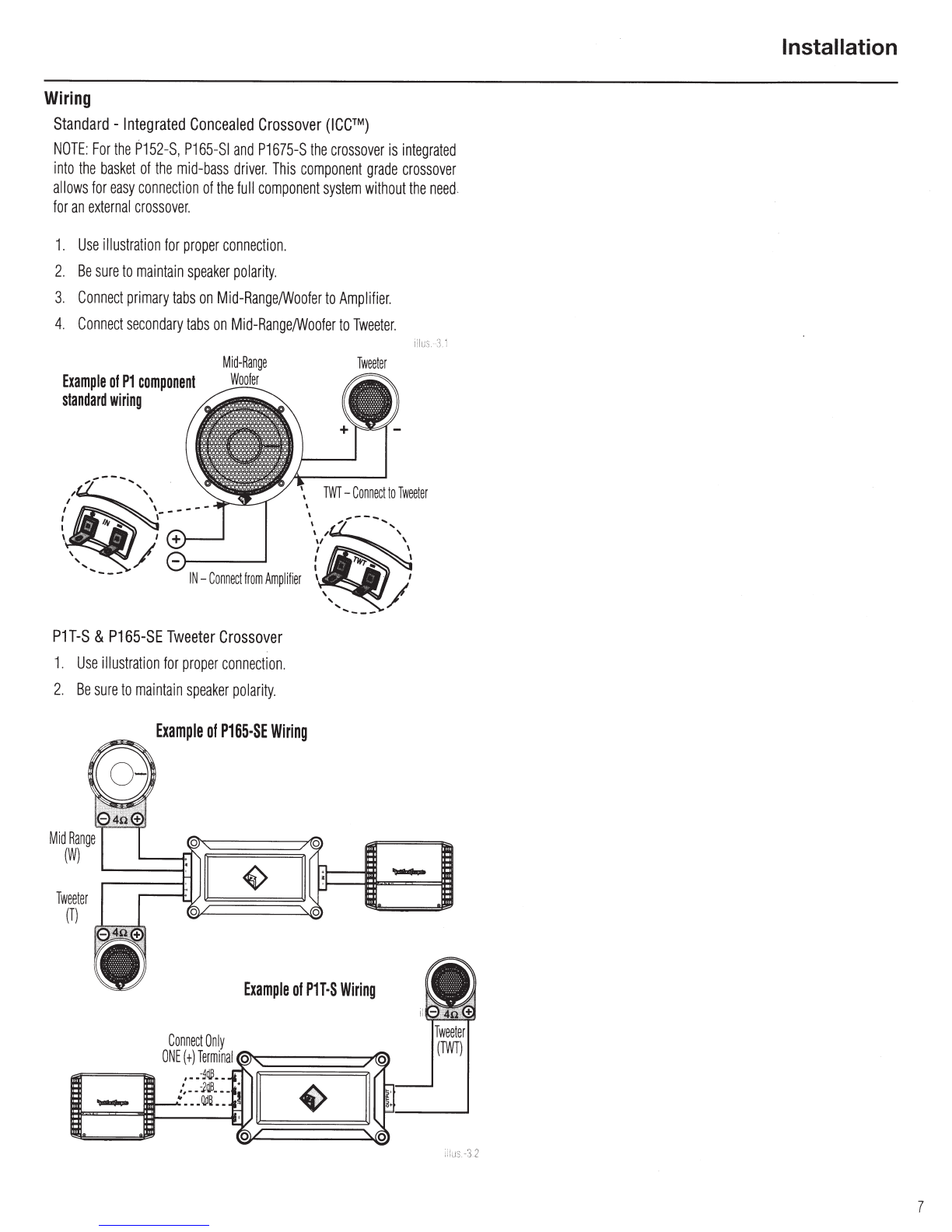
Wiring
Standard
-
Integrated
Concealed
Crossover
(ICC™)
NOTE:
For
the
P152-S,
P165-SI
and
P1675-S
the
crossover
is
integrated
into
the
basket
of
the
mid-bass
driver.
This
component
grade
crossover
allows
for
easy
connection
of
the
full
component
system
without
the
need
for
an
external
crossover
.
1.
Use
illustration
for
proper
connection.
2.
Be
sure
to
maintain
speaker
polarity
.
3.
Connect
primary
tabs
on
Mid-Range/Woofer
to
Amplifier.
4.
Connect
secondary
tabs
on
Mid-Range/Woofer
to
Tweeter.
Example
of
P1
component
standard
wiring
PH-S
&
P165-SE
Tweeter
Crossover
1.
Use
illustration
for
proper
connection.
2.
Be
sure
to
maintain
speaker
polarity
.
Tweeter
(T)
Example
of
P165-SE
Wiring
Tweeter
Example
of
PH·S
Wiring
!l!US.
3.
1
(TWT)
Installation
7
6
Installation
Contents
•
(1)
Pair
Punch
Series
Full
Range
Component
Speakers
•
(1)
Pair
of
grilles/trim
rings
•
Mounting
Hardware
Installation
Considerations
Before
beginning
any
installation,
follow
these
simple
rules:
1.
Be
sure
to
carefully
read
and
understand
the
instructions
before
attempting
to
install
these
speakers
.
2.
For
safety,
disconnect
the
negative
lead
from
the
battery
prior
to
beginning
the
installation.
3.
For
easier
assembly,
we
suggest
you
run
all
wires
prior
to
mounting
your
speakers
in
place.
4.
Use
high
quality
connectors
for
a
reliable
installation
and
to
minimize
signal
or
power
loss.
5.
Think
before
you
drill!
Be
careful
not
to
cut
or
drill
into
gas
tanks
,
fuel
lines,
brake
or
hydraulic
lines,
vacuum
lines
or
electrical
wiring
when
working
on
any
vehicle.
If
installation
in
a
boat,
take
care
not
to
cut
or
drill
through
the
main
hull.
6.
Never
run
wires
underneath
the
vehicle
.
Running
the
wires
inside
the
vehicle
or
hull
area
provides
the
best
protection
.
7.
Avoid
running
wires
over
or
through
sharp
edges.
Use
rubber
or
plastic
grommets
to
protect
any
wires
routed
through
metal,
especially
the
firewall.
Mounting
Mid-Bass
1.
Determine
where
the
speakers
will
be
mounted.
Ensure
an
area
large
enough
for
the
speaker
to
mount
evenly.
Be
sure
that
the
mounting
location
is
deep
enough
for
the
speaker
to
fit;
if
mounting
in
a
door,
operate
all
functions
(windows,
locks,
etc.)
through
their
entire
operating
range
to
ensure
there
is
no
obstruction.
2.
Refer
to
the
specification
chart
to
determine
the
proper
diameter
hole
to
cut
for
your
speaker
model.
Cutting
and
mounting
templates
can
be
found
at
www.rockfordfosgate.com.
3.
Mark
the
locations
for
the
mounting
screws.
Drill
the
holes
with
a
1/8"
bit.
4.
Feed
the
speaker
wires
through
the
cutout
and
connect
to
the
speaker
terminals.
Be
sure
to
observe
proper
polarity
when
connecting
the
wires.The
speaker's
positive
terminal
is
indicated
with
a
"+".
5.
Fit
the
trim
ring
over
the
speaker
and
mount
into
place
using
four
(4)
screws
.
6.
Tighten
the
screws
until
the
speaker
is
snug
in
place
to
prevent
rattling.
Do
not
over
tighten
the
screws.
Mounting
tab
removal
for
some
installations
0
Use
pliers
to
break
off
plastic
tab.
I!
JS.
~
1
~,
f)
Breakoff
mounting
tab
.
Example
of
standard
door
installation
........
~~
~
~-
.,
.
Po~i
.
t
i
?n~~;:
··
<:r
oAl
ig
n
Holes_
..
...-
..
..
..
··················
Tweeter-
Discreet
Dual
Clamp
(DOC™)
1.
Determine
where
the
speakers
will
be
mounted.
Ensure
an
area
large
enough
for
the
speaker
to
mount
evenly
.
Be
sure
that
the
mounting
location
is
deep
enough
for
the
speaker
to
fit
;
if
mounting
in
a
door
,
operate
all
functions
(windows
,
locks
,
etc.)
through
their
entire
operating
range
to
ensure
there
is
no
obstruction.
2.
Mark
the
location
for
the
mounting
hole
.
Drill
the
hole
with
a
standard
1.
75
inch
(45mm)
hole
saw
.
3.
With
a
single
center
screw
secure
the
inner
cup
from
the
front
of
the
door
panel
to
the
outer
cup
from
back
of
the
door
panel.
Tighten
the
screw
until
balanced
pressure
is
applied
to
both
faces
of
the
mounting
surface
.
4.
Feed
the
speaker
wires
through
the
cutout
and
connect
to
the
speaker
terminals
.
Be
sure
to
observe
proper
polarity
when
connecting
the
wires.
The
speaker
's
lead
wires
are
indicated
with
a
RED
wire
"+"and
a
BLACK
wire"-
".
5.
Simply
snap
the
tweeter
into
place
and
secure
with
a
snap-on
trim
ring.
Removal
is
easy
if
needed.
The
protective
grille
on
the
tweeter
is
non-removable
and
an
integral
part
of
the
design.
Use
tip
ol
a
smallllat
screwdriver
......
,
to
remove
tweeter
''
'
'
'
\
I
~
I\
I \
I \
'
_____
....,
Example
of
tweeter
mounting
usino
Discreet
Dual
Clarno
IDDC™l
Wiring
Standard
-
Integrated
Concealed
Crossover
(ICC™)
NOTE:
For
the
P152-S, P165-SI
and
P1675-S
the
crossover
is
integrated
into
the
basket
of
the
mid-bass
driver.
This
component
grade
crossover
allows
for
easy
connection
of
the
full
component
system
without
the
need
.
for
an
external
crossover.
1.
Use
illustration
for
proper
connection.
2.
Be
sure
to
maintain
speaker
polarity.
3.
Connect
primary
tabs
on
Mid-Range/Woofer
to
Amplifier.
4.
Connect
secondary
tabs
on
Mid-Range/Woofer
to
Tweeter.
Example
of
P1
component
standard
wiring
IN-
Connect
from
Amplifier
P1
T-S
&
P165-SE
Tweeter
Crossover
1.
Use
illustration
for
proper
connection.
2.
Be
sure
to
maintain
speaker
polarity.
Tweeter
,
TWT-
Connect
to
Tweeter
@Example
of
P165·SE
Wiring
Mid
Range
(W)
Tweeter
(T)
04n@
Example
of
P1T·S
Wiring
Connect
Only
ONE(+)
Terminal~-----'""""'
--===~
,
..
-~till
••
•:•-
JO.S.-
"••
Jl1J6..
Tweeter
(TWT)
Installation
7
Installation
Ius
4
1
8
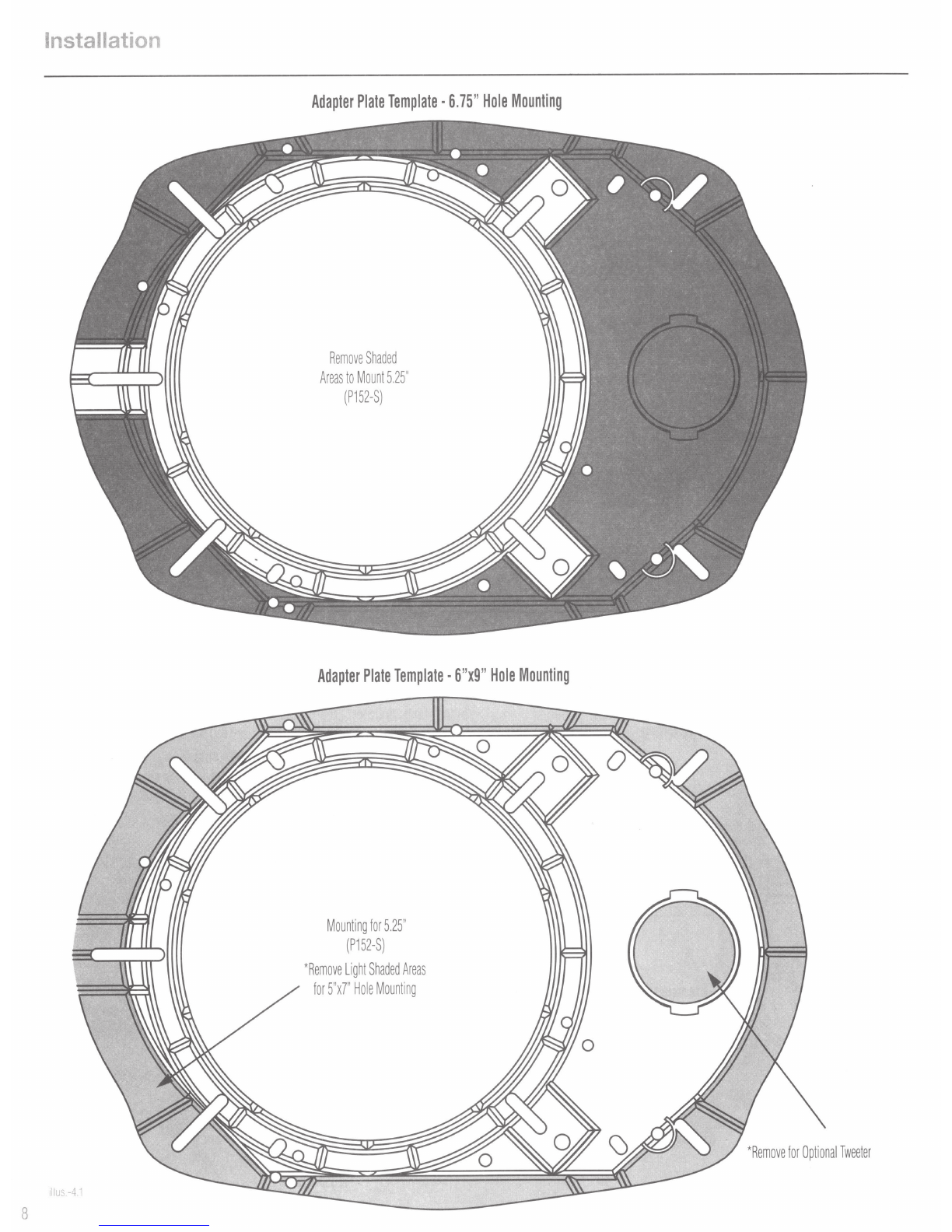
Adapter
Plate
Template·
6.75"
Hole
Mounting
Remove
Shaded
Areas
to
Mount
5.25"
(P152-S)
Adapter
Plate
Template
·
6"x9"
Hole
Mounting
Mounting
for
5.25
"
(P152-S)
*Remove
Light
Shaded
Areas
for
5"x7"
Hole
Mounting
*Remove
for
Optional
Tweeter