Redback A 1720C User manual

www.redbackaudio.com.au Redback® Proudly Made In Australia 1
Redback® A 1720C MP3 Tone Generator
User manual revision number: 1.0 29/11/2023
Operating Manual
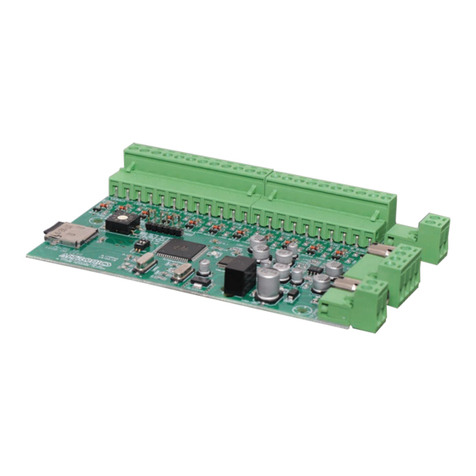
The A 1720C is an MP3 based message player and tone generator designed for public address, security, customer direction
or emergency evacuation announcements.
1.0 Installation
Power requirements: The A 1720C needs a minimum of 12VDC at 300mA to work correctly (Note: a minimum of 24V
DC is needed if the switched output is required). Do not exceed the maximum working voltage of 30VDC, as it will cause
permanent damage to the unit. A good working voltage is between 12 and 24VDC. The power is connected via 2 way screw
terminal (see g 1).
Output: Stereo output is via screw terminals and RCA sockets. Output level is nominal 500mV but is related to the recorded
level of the MP3.
Input triggers: The input triggers are activated by closing contacts whether by a normally open switch or a timer or
controller.
Switched output: The switched output terminal is triggered when any zone is activated. Note: A minimum of 24VDC must
be used to power the A 1720C for the switched output to operate. The voltage output from the switched output terminals
is the same as the power supplied to the unit.
Fig 1
1
2
3
11
8
9
10
4 5 67
Connections
1. Stereo audio output
2. Left & right RCA outputs
3. Switched power output
4. Trigger 1-8 inputs
5. Evac Trigger
6. Alert Trigger
7. Cancel Trigger
8. Micro SD Card slot
9. DIP switch
10. BCD switch
11. Power input (12- 30V)

www.redbackaudio.com.auRedback® Proudly Made In Australia2
Redback® A 1720C MP3 Tone Generator
2.0 Accessing Files On The Micro Sd Card
Remove power from the A 1720C and then remove the micro SD card from the unit.
To remove the micro SD card push the card in and it will eject itself.
The micro SD card will then need to be connected to a PC. You will need a PC equipped with a micro SD card reader to
do this (not supplied). If a Micro SD slot is not available then the Altronics D 0371C USB Memory Card Reader or similar
would be suitable (not supplied).
Make sure the PC is on and card reader connected and correctly installed. Then insert the micro SD card into the reader.
Go to “My Computer” or “This PC” and open the micro SD card which is usually marked “Removable disk”.
In this case it is named “Removable disk (K:)”. Click on the Removable disk and the contents of the micro SD card should
be listed as shown in gure 2.
Fig 2
Included on the micro SD card is a folder labelled #LIBRARY# (shown in gure 3) which includes a collection of sample
tones and messages which can be used for the trigger MP3’s.
Fig 3
2.1 Installing MP3 les into trigger folders
To open a trigger folder simply double click on the relevant folder, such as our example of the trig2 folder shown in gure
4. Inside the folder will be a default MP3 le, named in this case “trigger2.mp3”. This is the audio le that is played when
trigger 2 is activated. Delete this le and replace it with an MP3 le you want to play when you activate trigger2. This MP3
could be a le from the #library# folder or an MP3 of your own choosing.
The MP3 le name is not important only that there is a legitimate MP3 le in the trig2 folder (WAV, OGG or other formats

www.redbackaudio.com.au Redback® Proudly Made In Australia 3
Redback® A 1720C MP3 Tone Generator
do not work). Repeat this process for the required triggers.
Note: More than one MP3 le can be placed in the trigger folders. These will be played randomly while the trigger is acti-
vated.
Fig 4
2.2 MP3 le format
The audio les used must be in MP3 format, they cannot be WAV, OGG or other formats. The minimum recommended
MP3 format is 128kbps, 44.1kHz, 32bit, VBR or CBR, Stereo (even better as mono).
NOTE: the MP3 les used cannot be “Read only”. To check this, right click on the MP3 le and scroll down and select
Properties, you will get a popup window. Make sure the “Read Only” box has no tick in it.
2.3 Alert and Evac Messages
A message can be inserted every three alert cycles and/or every three evac cycles . A Voice message could be something
like “please evacuate the building”. To install an Alert or Evac message open the “voice” folder and then select the alert
or evac folder. Figure 5 illustrates the location of the voice/evac folder.
Delete the le in the folder and replace it with an MP3 message le you want to play when you activate the alert or evac.
This MP3 could be a le from the #library# folder or an MP3 of your own choosing.
Note: If an Alert or Evac message is not required delete the les in these folders.
Fig 5
3.0 Play modes
Alternate: When the A 1720C is in Alternate mode (DIP switch 1 OFF) (see Fig 1) a momentary closing contact or pulse
on the trigger pins will activate the associated trigger folder MP3. The A 1720C will continue to play the MP3 until it n-
ishes and will then stop playing. If the contact is held closed continually the MP3 will continue to loop over and over, or if
there are multiple MP3 les in the trigger folder, they will be played randomly until the contact is released.

www.redbackaudio.com.auRedback® Proudly Made In Australia4
Redback® A 1720C MP3 Tone Generator
To stop an MP3 playing when in Alternate mode the Cancel trigger is used. A momentary closing contact on the Cancel
trigger will stop the MP3 playing (It is recommended that the Cancel contact be held for up to 2 seconds to ensure the
MP3 stops playing).
Momentary: In momentary mode (DIP switch 1 ON) (see Fig 1) the closing contact must be held for the duration of the
MP3 play time, if it is released before the MP3 ends the MP3 will stop playing immediately. If the contact is held closed
continually the MP3 will still only play once and then stop. If there are multiple MP3 les in the trigger folder, a le will be
selected at random and played once.
4.0 Cancel Function
As outlined in the Alternate Playback mode, the cancel trigger can be used to cancel any activated trigger. The A 1720C
now includes a new function, which when congured can play an MP3 le on cancellation of a trigger, in Alternate
Playback mode only. On the micro SD card is a folder labelled “cancel” and inside this folder are the alert, evac and trigger
folders. To congure the unit for MP3 playback on trigger 3 cancellation for example, an MP3 le must be placed in the
trig3 folder (location K:\cancel\trig3).
5.0 Emergency tones (Alert and Evacuation)
The Alert and evacuation tones conform to Australian Standards AS1670.4 and are used to notify building occupants of
an emergency situation. Set DIP switch 2 to ON to activate the emergency tones.
Alert: The Alert tone is activated by a closing contact on the ALERT trigger
(Trigger10) and can be used in Alternate or Momentary setup as outlined in section
3.0. The Alert tone comes with a change over option which forces the A 1720C to
switch from Alert to the Evacuation tone after a prescribed time. Use the BCD switch
to adjust this time or switch off completely (see gure 6). Power down the A 1720C
for the changes to take effect.
Evacuation: The Evacuation tone is activated by a closing contact on the Evac
trigger (Trigger9) and can be used in Alternate or Momentary setup as mentioned in
section 3.0.
Alert and Evacuation messages: A message can be inserted every three alert
cycles and/or every three evac cycles. Refer to section 2.3 for more details.
Priority: The Emergency tones have priority over other triggers (1 to 8) and if
activated will stop any other MP3, and activate the selected emergency tone.
Evacuation also has priority over Alert. Fig 6.
6.0 Troubleshooting
NO Power (Power LED does not illuminate):
Make sure the power supply voltage is 12-30VDC.
Make sure the power supply is a DC input, not AC.
Emergency tones do not work:
Switch DIP1 switch 2 ON to activate emergency tones.
7.0 Specications
Power supply: ......................................................................12VDC to 30VDC 300mA (idle/maximum current draw 50mA)
Output: ...................................................................................................................................Stereo RCA 500mV nominal
Micro SD Card size: ....................................................................................................................................256MB to 32GB
Trigger Activation: .......................................................................................................................................Closing contact
MP3 info:
Bit rate: ....................................................................................................All standard MP3 rates (128kbps recommended)
Sample rate: .................................................................................................All standard MP3 rates (44kHz recommended)
Channels: ...................................................................................................................................................Stereo or mono
Switched Output Current Draw: ............................................................................................................. 200mA Maximum
* Specications subject to change without notice.
Distributed by Altronic Distributors Pty. Ltd. Perth. Western Australia. Phone: 1300 780 999 Fax: 1300 790 999
BCD POSITION
0
SWITCH-OVER
TIME (Sec)
OFF
130
260
390
4120
5150
6180
7210
8240
9270
Other Redback Portable Generator manuals