AN-80i Installation Guidelines
70-00074-01-09 Proprietary Redline Communications © 2011 Page 2 of 8 March 16, 2011
4 Test Overview
This Quick Install Guide provides steps for basic configuration and operational testing of
an AN-80i PTP link. This procedure assumes a setup consisting of two complete AN-80i
units. Refer to the AN-80i User Manual and Installation Guidelines for additional safety
instructions and for specific operational and installation details.
4.1 Required Test Facilities
You will require the following to perform these tests:
1. Identify the RF channel(s) to be used.
2. Obtain a valid Options Key for each AN-80i unit. This key (string of numbers, letters, and
dashes) must be entered into AN-80i configuration to allow full operation of the wireless
link.
3. Record the MAC address for each system to be tested/installed (label on AN-80i units).
The MAC address is needed to identify each AN-80i and select the correct Options Key
to be entered.
4. One or two PCs each having an Ethernet interface port, Web browser software installed
(Internet Explorer recommended), and a CAT-5 cross-over Ethernet cable for each PC.
5. A location with adequate space and power facilities.
6. To satisfy FCC and IC RF exposure requirements for RF transmitting devices, the
following distances should be maintained between the antenna of this device and
persons during device operation:
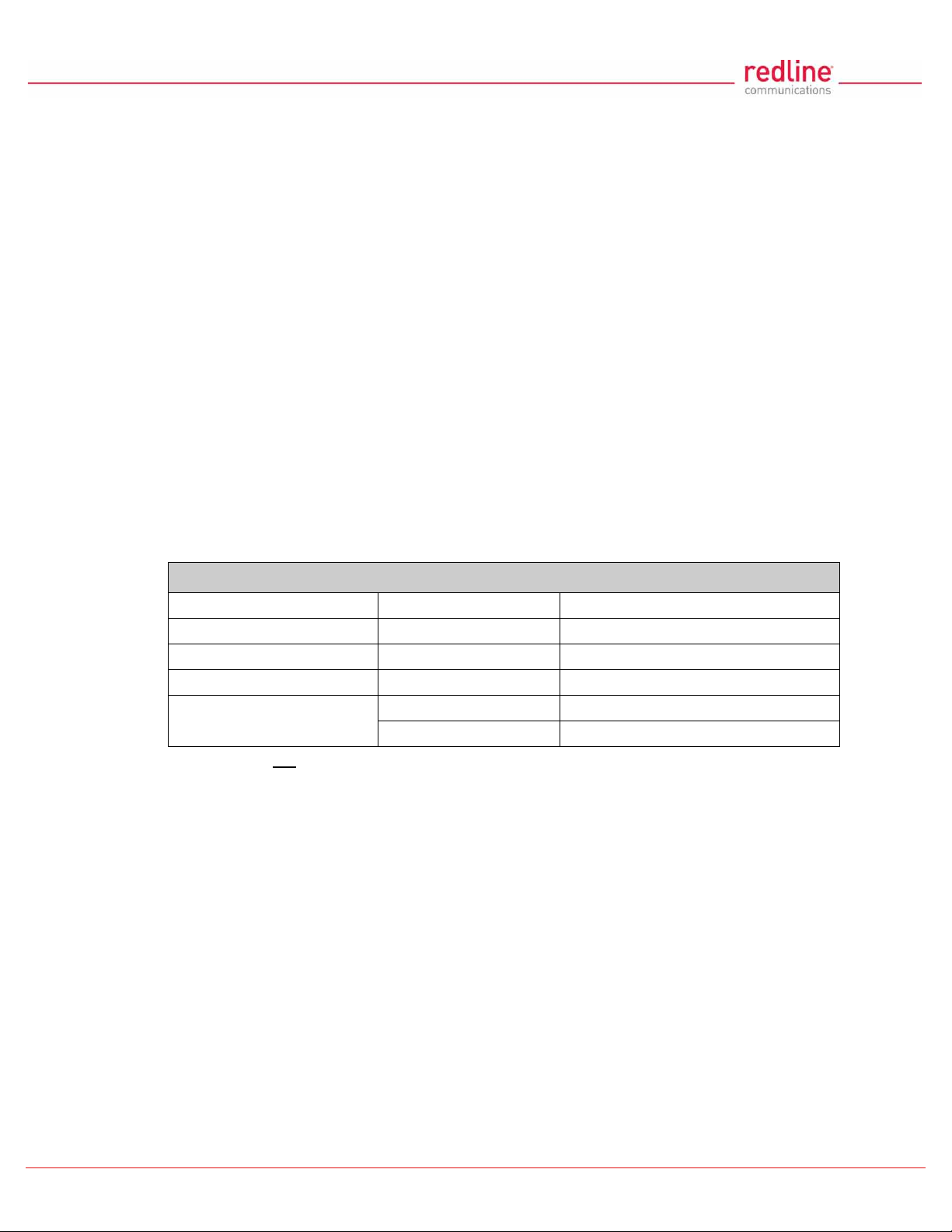
Table 1:FCC & IC RF Recommended Safe Separation Distances
Frequency (GHz) Mode Separation Distance
3.3 - 3.8 PTP / PMP 130 cm (52 in) or more
4.9 - 5.3 PTP / PMP 255 cm (101 in) or more
5.4 PTP / PMP 40 cm (16 in) or more
5.8 PMP 20 cm (8 in) or more
PTP 310 cm (122 in) or more
7. Redline does not endorse testing indoors with antennas. The operation of antennas in
close proximity results in poor connectivity due to high RF multipath effect and RF
saturation may damage equipment. Indoor testing may require the use of an RF
chamber.
When performing indoor testing the RF outputs from each AN-80i can be connected
together through a static/variable attenuator. Refer to the connection diagrams on the
following page.
4.2 Required Test Equipment
1. PC#1: Use a crossover CAT-5 Ethernet cable to connect PC#1 to the PoE Data In port
on the AN-80i. Equipped with a Web browser (requires Internet Explorer 6.0 or higher),
and Ethernet port for connection to AN-80i (PTP Slave). The IP address/subnet mask
must be set for the same subnet as the AN-80i. Recommended IP settings are:
IP address = 192.168.25.22, Net Mask = 255.255.255.0
2. PC#2: Use a crossover CAT-5 Ethernet cable to connect PC#2 to the PoE Data In port
on the AN-80i. Equipped with a Web browser and Ethernet port for connection to AN-80i
(PTP Master). The IP address/subnet mask must be set for the same subnet as the AN-
80i. Recommended IP settings are:
IP address = 192.168.25.23, Net Mask = 255.255.255.0
4Gon
www.4Gon.co.uk
[email protected] Tel:
+44
(0)1245
808295
Fax:
+44
(0)1245
808299